Computer Station Nation is reader-supported.
When you buy through links on our site, we may earn an affiliate commission. Learn more.
Your battlestation deserves better audio. Seriously. You’ve got the monitor dialed in, the keyboard clicking perfectly, maybe even some sweet RGB going on — and then you’re pumping sound through the two tiny speakers built into the bottom of your display. Not cool.
Computer speakers have come a long way. Whether you’re looking to spend $15 or $150, there’s something out there that’ll change the way your games and music sound. Let’s figure out which one belongs on your desk.
Quick Picks — TL;DR
- Best Overall: Logitech Z313 — 2.1 system with subwoofer, $54.99
- Best Budget RGB: TSV 2.0 Stereo Gaming Speakers — under $15
- Best USB Plug-and-Play: Logitech S150 — one cable, done
- Best Wireless: Bluetooth Sound Bar — Bluetooth + LED, $24.99
- Best Under $25: onn. AC Powered Speakers — simple and reliable
- Best for Clean/White Setups: LENRUE USB Speakers — compact, white, $26.99
Types of computer speakers: which setup is right for you?
2.0 stereo speakers
Two speakers, left and right. Simple, compact, minimal desk footprint. For casual listening, gaming, or video calls, 2.0 covers most of what people actually need. Most budget options land here — and they hold up fine for the money.
2.1 speakers + subwoofer
Add a subwoofer and suddenly explosions actually sound like explosions. Two satellites handle the mids and highs while the sub takes the low-end. Games sound bigger. Music hits differently. If you game at all, this is where the real upgrade happens. The Logitech Z313 below is the obvious place to start.
5.1 surround sound
Five speakers plus a subwoofer, wrapping sound around you from every direction. Genuinely epic for gaming. Less practical in small rooms — you’ll need space to position everything correctly and route cables all over the place. Worth it if you’ve got the setup for it. Overkill for most desks.
Soundbars
A single bar that sits under your monitor. Good spread, minimal clutter. Some use virtual surround to simulate channels. Not as satisfying as a real 2.1 but cleaner-looking and easier to manage.
What to look for when buying computer speakers
How you’ll connect
Three options, and they’re not all equal:
- 3.5mm analog: Plugs into your motherboard’s audio jack. Works everywhere. Sound quality depends on your onboard chip — which ranges from decent to garbage depending on your board.
- USB: Uses the speaker’s own built-in DAC (Digital-to-Analog Converter), bypassing your motherboard audio entirely. Usually sounds cleaner. Plug-and-play on every OS.
- Bluetooth: Wireless and convenient. Look for aptX codec support — it’s a better standard than default SBC and noticeably more faithful over a wireless connection.
For a permanent battlestation, USB is the sweet spot — clean digital signal, no extra hardware.
Power and wattage
More watts means louder potential. For a desk where you’re two or three feet away, 5–20W total is plenty. Watch out for peak wattage claims — some budget speakers advertise peak numbers that have nothing to do with what they actually sustain. Look for RMS ratings if you can find them.
Desk space
Measure before you buy. A 2.1 system means finding somewhere for the subwoofer — floor or under the desk. Full bookshelf speakers eat real estate. Compact USB speakers fit in front of your monitor without blocking anything.
Computer speakers vs. studio monitors
Consumer computer speakers are tuned for enjoyable listening — boosted bass, enhanced highs. Studio monitors are tuned flat for accurate audio mixing. For gaming and entertainment, consumer speakers are better. For music production or podcast editing, monitors are the right tool. Most people want consumer speakers.
The best computer speakers right now
Best overall: Logitech Z313
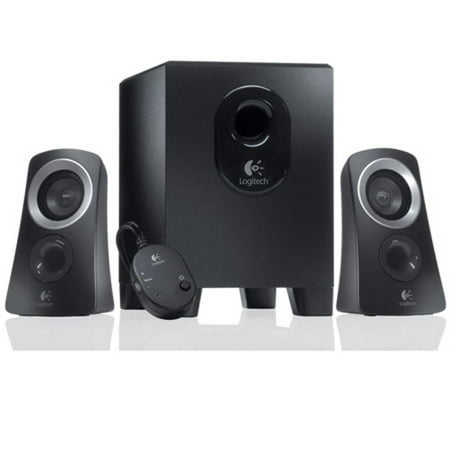
You’re listening to music and online videos, watching movies and TV on your computer. But your built-in PC audio just won’t cut it. That’s where the Logitech® Speaker System Z313 comes in, offering you the easy way to kick back and enjoy your music. Its convenient control pod makes it easy to...
The Z313 is the easy recommendation for anyone stepping up from basic stereo. Two satellite speakers plus a subwoofer, $54.99, 3.5mm connection. Sub goes under the desk, satellites flank the monitor. Controls are on a wired inline pod — volume knob and headphone jack right at hand.
Bass is noticeably fuller than anything comparable in 2.0. Real low-end you can actually feel a little. The highs run slightly recessed, but you’d only notice that coming from something much pricier. For most battlestation builds, this is the pick.
Best under $25: onn. AC Powered Computer Speakers
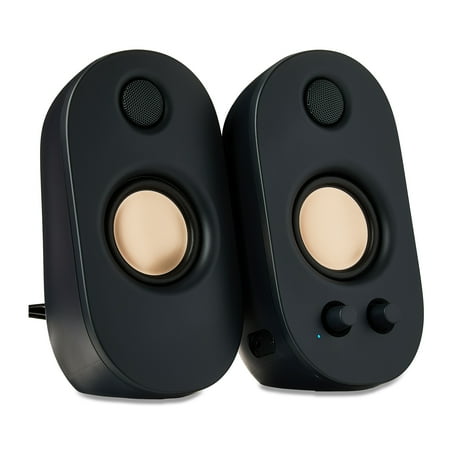
The onn Powered Stereo Speakers are a great option for anyone looking to enhance their audio experience. These speakers feature a 3.5mm AUX input, allowing you to connect your devices and enjoy high-quality sound. You can customize your listening experience with the volume and bass controls, and...
Budget is real tight? The onn. speakers work. AC powered, volume knob, bass controls — $24.36. Audio is basic, no question. But compared to built-in laptop speakers, these are a night-and-day upgrade. Good enough for office work, YouTube, casual gaming.
Best USB plug-and-play: Logitech S150
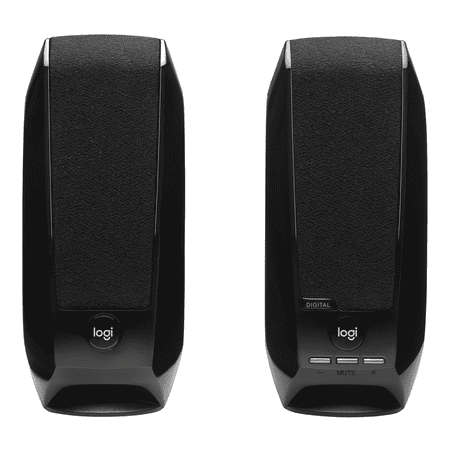
Questions about your S150 Digital USB Speaker System? We've got the answers, videos, downloads and information you need. Search for articles or select a topic below to get started.
One cable. Done. USB powered, USB audio — plug it in and it works on everything, no drivers. Logitech’s digital USB audio skips your motherboard sound chip for a cleaner signal than analog. $17.84. Sound is limited by the small drivers, but for a second desk or a minimal home office setup, the simplicity is hard to beat.
Best budget RGB: TSV 2.0 Stereo Gaming Speakers
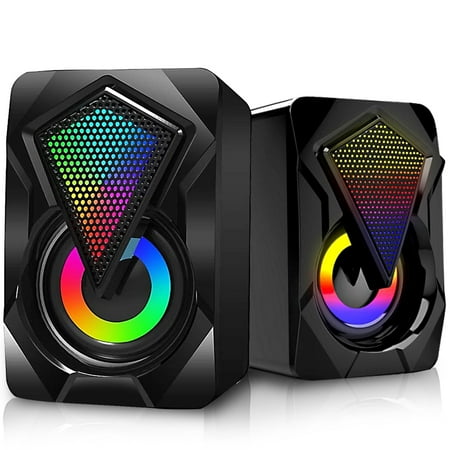
TSV provides three types of USB Powered RGB PC Gaming Speakers, which can deliver you with full-range 2.0 channel enhanced stereo and high-quality auditory feast, turning your desktop computer or laptop into a fantastic sound system. In terms of details, those three Desktop speakers are equipped...
RGB on your speakers. $13.98. Seven colors, physical switch button to cycle through them. Sound quality is what you’d expect for fourteen bucks — entry-level, nothing more. But if you’re doing a full RGB battlestation build and need speakers that don’t look boring, these fit the aesthetic without destroying the budget.
Best wireless budget option: Bluetooth Computer Sound Bar
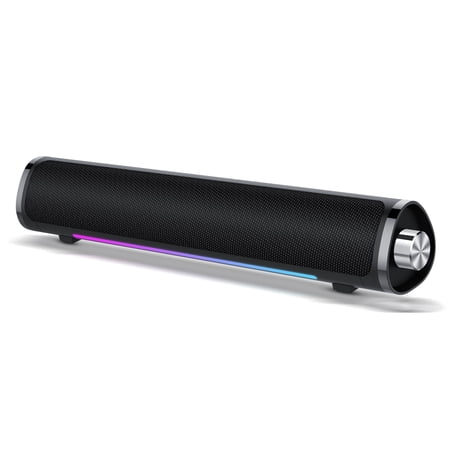
Click the link to discover more products --- CASCHO Shop Our team:CASCHO is a team dedicated to manufacturing intelligent products and is committed to meeting customers' various functional needs for intelligent products. Unlike other brands, we are careless in our promotions. We spend most of...
USB powered, connects via Bluetooth or 3.5mm, LED lighting, $24.99. The “deep bass” marketing is a stretch for a bar this size. For casual listening on a small desk where you want fewer cables, it does the job.
Best for clean white setups: LENRUE USB Powered Speakers
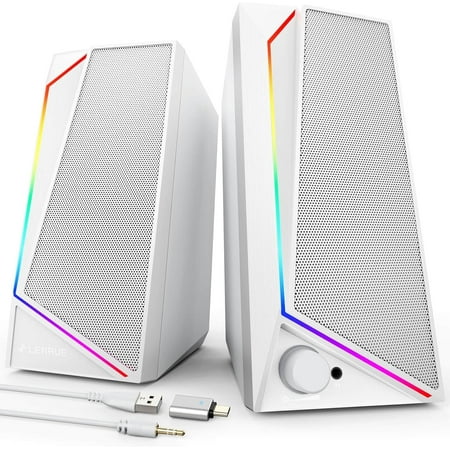
Product details Model: LENRUE 1059 | Computer Speakers Product Specifications Power Source : USB Audio Source : 3.5mm LED Lights: Colorful Lights + Light button Vol Control:In-Line Output-Power : 10W Enhanced Bass : 2 × Passive Radiator Frequency Range : 120 Hz-20 KHz Input-Power : 5V,1A If you...
White computer speakers under $30 are rare. The LENRUE pulls it off. USB powered, 3.5mm audio input, built-in headphone jack, small footprint. $26.99. Good fit for iMac builds, all-white battlestations, or anyone who can’t stand another black peripheral on the desk.
Do you actually need a subwoofer?
If you game: yes.
Small satellite speakers can’t physically push enough air for real bass. You feel that most in shooters, racing sims, anything with a proper soundtrack. A subwoofer solves it. The difference in gaming audio between 2.0 and 2.1 is not subtle.
For music and podcasts, 2.0 is genuinely fine. But if gaming is part of your setup, spend the extra and get the 2.1. The Z313 is the entry point and it won’t let you down.
Wired or wireless?
Wired is better for a desk that doesn’t move. No latency, no pairing issues, no battery to think about. If your speakers are three feet from your PC every day, the cable is not a problem.
Bluetooth is worth it if you regularly switch between your PC and your phone. In that case, look for aptX support — it compresses less than standard SBC, so music actually sounds like music over the wireless connection.
What the PC building community says
Spend five minutes in any PC building subreddit asking about speakers and you’ll see the same names. Budget: Logitech, specifically the Z313 and S150. Mid-range: Creative Pebble series, compact and good value. Over $100: Audioengine HD3 for real audio quality, Logitech Z623 if you want more 2.1 muscle without going full audiophile.
Almost everyone says the same thing after upgrading: they waited too long. The gap between built-in laptop audio and a $30 pair of desk speakers is huge. Going from $30 to a real 2.1 setup is another big jump. Past $150 the improvements get much harder to hear.
FAQ
Do I need a sound card for computer speakers?
No. USB speakers have their own DAC and don’t touch your motherboard audio. 3.5mm speakers use onboard audio, which works fine for most setups. A dedicated sound card or external DAC is only worth it if you’re deep into audiophile territory.
What’s the difference between 2.0 and 2.1 speakers?
2.0 is two speakers, left and right. 2.1 adds a subwoofer for bass. The sub handles low frequencies so the satellites can focus on mids and highs. Bigger, fuller sound — especially for anything with real low-end.
Are computer speakers good for music?
Yeah. Consumer speakers are tuned to sound good to most people — boosted lows, elevated highs. Studio monitors are tuned flat for mixing accuracy. For everyday listening, gaming, and movies, consumer speakers are the right call.
How loud do desk speakers need to be?
Not very. You’re two or three feet away. 5–15W total is plenty for a normal desk. Higher wattage gives extra headroom at loud volumes, but even budget speakers will get louder than most people actually want at a desk.
Can I use bookshelf speakers as computer speakers?
Yes, but passive bookshelf speakers need an external stereo amp or receiver — you can’t plug them straight into a PC. Powered bookshelf speakers connect directly and usually sound better than consumer computer speakers, but they’re bigger and pricier.
The bottom line
Still running built-in speakers? Any of these picks will feel like a revelation. The Z313 is the recommendation if you can get to $55 — that subwoofer changes things. Tighter budget: the S150 or onn. AC speakers both do honest work without any fuss.
Audio gets ignored in battlestation builds more than almost anything else. Don’t be the person who put real money into a monitor and GPU and is still using the speakers inside the display. Your games will thank you.