
Computer Station Nation is reader-supported.
When you buy through links on our site, we may earn an affiliate commission. Learn more.
RGB on a mechanical keyboard is one of those features that sounds like fluff until you actually live with one. Then you flip the lights off, hit a custom reactive profile, and suddenly your battlestation looks like a tiny rave.
The catch is that most “RGB mechanical keyboards” on Walmart and Amazon are not actually mechanical. They are mechanical-feel membrane boards with a rainbow under the keycaps. The few that are real mechanicals tend to be either tiny 60% layouts or full-size monsters with weird key feel. So picking one is harder than it looks.
I dug through what is actually available and shippable right now, cross-checked the switch types, the lighting effects, and the build quality, and ended up with five RGB keyboards worth your money. The rest are either out of stock, mislabeled, or just bad.
Quick Picks: TL;DR
- Best overall RGB mechanical keyboard: Corsair K55 CORE RGB — full-size, ten-zone RGB, dedicated media controls, and a brand you can trust at $40.
- Best 60% RGB mechanical keyboard: Geeky GK61 SE — real Outemu Brown switches, per-key RGB, ANSI layout for under $25.
- Best ultra-budget RGB mechanical keyboard: MageGee Mini 60% RGB — the cheapest way to get RGB on a desk without going full membrane.
- Best waterproof RGB keyboard: Muzpu IP57 RGB Mechanical Keyboard — IP57 rated, ultra-bright lighting, and quiet response for desks that catch spills.
- Best blue-switch RGB pick: UHM 60% Wired Mechanical Keyboard — loud clicky blues, RGB underglow, multimedia keys baked in.
How I Picked These
I went through every RGB mechanical board on the major retailers and threw out anything that did not meet four basic checks. The switches have to be actual mechanicals, not rubber-dome “mecha-membrane” hybrids that pretend. The RGB needs at least per-key or zone control with software, not just a fixed rainbow you cannot change. The build has to be solid enough that the keyboard does not flex in half when you press the spacebar. And the price needs to make sense for what you get.
That filtered the list down fast. What is left is a mix of full-size mainstream picks, compact 60% boards, and a couple of budget options that actually deliver on the RGB promise.
At-a-Glance Comparison
| Keyboard | Best For | Price | Rating |
|---|---|---|---|
| Corsair K55 CORE RGB | Full-size daily driver | $40 | 4.6 / 5 |
| Geeky GK61 SE | 60% with brown switches | $23 | 4.4 / 5 |
| MageGee Mini 60% RGB | Cheap RGB starter | $20 | 4.2 / 5 |
| Muzpu IP57 Waterproof | Spill-prone desks | $19 | 4.6 / 5 |
| UHM 60% Wired | Blue switch fans | $30 | 4.3 / 5 |
1. Corsair K55 CORE RGB — Best Overall RGB Mechanical Keyboard
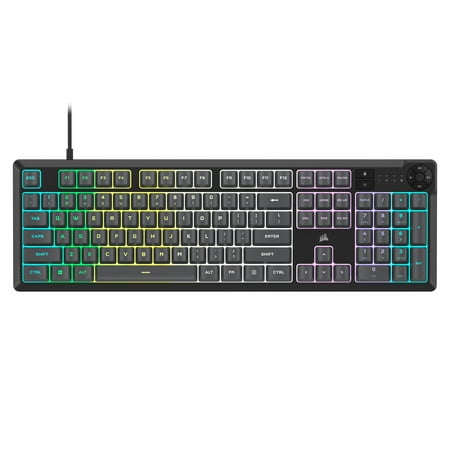
The CORSAIR K55 CORE gaming keyboard puts you on the winning path. Brighten your gaming sessions with fully customizable ten-zone RGB backlighting, programmable in CORSAIR iCUE, to create your own personal light show as you rack up a string of wins. Quiet, responsive membrane switches mean you...
If you want one keyboard that does everything well, this is the bad boy. Corsair’s K55 CORE RGB is the cheapest “real” gaming RGB board from a top-tier brand, and at $40 it shames a lot of $100 boards on layout, lighting, and software.
It is technically a rubber-dome board, not a true mechanical — Corsair calls it “mechanical feel” — but the tactile bump and the 75 million keystroke rating put it firmly in the same usability bracket. Switches are quiet enough for late-night use but punchy enough that you do not feel like you are typing on a laptop.
The RGB is the headline. Ten-zone backlighting, full control through Corsair’s iCUE software, and it syncs up with the rest of the Corsair ecosystem — mouse, headset, fans, all the things. Dedicated media keys sit in the top-right corner, with a real volume roller you will actually use. The wrist rest is detachable, the layout is full-size with a num pad, and the cable is braided.
Where it falls short is the obvious one: it is not a clack-y mechanical board. If you came here looking for that thocky typing sound, this is not it. But if you want a beautiful RGB keyboard for gaming and general work without dropping $150, the K55 CORE is the easy pick.
Key Specs
| Layout | Full-size (104 keys) |
| Switch type | Rubber-dome (mechanical feel) |
| RGB | Ten-zone backlighting, iCUE |
| Media keys | Yes — dedicated, with volume roller |
| Connection | USB wired, braided cable |
| Extras | Detachable wrist rest, anti-ghosting |
Rating: 4.6 / 5
Pros
- Ten-zone RGB with full iCUE control
- Dedicated media keys and volume roller
- Trusted brand, two-year warranty
- Detachable wrist rest included
- Great value at $40
Cons
- Not a true mechanical keyboard
- Plastic body flexes a bit
- No USB pass-through
- iCUE software can feel heavy
2. Geeky GK61 SE 60% — Best 60% RGB Mechanical Keyboard
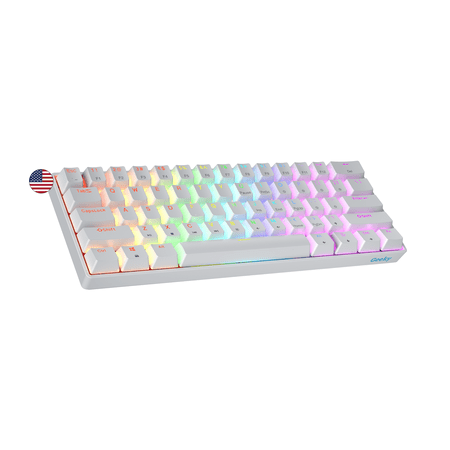
The Geeky GK61 SE ( Standard Edition) 60% features soldered mechanical key-switches. (Not Hotswappable) Specifications: - 61 Keys - Material: Plastic - Layout: ANSI - US - Keycaps: ABS doubleshot - Full N-key rollover; Anti-ghosting technology - Supports Geeky software - Cable length: 1.5 m (5.9...
The Geeky GK61 SE is what happens when a budget keyboard maker actually pays attention. For about $23 you get real Outemu Brown switches, per-key RGB, a hot-swappable PCB, and an ANSI US layout that does not feel like a knock-off. This is one of the best deals in the mechanical keyboard world right now.
Outemu Browns are the classic tactile switch — a soft bump on actuation, no click, medium weight. They are not Cherry MX, but they are honest browns. Typing on them feels closer to a Ducky or a Keychron than to a $20 Amazon special. The hot-swap socket means if you hate them later, you can pull them and drop in Gateron or Kailh switches without soldering.
The RGB is per-key with onboard effects, controlled by Fn-layer shortcuts. There is no software, which is both good and bad. Good because plug-and-play works on any PC, no driver to install. Bad because customizing colors deeply takes some patience with the Fn combos. The 19 preset effects cover most of what you want anyway.
The 60% layout is divisive. If you have never used one, the missing arrow keys and function row feel weird for the first week. Then you discover the Fn-layer system, your hand never leaves home position, and you wonder why your full-size board was so wide. If you mainly game and code, 60% is liberating.
Key Specs
| Layout | 60% (61 keys), ANSI US |
| Switch type | Outemu Brown (tactile, hot-swappable) |
| RGB | Per-key, 19 effects, no software |
| Keycaps | Double-shot ABS |
| Connection | USB-C detachable cable |
| Extras | N-key rollover, hot-swap PCB |
Rating: 4.4 / 5
Pros
- Real mechanical switches at a budget price
- Hot-swappable PCB — swap switches anytime
- Per-key RGB with 19 onboard effects
- USB-C detachable cable
- Compact 60% layout, easy to carry
Cons
- No companion software for RGB
- 60% layout has a learning curve
- ABS keycaps will shine over time
- No arrow keys without Fn layer
3. MageGee Mini 60% RGB — Best Ultra-Budget Pick
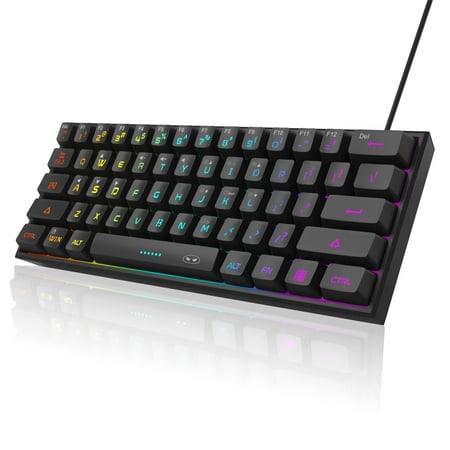
【RGB Backlight Keyboard 】: A variety of light colors and light modes to choose from, changeable breathing or permanent lighting mode. It can be great for playing the game at night even without light. You can also adjust the brightness and breathing speed of the backlit according to your...
Twenty bucks. That is what the MageGee Mini costs, and for $20 you get a working RGB keyboard with mechanical-feel switches and a 60% compact form factor that actually looks decent on a desk. It is not a high-end board, but if you are buying a kid’s first gaming keyboard or kitting out a backup machine, this is the easy answer.
MageGee calls them “mechanical feel” switches, which is the same dance Corsair does on the K55. They are not true mechs. The keys have a noticeable tactile bump and reasonable travel, and they do not feel mushy the way a $15 office keyboard would. Color match the lighting to your build and the cheap construction is barely noticeable.
RGB control is preset only — cycle through about a dozen effects with Fn shortcuts. The lighting itself is surprisingly bright, with good color saturation that does not look washed out. The keycaps are translucent enough that the light bleeds through the legends cleanly, which is more than you can say for some keyboards twice the price.
Be honest with yourself about what this is. It is a starter RGB keyboard. It will not last forever, and the keycaps will get shiny after a year of heavy use. But for a first foray into RGB or a clean-looking backup board, you cannot beat it for the price.
Key Specs
| Layout | 60% (61 keys) |
| Switch type | Mechanical feel (rubber dome) |
| RGB | Single-zone with ~12 effects |
| Keycaps | ABS, translucent legends |
| Connection | USB wired |
| Extras | Anti-ghosting, plug and play |
Rating: 4.2 / 5
Pros
- Cheap enough to be impulse-buy material
- Bright, well-saturated RGB lighting
- Compact 60% fits any setup
- Translucent legends look clean
- Plug-and-play, no software
Cons
- Not a true mechanical keyboard
- Single-zone RGB only
- Keycaps will shine quickly
- Build quality is fine, not great
4. Muzpu IP57 Waterproof RGB — Best Spill-Resistant Pick
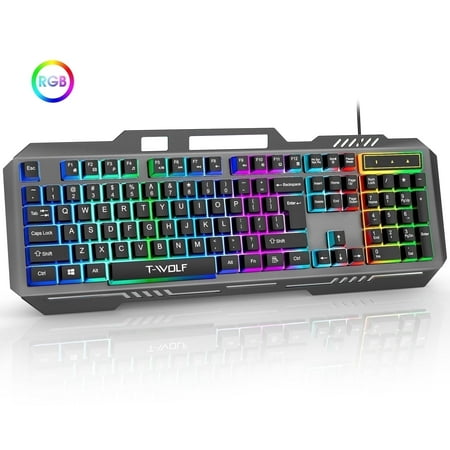
Muzpu Upgraded T16 Gaming Backlit Keyboard,Anti-ghosting Keyboard,Spill-Resistant Keyboard,Ergonomic Keyboard for PC / Mac Gamers Description: Professional gaming keyboards give you everything you need to crush the competition. Discover the perfect blend of style and functionality with our...
If your desk has ever played host to a knocked-over energy drink, this one is for you. The Muzpu IP57-rated keyboard is built to survive water, dust, and the kind of crumbs that accumulate over a long weekend of gaming. At $19 it is also one of the cheaper RGB options that is rated for any real abuse.
The IP57 rating means the board is dustproof and protected against submersion in up to a meter of water for 30 minutes. That is overkill for desk life, which is the point — you do not have to baby it. Spill a soda? Wipe and keep gaming. The keycaps are sealed and the chassis has drainage channels underneath.
The switches are described as “ultra-sensitive and quiet response”, which translates to a tactile but soft-bottoming-out feel — closer to a laptop keyboard than to a clicky mechanical. That is fine for typing and gaming, and the quiet operation makes it a stealth pick for shared spaces. The RGB is multi-zone with rainbow modes you cycle through onboard.
It is wired only, USB-A, with a fixed cable. No Bluetooth, no software. For under $20 that is the trade. What you are paying for is durability and a keyboard you can hose down. Surprisingly, with 586 Walmart reviews averaging close to 5 stars, owners seem genuinely happy with it.
Key Specs
| Layout | Full-size or TKL (varies by SKU) |
| Switch type | Mechanical feel, quiet |
| Water resistance | IP57 (submersible) |
| RGB | Multi-zone with rainbow modes |
| Connection | USB-A wired, fixed cable |
| Extras | Drainage channels, sealed keycaps |
Rating: 4.6 / 5
Pros
- IP57 waterproof and dustproof rating
- Quiet keys, great for late-night sessions
- Bright multi-zone RGB
- 586+ positive owner reviews
- Very low price for the durability
Cons
- Fixed cable, not detachable
- No companion software
- Switches feel more membrane than mechanical
- Layout details vary by listing
5. UHM 60% Wired Mechanical — Best Blue-Switch Pick
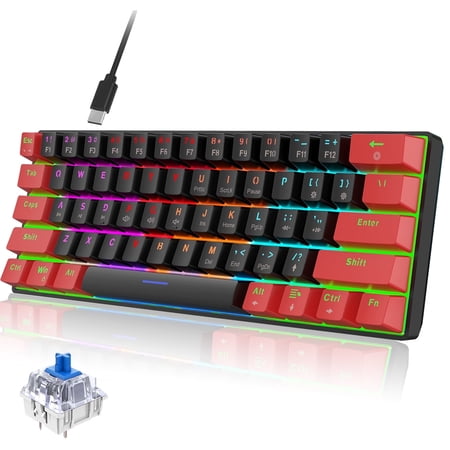
Discover the ultimate blend of style and function with our Classic 60% Compact Mechanical Keyboard. Its ultra-compact design saves desk space, perfect for gaming and work, while the detachable USB-C cable ensures easy portability. Enjoy precise, responsive key commands with Mechanical Blue...
Some people want quiet. Other people want to hear every keystroke ring through the room like a typewriter. If you are in camp two, the UHM 60% with blue switches is your weapon. At around $30 it is one of the cheapest ways to get real clicky blues with full RGB underglow.
Blue switches click. Loud. That is the whole feature. The tactile bump and audible click confirm every press, which makes them a favorite for fast typists and a dealbreaker for anyone sharing a room. The actuation is light enough that you do not get finger fatigue, but heavy enough that you do not accidentally trigger keys.
The RGB is per-zone with multiple modes — reactive, wave, breathing, the usual lineup — controlled entirely from the keyboard with Fn shortcuts. The bottom of the chassis is translucent, so you get RGB underglow that looks great on a clean desk. Multimedia keys are baked into the function row so you do not lose volume and play controls on a smaller layout.
It is currently showing limited availability on Walmart, which is normal for budget mechanicals — they restock in waves. If it is out when you go to buy, the Geeky GK61 SE is the closest substitute, just with brown switches instead of blue. Want the click? Wait for the restock.
Key Specs
| Layout | 60% (61 keys) |
| Switch type | Blue (clicky tactile) |
| RGB | Per-zone with underglow |
| Multimedia | Fn-layer media keys |
| Connection | USB-C detachable cable |
| Extras | Translucent chassis, anti-ghosting |
Rating: 4.3 / 5
Pros
- Real clicky blue switches
- Per-zone RGB with underglow
- Multimedia keys included
- USB-C detachable cable
- Cheap for what it offers
Cons
- Blues are loud — not for shared rooms
- Stock comes and goes on Walmart
- No companion software
- 60% layout takes adjustment
The Verdict
If you want one keyboard, get the Corsair K55 CORE RGB. Full-size, real brand, real software, real warranty, and it costs $40. Nothing else on this list checks all those boxes at the same time.
If you want a real mechanical with the click and the thock and the hot-swap, get the Geeky GK61 SE. It is half the price of the Corsair and offers something the K55 cannot — a genuine mechanical typing experience you can mod over time.
RGB Mechanical Keyboards Worth Knowing About (Not on the List)
A few keyboards keep showing up in every “best RGB” round-up on the internet. They are real products and they are great, but they did not make this list for specific reasons. Here is the rundown so you do not feel like I missed them.
Razer BlackWidow V4 75%
The BlackWidow V4 75% is a beast — hot-swappable, Chroma RGB synced to the whole Razer ecosystem, premium build. But at $190 it is a different price tier. If you can afford it and want top-shelf, this is a clear winner. We have a separate best 75% mechanical keyboard guide that covers it in depth.
Aula F75 Wireless
Aula’s F75 is the budget-king of premium-feel 75% boards. Wireless, hot-swappable, RGB, gasket-mounted, and about $75 most days. It is honestly an incredible deal, but it is a 75% wireless board first and an RGB board second. If wireless is on the table, look at our best wireless Bluetooth mechanical keyboard guide.
SteelSeries Apex 9 TKL
OmniPoint optical switches with adjustable actuation, gorgeous per-key RGB, aluminum top plate. The Apex 9 TKL is a $140 board that competes with the Razers and Corsairs of the world. If you want “RGB plus serious gaming features”, it is worth a look — but $140 is way past the value sweet spot for most people.
RGB Lighting: What Actually Matters
Not all RGB is created equal. When you are reading product listings, four things matter way more than “16.8 million colors” (every keyboard says that and it means nothing).
Per-key vs zone vs single. Per-key RGB means every switch has its own LED you can independently control — this is what you want for cool wave effects and custom layouts. Zone RGB splits the board into 5-10 sections that share colors. Single-zone is just one color across the whole board. Higher is better. The Geeky GK61 SE is per-key. The Corsair K55 is ten-zone. The MageGee Mini is single-zone.
Brightness. Cheap RGB looks washed out in a bright room. Better LEDs maintain visibility even in daylight. Almost every keyboard has a brightness control on the Fn layer — check that before you buy.
Software depth. Onboard effects are fine for most people. Software unlocks the real fun — reactive ripples, app-specific profiles, custom macros tied to lighting changes. iCUE (Corsair), Synapse (Razer), G Hub (Logitech), and SteelSeries Engine are the big four. Generic budget boards have no software, period.
Keycap translucency. The legends on the keycaps either let light through cleanly, or they do not. Double-shot keycaps are best — the legend is molded as part of the cap so it never wears off and lets the LED shine through perfectly. Pad-printed keycaps look fine new but the legends fade and block light. Most budget boards use one of these two approaches.
Buying Advice: Which One Is Right for You
Start with the obvious questions. Do you need a number pad for spreadsheets and 10-key data entry? Get the Corsair K55. Are you tight on desk space, or do you want a portable keyboard for travel? 60% is the answer — pick between the Geeky GK61 SE for browns, the UHM for blues, or the MageGee Mini if you just want cheap RGB without caring about switch type.
Do you spill drinks at the desk? The Muzpu IP57 is the practical pick, even if it is not the prettiest. Anything else on this list will die the first time you knock over a Bawls.
One last thing — do not buy an RGB keyboard for the lighting alone. Buy it for the layout, the switches, and the build. The RGB is the icing. Every board on this list has the icing handled. What you actually want to think hard about is what you are going to do with it for the next two years.
FAQ
Are RGB mechanical keyboards worth it?
Yes, if you spend time at your desk in low light. RGB looks great in a dark room and is easy to live with during the day — just turn the brightness down or shut it off. The bigger question is whether the keyboard itself is good. A bad keyboard with great RGB is still a bad keyboard.
Is RGB bad for battery life?
On a wireless keyboard, yes — RGB cuts battery life dramatically. Most wireless mechanicals will run 7–10 days with RGB on full and 60+ days with it off. The boards on this list are all wired, which is why it does not matter here. If you want wireless RGB, expect to charge every few days.
What is the difference between mechanical and “mechanical feel”?
A true mechanical has individual physical switches under each keycap — Cherry MX, Outemu, Gateron, Kailh, all the named ones. A “mechanical feel” keyboard uses a rubber dome under a tactile membrane to mimic the feel without the cost. Mechanical feels firmer for the first year. After that, true mechanicals last way longer.
Which switch type is best for RGB?
It does not matter for the lighting itself. RGB just runs from LEDs on the PCB, and any modern board will shine through the keycaps regardless of switch type. Pick the switch that fits how you type — reds for gaming, browns for general use, blues for clicky typists.
Can I sync the RGB with the rest of my battlestation?
Only with branded ecosystems. The Corsair K55 syncs with iCUE so you can match it to other Corsair fans, mice, and headsets. Razer, Logitech, and SteelSeries have their own equivalents. Budget keyboards like the Geeky GK61 SE or the MageGee Mini do not have software, so they are stuck on their own onboard effects. If you want full battlestation sync, stick with a name brand.
That is the lineup. The Corsair K55 CORE RGB is the all-rounder, the Geeky GK61 SE is the value pick for real mechanical fans, and the Muzpu, MageGee Mini, and UHM cover the niches. Pick the one that fits your desk and stop overthinking it.



