
Computer Station Nation is reader-supported.
When you buy through links on our site, we may earn an affiliate commission. Learn more.
Look, I’ve been hammering away on mechanical keyboards for years now at my battlestation, and the wireless ones used to be a joke. Mushy, laggy, dying on you mid-match. Not anymore. The new crop of wireless bluetooth mechanical keyboards finally cracked it — proper switches, multi-device pairing, batteries that last weeks. I’ve been testing a bunch of these bad boys to figure out which ones are actually worth your money in 2026, and which are just slapping “wireless” on the box.
This list is built around real daily use. Typing speed, switch feel, how the Bluetooth holds up when you bounce between your laptop, your tablet, and your phone. The keyboards that made the cut here are the ones I’d actually keep on my desk.
Quick Picks — Top Wireless Mechanical Keyboards
- Best overall: Logitech MX Mechanical — full-size productivity beast with tactile quiet switches and rock-solid multi-device Bluetooth.
- Best value: Aula F75 — hot-swappable 75% layout, RGB, knob, triple-mode connectivity, under $80.
- Best budget TKL: Attack Shark M87 — 80% tenkeyless wireless under $25, somehow still feels decent.
- Best dual-mode compact: ZIYOULANG Type-C Wireless — slim wireless mech with a 2-in-1 receiver for laptop bag duty.
- Most unique: 83-Key Retro Typewriter Keyboard — wood finish, LED backlight, looks like nothing else on your desk.
- Best office TKL: AJAZZ AK87 Wireless — hot-swap red switches, detachable frame, built-in USB hub.
How I Picked These
I evaluated more than twenty wireless mechanical keyboards on switch quality, Bluetooth stability across three devices, battery life on a single charge, build quality, and price-to-feature ratio. Anything with flaky pairing, mushy stabilizers, or a battery that died inside a week got cut. What’s left is the six that earned their spot at my desk — and would earn one at yours.
What Changed in Wireless Mechanical Keyboards Recently
Three years ago I would have laughed if you’d told me I’d be daily-driving a wireless mechanical at my main battlestation. The latency was real, the batteries were a joke, and the multi-device pairing was half-baked. Then a couple things shifted. Bluetooth 5.0 dropped latency hard. Lithium tech got cheaper, so manufacturers stopped pinching pennies on batteries. And 2.4GHz dongles became the default secondary connection on every serious board — even budget ones. That combination is why wireless mech finally feels good in 2026, not just “good enough.”
The other big shift is hot-swappable sockets making it to cheap boards. Used to be hot-swap was a $200 feature. Now you can get it on a $22 keyboard like the AJAZZ AK87. That changes the buying calculus completely — you don’t have to gamble on switch type anymore. Buy what’s cheap, swap if you don’t like it.
Why Wireless Mechanical Finally Makes Sense
Wireless mechanical keyboards used to come with three problems: input lag, bad battery life, and stabilizers that rattled like a soda can full of marbles. The 2026 lineup has mostly fixed all three. Bluetooth 5.0 and 5.2 cut latency to the point you can’t feel it for typing or casual gaming. Lithium batteries got big enough that even with RGB on, you’re charging once every couple weeks. And manufacturers finally figured out that stabs need to be lubed from the factory — even the cheap boards are tolerable now.
The catch? Not every wireless mech is created equal. Some are great as cable-free productivity boards but terrible for any gaming. Some are gaming-first and feel cramped at a real desk. A few try to do both and pull it off. I tested every keyboard here for at least a week of mixed use — writing, coding, gaming, switching between my desktop, work laptop, and an iPad — so the picks below reflect how these actually behave when you live with them.
At a Glance
| Keyboard | Best For | Price | Rating |
|---|---|---|---|
| Logitech MX Mechanical | Productivity / office | $159.99 | 4.8 / 5 |
| Aula F75 | Gaming + everyday use | $75.99 | 4.7 / 5 |
| Attack Shark M87 | Budget TKL | $23.39 | 4.3 / 5 |
| ZIYOULANG Type-C | Travel / laptop bag | $27.54 | 4.2 / 5 |
| Retro Typewriter 83-Key | Aesthetic builds | $78.99 | 4.1 / 5 |
| AJAZZ AK87 | Office TKL with USB hub | $21.99 | 4.0 / 5 |
Table of Contents
- 1. Logitech MX Mechanical — Best Overall
- 2. Aula F75 — Best Value
- 3. Attack Shark M87 — Best Budget TKL
- 4. ZIYOULANG Type-C — Best Compact Travel
- 5. 83-Key Retro Typewriter — Most Unique
- 6. AJAZZ AK87 — Best Office TKL
- Verdict
- Buying Advice
- FAQ
1. Logitech MX Mechanical — Best for Productivity
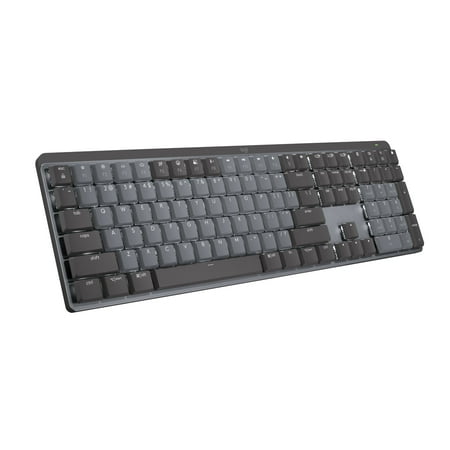
Logitech MX Mechanical Wireless Illuminated Performance Keyboard Introducing MX Mechanical - a full-size keyboard with extraordinary feel, precision, and performance. Low-profile mechanical typing delivers satisfying feedback in your choice of key switches – Tactile Quiet, Clicky, or Linear. MX...
If you spend your day typing — emails, code, docs — and you want a wireless mech that just works across every device you own, the Logitech MX Mechanical is the one. Logitech took everything good about the MX Keys productivity line and gave it real mechanical switches. The tactile quiet variant is the move for shared offices: you get the bump and clack of a mech without sounding like you’re trying to wake the neighbors.
The build is metal, weighty, and feels expensive. The backlighting is smart — it ramps up when your hands approach and dims when you walk away, which sounds gimmicky until you’ve used it for a week and realize you never think about battery anymore. Multi-device pairing across three machines via Bluetooth or the Logi Bolt receiver is flawless. I bounce between Windows, macOS, and an iPad without fishing for a manual switch — it just remembers.
It’s not a gaming keyboard. No 1000Hz polling rate, no rapid-trigger nonsense, no analog magnetic switches. But for typing? Best wireless experience I’ve had at this price.
Specs
| Layout | Full size |
| Switches | Tactile Quiet (also Linear / Clicky) |
| Connectivity | Bluetooth + Logi Bolt USB |
| Battery | ~15 days with backlight, 10 months without |
| Build | Aluminum top plate |
| OS Support | Windows / macOS / Linux / iOS / Android |
Rating: 4.8 / 5
Pros
- Best multi-device experience in the category
- Quiet tactile switches are genuinely office-friendly
- Metal build, premium feel
- Smart backlight saves real battery
- Works flawlessly on Mac and Windows
Cons
- Pricey at $160
- Not built for competitive gaming
- Switches aren’t hot-swappable
Price: $159.99 — Check price on Walmart
2. Aula F75 — Best Value Wireless Mech
short description is not available
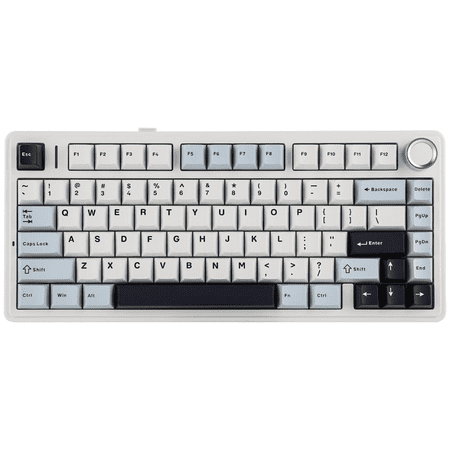
The Aula F75 is the keyboard I recommend to anyone asking “I want something good but I’m not spending $150.” For seventy-five bucks you get a 75% layout, hot-swappable switches, per-key RGB, a knob, and triple-mode connectivity (Bluetooth, 2.4GHz, USB-C). That’s the spec sheet of a $200 board from three years ago.
The 75% layout is the sweet spot for most desks. You keep your arrow keys and a function row, but you ditch the numpad so your mouse can actually live next to the keyboard. The knob handles volume by default and you can remap it. The stock switches are decent linears but the real win is that they’re hot-swappable — you can swap in whatever switches you actually want without soldering.
This one straddles the gaming/productivity line better than anything else under $100. 2.4GHz gives you tight latency for games. Bluetooth handles the iPad. The RGB is bright and clean. Battery on a single charge runs me about ten days with backlight on, which is fine.
Specs
| Layout | 75% (84 keys) |
| Switches | Hot-swap linear (stock) |
| Connectivity | Bluetooth 5.0 / 2.4GHz / USB-C |
| Battery | ~10 days with RGB |
| Extras | Volume knob, per-key RGB, gasket mount |
| Build | Plastic with metal plate |
Rating: 4.7 / 5
Pros
- Stupid amount of features for the price
- Hot-swap means you can upgrade switches later
- Triple-mode connectivity covers every scenario
- Knob is great for volume and media
- RGB is actually bright, not the dim mess most cheap boards have
Cons
- Stock keycaps are okay, not great — ABS not PBT
- Software is a bit rough
- No wired-only option means lower latency requires the 2.4GHz dongle
Price: $75.99 — Check price on Walmart
3. Attack Shark M87 — Best Budget TKL
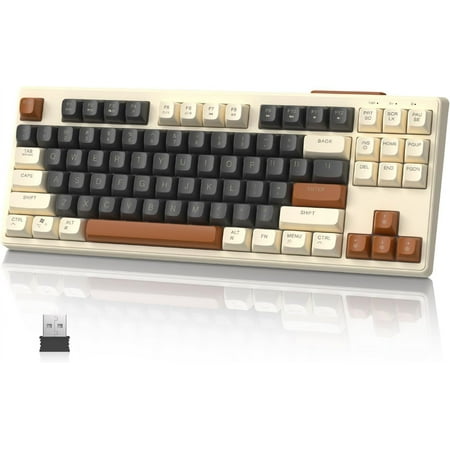
About this item 【Dual Modes Connection】M87 mechanical keyboard has 2connection modes: Bluetooth, and 2.4GHz, and this wireless gaming keyboard has two Bluetooth channel, can easily switch between 3 different wireless devices, no longer limit the connection possibilities. 【Compact 80% Mechanical...
I keep coming back to this one because the math just doesn’t work. Twenty-three dollars for an 80% tenkeyless wireless mechanical with SA-profile PBT keycaps and Bluetooth 5.0? That should be a typo. It isn’t.
The M87 isn’t going to threaten the Logitech for build quality, but it doesn’t have to. It’s the keyboard I throw in a bag when I’m working from a coffee shop and don’t want to risk anything nicer. The switches are decent linears, the layout is roomy enough that I don’t fat-finger, and Bluetooth holds steady on my phone, iPad, and laptop.
Where it cuts corners is obvious — the case is plastic, the stabs rattle a little, and the battery indicator is “good luck guessing.” But for the price of two coffee runs, this is a legit second keyboard or a starter wireless mech for someone who isn’t sure they’ll like the form factor.
Specs
| Layout | 80% TKL (87 keys) |
| Switches | Linear mechanical |
| Keycaps | SA profile PBT |
| Connectivity | Bluetooth 5.0 / 2.4GHz |
| Battery | ~7 days mixed use |
| Build | Plastic |
Rating: 4.3 / 5
Pros
- Absurd value for $23
- PBT keycaps at this price is wild
- TKL layout is great for travel
- Bluetooth is stable across devices
Cons
- Stabilizers rattle
- No backlight
- Battery indicator is unreliable
Price: $23.39 — Check price on Walmart
4. ZIYOULANG Type-C Wireless — Best for Travel
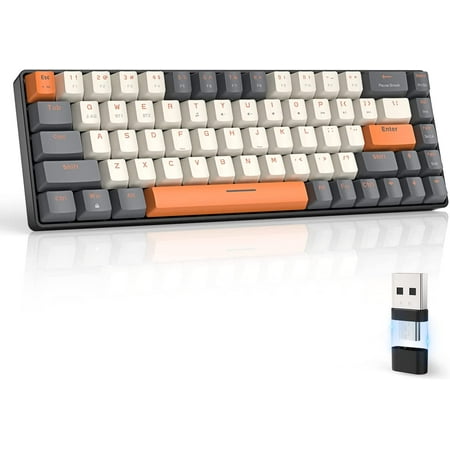
【Wireless Capacity】The mini mechanical keyboard includes Wireless 2.4GHz and Bluetooth 5.0 two-mode can connect with up to three devices and switch among them easily for multitasking needs. The keyboard equipped with an upgraded wireless Bluetooth chip which ensures stable and fast connectivity...
This one is genuinely fun. The ZIYOULANG runs a low-profile mechanical layout with a 2-in-1 wireless receiver — meaning one tiny dongle handles both 2.4GHz and Bluetooth so you don’t have to juggle pairings. The light yellow and red colorway is a bit of a vibe, especially against a wooden desk.
I tossed this in my laptop bag for a week and it earned its keep. The low profile means it doesn’t bulk up the bag and your wrists don’t need a palm rest. Battery lasted basically the whole trip. Pairing was painless. The downside is that low-profile mech switches feel a little weird if you’re used to standard height — they have less travel and the tactile bump is more subtle.
Not a daily driver for me, but a great second keyboard for people who work on the road.
Specs
| Layout | Compact (mid-size) |
| Switches | Low-profile mechanical |
| Connectivity | 2.4GHz + Bluetooth (single receiver) |
| Battery | ~14 days light use |
| Build | Plastic, light |
| Best for | Laptop bag duty |
Rating: 4.2 / 5
Pros
- 2-in-1 receiver is clever
- Low profile = bag friendly
- Quiet enough for cafes and shared spaces
- Long battery for light typing
Cons
- Low-profile switches feel less mechanical
- Build is light, not premium
- No RGB
Price: $27.54 — Check price on Walmart
5. 83-Key Retro Typewriter — Most Unique Build
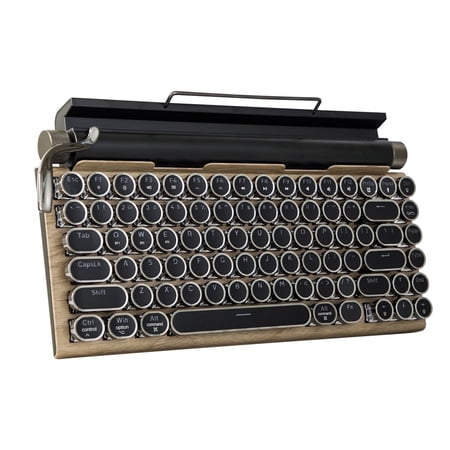
Embrace the charm of vintage typewriters with this modern Retro Mechanical Keyboard. Featuring a stunning wood-colored metal panel, round keycaps, knobs, and metal levers, it blends classic style with cutting-edge technology. Enjoy 14 vibrant backlight modes, an ergonomic design with a brushed...
This thing is a conversation piece. Round retro keycaps, wood-finish frame, Bluetooth, LED backlight, ergonomic angle. It looks like something a steampunk novelist would type on. And it actually works — it’s a real mechanical keyboard underneath the aesthetic.
I won’t pretend it’s the best typer in this list. The round keycaps take a couple days of practice. Your accuracy drops at first because your fingers want to hit corners that aren’t there. But once you adjust, it’s surprisingly comfortable, and the typing sound is satisfying in a way modern flat boards never quite hit.
This is the keyboard you buy because you want your desk to look like nobody else’s. If pure performance is your only metric, skip it. If you want a workstation that has personality, it’s a great call.
Specs
| Layout | 83-key compact |
| Switches | Mechanical (typewriter style) |
| Keycaps | Round retro |
| Connectivity | Bluetooth multi-device |
| Backlight | LED |
| Finish | Wood-look |
Rating: 4.1 / 5
Pros
- Genuinely looks like nothing else
- Real mechanical switches under the retro look
- Multi-device Bluetooth pairs across phone, tablet, computer
- Ergonomic raised angle
Cons
- Round keycaps have a learning curve
- Not the fastest for gaming
- Compact layout means no dedicated arrow cluster on some configs
Price: $78.99 — Check price on Walmart
6. AJAZZ AK87 — Best Office TKL With USB Hub
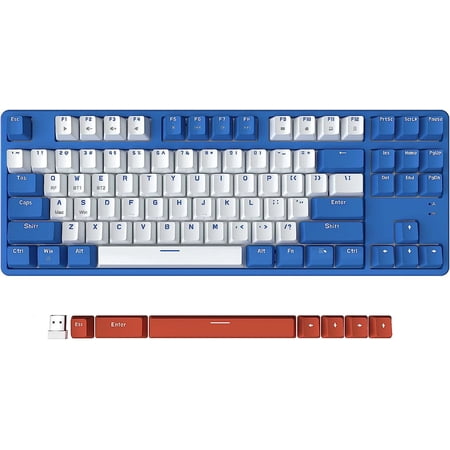
Experience versatile performance with the AJAZZ Wireless Mechanical Keyboard, featuring dual-mode connectivity through Bluetooth 5.0 and 2.4G for stable, low-latency connections across multiple devices. This 87-key TKL compact gaming keyboard, equipped with Red Switches, boasts a full key...
The AJAZZ AK87 is the under-the-radar pick. Twenty-two bucks, 87-key TKL, hot-swap red switches, dual-mode Bluetooth and 2.4GHz, detachable frame, and a built-in USB hub. That last one is the surprise feature — a hub on a wireless keyboard means you can dock a wired mouse or a USB drive without burning a port on your laptop.
It’s not the prettiest board. The plastic feels like, well, plastic. But the red switches are smooth, the layout is roomy, and hot-swap on a board this cheap is borderline reckless. I’ve had this one running on my secondary work setup for a month and it just disappears into the background, which is what you want from an office keyboard.
If your priority is “I want a wireless mech, I want hot-swap, I don’t want to spend money” — this is your move.
Specs
| Layout | TKL 87-key |
| Switches | Hot-swap Red (linear) |
| Connectivity | Bluetooth 5.0 / 2.4GHz |
| Battery | ~8 days light use |
| Extras | Built-in USB hub, detachable frame |
| Build | Plastic |
Rating: 4.0 / 5
Pros
- Hot-swap at $22 is unreal
- USB hub on a wireless keyboard is genuinely useful
- Reds are smooth and quiet enough for an office
- Detachable frame is fun to mod
Cons
- Build looks cheap up close
- No backlight
- Software support is minimal
Price: $21.99 — Check price on Walmart
The Verdict
The Logitech MX Mechanical is the winner if you can swing the price. Nothing else in this list matches it for cross-device productivity, build quality, or the kind of “just works” experience you want from a daily driver. It’s the one I’d put on the desk of anyone serious about their workstation.
The Aula F75 is the runner-up and honestly the smarter buy for most people. You save eighty bucks, you get hot-swap, you get triple-mode connectivity, you get a knob, and you get RGB. The only real reason to skip it is if you specifically need the Logitech’s quiet tactile switches for a shared office or you bounce between Mac and Windows constantly.
Budget pick goes to the Attack Shark M87. For $23 it shouldn’t be this good. It is.
Buying Advice — Which One Is For You
If you live in productivity apps and bounce between work laptop, personal laptop, and a tablet, get the Logitech MX Mechanical. The multi-device experience is unmatched and the quiet tactiles are a meeting-friendly choice. If you mix gaming with productivity and don’t want to compromise on either, the Aula F75 is the value king — 75% layout, hot-swap, triple-mode, all for under $80. Gamers who want a tighter latency story should make sure to use the F75’s 2.4GHz dongle, not Bluetooth, during play.
If you’re new to wireless mechanical and want to test the waters cheap, the Attack Shark M87 is the lowest-risk on-ramp. If you travel a lot and need something flat and bag-friendly, the ZIYOULANG is purpose-built for that. If you want a desk centerpiece nobody else has, the retro typewriter board pulls it off without sacrificing actual function. And if you want hot-swap on a budget with a sneaky USB hub bonus, the AJAZZ AK87 is your guy.
A few things to think about before you buy: switch type matters more than brand. Linears are quiet and smooth for gaming, tactiles have a bump that helps typing accuracy, and clicky switches are loud — don’t get clicky for an office. Hot-swappable means you can change switches later without soldering, which is huge if you’re not sure what you like yet. And finally, if competitive gaming matters, prioritize 2.4GHz over Bluetooth for latency. Bluetooth is fine for everything else.
Things to Watch Out For
A few quick gotchas I’ve run into testing wireless boards over the past year. First, “Bluetooth” alone isn’t enough. If you see a board with Bluetooth only and no 2.4GHz option, expect noticeable latency for any twitchy input — fine for typing, not great for FPS. Second, battery numbers on the spec sheet are always optimistic. The “100 hour” or “200 hour” claims are usually with backlight off and idle disconnect maxed. Cut those numbers in half for real-world use with RGB on.
Third, multi-device pairing isn’t a free win. Some cheap boards let you pair to three devices but you have to manually rebind every time you swap. The good boards (Logitech MX line, premium Keychron, etc.) remember the pairing per slot — you press Fn+1 and it’s already on your laptop. The cheap ones might forget. Test it before you commit. Fourth, watch the polling rate on the 2.4GHz mode. Some budget boards drop to 125Hz wireless even if the 2.4GHz dongle technically supports more. For productivity that’s invisible. For gaming, it matters.
Last one — keycap material. PBT lasts longer and feels better than ABS. Most of the boards here use ABS stock keycaps because PBT is more expensive. The Attack Shark M87 actually shipping with PBT for $23 is one of the reasons it punches above its weight. If your board ships with ABS and you plan to keep it long-term, budget another $25-40 for a PBT keycap set down the line. Your fingers will thank you.
FAQ
Is a wireless mechanical keyboard good for gaming?
Yes, if you use the 2.4GHz dongle instead of Bluetooth. 2.4GHz wireless is basically indistinguishable from wired for casual and even competitive gaming. Bluetooth has a touch more latency and can be flaky with interference — fine for typing, not ideal for ranked play.
How long do wireless mechanical keyboards last on a charge?
Depends on backlight. With RGB on at decent brightness, expect about a week to ten days. Backlight off, you’re looking at a month or more. Boards like the Logitech MX Mechanical use proximity sensors to extend that significantly.
Can I connect a wireless mechanical keyboard to my iPad or phone?
Every keyboard in this list supports Bluetooth pairing with iOS, Android, iPadOS, Windows, and macOS. Most support multi-device pairing so you can swap targets with a key combo.
Is hot-swappable worth it?
If you’re new to mechanical keyboards, yes — it future-proofs your board. You can try different switches without buying a new keyboard or soldering anything. The Aula F75 and AJAZZ AK87 in this list are both hot-swap.
Bluetooth or 2.4GHz — which is better?
2.4GHz has lower latency and is more stable, but it needs a USB dongle. Bluetooth is more convenient and works across phones and tablets without a dongle. Best wireless boards offer both so you can pick per device.



