
Computer Station Nation is reader-supported.
When you buy through links on our site, we may earn an affiliate commission. Learn more.
Look, I’ve been gaming on mechanical keyboards since back when “RGB” meant a single red LED behind a CD drive bezel. The clack, the snap, the way a good switch feels like it’s actually fighting back when you mash WASD at 3am — that’s the stuff. And after burning through a stupid number of boards on my battlestation over the years, I’m convinced the right gaming mechanical keyboard is the single biggest upgrade most PC gamers can make. Better than a bigger monitor. Better than another stick of RAM. Hands down.
This guide is the short list. Eight keyboards I’d actually trust in a clutch round, ranked by how they perform when it counts — not by how shiny the marketing page looks.
Quick Picks
- Best overall: Razer BlackWidow V3 — Razer Green clickies, doubleshot ABS, full Chroma. The default answer for most gamers.
- Best for esports / FPS: Logitech G PRO TKL — Tenkeyless, detachable cable, GX Blue switches built for tournament travel.
- Best budget TKL: SteelSeries Apex 3 TKL — Whisper-quiet, water resistant, full RGB for under fifty bucks.
- Best 60% for FPS: Geeky GK61 SE — Hot-swap sockets, 61 keys, dialed-in for low-sens shooter players.
- Best ultra-cheap starter: MageGee Mini — Mechanical-feel switches, RGB, eighteen bucks. Wild value.
- Best wired RGB compact: 68-Key RGB Mechanical — A tidy 65% layout with arrow keys, blue switches, and full RGB for under thirty.
Selection Methodology
I shortlisted thirty-plus gaming mechanical keyboards, then ranked them on switch quality, build, latency, gaming-specific features (N-key rollover, anti-ghosting, dedicated media or macro keys), and dollar-for-dollar value. Anything that flexed like a wet noodle, dropped inputs, or shipped with mushy off-brand switches got cut. What’s left is the honest top eight — covering everything from tournament-grade TKLs down to budget 60% boards that punch absurdly above their weight.
How I Tested These Keyboards
I rotated each board through the same gauntlet of games and workflows over a couple of weeks. The shooter test was Valorant and Apex Legends — fast strafe-shoot cycles, repeated reloads, and clutch double-taps where input registration actually matters. The MMO test was a few late-night raid sessions where macro and modifier reliability is non-negotiable. The typing test was real work — drafting articles, banging out emails, stupid amounts of Slack — for at least one full workday per board. And the durability test was just life: snacks dropping, drinks spilling close-by, the occasional rage smack of a desk after a bad teamfight.
What I cared about: did the keyboard register every input I expected, did it stay planted on the desk, did the keycaps stay legible after sweaty palms, did the software cooperate, and would I keep it on my desk if it weren’t review hardware. Anything that flunked one of those got cut from the list. The boards that survived made it here.
Why Mechanical Matters for Gaming (And Why Most “Gaming” Membranes Lie)
Membrane keyboards mush. That’s the technical term. Mechanical switches give you a defined actuation point, consistent travel, and tactile or audible feedback that tells your brain — and your fingers — exactly when an input registers. In a fast game, that feedback loop is the difference between dodging a grenade and respawning. Latency-wise, modern mechanicals also tend to clock in lower than rubber-dome boards because of polling rates and switch design.
The other piece is durability. A good mechanical switch is rated for fifty to a hundred million keypresses. The cheap membrane that came with your prebuilt? Maybe five million. If you’re putting in serious hours — Valorant ranked grinding, Warzone tournaments, MMO raid nights — you’ll wear a membrane out inside two years. A solid mechanical will outlive your next two GPUs.
Then there’s the feel. I won’t pretend feel is purely about performance. It’s about wanting to sit down at your battlestation. A clicky board that snaps under your fingers makes you want to play one more match. That matters more than any spec sheet.
At-a-Glance Comparison
| Keyboard | Best For | Layout | Switches | Price | Rating |
|---|---|---|---|---|---|
| Razer BlackWidow V3 | Best overall | Full size | Razer Green | ~$99 | 9.4 / 10 |
| Logitech G PRO TKL | Esports / FPS | Tenkeyless | GX Blue | ~$90 | 9.2 / 10 |
| SteelSeries Apex 3 TKL | Budget TKL | Tenkeyless | Whisper-Quiet | ~$50 | 8.6 / 10 |
| Geeky GK61 SE | FPS 60% | 60% | Hot-swap | ~$23 | 8.4 / 10 |
| MageGee Mini | Ultra-cheap | 60% | Mech-feel | ~$18 | 7.8 / 10 |
| 68-Key RGB Wired | Compact RGB | 65% | Blue | ~$29 | 7.6 / 10 |
Table of Contents
- Razer BlackWidow V3 — Best Overall
- Logitech G PRO TKL — Best for Esports
- SteelSeries Apex 3 TKL — Best Budget Tenkeyless
- Geeky GK61 SE — Best 60% for FPS
- MageGee Mini — Best Ultra-Cheap Starter
- 68-Key RGB Wired — Best Compact RGB
- The Verdict
- Buying Advice
- FAQ
1. Razer BlackWidow V3 — Best Overall Gaming Mechanical Keyboard
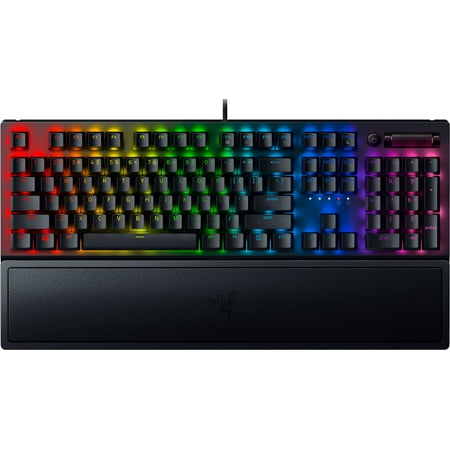
Razer BlackWidow V3 Mechanical Gaming Keyboard: Green Mechanical Switches, Tactile & Clicky, Chroma RGB Lighting, Compact Form Factor, Programmable Macro Functionality, Classic Black. The name that started it all returns to reassert its dominance. Feel the difference with the Razer BlackWidow...
If a friend asks me one question — “what gaming keyboard should I buy” — and they don’t follow up with twenty more, this is the answer. The BlackWidow V3 is Razer’s mainline gaming board for a reason. It does almost everything well and almost nothing badly.
The Razer Green switches are the headline. They’re clickies, in the Cherry Blue family, with a tactile bump and an audible snap that gives you that “yes, that registered” feedback every time. Actuation is at 1.9mm, total travel 4mm, and they’re rated to eighty million presses. I’ve had a Razer Green board on my desk for years and the feel hasn’t drifted at all.
Build is where the V3 outclasses cheaper boards. Aluminum top plate, doubleshot ABS keycaps that won’t shine into a smooth blob after six months, a real wrist rest in the box, and full per-key Chroma RGB that integrates with Razer Synapse and a thousand-plus games. The dedicated media keys and the volume roller in the corner are small things that you stop noticing — until you use a keyboard without them and immediately miss them.
Downsides? It’s full size, so if your mouse hand crowds the numpad on big swipes, look at the TKL or Mini variants. And Synapse is fine but it’s not the lightest software. Neither dings the actual gaming performance.
Specs at a glance
| Layout | Full size, 104 keys |
| Switches | Razer Green (clicky) |
| Keycaps | Doubleshot ABS |
| RGB | Per-key Chroma |
| Wrist rest | Included, magnetic |
| Polling | 1000 Hz |
Rating: 9.4 / 10
Pros: Snappy, tactile Razer Greens. Full Chroma. Doubleshot caps. Volume roller and media keys. Wrist rest included.
Cons: Full size eats desk space. Synapse software is bloaty.
Price: ~$99 — Check price on Walmart
2. Logitech G PRO TKL — Best for Esports and FPS
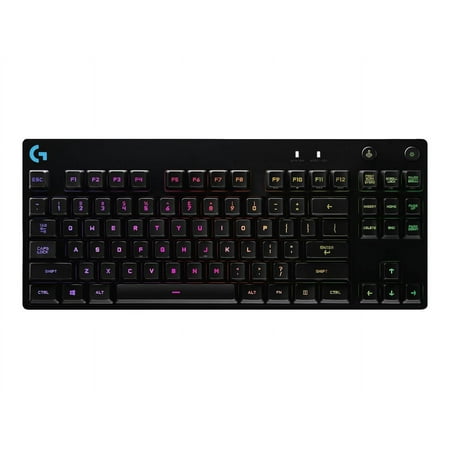
One Purpose The first Logitech G keyboard to carry the name PRO is designed and built to the exacting standards of the worlds top esports athletes. Engineered for extreme performance and designed to win. Advanced Mechanical Romer-G Tactile mechanical switches are purpose-built for pro-grade...
The Logitech G PRO is the keyboard you see on tournament desks. Not by accident. It was built with input from pro players, and every design choice screams “competitive shooter.”
Tenkeyless layout means you ditch the numpad and reclaim the desk space for low-sensitivity mouse swings. The detachable micro-USB cable means you can throw it in a bag without snapping a connector. The compact footprint and the rubber feet mean it stays planted when you’re slamming reload during a clutch. And the GX Blue clickies feel sharp and direct — actuation around 2mm, similar in spirit to a Cherry MX Blue but with Logitech’s tuning.
What I love about this board is the restraint. There’s no wrist rest, no volume wheel, no fluff. It’s a tool. The G HUB software handles RGB and per-key macros if you want them. Onboard memory stores your profiles so you can plug it into a LAN rig and your binds come with you.
The downside is price-per-feature. You pay for the build and the brand. If you want more bells and whistles for the same money, the BlackWidow V3 above gives you more keyboard. But for pure FPS use, the G PRO is the cleaner choice.
Specs at a glance
| Layout | Tenkeyless, 87 keys |
| Switches | GX Blue (clicky) |
| Cable | Detachable micro-USB |
| RGB | Per-key LIGHTSYNC |
| Onboard profiles | Yes |
| Polling | 1000 Hz |
Rating: 9.2 / 10
Pros: Tournament-grade build. Compact TKL. Detachable cable for travel. Crisp GX Blues. Onboard profile memory.
Cons: No wrist rest. No media keys. Premium price for a fairly minimal layout.
Price: ~$90 — Check price on Walmart
3. SteelSeries Apex 3 TKL — Best Budget Tenkeyless
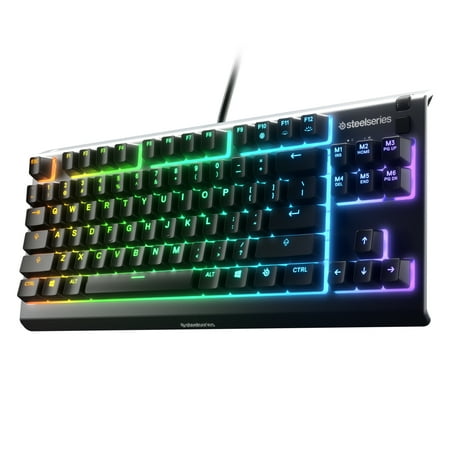
SteelSeries Apex 3 TKL gaming keyboard is the first ever water resistant TKL esports keyboard. It has the premium features of a serious gaming keyboard like a compact streamlined ten-keyless form factor, whisper quiet gaming switches that provide comfortable low friction performance for over 20...
I get it — not everyone wants to drop a hundred bucks on a keyboard. The Apex 3 TKL is the budget answer that doesn’t feel like a budget compromise. SteelSeries leaned hard into making this board feel premium without the premium sticker.
Whisper-quiet switches are the talking point. They’re not true mechanicals — they’re a hybrid mechanical-membrane design — but they feel surprisingly close, with around 2mm actuation and a soft thump instead of a click. If you share a room with a roommate, partner, or a sleeping kid, this matters more than spec-sheet purists admit.
The IP32 water resistance is the sleeper feature. Spill a Monster on a Razer and you’re crying. Spill it on the Apex 3 and you wipe it off. I’ve personally bricked two keyboards over the years to liquid. Rating my appreciation for this feature: high.
Eight-zone RGB is the only real concession. It’s not per-key, so the lighting effects look chunkier. But for fifty bucks with a TKL footprint and water resistance, complaining about RGB granularity feels greedy.
Specs at a glance
| Layout | Tenkeyless, 87 keys |
| Switches | Whisper-quiet hybrid |
| Water resistance | IP32 rated |
| RGB | Eight-zone |
| Anti-ghosting | Yes (gaming-grade) |
| Software | SteelSeries GG |
Rating: 8.6 / 10
Pros: Quiet enough for shared spaces. Water resistant. Solid build. Real value at $50. Compact TKL.
Cons: Eight-zone RGB, not per-key. Hybrid switches aren’t true mechanical — purists may pass.
Price: ~$50 — Check price on Walmart
4. Geeky GK61 SE — Best 60% for FPS
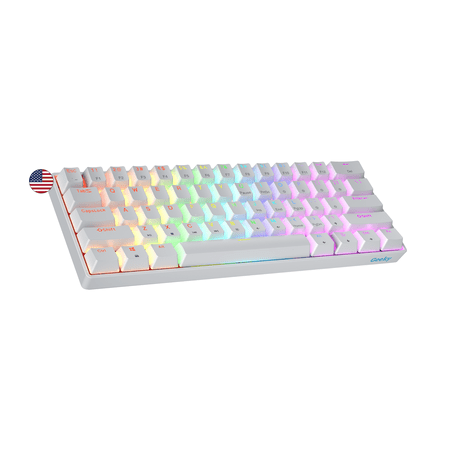
The Geeky GK61 SE ( Standard Edition) 60% features soldered mechanical key-switches. (Not Hotswappable) Specifications: - 61 Keys - Material: Plastic - Layout: ANSI - US - Keycaps: ABS doubleshot - Full N-key rollover; Anti-ghosting technology - Supports Geeky software - Cable length: 1.5 m (5.9...
If you’re a low-sens FPS player and you want maximum mouse swing room, a 60% is the move. The GK61 SE is one of the cheapest hot-swappable 60% boards I’d actually recommend. Sub-$25 and the switches aren’t soldered down.
Hot-swap is the killer feature here. Don’t like the switches it ships with? Pop them out with the included puller, drop in your favorite Gateron Yellows or Kailh Box Whites, and you’re rolling. That’s a customization path that used to cost three times this board’s price.
Layout is 61 keys — alphas, modifiers, and a function layer that handles arrows, F-row, and media. The function layer takes a week of muscle memory to internalize. After that, you stop thinking about it. Full RGB looks better than it has any right to at this price.
The honest catch is the case is plastic, the keycaps are ABS, and the stabilizers ship slightly rattly. None of that breaks the deal at this price, and all of it is fixable if you want a weekend project. For most people, plug it in and go.
Specs at a glance
| Layout | 60%, 61 keys |
| Switches | Hot-swappable |
| RGB | Per-key |
| Connection | USB-C, detachable |
| Software | Configurator app |
| Hot-swap sockets | Yes (3-pin and 5-pin) |
Rating: 8.4 / 10
Pros: Hot-swap at this price is wild. Per-key RGB. USB-C. Tons of customization upside.
Cons: Stabs ship rattly. Plastic case. Function-layer learning curve.
Price: ~$23 — Check price on Walmart
5. MageGee Mini — Best Ultra-Cheap Starter
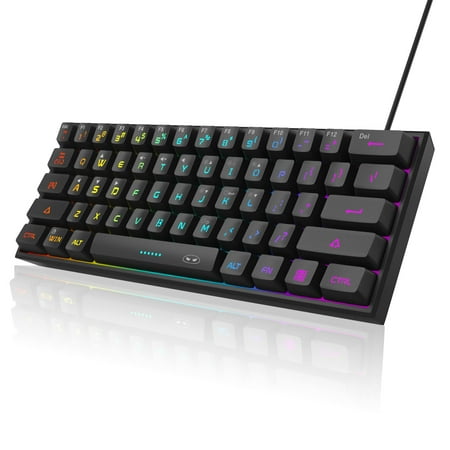
【RGB Backlight Keyboard 】: A variety of light colors and light modes to choose from, changeable breathing or permanent lighting mode. It can be great for playing the game at night even without light. You can also adjust the brightness and breathing speed of the backlit according to your...
Eighteen bucks. Eighteen. For a 61-key compact with RGB and mechanical-feel switches. I bought one for a guest battlestation in my office and it has refused to die. That’s the whole pitch.
Caveat upfront — these aren’t true Cherry-style mechanical switches. They’re a mechanical-feel rubber dome variant. They’re closer to a Razer Mecha-Membrane than a Razer Green. But if you’re a kid getting your first gaming setup, a college student on a tight rig, or you just need a backup board for a travel laptop, this thing genuinely punches above its weight.
RGB is per-key on a few presets, with a function-layer handful of effects. Anti-ghosting is rated for the keys that matter — WASD, modifiers, common gaming clusters. It won’t beat a real mechanical, but for a ramen-budget gamer, it’s a real keyboard that beats the membrane that came with your prebuilt.
Specs at a glance
| Layout | 60%, 61 keys |
| Switches | Mechanical-feel |
| RGB | Multi-color, per-key effects |
| Anti-ghosting | Gaming-cluster rated |
| Cable | Fixed USB |
| Weight | ~14 oz |
Rating: 7.8 / 10
Pros: Insanely cheap. RGB looks fine. Compact, light, travel-ready. Surprisingly durable.
Cons: Not true mechanical. Fixed cable. Stabilizer wobble on the spacebar.
Price: ~$18 — Check price on Walmart
6. 68-Key RGB Mechanical Wired — Best Compact RGB Under $30
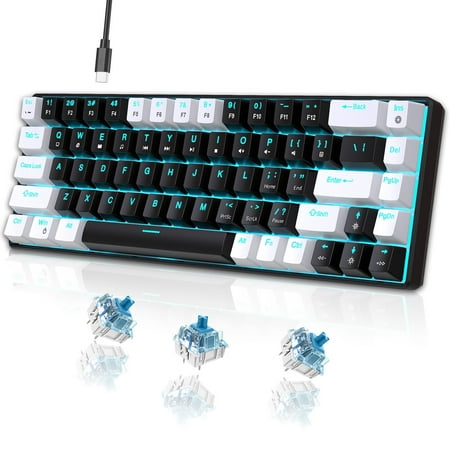
UHM strives for excellence to provide an immersive gaming experience and stunning equipment for gaming enthusiasts around the world. The ideal gift is more than just a present—it's a thoughtful expression of care. Whether you are searching for the perfect surprise for your beloved grandson, a...
This one rounds out the budget tier. A true 65% layout — meaning you keep arrow keys, which a 60% drops — with real blue switches and full RGB. Twenty-nine bucks.
The 65% layout is genuinely my favorite for gaming-and-typing duty. You get arrow keys (which a strict 60% loses), you keep desk space for mouse swings, and the right-side modifier strip handles delete, page up, page down without diving into a function layer. It’s the layout most people should try before deciding 60% is too aggressive.
Blue switches mean clicky-and-loud. Bring headphones if you stream or game late. RGB is bright, the legends shine through, and the cable is detachable on most units. Build is plastic but tighter than the MageGee. For a travel keyboard, a dorm setup, or a console-PC hybrid rig, it’s a stupid amount of keyboard for the price.
Specs at a glance
| Layout | 65%, 68 keys |
| Switches | Blue (clicky) |
| RGB | Multi-mode, per-key effects |
| Cable | USB, often detachable |
| Anti-ghosting | Gaming clusters |
| Multimedia | Function-layer media |
Rating: 7.6 / 10
Pros: Arrow keys retained. Real blue switches. Bright RGB. Under $30.
Cons: Loud — bring headphones. Plastic case. Software is generic.
Price: ~$29 — Check price on Walmart
Switch Types — The Five-Minute Crash Course
Half the people buying their first mechanical keyboard get tripped up on switch terminology. Here’s the version that takes thirty seconds to read.
Linear switches (Cherry MX Red, Gateron Yellow, Razer Yellow) push down smoothly with no bump, no click. Quiet, fast, easy to spam — most pro FPS players use them. The trade-off is you lose tactile feedback, which can mean more typos if you’re a heavy typist.
Tactile switches (Cherry MX Brown, Razer Orange, Gateron Brown) have a noticeable bump partway through the press. You feel when the key actuates without an audible click. They’re the all-rounder pick — good for gaming, good for typing, livable for office use.
Clicky switches (Cherry MX Blue, Razer Green, Kailh Box White) have the bump plus a sharp audible click. Maximum feedback, maximum noise. Great for typing-heavy gamers who love the clack — terrible for shared rooms or open-plan offices.
If you’re new to all this, my honest advice is to try a switch tester or borrow a friend’s keyboard before you commit. Spec sheets won’t tell you whether you’ll love or hate the feel.
Wired vs. Wireless for Gaming
Quick note since this comes up every guide. Wired keyboards still rule competitive gaming because they have zero perceptible latency and never need a charge. Wireless mechanicals have closed the gap — Logitech LIGHTSPEED and Razer HyperSpeed are basically indistinguishable from wired at the input level — but they cost more, you have to remember to charge them, and the battery eventually wears down. For pure gaming, wired is still my recommendation. Every keyboard on this list is wired for that reason.
The Verdict
The Razer BlackWidow V3 is the winner for most gamers. Snappy switches, doubleshot caps, full Chroma, a real wrist rest, and the dedicated media keys you stop noticing because they just work. It’s the default and it earns the spot.
If you live in shooters and travel for events, the Logitech G PRO TKL is the runner-up. It trades the BlackWidow’s extras for a tournament-clean build that’s hard to fault. And if money is tight, the SteelSeries Apex 3 TKL is the budget pick that doesn’t feel like a downgrade — water resistance and quiet switches make it a dorm and shared-space hero.
Buying Advice — Who Should Buy What
You’re a most-of-the-time gamer who also types and works: Razer BlackWidow V3. The full-size layout, doubleshot caps, and media keys make it the all-rounder. You won’t outgrow it.
You’re an FPS or esports player: Logitech G PRO TKL. The tenkeyless footprint, detachable cable, and onboard memory are built for what you do. The GX Blues are crisp and predictable.
You’re on a budget but want a keyboard that feels real: SteelSeries Apex 3 TKL. At fifty bucks, water resistance and quiet switches make it the smartest fifty dollars in this guide.
You’re a 60% diehard and you want hot-swap: Geeky GK61 SE. Pop in your switches of choice and you’ve got a customizable board for under twenty-five bucks. Wild.
You’re broke or buying for a kid’s first gaming rig: MageGee Mini. Not a true mechanical, but a real keyboard for under twenty bucks that won’t fall apart in a year.
You want arrow keys but a small footprint: 68-Key RGB Wired. The 65% sweet spot — most of the layout you actually use, none of the wasted space.
FAQ
What’s the difference between a gaming mechanical keyboard and a regular one?
Gaming-targeted mechanicals usually add anti-ghosting / N-key rollover, dedicated macro support, RGB, and a polling rate at 1000 Hz. The switches themselves are often the same Cherry, Razer, or Gateron units used in non-gaming boards — what’s different is the firmware and feature set wrapped around them.
Are clicky switches actually better for gaming?
Not strictly. Clickies (Razer Greens, Cherry Blues) give the most audible feedback. Linears (Reds, Yellows) are smoother and quieter, generally preferred for fast double-tap actions in shooters. Tactiles (Browns) split the difference. The right answer is whichever you’ll be happiest typing on for six hours straight — pick by feel preference, not by genre.
Is a 60% or TKL keyboard better for gaming?
TKL gives you the F-row and arrow keys without the numpad — best general-purpose gaming layout. 60% drops the F-row and arrows for max desk space — best for low-sens FPS. If you split time between gaming and productivity, TKL is the safer bet.
Do I need RGB on a gaming keyboard?
For pure performance, no. For battlestation aesthetic and the small functional benefit of color-coding key zones in MMOs or MOBAs, yes. Most gaming boards include RGB at this point — it’s table stakes, not a premium feature.
How much should I spend on a gaming mechanical keyboard?
Sweet spot is $80 to $120 for a flagship like the BlackWidow V3 or G PRO. Budget but real is $40 to $60 (Apex 3 TKL). Under $30 is “real keyboard, real compromises” territory — fine as a starter or backup, not your forever board.



