Peripherals & Accessories
Finding the right wheelchair-height desk is one of those purchases that looks simple on paper but gets complicated fast. A standard desk sits around ...
If you have limited use of one hand—whether from stroke recovery, cerebral palsy, carpal tunnel, RSI, arthritis, or an amputation—a standard mouse ...
Quick Answer: For people with hand tremor, a trackball mouse is almost always the better choice. It keeps your hand stationary while your thumb ...
If your wrists ache after a day at the keyboard or your hand goes numb halfway through a mouse session, you're not imagining it. Repetitive strain ...
Ergonomic Keyboard and Mouse Buying Guide for RSI and Carpal Tunnel Relief (2026)
If you're reading this, you probably already know the feeling. ...
If you spend hours at a keyboard and feel that familiar ache creeping into your wrists, you're not alone. Repetitive strain injuries and carpal ...
Standard keyboards assume you have two hands with full range of motion. If you don't, whether from stroke recovery, cerebral palsy, arthritis, RSI, ...
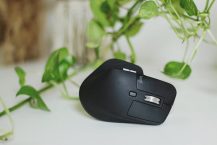
Quick Answer: For most people dealing with wrist pain, a vertical mouse (like the Logitech MX Vertical) is the safer first choice. It keeps your ...
Best Large Print Keyboards for Visually Impaired Users (2026)
If you've caught yourself squinting at your keyboard, leaning in, or fat-fingering ...
How to Set Up Built-In Accessibility Features in Windows and macOS for Adaptive Computing
If standard computer interfaces don't work well for ...
Adaptive & Accessible Computing Equipment: The Complete Buying Guide (2026)
If standard computer gear makes your daily workflow harder ...
Gaming Mouse Pads at a Glance
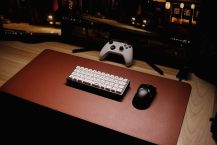
A gaming mouse pad is one of the most overlooked upgrades you can make to your battlestation. It gives you a ...