Computer Station Nation is reader-supported.
When you buy through links on our site, we may earn an affiliate commission. Learn more.
Your phone has a great camera. That’s not in question. But should you use it as a webcam, or is a dedicated budget webcam actually better? The answer might surprise you — and it depends a lot on what you’re doing.
Quick Verdict
For video calls and streaming where you stay at your desk: a dedicated budget webcam is simpler and more reliable. For portrait-quality video where camera performance matters most: your phone wins. Both have real use cases. Here’s the breakdown.
The Comparison: Dedicated Webcam vs Smartphone Camera
Where a Budget Webcam Wins
- It stays put: Mount it on your monitor, forget about it. No stand, no holder, no worrying about battery. It’s always positioned and ready.
- No battery drain: Using your phone as a webcam drains it fast. After an hour-long call your phone might be at 30%.
- No distractions: Your phone is your phone — messages, notifications, calls. Using it as a webcam means those interruptions hit your camera source.
- Plug-and-play simplicity: USB in, select in Zoom, done. No app, no pairing, no Wi-Fi dependency.
- Wide-angle lens: Budget webcams have a fixed wide FOV (usually 80–90°) designed for desk use. Phone cameras often have a narrower default lens that crops you awkwardly from monitor height.
Where a Smartphone Camera Wins
- Raw image quality: Modern smartphone cameras — especially flagship models — have larger sensors and better image processing than a $20 webcam. The gap narrows significantly in good lighting, but smartphones win in low light.
- Portrait mode: Software bokeh (blurred background) looks great on video calls. No $17 webcam does this natively.
- No extra cost: You already own your phone. If using it as a webcam with Continuity Camera (Mac) or a third-party app works for your setup, you spend nothing.
Budget Webcam Options Worth Having
If you decide a dedicated webcam makes sense, here are the best budget picks under $30:
Best All-Rounder: 1080p Full HD Webcam
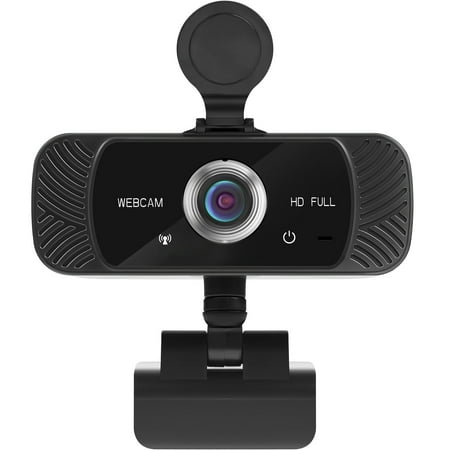
The Mata1 webcam is driverless for plug-and-play (PnP) streaming. The camera can rotate horizontally, 360 degrees, and vertically 180 degrees. The base conveniently has a tapped hole to connect a tripod (not included). The CMOS image sensor allows for a high frame rate and resolution, thus...
$17, 1080p, built-in mic. Simple, reliable, always positioned correctly. This is the baseline argument for a dedicated webcam — it costs less than dinner and handles everything a video call or casual stream needs.
Best Value: USB Webcam 1080P HD Mini
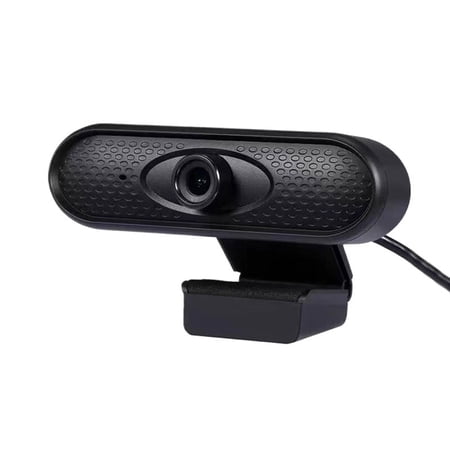
USB Webcam 1080P HD Mini Webcam for Laptop Computer Web Camera Built-in Microphones for Living/ Video Call/ Conference Description: The ultra-clear resolution of this PC webcam ensures sharp clarity, making a lasting impression in everyhigh-quality video call with peers or superiors. Fast...
A step up at $26 — better image quality, slightly wider field of view. Still dead simple to use and significantly more convenient than managing your phone as a camera source.
Most Portable: YIEMEEN Portable Webcam
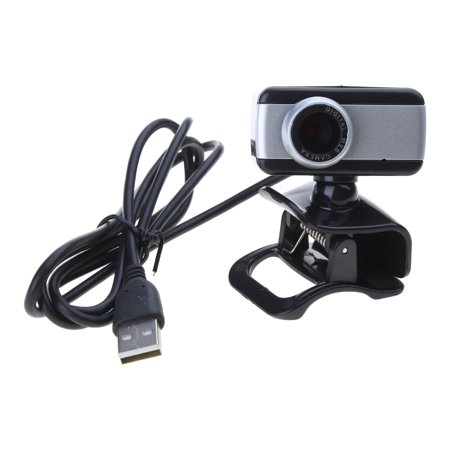
Features: Built-in microphone makes voice calls clear. Suitable for online course, live broadcast, video conference, video chat and so on. Use high-definition lens, good light transmission, color reproduction, effectively reduce for images distortion. High-definition video, clear and smooth,...
$9.42 and smaller than most phone cases. If you travel and need a webcam that actually fits in a bag without thinking about it, this is the pick. Lighter than your phone’s tripod adapter too.
The Honest Verdict
For most desk setups, a dedicated budget webcam wins on convenience and simplicity. The image quality gap between a $17 webcam and a smartphone narrows a lot in decent lighting — and a webcam never drains your battery, never gets notifications, and never needs to be repositioned.
Use your phone as a webcam if: you have a flaghsip with a great camera and a stable mount, you’re doing something where portrait-quality video matters, or you genuinely need to save the cost of a webcam.
Buy a dedicated webcam if: you do video calls or stream regularly and want a zero-friction setup.
FAQ
Can I use my iPhone as a webcam on Windows?
Yes, with third-party apps like EpocCam or Camo. Apple’s Continuity Camera is Mac/iPhone only. On Windows, you’ll need an app and a USB or Wi-Fi connection. It works but adds setup overhead compared to plug-in-and-go USB webcams.
Do budget webcams have worse video quality than phone cameras?
In good lighting, the gap is small. In low light or challenging conditions, flagship phones win. Budget webcams in the $17–$26 range produce solid 1080p in good lighting that looks fine on any video call or casual stream.
What’s the cheapest webcam worth buying?
The 1080p Full HD webcam at ~$17 is the floor for a genuinely useful upgrade. Below that you’re getting 720p cameras that may not be better than what you already have.