Computer Station Nation is reader-supported.
When you buy through links on our site, we may earn an affiliate commission. Learn more.
The camera and mic get all the attention, but streaming accessories are the difference between a setup that actually works and one that causes problems mid-broadcast. Boom arm picking up desk vibration. Bad lighting killing your camera quality. No way to switch scenes without alt-tabbing. These are the accessories that solve real problems — plus two kits for anyone who wants to skip the individual purchases.
Streaming accessory kits
Hercules Stream Essentials Kit — full production bundle
The Hercules Stream Essentials Kit is one of the few all-in-one bundles that doesn’t feel like a compromise. At $399.99 it’s not cheap, but it covers the hardware gap between “I have a mic and a camera” and “my stream looks and sounds like it was produced.” Everything in the kit is purpose-built for streaming rather than repurposed consumer gear.
Worth looking at if you’re setting up a new streaming battlestation and want to avoid buying accessories one at a time. The bundle pricing typically beats individual purchases and everything is designed to work together.
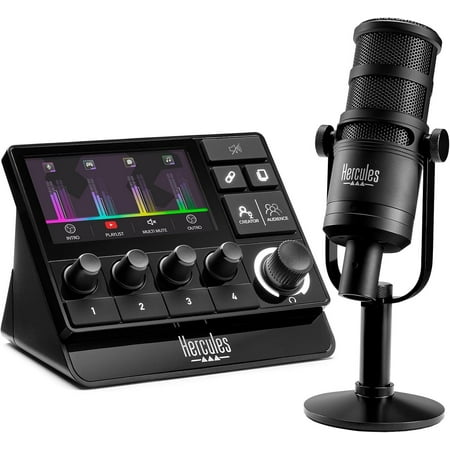
Hercules Stream Essentials Kit, Includes Stream 200 + Microphone HXD-700 XLR microphone, 3 months Voicemod Pro, core streaming apps pre-integrated (OBS, Streamlabs) for PC Take full control of your stream audio, experience a professional voice quality Features Easily control your personal audio...
Vivitar Streaming Microphone Accessory Kit — budget starter
At $24.91, the Vivitar mic accessory kit handles the basics: pop filter, shock mount, and the hardware you need to mount a USB mic properly. Not premium gear, but it covers the common problems that turn a decent mic into a frustrating experience — desk vibration, plosives, wrong angle.
If you just bought a Blue Yeti or similar and don’t want to spend $100 on a Rode PSA1 arm yet, this kit bridges the gap while you figure out your setup.
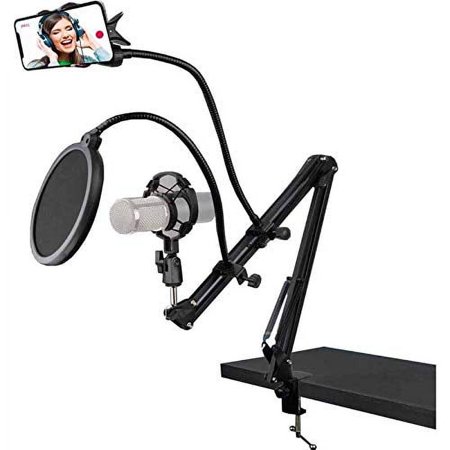
Vivitar Streaming Microphone Accessory Kit (VIVMICACCKIT). For Handsfree Professional Studio Recording or Broadcasting. Adjustable Arm Stand - Clamps to your Desk. Shock Mount - Isolates Most Studio Condenser Mic. Pop Filter - Efficiently Reduce Plosive, Wind, Interference etc.
Streaming lighting accessories
Vivitar 10″ LED Ring Light + Tripod Kit
A ring light and tripod together for $24.99 is a good deal. The 10″ size is right for a desk setup — large enough to fill the face evenly without taking over your workspace. The tripod lets you position it at the right height without a separate clamp. Works for streaming, video calls, and YouTube recording.
This is the “just get something in front of you” tier. It’s not the Elgato Key Light. But it’s $25 and will make your camera look noticeably better than streaming with no dedicated lighting. Good starting point before you invest in a better solution.
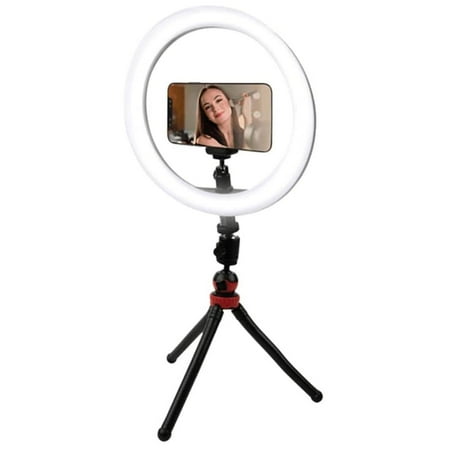
The LED ring light can be mounted on the spider tripod and taken anywhere, it can also be removed from the stand at any time, the tripod ball head can rotate 360-degree to adjust to any angle. The ring light is made of 120 pcs energy-saving LEDs. 3 color temperatures and a 10 level adjustable...
Phone Live Stream Ring Light Clamp
At $18.20, this clamp-mount ring light is built specifically for phone streaming. Clips to a desk or monitor, positions the light directly in front of the phone camera. If you’re streaming from a phone rather than a PC setup, this is a cleaner solution than trying to position a freestanding ring light.
Also works for video calls, live shopping, and any phone-based content. The clamp mechanism is more stable than a freestanding tripod on a crowded desk.
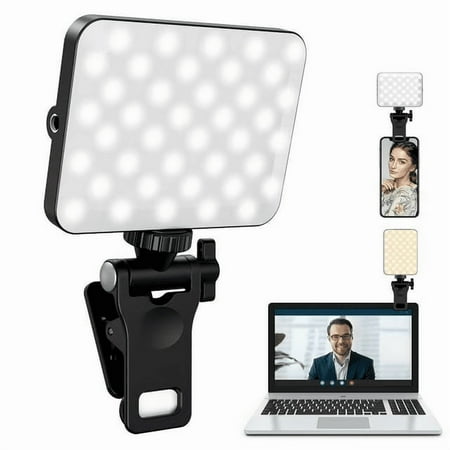
Multi-Level Brightness Adjustment, Perfect for Supplementary Lighting With multiple brightness settings, users can easily adjust the light intensity according to different live streaming environments or shooting needs, ensuring optimal results under various lighting conditions.
Accessories worth buying separately
Some of the best streaming accessories don’t show up in bundles. Here’s what’s worth tracking down individually.
A boom arm is one of the highest-impact purchases in streaming gear. A mic on a desk stand transmits every keystroke, mouse click, and desk bump straight to the capsule. A boom arm isolates it completely. The Rode PSA1 (~$99) is the gold standard. The TONOR T20 (~$25) is the budget alternative that holds up better than it has any right to. Get one of these before spending more on the mic itself.
Pop filters are a $10 fix for a problem that expensive software struggles to solve cleanly. Plosives — the harsh P and B bursts that peak your audio — are almost impossible to fix in post without affecting voice quality. A foam or mesh pop filter stops them at the source. Non-negotiable once you care about audio.
A green screen is optional, but it changes what you can do with your stream. Fabric screens ($25–$50) work well in consistent lighting. Collapsible frames are easier to deal with than tension rod setups. If your room lighting varies, a physical backdrop is more reliable than chroma key.
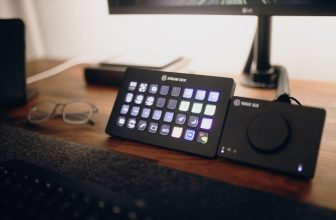
The Elgato Stream Deck is the accessory most streamers wish they’d bought earlier. Scene switches, mute toggles, alert controls, music — all on physical buttons you don’t have to alt-tab to reach. The Stream Deck Mini (~$79) covers the basics. The MK.2 (~$149) if you want more buttons. Not essential day one, but once you’ve used one you won’t go back.
How to prioritize streaming accessories
Not everything on this list is equally important. Here’s the order that actually makes sense:
- Boom arm — immediate impact on audio quality, solves desk vibration before it starts
- Pop filter — $10 fix that no software chain handles cleanly
- Dedicated lighting — ring light or key light, whichever fits your budget
- Green screen — optional, but opens up background control
- Stream Deck — quality-of-life upgrade, not a technical requirement
- Acoustic treatment — foam panels, desk diffusers — only if echo is a real problem
Most streamers get this backwards and buy the Stream Deck before sorting their audio chain. Fix the basics first.
Frequently asked questions
Do I need a Stream Deck to stream?
No. OBS hotkeys cover everything the Stream Deck does. The Stream Deck just makes it faster and less disruptive during a stream. It’s a convenience upgrade, not a requirement.
What’s the best boom arm for a Blue Yeti?
The Rode PSA1 holds the Blue Yeti’s weight reliably without drooping. Budget alternative: the TONOR T20. Avoid very cheap no-name arms — the Blue Yeti is heavy enough to cause drooping and slow drift on undersized arms.
Is a green screen worth it?
Depends on your setup and content. If your background is messy or distracting, a green screen or physical backdrop cleans it up. If your lighting is inconsistent, chroma key will flicker and look worse than your actual background. Sort your lighting before investing in a green screen.