Computer Station Nation is reader-supported.
When you buy through links on our site, we may earn an affiliate commission. Learn more.
You don’t need to spend $100 on a webcam. You don’t even need to spend $50. The budget webcam market has gotten shockingly good — there are 1080p options under $20 that will absolutely embarrass your laptop’s built-in camera. Here’s how to choose the right one and which picks are actually worth your money.
Quick Picks
- Best Overall Under $50: USB Webcam 1080P HD Mini — solid 1080p at $26. Clean image, clip mount, mic included.
- Best $17 Pick: 1080p Full HD Webcam — reliable, 30fps, 1080p, plug-and-play at $17.
- Best Under $15: Yrmaups 1080P Webcam — under $11, 1080P, mic, works with everything.
- Most Portable: YIEMEEN Portable Webcam — tiny, lightweight, $9.42. For laptops on the go.
How we selected these: Filtered for webcams under $50 with at least 1080p resolution and a built-in microphone. Evaluated for plug-and-play compatibility and value at each price tier.
Table of Contents
What to Know Before Buying a Budget Webcam
Don’t Go Below 1080p
720p webcams exist and they’re tempting because they’re even cheaper. Don’t. Your laptop’s built-in camera is probably 720p. A 720p external webcam is barely an upgrade. Every option on this list is 1080p — that’s the floor for an actual improvement.
Fixed Focus vs Autofocus
Budget webcams usually have fixed focus. That means once you position yourself correctly, you’re sharp — but move around and you might blur. For a desk setup where you sit in one spot, fixed focus is totally fine. If you move a lot, save a bit more for an autofocus model.
Built-In Mic Quality
Budget webcam mics are functional, not great. They’ll cover video calls fine. If audio quality matters for what you’re doing (streaming, recording), consider adding a budget USB mic later — even a $30 dedicated mic is a big step up.
Plug-and-Play vs Driver Required
All four picks here are plug-and-play USB — no software installation needed. That’s the right baseline for a budget webcam. Avoid any budget option that requires a proprietary driver install; it creates more headaches than it’s worth.
Comparison Table
| Webcam | Resolution | Autofocus | Mic | Price | Best For |
|---|---|---|---|---|---|
| USB Webcam 1080P HD Mini | 1080p | No | Yes | ~$26 | Best all-rounder |
| 1080p Full HD Webcam | 1080p | No | Yes | ~$17 | Reliable $17 pick |
| Yrmaups 1080P | 1080p | No | Yes | ~$11 | Cheapest 1080p |
| YIEMEEN Portable | 720p+ | No | Yes | ~$9 | Most portable |
The Picks
Best Overall Under $50: USB Webcam 1080P HD Mini — Best Value at $26
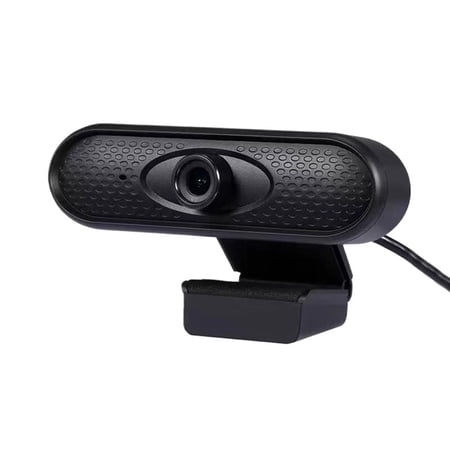
USB Webcam 1080P HD Mini Webcam for Laptop Computer Web Camera Built-in Microphones for Living/ Video Call/ Conference Description: The ultra-clear resolution of this PC webcam ensures sharp clarity, making a lasting impression in everyhigh-quality video call with peers or superiors. Fast...
At $26, this is the pick if you want a solid 1080P webcam without any budget compromises holding you back. Clean image quality, a clip that sits stable on your monitor, and a microphone that handles video calls without embarrassing you. Fixed focus works fine for a static desk setup. Plug it in, it works. That’s what you want from a budget webcam.
| Resolution | 1080p |
| Mic | Built-in |
| Mount | Clip |
| Price | ~$26 |
- ✅ Solid 1080p at budget price
- ✅ Works plug-and-play
- ✅ Stable clip mount
- ❌ No autofocus
Best at $17: 1080p Full HD Webcam — Most Reliable Budget Pick
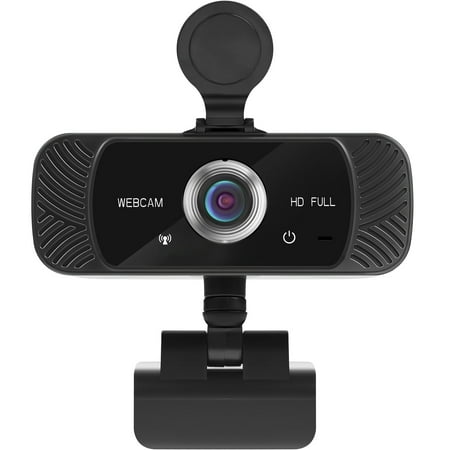
The Mata1 webcam is driverless for plug-and-play (PnP) streaming. The camera can rotate horizontally, 360 degrees, and vertically 180 degrees. The base conveniently has a tapped hole to connect a tripod (not included). The CMOS image sensor allows for a high frame rate and resolution, thus...
$17 for 1080p, 30fps, built-in mic. This is about as cheap as 1080p gets while still delivering a usable image. It’s not going to win any image quality awards, but it’s a real upgrade from a laptop camera and costs less than most lunch orders. Plug and play on Windows, Mac, and most Linux distros.
Cheapest 1080p: Yrmaups 1080P Webcam — Best Under $15
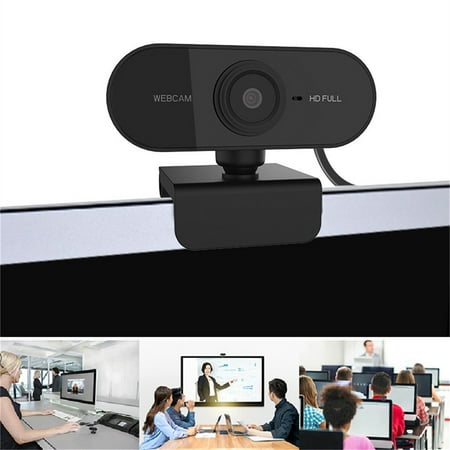
1080P Webcam under $5! Yrmaups 1080P Webcam with Microphone, USB Computer Camera for PC and Laptop, HD Webcam with Built-in Mic, Adjustable Clip-on Webcam for Video Calls 1080P Megapixels USB.0 Webcam Camera with MIC for Computer PC Laptops Features: 1080P built-in 10 m sound-absorbing...
Under $11 for 1080P with a microphone. The Yrmaups exists in a price bracket where you’d normally only find 720p, yet here’s a functioning 1080p webcam. Expect basic image quality and a very basic mic — but for video calls where you just need to not look like a pixelated nightmare, it does the job. Remarkable value at this price.
Most Portable: YIEMEEN Portable Webcam — Best for Laptop Use
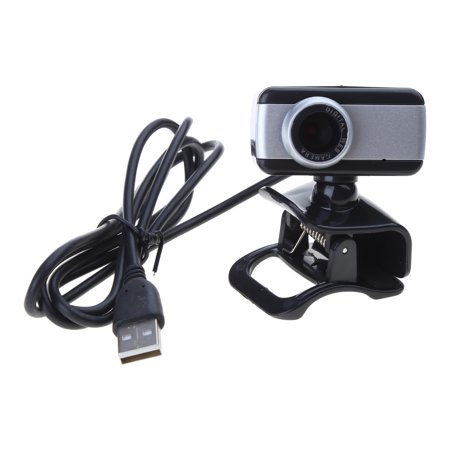
Features: Built-in microphone makes voice calls clear. Suitable for online course, live broadcast, video conference, video chat and so on. Use high-definition lens, good light transmission, color reproduction, effectively reduce for images distortion. High-definition video, clear and smooth,...
$9.42 and fits in a jacket pocket. If you need a webcam for a laptop you travel with, the YIEMEEN’s lightweight, portable design beats every other option on this list. It’s not the sharpest image — portable budget cameras make trade-offs — but it’s an actual external webcam at an absurd price. For basic video calls on the go, it works.
Buying Advice
If budget is no concern within the sub-$50 bracket, grab the USB Webcam 1080P HD Mini at $26 — it’s the cleanest all-around pick. If you want to spend as little as possible for a real 1080p upgrade, the $17 1080p Full HD or the Yrmaups at $11 both get you there. The portable YIEMEEN is only the right pick if travel is genuinely part of your use case.
Avoid spending less than $9 — below that you’re getting 480p cameras that are genuinely not an improvement over a built-in webcam. The options on this list represent the real floor for useful camera quality.
FAQ
Is a $20 webcam actually good enough?
For standard video calls — Zoom, Teams, Google Meet — yes. You’ll look noticeably better than with a laptop camera. For streaming or recording where image quality is more scrutinized, a $30–$50 option with better low-light performance is worth the step up.
Will these work on a Mac?
Yes — all are plug-and-play USB webcams compatible with Mac, Windows, and most Linux setups. No driver installation needed.
Do budget webcams work with Zoom and Teams?
All four picks are plug-and-play compatible with Zoom, Microsoft Teams, and Google Meet. Just plug in and select the camera in your video settings.