Computer Station Nation is reader-supported.
When you buy through links on our site, we may earn an affiliate commission. Learn more.
Your laptop camera is garbage. I’ll just say it. That pinhole lens sitting above your screen is actively making you look worse on every Zoom call, every stream, every video you record. It’s time to fix that.
A decent webcam changes everything — sharper video, cleaner audio, better low-light performance. Whether you’re streaming games, grinding through back-to-back video calls, or just trying not to look like you’re broadcasting from a cave, the right webcam makes a real difference. The problem? There are a ton of options and the specs can be confusing.
This guide breaks it all down. What specs actually matter, what’s marketing fluff, and which webcams are worth buying right now. Let’s get into it.
Quick Picks — If You Just Want an Answer
- Best Overall: onn. 4K Webcam with Autofocus — 4K for under $35 is wild value. Autofocus, swivel head, dual mics.
- Best for Streaming: Logitech Pro Stream Webcam — 1080p/30fps, omnidirectional mic, built for the job.
- Best Mid-Range: onn. 1440P Webcam with Autofocus — solid 1440p with adjustable positioning for $33.
- Best Value: Vizolink 2K Webcam — dual mics, 2K resolution, $18. Hard to beat.
- Best Budget: Logitech C270 HD Webcam — reliable, simple, gets the job done for under $17.
Table of Contents
- What to Look For in a Webcam
- Our Top Webcam Picks
- Quick Comparison Table
- Which Webcam Is Right for You
- FAQ
What to Look For in a Webcam
Before you buy anything, you need to understand what the specs actually mean. Here’s what matters — and what doesn’t.
Resolution — 720p, 1080p, or 4K?
Resolution is the big one. Skip 720p entirely — you’ll look grainy, and most built-in laptop cameras already hit 720p anyway. That’s not an upgrade.
1080p (Full HD) is the sweet spot for most people. Sharp enough for streaming, video calls, and recording. Plenty of options here in the $20–$70 range.
4K is worth it even if your video call software caps you at 1080p. 4K webcams use larger sensors that capture more light. Even when Zoom downscales you to 1080p, you still look noticeably better than a native 1080p camera. You also get room to crop in without losing sharpness — useful for streamers who reframe often.
2K / 1440P is a solid middle ground. Better than 1080p, cheaper than 4K. Good value pick if you want a step up without spending much more.
Frame Rate — 30fps vs 60fps
Frame rate controls how smooth your video looks. 30fps works fine for video calls. But if you’re streaming or recording, 60fps is noticeably more fluid and natural. The catch: most 4K webcams top out at 30fps. For most people, 4K/30fps is the better trade-off over 1080p/60fps.
Field of View (FOV)
FOV is how wide the camera sees. Most webcams sit around 78–90 degrees — plenty for a solo shot at your desk. If you need to capture a group setting, look for 100–120 degree FOV. But a too-wide FOV can distort your face if you’re sitting close to the lens.
Built-In Microphone
Single mics pick up your voice but also pick up keyboard clatter, fan noise, and background sounds. Dual mics with noise reduction do a much better job isolating your voice. For video calls, a good dual-mic webcam handles it. Serious streamers should consider a dedicated USB microphone — the difference is significant.
Low-Light Performance
This separates good webcams from bad ones. Cheap sensors struggle in anything less than ideal lighting — grainy, dark, or blown out. Quality webcams use larger sensors with better light-gathering capability, often with automatic light correction. If your setup has direct window light or you’re recording at night, this matters a lot.
Autofocus
Fixed-focus webcams lock onto your position. Move around and you blur. Autofocus tracks you dynamically. If you’re a streamer who moves, or you gesture a lot during calls, autofocus is worth paying for. If you sit completely stationary, fixed focus is fine — but given how cheap autofocus options are now, just get it.
Privacy Shutter
A physical privacy shutter physically blocks the lens. No software, no trust — just a slider that covers the camera. Simple, effective, and increasingly standard on mid-range and up. If privacy matters to you, look for this feature specifically.
Our Top Webcam Picks
Best Overall: onn. 4K Webcam with Autofocus — ~$35
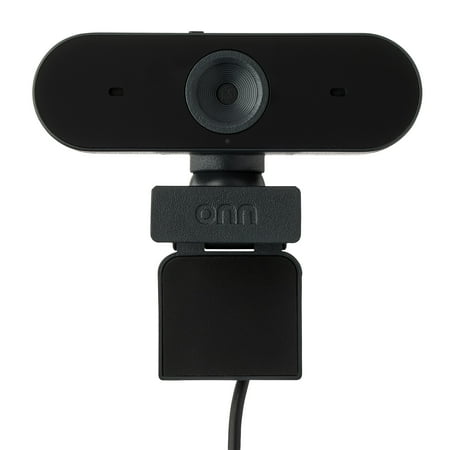
The onn 4K Webcam is a high-quality device designed to deliver superior video clarity and audio performance. With its ability to support up to 2160p resolution at a maximum of 25 fps, and 1080p resolution at 30 fps max, you can expect crystal clear images in every interaction. The webcam also...
Four-K for thirty-five bucks. The onn. 4K Webcam delivers genuine 4K resolution with autofocus, a swivel head, and dual built-in microphones at a price that undercuts most 1080p options from name brands. The swivel head is genuinely useful — easy to reposition without moving your whole monitor setup.
| Resolution | 4K |
| Autofocus | Yes |
| Microphone | Dual built-in |
| Mount | Swivel clip |
| Price | ~$35 |
Best for: Anyone wanting 4K quality without the typical 4K price. WFH workers and streamers who want a real upgrade without spending $100+.
Best for Streaming: Logitech Pro Stream Webcam — ~$67
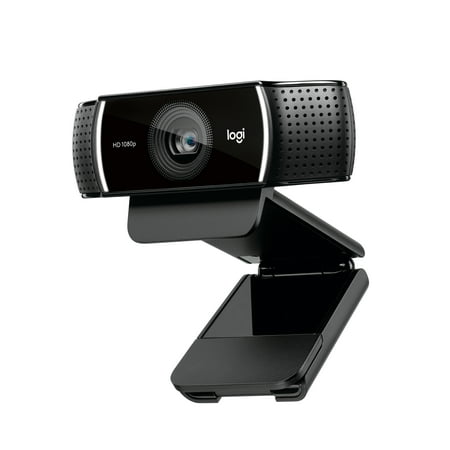
Live stream with outstanding clarity with the Logitech Pro Stream webcam, designed and built for streamers who take their game seriously. With a choice of 30 fps at 1080p or the hyperfast 60 fps at 720p, you can record or go live with vibrant, true-to-life video on channels like Twitch and...
Logitech makes some of the best streaming peripherals around, and the Pro Stream delivers. 1080p at 30fps, omnidirectional mic, autofocus, and solid build quality. It sits flat on a monitor or mounts to a tripod — both options included. In a quiet room it sounds clean; in a noisy environment, pair it with a separate mic.
| Resolution | 1080p / 30fps |
| Autofocus | Yes |
| Microphone | Omnidirectional |
| Mount | Clip + tripod |
| Price | ~$67 |
Best for: Streamers and content creators who want reliable 1080p with name-brand quality behind it.
Best Mid-Range: onn. 1440P Webcam — ~$33
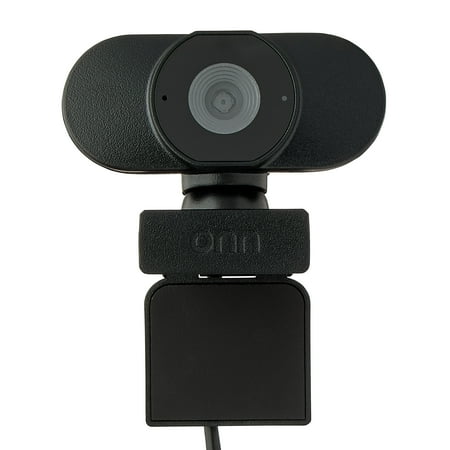
Camera onn. Your conference calls and virtual meetings are about to get an upgrade with our onn. Webcam with Autofocus! With an adjustable base and USB connectivity, now you can add a webcam to your screen easily. We've even given it up to 1440p resolution, so your video will transmit sharp and...
1440p is that sweet middle ground — sharper than 1080p, cheaper than 4K. The onn. 1440P hits that spot with autofocus and adjustable positioning at a price that doesn’t hurt. For under $35, this is an excellent daily driver for the workstation or battlestation.
| Resolution | 1440p |
| Autofocus | Yes |
| Microphone | Built-in |
| Price | ~$33 |
Best Value Under $20: Vizolink 2K Webcam — ~$18
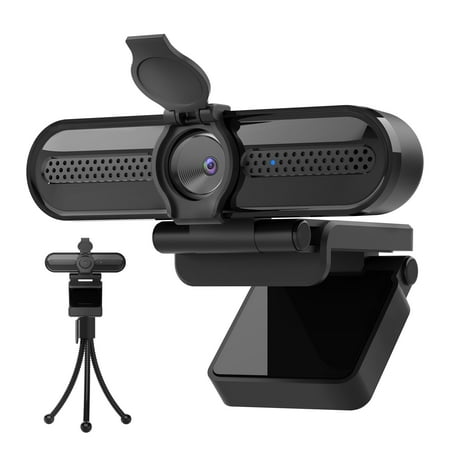
The Vizolink 2K/1080p Webcam with 2 Microphones for Laptop Conference Streaming PC USB Web Cam Autofocus offers professional-quality video calling, recording, and broadcasting. Featuring a Full HD AutoFocus lens, this webcam delivers crisp video at resolutions up to 2K and 1080p with frame rates...
Eighteen bucks. Dual microphones. 2K resolution. The Vizolink is the definition of budget done right. The image is sharp, the mics are decent, and it works plug-and-play with every major OS. If you’re on a tight budget and need a real upgrade from your laptop camera, this is the move.
| Resolution | 2K / 1080p |
| Microphone | Dual built-in |
| Compatibility | Plug and play |
| Price | ~$18 |
Best Entry-Level: Logitech C270 HD Webcam — ~$17
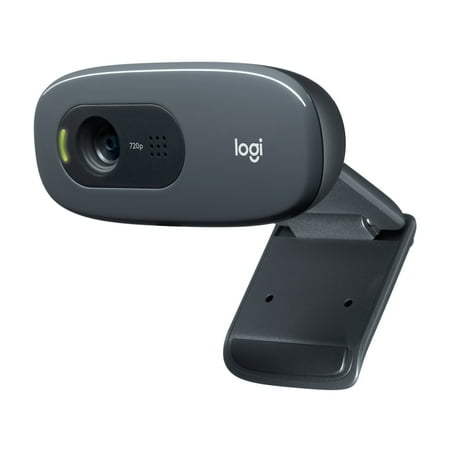
With the Logitech C270 Webcam, you can confidently join any video meeting knowing you’ll always have quality audio and video. Our most affordable camera, the C270 Webcam is an upgrade for your laptop or desktop with practical features that outperform most built-in laptop cameras. It supports...
The Logitech C270 has been around long enough to prove itself. It’s 720p, which is lower than everything else on this list — but it’s Logitech, which means solid drivers, universal compatibility, and a mic that works reliably. For basic video calls where you just need something that works every single time without fuss, the C270 delivers.
| Resolution | HD (720p) |
| Microphone | Noise-reducing single mic |
| Reliability | Plug-and-play, rock solid |
| Price | ~$17 |
Quick Comparison Table
| Webcam | Resolution | Autofocus | Dual Mic | Price | Best For |
|---|---|---|---|---|---|
| onn. 4K | 4K | Yes | Yes | ~$35 | Best overall value |
| Logitech Pro Stream | 1080p/30fps | Yes | Omni | ~$67 | Streaming / pro calls |
| onn. 1440P | 1440p | Yes | Yes | ~$33 | Mid-range upgrade |
| Vizolink 2K | 2K | No | Yes | ~$18 | Budget value |
| Logitech C270 | 720p | No | No | ~$17 | Entry-level reliability |
Which Webcam Is Right for You?
For Streamers and Content Creators
You want at minimum 1080p, autofocus, and a decent mic. The onn. 4K or Logitech Pro Stream are both strong choices. If streaming audio quality is critical, pair either with a dedicated USB mic — the built-in options on webcams rarely satisfy serious streamers. See our full guide to the Top 10 Webcams for Streaming for deeper coverage.
For Remote Workers and Video Calls
For grinding through Teams and Zoom all day, you want good low-light performance and a capable mic. The onn. 4K is the standout pick — the larger sensor handles varied office lighting well, and dual mics keep you sounding clear. Check our Best Webcams for Video Conferencing guide for more options in this category.
For Budget Shoppers
The Vizolink 2K at $18 is impressive for the price, and the onn. 1440P at $33 is arguably the best-value webcam on the market right now. Avoid going below 1080p — the quality difference isn’t worth the few dollars saved. Our Affordable Webcams Under $50 buying guide covers every solid budget option in more detail.
For Privacy-Conscious Users
If you want a physical privacy shutter — and you probably should — see our Best Webcams with Privacy Features roundup. Most budget options skip the shutter, so it’s worth knowing which models actually include it.
FAQ
Is 4K worth it for a webcam?
Yes, even if your video call software caps at 1080p. 4K webcams use larger sensors that gather more light, so you look better even when resolution gets downscaled. The onn. 4K at ~$35 makes it an easy call.
Do I need a webcam with a built-in microphone?
For video calls, a decent dual-mic webcam is fine. For streaming or recording where audio quality matters, a dedicated USB microphone is a significant upgrade. You can always disable the webcam mic and use a separate one — they’re not mutually exclusive.
Will these work on Mac?
All plug-and-play USB webcams on this list work on Mac without driver installation. Logitech options also have dedicated Mac software (Logi Tune) for additional settings.
What’s the difference between 1080p/30fps and 1080p/60fps?
Frame rate affects smoothness. 60fps looks more fluid and natural — it’s what most TVs display. For video calls, 30fps is fine. For streaming or recording where you move a lot, 60fps is noticeably better.
Should I get autofocus or fixed focus?
If you move around, gesture, or lean back from your camera, get autofocus. Fixed focus is fine if you stay completely stationary — but most people move more than they think, and autofocus options are cheap enough now that it’s not worth compromising.
The Bottom Line
Stop letting a garbage built-in camera represent you on every call and stream. The good news: you don’t need to spend much to make a real difference.
The onn. 4K Webcam at ~$35 is the best value on this list by a significant margin — 4K, autofocus, dual mics, all under what most 1080p brands charge. If you want streaming-specific features and Logitech reliability, the Pro Stream at ~$67 is worth the premium. And if you’re truly on a budget, the Vizolink 2K at $18 is genuinely impressive.
Pick your use case, check the table above, and upgrade your setup. Your battlestation deserves better than that pinhole camera.