Computer Station Nation is reader-supported.
When you buy through links on our site, we may earn an affiliate commission. Learn more.
Your streaming setup deserves a webcam that keeps up. A bad camera kills your stream’s vibe faster than lag — viewers notice, and they click away. I’ve gone through the options at every price point to find the ones actually worth putting on your battlestation.
Here are the best webcams for streaming right now, from budget picks that punch above their price to the go-to choice for anyone serious about their stream quality.
Quick Picks
- Best Overall: Logitech Pro Stream Webcam — 1080p, autofocus, omnidirectional mic. Built for this.
- Best Value: onn. 1440P Webcam — 1440p autofocus for $33. Ridiculous value.
- Best 4K Budget: 4K Streaming Webcam — 4K for under $30.
- Best Ultra-Budget: 1080p Full HD Webcam — $17, gets the job done.
- Best for Tight Budgets: Vizolink 2K Webcam — dual mics, 2K, $18.
Selection criteria: After evaluating webcams across resolution, autofocus performance, mic quality, and streaming software compatibility, these five earned their spots based on real value at each price tier. No filler picks.
Table of Contents
What Streamers Actually Need in a Webcam
Streaming has different demands than video calling. Here’s what actually matters for your stream:
- Resolution: 1080p minimum. 1440p or 4K gives you room to crop your frame in OBS without losing sharpness.
- Frame rate: 30fps is acceptable; 60fps is noticeably smoother. Most 4K webcams are limited to 30fps — trade-off you have to make.
- Autofocus: If you move around, gesture, or reach for things, autofocus keeps you sharp. Fixed focus blurs when you leave your locked position.
- Mic quality: Webcam mics are a starting point, not an endpoint. If your stream is voice-heavy (commentary, talk streams), budget a dedicated mic into your setup. For gaming with occasional voice, a dual-mic webcam handles it.
- Low-light: Most streaming happens at night. A webcam that can’t handle dim lighting will wash you out or make you look grainy. This is where cheap sensors fall apart.
- OBS/Streamlabs compatibility: Every webcam on this list is plug-and-play with OBS Studio, Streamlabs, and XSplit. No special drivers needed.
At-a-Glance Comparison
| Webcam | Resolution | Autofocus | Mic | Price | Best For |
|---|---|---|---|---|---|
| Logitech Pro Stream | 1080p/30fps | Yes | Omnidirectional | ~$67 | Serious streamers |
| onn. 1440P | 1440p | Yes | Built-in | ~$33 | Best value overall |
| 4K Streaming Webcam | 4K | Yes | Built-in | ~$30 | 4K on a budget |
| 1080p Full HD | 1080p | No | Built-in | ~$17 | Entry-level streaming |
| Vizolink 2K | 2K | No | Dual | ~$18 | Best dual-mic budget |
The Picks
#1 Best Overall: Logitech Pro Stream Webcam — Best for Streaming
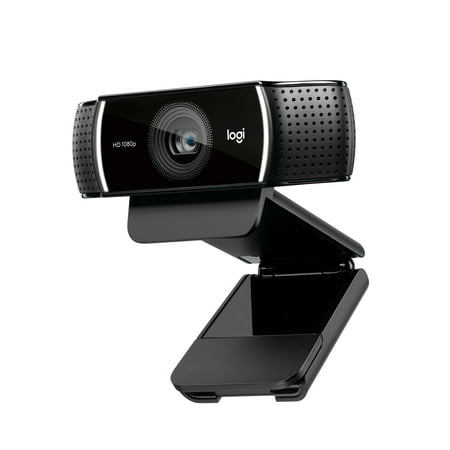
Live stream with outstanding clarity with the Logitech Pro Stream webcam, designed and built for streamers who take their game seriously. With a choice of 30 fps at 1080p or the hyperfast 60 fps at 720p, you can record or go live with vibrant, true-to-life video on channels like Twitch and...
Logitech built this specifically for streaming and it shows. The omnidirectional mic is genuinely good for a webcam — it captures your voice cleanly in a quiet room and holds up better than single-mic options in a moderately noisy environment. Autofocus tracks you smoothly. Mount options include clip-on and tripod. The 1080p/30fps output is solid and stable under OBS without any fiddling.
It’s not cheap compared to the other options here, but it’s built specifically for what streamers actually need. If streaming is a regular part of your life, this is the camera to start with.
| Resolution | 1080p / 30fps |
| Autofocus | Yes |
| Microphone | Omnidirectional |
| Mount | Clip + tripod ready |
| Price | ~$67 |
- ✅ Made specifically for streaming workflows
- ✅ Omnidirectional mic is best-in-class for webcam audio
- ✅ Autofocus works reliably
- ❌ 30fps only — no 60fps option
- ❌ Premium price for 1080p when budget 4K options exist
#2 Best Value: onn. 1440P Webcam — Best Mid-Range Pick
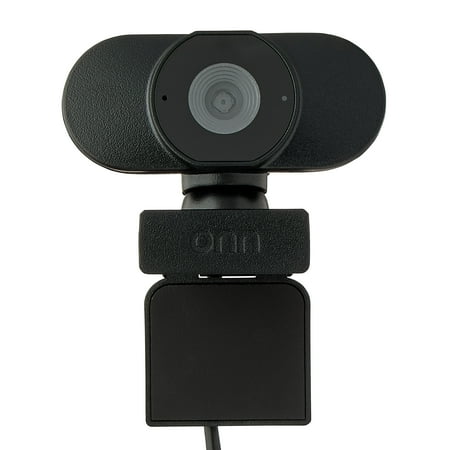
Camera onn. Your conference calls and virtual meetings are about to get an upgrade with our onn. Webcam with Autofocus! With an adjustable base and USB connectivity, now you can add a webcam to your screen easily. We've even given it up to 1440p resolution, so your video will transmit sharp and...
Thirty-three dollars for 1440p with autofocus. This thing should not exist at this price and yet here we are. The onn. 1440P delivers a noticeably sharper image than 1080p without the 4K premium, and the autofocus keeps you sharp when you move around. Adjustable clip positioning means you can tilt it just right without fighting your monitor.
For streamers who want a real visual upgrade from a budget webcam without spending real money, this is the answer. It outperforms options costing twice as much on pure image quality.
| Resolution | 1440p |
| Autofocus | Yes |
| Microphone | Built-in |
| Price | ~$33 |
- ✅ 1440p resolution for $33 is exceptional value
- ✅ Autofocus included at this price
- ✅ Adjustable mount
- ❌ Single mic — not ideal for voice-heavy streams
- ❌ onn. brand has less community support than Logitech
#3 Best Budget 4K: 4K Streaming Webcam — Best 4K Under $30
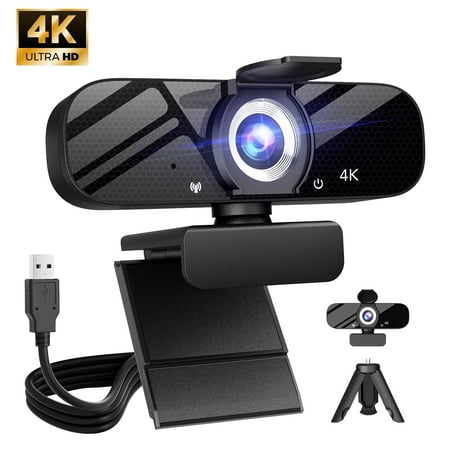
Compatible for Switch 2 Autofocus USB Web Cam 2 Microphones for PC Laptop Video Streaming
4K for under thirty bucks. If resolution is the metric you’re optimizing for, this 4K streaming webcam delivers it. Built-in autofocus, designed specifically for collaboration and streaming use cases, and compatible with all major streaming software. The image is genuinely sharp and the 4K footage gives you a lot of flexibility to crop and reframe in OBS.
At this price point, don’t expect premium build quality — but for what it does, it’s a solid pick for anyone who wants 4K on a budget.
| Resolution | 4K |
| Autofocus | Yes |
| Microphone | Built-in |
| Price | ~$30 |
- ✅ Genuine 4K resolution at a budget price
- ✅ Autofocus
- ✅ OBS/streaming-optimized design
- ❌ Budget build quality
- ❌ Single mic
#4 Best Entry-Level: 1080p Full HD Webcam — Best Under $20
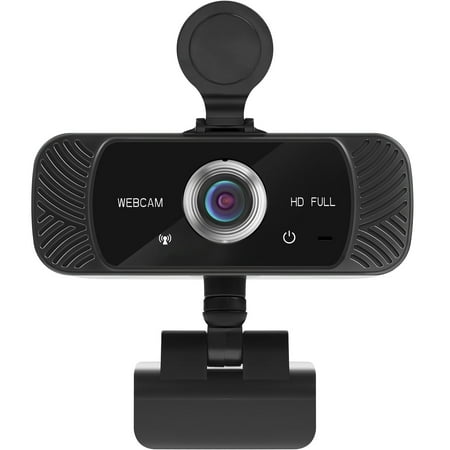
The Mata1 webcam is driverless for plug-and-play (PnP) streaming. The camera can rotate horizontally, 360 degrees, and vertically 180 degrees. The base conveniently has a tapped hole to connect a tripod (not included). The CMOS image sensor allows for a high frame rate and resolution, thus...
Seventeen bucks, 1080p, built-in mic. If you’re just starting out with streaming and need something that works right now, this gets you there without a significant investment. 30fps is the standard for most streaming platforms at this resolution, and this camera delivers it reliably. It’s not going to wow anyone with image quality, but it’s a real step up from a built-in laptop camera.
| Resolution | 1080p / 30fps |
| Autofocus | No (fixed focus) |
| Microphone | Built-in |
| Price | ~$17 |
- ✅ Cheapest 1080p option on the list
- ✅ Plug-and-play with all streaming software
- ❌ No autofocus
- ❌ Single mic, no noise reduction
#5 Best Dual-Mic Budget: Vizolink 2K — Best for Audio-Conscious Streamers
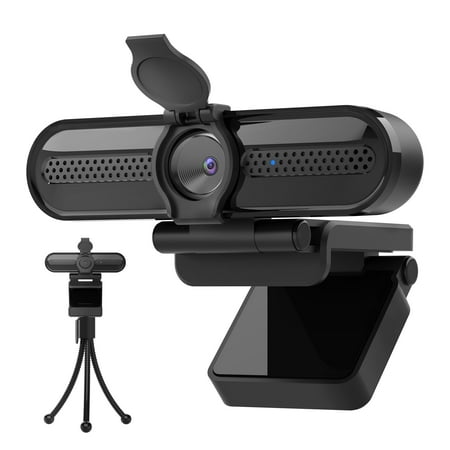
The Vizolink 2K/1080p Webcam with 2 Microphones for Laptop Conference Streaming PC USB Web Cam Autofocus offers professional-quality video calling, recording, and broadcasting. Featuring a Full HD AutoFocus lens, this webcam delivers crisp video at resolutions up to 2K and 1080p with frame rates...
If dual microphones matter to you and you’re on an $18 budget, the Vizolink 2K is your pick. Two mics at this price is unusual — most budget webcams give you one. The 2K resolution is also a step above basic 1080p. It lacks autofocus, so you’ll want to position it correctly and stay put — but for a stationary streaming desk setup, that’s rarely an issue.
| Resolution | 2K / 1080p |
| Autofocus | No |
| Microphone | Dual built-in |
| Price | ~$18 |
- ✅ Dual mics at $18 is rare
- ✅ 2K resolution above standard 1080p
- ✅ Plug-and-play
- ❌ No autofocus
- ❌ Budget build quality
Verdict
The Logitech Pro Stream is the clear winner if streaming is a regular part of your life — it’s purpose-built for the use case and the omnidirectional mic is a genuine differentiator. But if you’re watching your budget, the onn. 1440P at $33 is the best value play on this list. 1440p with autofocus for that price is just hard to argue with.
Need 4K on a budget? The 4K Streaming Webcam at $30 delivers it. Just getting started and need something now? Grab the 1080p Full HD at $17 and upgrade later when your stream grows.
Whatever tier you’re at, you’re covered. Now go live.
Buying Advice
If you’re streaming at least a few times a week and your face is on camera regularly, invest in the Logitech Pro Stream. It’s the right tool for the job and the quality shows on stream. If you’re more casual — streaming occasionally, mostly gaming with cam in the corner — the onn. 1440P gives you great image quality without the premium price. Pure budget? Vizolink 2K’s dual mics are a rare feature at that price tier and will serve voice-heavy streamers better than the single-mic alternatives.
FAQ
What resolution should I stream at?
Most platforms cap streams at 1080p for non-partners. For display quality, 1080p is fine. But a 1440p or 4K webcam gives you flexibility to crop your frame in OBS without losing resolution — which is worth it even if your stream outputs at 1080p.
Do I need 60fps for streaming?
Not necessarily, but it helps if you move around a lot on camera. 30fps is the standard and most viewers won’t notice the difference for a stationary cam. If your cam-in-a-corner setup is mostly static, 30fps is fine.
Should I use my webcam mic or get a separate microphone?
For talk-heavy streams or podcast-style content, a dedicated USB mic is a significant upgrade. For gaming with occasional commentary where your mic is mostly an afterthought, a dual-mic webcam handles it. The Logitech Pro Stream’s omnidirectional mic is the best webcam-built option on this list if you need to skip the separate mic.
Will these work with OBS Studio?
Yes — all five are plug-and-play USB webcams compatible with OBS Studio, Streamlabs, XSplit, and every major streaming platform. No special drivers required.