Computer Station Nation is reader-supported.
When you buy through links on our site, we may earn an affiliate commission. Learn more.
Budget streaming kits: quick picks
| Pick | Kit | Price |
|---|---|---|
| Best all-in-one kit | Auto Face Tracking Vlog Kit | $59.99 |
| Best audio bundle | BM-800 + Audio Mixer Bundle | $49.99 |
| Best podcast starter | Pecham Podcast Bundle | $38.99 |
| Best mobile kit | innotech Vlogging Kit | $15.19 |
| Ultra budget mobile | Hinzonek Vlogging Kit | $12.50 |
Full reviews and DIY setup guides below.
You don’t need $500 to start streaming. You need a mic that doesn’t sound like a phone call, something pointed at your face, and a light source. The rest is optional. These kits cover the gear side of that for under $60 — plus a breakdown of how to build a proper budget setup piece by piece if you’d rather not buy a bundle.
Budget streaming starter kits
1. Auto Face Tracking Vlogging Kit — best all-in-one
At $59.99, the auto face tracking kit is the most feature-packed bundle here. The 63″ tripod with auto face tracking handles camera framing automatically — useful for streamers who move around or don’t want to think about staying in frame. Comes with LED light, phone mount, and the tracking hardware. Works with iPhone and Android.
Auto face tracking at this price is legitimately impressive. The technology usually lives in $200+ gimbal setups. For a mobile or standing desk stream where you move around, this kit removes a real friction point.
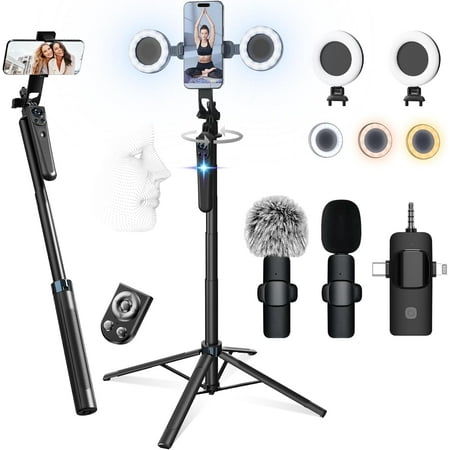
Product description Previous page Next page 1 360 Auto Face Tracking 2 LED Fill Lights 3 Bluetooth Remote Control Previous page Next page 1 Plug and Play 2 Easy to Remote 3 Easy to Use Previous page Next page
2. BM-800 Condenser Mic + Audio Mixer Bundle — best audio starter
For streamers where audio is the priority, the BM-800 bundle at $49.99 is the pick. You get a condenser microphone, audio mixer, and voice changer in one package. The audio mixer is what makes this interesting — having hardware control over your audio levels is a step up from software-only gain control, and the voice changer is a bonus for streamers who want sound effects or character voices.
The BM-800 is a classic budget studio microphone that has been around long enough to have a real support community behind it. Not a Blue Yeti, but it sounds noticeably better than headset mics and most USB gaming mics at this price.
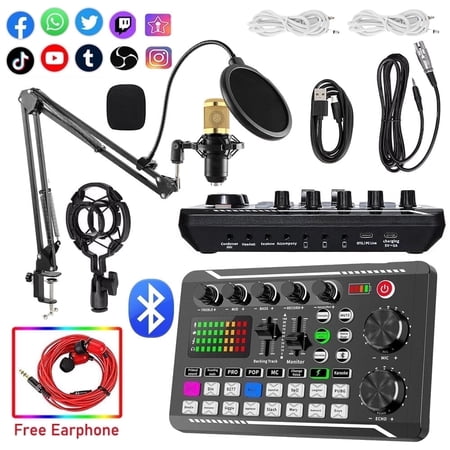
The BM800 high-performance microphones are designed to deliver clear, high-quality sound for memorable recordings. can deliver warm, clear bass, detailed midrange, and a silky high end. It is ideal for vocals, musical instruments, podcasting, voiceovers, interviews, field recordings. Suitable...
3. Pecham Podcast Equipment Bundle — best podcast/stream starter
The Pecham bundle at $38.99 gives you an audio mixer and condenser microphone with a sound card — a solid combo for anyone starting a podcast alongside streaming. The sound card handles the USB audio interface function, so you don’t need a separate interface to use the condenser mic. Everything works together out of the box.
For a first streaming or podcasting setup where you want to hit the ground running without diagnosing compatibility issues between separate components, this bundle removes the guesswork.
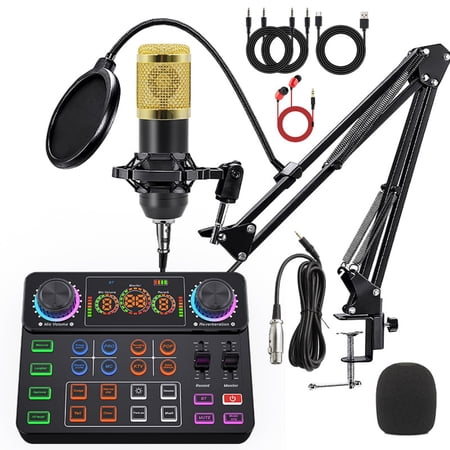
Pecham Podcast Equipment Bundle is designed for podcasts, live broadcasts, music and short video recording! The cardioid pickup pattern makes the sound fuller and rounder, and can reproduce music and voice clearly and naturally. The podcast equipment set has 8 sound effects, which will bring you...
4. innotech Vlogging Kit — best budget mobile setup
At $15.19, the innotech kit covers the mobile streaming basics: tripod, 36-LED light panel, and phone mount. It’s phone-only streaming gear — not for desk setups. But for IRL streaming, gaming on a mobile device, or any content where you’re using your phone as the camera, this kit gives you stable positioning and basic lighting for under $20.
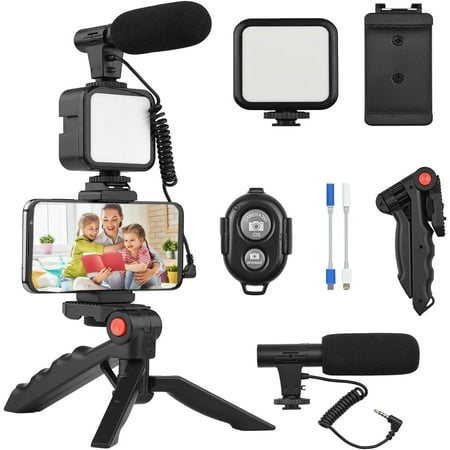
High Quality Microphone】The vlogging kit comes with a microphone with foam earmuffs (batteries required), which reduces background noise when picking up sound, providing clear, high-quality audio. Supports all devices with 3.5mm audio input interface. We also offer adapters for Android and...
5. Hinzonek Vlogging Kit — ultra budget mobile
Same concept as the innotech at $12.50 — tripod, LED light, phone holder. The floor for a functional mobile streaming kit. If you need to get started and budget is the only constraint, this gets you a stable mount and some light for the price of lunch.
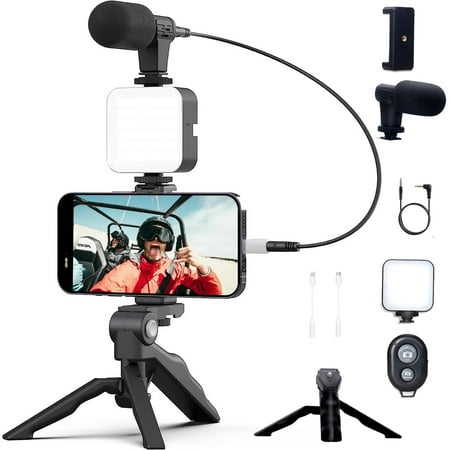
Features With 49 LED pearls and three adjustable brightness levels, this handheld photo light ensures you always have the perfect lighting for your live streams, vlogs, interviews, and more. Say goodbye to messy cords and limited mobility. This wireless live streaming light is designed with a...
Building a budget streaming setup from scratch
Rather than a bundle, some streamers prefer to build piece by piece. Here’s the order that maximizes impact per dollar.
Under $100: the minimum viable setup
- Mic: Blue Snowball iCE (~$49) or FIFINE A6NEO (~$38)
- Lighting: desk lamp bounced off the ceiling — $0 if you own one
- Camera: built-in laptop webcam or phone on a tripod
- Software: OBS Studio (free)
This setup sounds fine and costs under $50 in new gear. The camera is the weak link, but viewers tolerate average video — they won’t tolerate bad audio.
Under $200: a proper starting setup
- Mic: HyperX QuadCast S (~$139) — USB, sounds great, looks great
- Lighting: Neewer ring light kit (~$39) — immediate camera quality improvement
- Camera: Logitech C920 (~$69) — reliable 1080p autofocus
- Software: OBS Studio (free)
This is the tier where your stream starts looking like you know what you’re doing. Each piece covers a real problem.
What to skip at the budget tier
Skip the Stream Deck until you’ve figured out your scene layout — it’s a quality-of-life upgrade, not a technical requirement. Skip the green screen until your lighting is consistent — bad lighting makes chroma key look worse than your actual background. Skip the XLR mic upgrade until you’ve genuinely hit the ceiling on USB.
Frequently asked questions
Can I stream for free?
Yes. OBS is free. Twitch, YouTube, and Kick are free. If you have a PC with a built-in webcam and a headset mic, you can start streaming today at zero additional cost. The budget gear on this page improves quality — it doesn’t enable streaming where it wasn’t possible before.
What’s the single best budget upgrade for streaming quality?
A dedicated microphone. The jump from headset mic to a $50 USB condenser mic is the most audible improvement you can make per dollar spent. Audio quality is what determines whether people stay.
Is it worth buying a streaming bundle vs. individual gear?
Bundles make sense when you don’t know what you need yet. They remove compatibility questions and get you started faster. Individual gear makes sense when you know exactly what you want and can compare specs per dollar. For first-time streamers, a bundle is usually the better entry point.