Computer Station Nation is reader-supported.
When you buy through links on our site, we may earn an affiliate commission. Learn more.
Streaming gear: quick picks
| Category | Top pick | Price |
|---|---|---|
| Best mic (overall) | Shure MV7 | ~$249 |
| Best budget mic | Blue Snowball iCE | ~$49 |
| Best webcam | Logitech C920 | ~$69 |
| Best capture card | Elgato HD60 X | ~$149 |
| Best key light | Elgato Key Light | ~$199 |
| Best budget light | Neewer 18″ Ring Light | ~$35 |
Full breakdowns for each category below.
Most streaming gear lists are just Amazon affiliate dumps. Forty products, zero context, no explanation of why one mic beats another or what you actually need at each budget. You end up spending $400 on gear you could’ve skipped and $0 on the one thing that would’ve made a real difference.
This guide works differently. What actually matters in each category, what you can skip, and how to build a solid setup from the ground up — whether you’ve got $100 or $1,000 to spend.
What streaming gear do you actually need?
Honest answer: a decent mic and stable internet. That’s the floor. Viewers tolerate average video quality. They will not tolerate bad audio. A $50 Blue Snowball iCE into OBS is enough to start. A $15 USB headset is not.
Beyond audio, the priority order that actually holds up:
- Microphone — audio determines listenership more than anything else
- Stable internet — at least 6 Mbps upload for 1080p60
- Camera/webcam — face cam builds connection; 1080p30 is fine to start
- Lighting — bad lighting makes a $300 camera look like $30
- Capture card — only if you’re pulling from a console or second PC
- Audio interface + XLR mic — upgrade path once USB starts feeling limiting
PC streamers don’t need a capture card. Console streamers do. That filter alone saves a lot of confusion.
Streaming microphones
The mic market is noisy. “Studio quality” gets printed on $30 gear that sounds like it was recorded in a tin can. Here’s how to cut through it.
USB mics plug straight into your PC. XLR mics need an audio interface. USB is easier and cheaper — and honestly, a good USB mic will outperform a mediocre XLR setup. The Shure MV7 runs both USB and XLR from the same capsule, which is a nice hedge if you want to upgrade later without replacing the mic. Don’t feel pressured into XLR until you’ve actually hit the ceiling on USB.
For polar pattern, stick to cardioid. It picks up what’s in front and rejects what’s behind. Omnidirectional is for podcast roundtables. If you’re streaming solo, cardioid is the answer every time.
Frequency response and self-noise ratings look good on paper but don’t tell the whole story. How a mic handles background noise rejection, off-axis bleed, and peaks under a loud voice — none of that shows in the spec sheet. Read reviews from actual streamers, not audiophile forums.
Mic tiers that hold up:
- Under $60: Blue Snowball iCE, FIFINE K669B
- $60–$150: Blue Yeti, HyperX QuadCast S, Rode NT-USB Mini
- $150–$300: Shure MV7, Audio-Technica AT2020USB+
- $300+: Shure SM7B + Focusrite Scarlett Solo (XLR setup, worth it if you’re serious)
Streaming cameras and webcams
Webcams have a bad reputation because budget webcams genuinely are bad. The Logitech C270 at $30 looks like 2009 Skype. But the C920 at $69 is still one of the best streaming cameras on the market, years after launch. Price isn’t a reliable predictor of quality here — brand and model matter more than the number on the tag.
A DSLR with a fast lens looks dramatically better than any webcam — shallow depth of field, better low-light, crisper image. The catch: cameras aren’t built to run 8-hour streams, they overheat, you need a capture card to connect them, and the setup complexity adds up fast. For most streamers, a $100–$150 webcam is the right call. DSLRs are for full-time creators with production budgets and time to troubleshoot.
One thing people overlook: field of view matters more than resolution. A 78° FOV keeps your face and desk in frame cleanly. Push above 90° on a wide-angle lens and heads start looking like balloons at the edge. Check that spec. Most streaming platforms cap delivery at 1080p anyway, so 4K camera resolution is wasted spend on streaming-only setups.
Camera picks by tier:
- Budget: Logitech C920 (~$69) — still the standard for good reason
- Mid-range: Elgato Facecam (~$149), Razer Kiyo Pro (~$99)
- Premium: Sony ZV-E10 mirrorless + Elgato HD60 X if you want the DSLR path
Capture cards
If you stream from a PC, skip this section. Capture cards are for console streamers and dual-PC setups. That’s it.
The capture card sits between your console and your streaming PC. It grabs the HDMI output, encodes it, and feeds it into OBS as a video source. No card, no console footage in your stream.
Internal cards (PCIe) install directly into your streaming PC and give you lower latency and more bandwidth. External cards (USB) are plug-and-play and work in dual-PC setups where you don’t want to crack a case. Most streamers go external — the latency difference rarely matters for streaming as opposed to recording.
Elgato vs. AVerMedia is a real debate. Elgato’s software is cleaner and integrates well with the Stream Deck ecosystem. AVerMedia generally wins on raw specs at the same price. Beginners will have an easier time with Elgato. Power users chasing 4K60 capture should look at AVerMedia’s Live Gamer 4K.
Capture card picks:
- Budget console streaming: AVerMedia Live Gamer Portable 2 Plus (~$99)
- Best overall: Elgato HD60 X (~$149) — 4K30 passthrough, works with PS5 and Xbox Series X
- High-end / dual PC: AVerMedia Live Gamer 4K (~$199)
Streaming lighting
Most underrated upgrade in streaming, and it’s not close. A $35 ring light on a $70 webcam will beat a $150 webcam in bad lighting every single time. Light quality determines how good your camera looks. Not the camera sensor. The light.
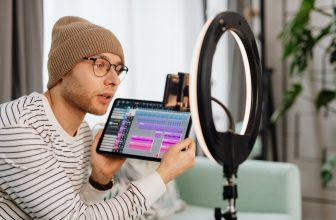
Ring lights are cheap, fill the face evenly, and throw that circular catchlight into your eyes that looks clean on camera. Key lights (like the Elgato Key Light) give you more directional, adjustable illumination — tunable color temperature, no ring reflection in glasses, built for desk use. Ring light is the smart budget move. Key light is the professional upgrade.
Color temperature: aim for 5500–6500K for natural daylight balance. Warm yellow light (2700K) makes you look like you’re streaming from a basement bathroom. Tunable temperature is worth paying a bit more for — it lets you match whatever ambient light your room has instead of fighting it.
Placement: light source in front of you, slightly above eye level. Never behind (you become a silhouette). Never directly to the side (harsh uneven shadows). A diffuser on bare LED panels kills hot spots — ring lights come pre-diffused by the shade.
Lighting picks:
- Budget: Neewer 18″ Ring Light Kit (~$35–$45)
- Mid-range: Elgato Ring Light (~$99) or Lume Cube Panel Mini (~$79)
- Professional: Elgato Key Light (~$199) — app-controlled, 2800–7000K range
Essential streaming accessories
The stuff that makes your setup not fall apart mid-stream.
A boom arm is non-negotiable once you care about audio. A mic sitting on a desk picks up every keystroke and desk bump through vibration. A boom arm gets it off the surface and lets you position it right without filling the frame. Rode PSA1 (~$99) is the gold standard. TONOR T20 (~$25) holds up surprisingly well for the price.
If you’re running an XLR mic like the SM7B, you need a shock mount — it isolates the capsule from stand vibration. USB mics usually have built-in isolation so it’s less critical, but for XLR setups it’s not optional.
Get a pop filter. A $10 pop filter stops plosives (those harsh P and B sounds that clip your audio) better than any software chain can fix them after the fact. It’s the single cheapest meaningful purchase in streaming gear.
Green screens are divisive. Some audiences love a clean virtual background. Others think they look cheap even when done well. Fabric screens ($25–$50) work fine in consistent lighting. If your room lighting is unpredictable, a physical backdrop is more reliable and less fussy.
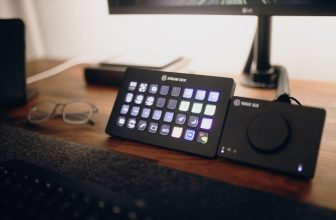
The Elgato Stream Deck isn’t essential, but once you’re managing scene transitions, mute buttons, alert panels, and music controls at the same time, having physical buttons for all of it genuinely changes the experience. The Mini (~$79) covers most use cases. The full MK.2 (~$149) if you want room to grow.
Budget streaming setups
Three tiers, fully kitted out:
Starter: ~$120
- Mic: Blue Snowball iCE ($49)
- Webcam: Logitech C920 ($69) — skip it if budget is tight and do audio first
- Lighting: desk lamp pointed at the ceiling for bounce light (~$0 if you own one)
- Software: OBS Studio (free)
Intermediate: ~$400
- Mic: HyperX QuadCast S ($139)
- Webcam: Elgato Facecam ($149)
- Lighting: Neewer Ring Light ($39)
- Arm: TONOR T20 boom arm ($25)
- Software: OBS + Streamlabs for overlays
Pro: ~$1,000+
- Mic: Shure SM7B + Focusrite Scarlett Solo ($399 combined)
- Camera: Sony ZV-E10 mirrorless ($648) + Elgato HD60 X ($149)
- Lighting: Elgato Key Light x2 ($398)
- Control: Elgato Stream Deck MK.2 ($149)
- Arm: Rode PSA1 ($99)
The starter-to-intermediate jump is where you get the most improvement per dollar. Going pro is a different calculation — that tier only makes sense when your stream is generating income and production quality directly affects it.
Frequently asked questions
Do I need a capture card to stream on PC?
No. PC streamers capture game footage directly in OBS via software. Capture cards are for console streaming and dual-PC setups only.
What’s the minimum upload speed for streaming?
6 Mbps for stable 1080p60 at Twitch’s 6000 kbps recommended bitrate. 3 Mbps works for 720p30. Test your actual upload speed — not what your ISP advertises — and leave 20% headroom for background traffic.
USB mic or XLR — which should I start with?
USB. An audio interface adds $100–$150 before you’ve bought anything else. The quality gap between a good USB mic and an entry-level XLR setup is smaller than the ads suggest. Go XLR when you’ve actually outgrown USB — not before.
Ring light or key light — which is better?
Under $50, ring light wins. For a serious setup, key light is better — more natural quality, no ring catchlight in glasses, built for desk setups. The Elgato Key Light at $199 is the benchmark most full-time streamers eventually land on.
What streaming software do most people use?
OBS Studio — free, open source, runs on anything. Streamlabs wraps it with alerts and widgets at the cost of heavier CPU usage. XSplit is a paid alternative with good scene management. Most full-time streamers end up on plain OBS once they know what they’re doing.
Can I stream with a gaming headset mic?
You can. You probably shouldn’t if you care about audio quality. Headset mics are tuned for chat — narrow frequency range, heavy noise gating, compressed and thin. Fine for teammates, bad for an audience. A $49 Blue Snowball iCE is a real upgrade over any headset mic.
Related reading
- Best Streaming Microphones
- Top Cameras for Live Streaming
- Best Capture Cards for Streaming
- Best Streaming Lighting & Ring Lights
- Essential Streaming Accessories
- Budget-Friendly Streaming Setups