Computer Station Nation is reader-supported.
When you buy through links on our site, we may earn an affiliate commission. Learn more.
Lighting is the part of your battlestation most people get wrong — not because it’s hard, but because it feels optional. It isn’t.
You can have a top-tier GPU, a great monitor, cable management your mother would be proud of — and still have a setup that looks mediocre and leaves your eyes shot after two hours. That’s a lighting problem. Fix the lighting, fix the setup.
This guide covers every type of desk lighting worth knowing about, what to look for when picking one, and the best options right now across different budgets.
Quick picks
- Best budget desk lamp: Mainstays 17″ LED Desk Lamp — flexible gooseneck, built-in outlet, hard to beat at $8
- Best mid-range: BCOOSS LED Desk Lamp — wireless charging pad + pen holder built in, 3 color modes
- Best for a wired battlestation: BOHASHIN LED Lamp — 2 USB ports + 4 AC outlets on the base, great desk hub
- Best clip-on: Lepro LED Clip-on Lamp — mounts anywhere, USB-powered, 10 brightness levels
Table of contents
- Why lighting makes or breaks your setup
- The 5 types of computer desk lighting
- What to look for
- Top desk lamp picks
- Quick setup tips
- What the community says
- FAQ
Why lighting makes or breaks your setup
Most people build their desk setup in a certain order: monitor, peripherals, chair, maybe a desk pad. Lighting is an afterthought, if it’s a thought at all. Then they wonder why their eyes hurt and their setup photos look underwhelming.
Your eyes work harder when the screen is dramatically brighter than the room around it. No ambient light behind your monitor means your pupils are constantly adjusting between two very different light levels. Do that for four hours and yeah, you’re going to feel it. A bit of light behind the monitor — even a cheap strip — cuts that contrast significantly.
Then there’s the aesthetic angle. RGB strips, bias lighting, smart bulbs — this stuff genuinely transforms a plain desk into a setup that looks intentional. That’s not nothing.
The 5 types of computer desk lighting
1. Traditional desk lamps
Direct, focused, reliable. Desk lamps put light exactly where you need it: keyboard, notebook, work surface. Modern LED desk lamps run cool, last 20,000+ hours, and most now come with adjustable color temperature. A lot of them have USB charging ports or wireless pads built into the base too, which is honestly pretty useful on a cluttered desk.
If you work from home or spend a lot of time reading and writing at your desk, a good lamp is worth more than people give it credit for.
2. LED strip lights
The easiest ambient upgrade you can make. Stick a strip under your desk, behind your monitor, along the back edge of the desk surface, or under wall-mounted shelves. They’re cheap, you can cut them to fit, and most run off USB.
RGBIC strips (individually addressable LEDs) are worth spending a little more on if you want actual effects — different color segments, music sync, app control. Standard RGB just changes everything to one color at a time, which gets old fast. Govee and DAYBETTER are the brands most people land on at budget-to-mid prices.
3. Bias / monitor backlight
A strip of LEDs mounted on the back of your monitor, casting a glow onto the wall behind it. Sounds simple, and it is. But the effect on eye comfort over long sessions is real — it reduces the contrast between your bright screen and the dark room around it.
Basic versions are just neutral white LEDs. Then there’s stuff like the Govee DreamView, which uses a small camera to sync the light colors to whatever’s on screen in real time. Watched a movie with one of those going in a dark room. It’s a lot.
4. RGB gaming lights
Strips, bars, wall panels, standalone lightbars. This category is mostly about aesthetics and there’s nothing wrong with that. Music sync, game sync, color presets — it’s the kind of thing that makes your setup look alive instead of like furniture.
Geometric wall panels (triangles, hexagons) behind the setup are one of the most recognizable battlestation looks right now. Govee does them at a reasonable price. Nanoleaf is the premium version if you want better build quality and ecosystem integration.
5. Smart lights
Smart bulbs, light bars, strips — anything that connects to an app or responds to voice. Philips Hue is the top ecosystem. Govee, LIFX, and WiZ cover the budget-to-mid range pretty well.
The thing that makes smart lights actually useful (not just a novelty) is scenes and schedules. Cool white during the day, warm amber after dinner, automatically. A “focus” scene that kills everything except your desk lamp. Once you’ve had it you don’t really want to go back to flipping a switch.
What to look for
Color temperature (Kelvin)
The spec most people ignore and then wish they hadn’t. Kelvin (K) measures how warm or cool a light looks: 2700–3000K is warm white (good for evenings), 4000–4500K is neutral and close to natural light (best general-purpose choice), 5000–6500K is cool daylight (sharp and alert-feeling, rough at night).
Get a lamp with at least two or three color temperature modes. Being locked into a single Kelvin value is annoying. You’ll feel it.
Brightness and dimmability
200–500 lumens is enough for a desk lamp used next to a monitor. You’re not lighting a room, you’re filling in ambient light. A 10-level dimmer is worth having — it’s the difference between “that’s too bright” and actually dialing it in properly.
Flicker-free and blue light
Flicker-free LEDs and low blue light modes matter if you’re at your desk for long stretches. The flickering in cheaper LEDs is often below the visible threshold but still contributes to eye fatigue over time. Most quality lamps advertise flicker-free now. If it doesn’t say so, it probably isn’t.
Desk real estate
A base lamp takes up space on a tight desk. Clip-ons solve that — they clamp to the edge or to a monitor arm and disappear. Monitor light bars are even better for tight setups: a single bar that sits on top of the monitor and points down at your desk, no footprint at all.
Top desk lamp picks
Best budget: Mainstays 17″ LED desk lamp — $8.28
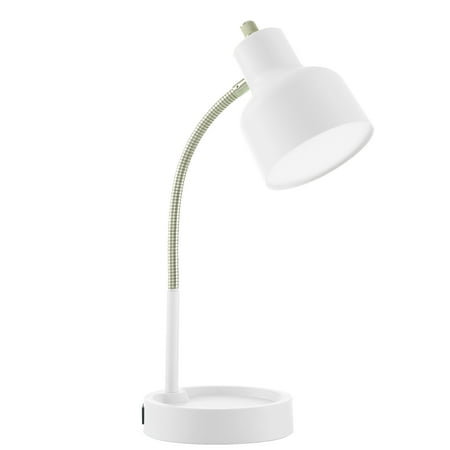
Introducing the Mainstays LED Desk Lamp with Catch-All Base and AC Outlet - The perfect lighting solution for any workspace! This lamp is designed to provide ample lighting while also serving as a convenient storage space for all your small desk items. Measuring at 14.5" H x 5.52" W at it's...
Eight bucks. Flexible gooseneck, built-in AC outlet on the base so you’re not losing a plug. No dimmer, no color temperature modes — it’s a basic lamp. But it works, it costs almost nothing, and the built-in outlet is genuinely useful. Good secondary lamp or starter pick.
Best mid-range: BCOOSS LED desk lamp — $14.99
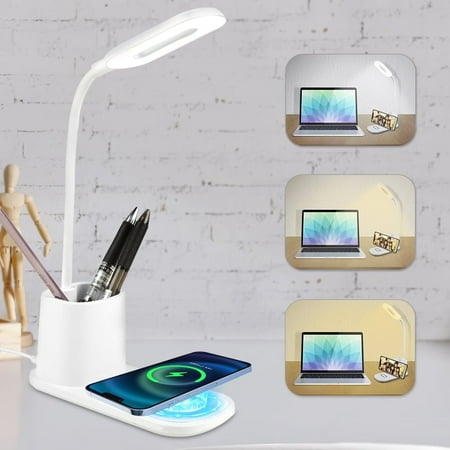
If you love a clean and tidy desk space that is clutter-free, BCOOSS LED desk lamp is here for you. It offers more than just illumination; it features a built-in pen holder for your pencils, pens, or glasses, and a convenient wireless charger that also doubles as a phone holder for your...
Wireless charging pad built into the base, pen holder, flexible gooseneck, three color temperature modes. Fifteen bucks for all of that. It doubles as a desk organizer and phone charger, which I appreciate on a setup where desk space is already contested.
Best for a wired setup: BOHASHIN LED lamp — $16.99
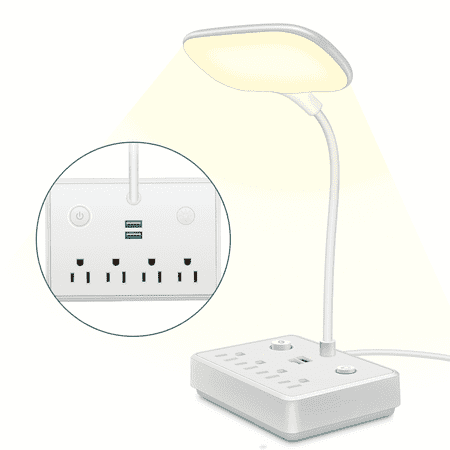
BOHASHIN LED desk lamp with 2 USB Charging Port and 4 AC Outlets, 2 Color Temperatures and 4ft Extension Cord for reading, Working, Studying Number of Outlets: 4 Number of USB ports: 2USB Shell: ABS Line length: 4ft Rated voltage: 110V Rated current: 10A Rated total power: 2000w USB output...
Two USB ports and four AC outlets built into the base. If your battlestation has a lot going on cable-wise, this thing is a charging hub that happens to have a lamp attached. Two color temperatures, dimmable, comes with a 4-foot extension cord.
Best clip-on: Lepro LED clip-on lamp — $18.99
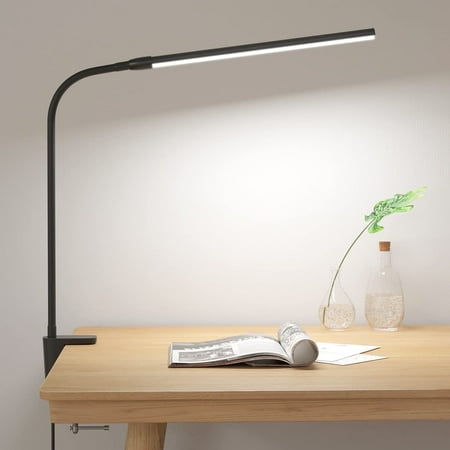
✨✨This Lepro clip desk lamp is designed with C-clamp, which can be easily fixed on desk, bedside, cabinet, nail table, workbench and so on. The clip design saves space and keeps your area tidy. With three color temperatures and 10 levels of brightness, this table lamp can meet the lighting needs...
Clamps to your desk edge or monitor arm, runs on USB, 10 brightness levels across 3 color temperatures. Zero footprint. Good option if you’re tight on desk space or just don’t want another base lamp sitting around.
Quick setup tips
- Don’t position a lamp directly behind your screen — side or slightly above the monitor angle avoids glare.
- Put bias lighting behind the monitor even if it’s just a cheap strip. It makes a real difference in a dark room.
- Match your desk lamp color temperature to the rest of the room. Mixed warm and cool light looks off.
- Layer it: task light for the desk, ambient for the room, accent RGB if you want it. One light source trying to do everything usually does none of it well.
- If you stream or take setup photos, key light placement matters. Slightly above and to one side is the universally flattering angle.
What the community says
r/AskBattlestations has been talking about this stuff for years. A few things keep coming up:
- Bias lighting gets recommended constantly — it’s usually the first thing experienced builders suggest when someone complains about eye strain.
- The best-looking setups tend to use one or two accent colors, not the full rainbow. Less is more with RGB.
- Almost nobody regrets buying a lamp with adjustable color temperature. A lot of people regret buying a fixed-color lamp.
- Govee is the consensus pick for budget RGB and smart lighting. Works reliably, app is decent, price is right.
FAQ
What color temperature is best for a computer desk lamp?
4000–4500K is the best all-around. Close to natural daylight, comfortable for long sessions, and won’t interfere with sleep if you’re at the desk in the evening. If you’re mostly working at night, go warmer — 3000–3500K is easier on the eyes after dark.
Does RGB lighting actually help with eye strain?
Not on its own. But RGB set up as bias lighting behind your monitor does help, because it reduces the contrast between your bright screen and the dark room around it. The RGB is aesthetic. The reduced contrast is functional. Both can be true.
How many lumens do I need for a desk lamp?
200–500 lumens for a lamp used alongside a monitor. More isn’t better here — too bright and you’re washing out your screen’s contrast.
Are LED strips safe behind a monitor?
Yes. USB-powered strips run cool and draw low wattage. Use indoor-rated strips, keep them away from heat sources, and the adhesive backing holds fine on the back of any monitor.
What’s the difference between RGB and RGBIC LED strips?
Standard RGB: all LEDs show the same color at once. RGBIC: individually addressable, so different segments can show different colors simultaneously. That’s what allows rainbow effects, color chasing, and music sync that actually looks good. RGBIC costs more, but it’s a noticeable difference.
The bottom line
A $15 LED strip behind your monitor and a decent desk lamp under $20 will do more for your daily setup experience than most gear upgrades at five times the price. It’s not glamorous. But it works every single time.
Start with the desk lamp and the bias light. Get those right. Then add RGB and smart lights if you want the aesthetic. That order matters.