Computer Station Nation is reader-supported.
When you buy through links on our site, we may earn an affiliate commission. Learn more.
Not every keyboard is worth your desk space. The mechanical keyboard market in 2026 has never had more options — and never had more garbage to sort through to find the good stuff. We cut through it. These are the picks worth your money, from the budget end all the way up to the boards that’ll outlast your next three PC builds.
TL;DR — Our Top Picks
- Best overall: Razer BlackWidow V3 — flagship build, great switches, widely available
- Best budget: onn Gaming Keyboard with Blue Switches — real clicky switches under $50
- Best compact: 60% RGB Mechanical Keyboard — tight footprint, under $30
Best Overall: Razer BlackWidow V3
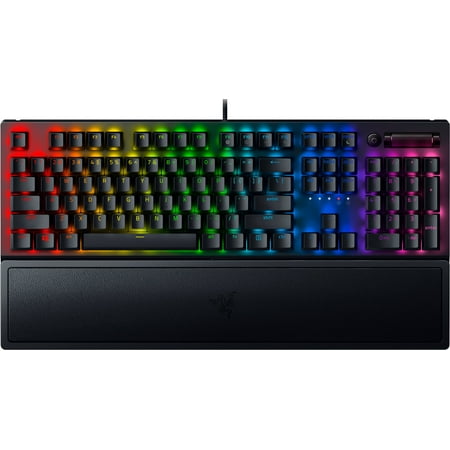
Razer BlackWidow V3 Mechanical Gaming Keyboard: Green Mechanical Switches, Tactile & Clicky, Chroma RGB Lighting, Compact Form Factor, Programmable Macro Functionality, Classic Black. The name that started it all returns to reassert its dominance. Feel the difference with the Razer BlackWidow...
The BlackWidow V3 is Razer’s full-size flagship and it earns the spot. Full aluminum construction, Razer’s proprietary Green switches (tactile plus audible click, 50g actuation), per-key RGB with Chroma integration, and N-key rollover. At $119 it’s the priciest pick on this list, but it’s also the one that’ll still feel right five years from now.
The Green switches split opinion — some people love the click, others find them loud for shared spaces. Razer also sells the V3 with Yellow (linear, silent) switches if clicky isn’t your thing. Build quality is legitimately premium. The USB passthrough port is a nice bonus for plugging in a mouse or headset.
Who it’s for
Gamers and heavy typists who want a board that can do both well and don’t mind spending for quality. If the BlackWidow V3 is out of stock or out of budget, the Razer BlackWidow V3 TKL is the same board minus the numpad at a lower price.
Who should skip it
Anyone in an open office or on calls who needs quiet switches — the Green clicks are not subtle. Also not the move if you want hot-swap capability; the V3 has soldered switches.
Best Budget: onn Gaming Keyboard with Blue Switches
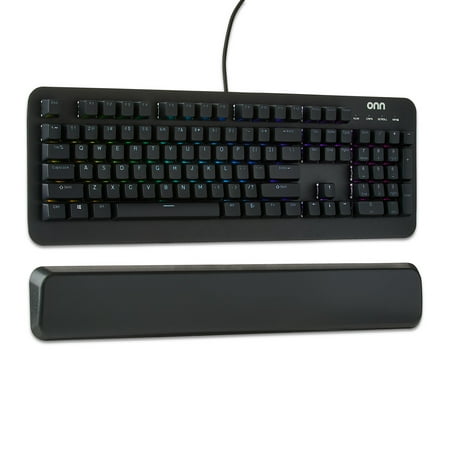
The onn Mechanical Gaming Keyboard is designed for gamers seeking precision and durability. Featuring 104 mechanical blue switches, this keyboard ensures up to 50 million keystrokes. Its adjustable RGB lighting with 16.8 million colors lets you personalize your setup. The magnetic wrist rest...
The onn keyboard shouldn’t be this good at $46. Cherry-compatible Blue switches with a proper tactile bump and audible click, full-size layout, RGB backlighting. It’s a Walmart house-brand keyboard and Walmart didn’t phone it in here.
The Blue switches are clicky — louder than browns or reds. The build is mostly plastic, which is expected at this price. No software, no macro support, no frills. But the switch feel is the thing that matters and the switch feel is legitimately good.
Who it’s for
Anyone who wants to try a real mechanical keyboard without committing $100+. Also a solid pick for a secondary desk setup or as a gift for someone getting into PC gaming.
Who should skip it
If you want software customization, per-key remapping, or quiet switches, look elsewhere. The onn is a no-frills board. That’s both its strength and its limit.
Best Compact: 60% RGB Mechanical Keyboard
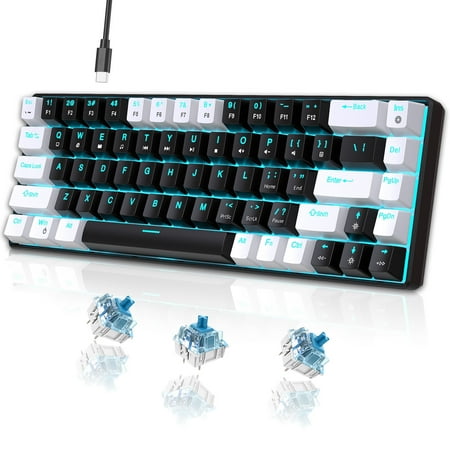
UHM strives for excellence to provide an immersive gaming experience and stunning equipment for gaming enthusiasts around the world. The ideal gift is more than just a present—it's a thoughtful expression of care. Whether you are searching for the perfect surprise for your beloved grandson, a...
If you’re tight on desk space or building a minimal setup, this 68-key compact mechanical is under $30 and hits harder than the price suggests. RGB backlight, mechanical switches, and — importantly — it keeps the arrow keys in that 68-key layout, so you’re not completely flying blind on navigation.
The 60% form factor puts your hands closer together and frees up a lot of desk space for mouse movement. The tradeoff is that some functions get moved to secondary layers, which takes adjustment time. If this is your first compact keyboard, give yourself a week before judging it.
Who it’s for
Small desk setups, minimalist battlestations, travel rigs, or anyone curious about compact keyboards without wanting to spend more than $30 to find out if they like it.
Who should skip it
Heavy spreadsheet or data entry users — you want that numpad. Writers who navigate documents constantly should also start with something bigger. 60% takes getting used to.
What to Know Before You Buy
Switch type matters more than brand
Linear switches (Red, Yellow) are smooth and fast — best for gaming. Tactile switches (Brown, Orange) have a bump that helps with typing accuracy. Clicky switches (Blue, Green) add a loud audible click. Once you pick the right switch type, the brand almost doesn’t matter. Cherry MX is the gold standard, but Gateron and Kailh make excellent alternatives that often feel just as good for less money.
Form factor affects your whole setup
Full size is great for data entry. TKL (tenkeyless, no numpad) gives your mouse hand more room — popular with FPS gamers. 75% and 65% are good for tight spaces. 60% is ultra-compact but requires a learning curve. Pick based on how your desk is laid out, not just how the keyboard looks in photos.
Hot-swap vs. soldered
Hot-swap boards let you change switches without soldering tools — pull the old one out, push the new one in. Great for experimenting. Soldered boards are locked to whatever switch they ship with. If you’re buying your first mechanical keyboard and think you might want to try different switches down the line, look for hot-swap support.
FAQ
How much should I spend on a mechanical keyboard?
You can get a genuinely good mechanical keyboard for $30 to $100. Under $30, quality control is inconsistent — you might get lucky, you might not. The $50 to $100 range is the sweet spot where build quality, switch quality, and feature set all come together. Above $100, you’re paying for hot-swap, better acoustics, wireless, or premium materials. All valid reasons to spend more, but not required for a great everyday keyboard.
Are gaming keyboards different from regular mechanical keyboards?
Mostly marketing. “Gaming” keyboards often add RGB, software suites, macro keys, and anti-ghosting features that matter for gaming. But the core typing experience comes down to the switch, and those switches are the same whether the box says “gaming” or not. A Cherry MX Red is a Cherry MX Red regardless of whether it’s in a Razer keyboard or an unbranded board.
Can I use a gaming keyboard for typing and work?
Absolutely. The “gaming” label just means it was marketed to gamers. Tactile or clicky switches (Brown or Blue) work great for typing. Linear switches (Red) can feel slightly imprecise for long typing sessions since there’s no tactile feedback, but plenty of people type on them all day with no issues.
Related Guides
- How to choose a mechanical keyboard — 4-step decision guide
- Mechanical vs membrane keyboards — honest comparison
- How to clean a mechanical keyboard — quick and deep clean methods
- Why mechanical keyboards are worth it — the case for switching