Computer Station Nation is reader-supported.
When you buy through links on our site, we may earn an affiliate commission. Learn more.
At a glance — our top pick
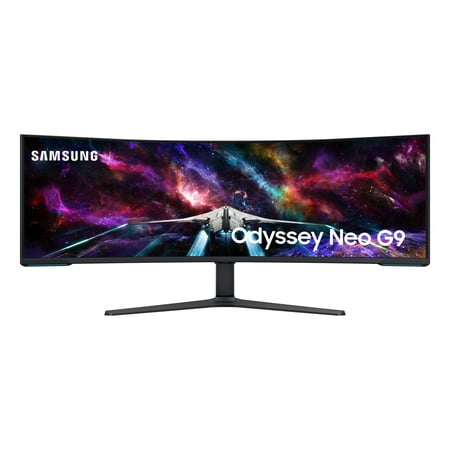
Elevate your game with the world's first Dual UHD Monitor – The Samsung 57" Class Odyssey Neo G9 Dual 4K UHD Quantum Mini-LED 240Hz 1ms HDR 1000 Curved Gaming Monitor. Features 57" screen size, 1000R curve with Quantum Matrix Technology powered by Quantum Mini LEDs for astounding levels of...
The Samsung Odyssey Neo G9 is the most jaw-dropping gaming monitor you can put on a desk. 57 inches. Dual 4K. Mini-LED backlighting with HDR 1000. 240Hz. This bad boy costs serious money, but nothing else matches it for raw spectacle. If you’ve got the GPU and the desk — you know what to do.
Introduction
Your monitor is the most underrated part of your battlestation. People drop $500 on a GPU upgrade but keep rocking the same 60Hz panel from 2015. I’ve seen it a thousand times. It’s backwards.
The monitor is what you look at for every second you’re gaming. Every frame, every color, every motion blur artifact — that’s all the monitor. Skimping on it while spending big on everything else is like buying a Ferrari and running it on regular-grade fuel.
I’ve swapped monitors multiple times building this site. Started with a cheap 24″ 1080p 60Hz panel. Moved to 1440p 144Hz. Now running a 27″ 165Hz IPS and I genuinely can’t imagine going back. The jump from 60Hz to 144Hz alone felt like my entire computer got faster.
Most gamers want a 27-inch IPS panel at 1440p and 144Hz or higher. If that fits your budget, you’re basically done. Everything below helps you fine-tune from there.
What kind of gamer are you?
Before you look at a single spec number, figure out how you actually play. Everything flows from that.
The competitive player
CS2, Valorant, Apex — games where reaction time is your edge. High refresh rate is everything here. 165Hz minimum, 240Hz ideal. Go 360Hz if you’re playing at a serious level. Smaller screen is usually better for competitive — 24-25″ keeps your FOV tight. 1080p is completely fine for this. Pushing high framerates at 1080p is way easier on your GPU than 1440p. Don’t let anyone tell you 1080p is “too low” — plenty of pros on $10,000 rigs still use 1080p monitors.
The immersive single-player gamer
RPGs, open-world games, story-driven titles. You want to be inside the world. Resolution and panel quality matter most. 1440p or 4K on a 27-32″ screen looks incredible. HDR is worth it here if you get a monitor that actually does it properly. Refresh rate still matters — 144Hz feels way smoother than 60Hz — but 240Hz isn’t the priority it is for competitive play.
The work + play hybrid
You game but also use the battlestation for work, content creation, browsing. Color accuracy matters more here. IPS panel is a must. 1440p is the right call — sharp enough for detailed work, good for gaming. 27″ is the sweet spot. This is where most people reading this fall, honestly.
The ultrawide enthusiast
You want the full cinematic experience. A 34″ or 49″ curved ultrawide wraps around your peripheral vision and changes how games feel. The immersion is real. Tradeoffs: not all games support ultrawide natively, you need GPU power to push the extra pixels, and it costs more. But for games that support it — racing sims, space games, open-world RPGs — ultrawide is something else entirely.
Panel types — what’s actually out there
The panel type determines colors, contrast, response time, and viewing angles. Here’s the rundown.
IPS (In-Plane Switching)
The most popular choice for gaming monitors right now. Wide viewing angles, accurate colors, good response times. Modern fast IPS panels hit 1ms GtG, which is totally competitive for gaming.
One knock on IPS: lower native contrast ratio (typically 1000:1) compared to VA. You’ll notice “IPS glow” — slightly brighter corners in dark rooms. Not dealbreaking, but real. This is what I use.
VA (Vertical Alignment)
VA panels have the best native contrast — typically 3000:1 to 5000:1 versus IPS’s 1000:1. Dark scenes actually look dark. Black is actually black. For horror games and cinematic titles, this matters a lot.
The tradeoff: slower pixel response time. You’ll see ghosting on fast-moving content — a smearing artifact behind moving objects. It gets more noticeable the faster the action. Response times have improved but IPS is still faster in practice. VA is great for single-player games, movies, and anything where you’re sitting directly in front of the screen.
TN (Twisted Nematic)
The old competitive gaming standard. Fastest response times, lowest cost. But the color quality is genuinely bad — washed out, narrow viewing angles. These panels are mostly obsolete now. Fast IPS costs the same and looks dramatically better. Skip unless you find one at clearance pricing.
OLED and QD-OLED
OLED is per-pixel lighting — each pixel creates its own light and can switch completely off. Infinite contrast ratio, perfect blacks, colors that pop, response times that are effectively instant. QD-OLED (Samsung and Sony’s version) adds a quantum dot layer to improve saturation and brightness. These panels are stunning.
Downsides: higher price, burn-in risk (real but manageable with modern pixel-shifting features), lower peak brightness than Mini-LED in HDR scenarios. Worth every penny for premium setups.
Mini-LED
Not a panel type — a backlighting technology. Traditional monitors have a handful of LEDs behind the screen. Mini-LED uses thousands of tiny LEDs, giving hundreds of local dimming zones. Way better HDR, higher peak brightness, deeper local blacks compared to standard edge-lit panels.
The Samsung Odyssey Neo G9 runs Mini-LED. That’s why its HDR looks so good — real brightness, not just a spec on paper.
The numbers that actually matter
Refresh rate
Higher Hz = smoother motion. This is the biggest single upgrade most people can make to their gaming experience.
- 60Hz — Works, but you’ll notice the choppiness fast once you’ve tried anything higher.
- 120-144Hz — The sweet spot. The jump from 60Hz to 144Hz is transformative. Aiming feels responsive, motion is smooth. This should be the floor for any new gaming monitor in 2026.
- 165-180Hz — Even smoother, all game types benefit. The difference vs 144Hz is real but less dramatic than the 60-to-144 jump.
- 240-300Hz — Competitive advantage in fast shooters. The TCL G64 hits 300Hz at $148, which is kind of insane for the price.
- 360Hz+ — Pro esports territory. Diminishing returns for most people.
Response time (GtG vs MPRT)
One of the most abused specs in monitor marketing. GtG (Gray to Gray) is how fast a pixel transitions between shades — this is the real number. Under 4ms GtG is fine for gaming. 1ms GtG is great for competitive play.
MPRT (Moving Picture Response Time) uses backlight strobing to hit a low number on spec sheets. The tradeoff is brightness reduction and potential flicker. Brands love advertising MPRT to make budget panels look faster than they are. Check GtG, not MPRT. Anything under 5ms GtG on a quality IPS panel works well.
Resolution
- 1080p — Perfect for 24-25″ monitors. Starts looking soft at 27″+. Easy to push high framerates.
- 1440p — The sweet spot for 27″ gaming. Sharp, not GPU-crushing. Where I’d put most people’s money.
- 4K — Excellent for 27-32″ screens. Needs serious GPU (RTX 4070 minimum for comfortable framerates).
- Ultrawide variants — 3440×1440 for 34″ panels, 5120×1440 for 49″ (DQHD). Both demand GPU power.
Screen size
- 24-25″ — Competitive standard. Tight FOV, everything in your immediate sightline.
- 27″ — Sweet spot for 90% of gamers. Great immersion, manageable from normal desk distance.
- 32″ — Immersive single-player gaming, needs more desk real estate.
- 34-49″ ultrawide — The full battlestation experience. Massive FOV, needs proper desk depth to sit far enough back.
Sync tech
Screen tearing — that horizontal split artifact when your GPU and monitor get out of sync — is annoying once you notice it. Sync tech matches refresh rate to GPU output in real time.
G-Sync is NVIDIA’s solution. Hardware module, consistent performance. More expensive. Worth it if you’re committed to the NVIDIA ecosystem.
FreeSync is AMD’s open standard. Works natively on AMD, and most modern FreeSync monitors are NVIDIA-certified as “G-Sync Compatible” too. For most people, G-Sync Compatible FreeSync is plenty good and you skip the premium.
If you’re on console (PS5 or Xbox Series X), make sure the monitor has HDMI 2.1 VRR. That’s what makes variable refresh rate work on current-gen consoles and the difference is noticeable.
HDR — when it’s worth caring about
- HDR400 — A marketing label. Minimal difference from SDR. Ignore it.
- HDR600 — Noticeable improvement with real HDR content. You’ll start seeing the benefit.
- HDR1000 — Real HDR. Bright highlights pop against dark backgrounds. The Neo G9 gets here with Mini-LED.
- OLED HDR — Perfect blacks plus high brightness. The gold standard for HDR quality.
If you’re on a budget, don’t chase HDR. A good SDR IPS panel beats mediocre HDR every time. Plan to spend $400+ if you want HDR that genuinely impresses you.
Curved vs flat
Curved is more immersive — the screen wraps toward your peripheral vision. The effect is most noticeable on 34″+ ultrawides. On a standard 27″ panel it’s subtle but pleasant. Flat is better if you share the screen with someone or frequently sit off-angle. Curve ratings: 1000R is aggressive (good for ultrawide), 1500R is moderate, 1800R is mild.
Our picks
Best overall — the one to get if money isn’t the constraint
Elevate your game with the world's first Dual UHD Monitor – The Samsung 57" Class Odyssey Neo G9 Dual 4K UHD Quantum Mini-LED 240Hz 1ms HDR 1000 Curved Gaming Monitor. Features 57" screen size, 1000R curve with Quantum Matrix Technology powered by Quantum Mini LEDs for astounding levels of...
The 57-inch Samsung Odyssey Neo G9 is in its own category. Dual 4K (7680×2160) across a massive curved panel, Mini-LED backlighting, 240Hz, HDR 1000. The local dimming zones make highlights pop against dark backgrounds in ways standard monitors can’t do. You need a serious GPU, a big desk, and a serious wallet. If you have all three, nothing comes close for a battlestation centerpiece.
Best value under $100
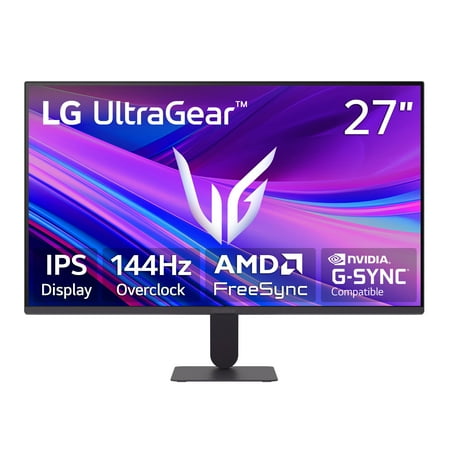
Upgrade your setup with this 27-inch Full HD IPS monitor made for work and play. See bright colors, wide angles, and a borderless screen for easy multi-monitor use. Enjoy smooth gaming with 144Hz, 1ms response, and AMD FreeSync and G-Sync Compatibility. Black Stabilizer and Dynamic Action Sync...
The LG 27″ UltraGear at $89 is genuinely absurd value. FreeSync Premium, G-Sync Compatible, 144Hz, 1ms response time. It’s 1080p at 27″ — not the sharpest — but the 144Hz smoothness changes how games feel and that matters more. The ideal first gaming monitor upgrade.
Best for competitive play
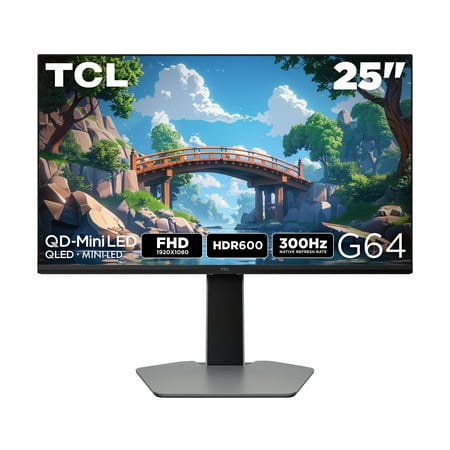
The TCL 25G64 QD-Mini LED Gaming Monitor is ideal for next level gaming with TCL’s Halo Control System that includes the Powerful Light-emitting Microchip, Condensed Micro Lens, Micro OD Reduced Optical Distance, High Contrast HVA Panel, QLED, and Dynamic Light Algorithm for Stunning “Halo-Free”...
The TCL 25″ G64 hits 300Hz at $148. That number shouldn’t exist at this price. QD-Mini LED backlighting, AMD FreeSync, 25″ competitive size. If CS2 or Valorant is your main thing, this is where the monitor budget goes.
Best ultrawide for the money
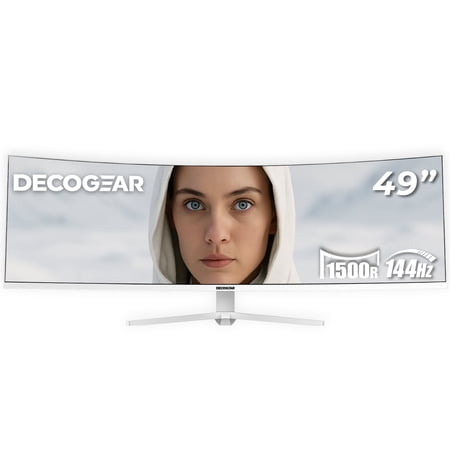
Experience the Deco Gear DGLUMIERE49 49” White Curved Ultrawide Monitor. A sleek, value-packed display that delivers the immersion of two monitors in one seamless screen. With a 144 Hz refresh rate, Adaptive-Sync, and a GPU-friendly WDFHD resolution, it’s built for smooth gaming, effortless...
49″ white curved ultrawide with HDMI 2.1 and DisplayPort 1.4 at $639. The white colorway looks clean on a modern battlestation. 3840×1080 isn’t as sharp as a premium DQHD panel but the immersive experience is real. An accessible entry into ultrawide without paying $1000+.
Best budget Samsung
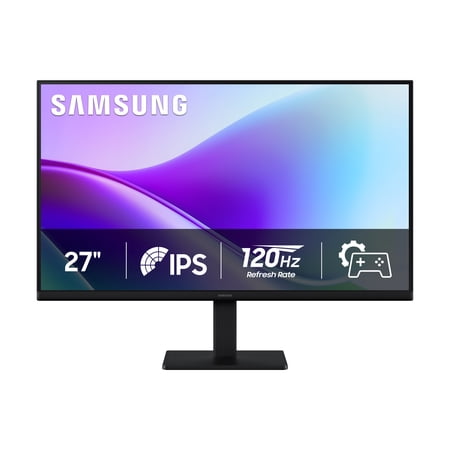
Samsung's 27" S3 Monitor with FHD Resolution consistently delivers stunning colors across the entire display with the IPS panel. The 120Hz refresh rate reduces lag and motion blur when playing fast-paced games, watching videos, or working on creative projects. Game Picture Mode shifts any game...
Samsung quality without the flagship price. 27″ IPS, 120Hz, FHD. Good factory calibration, solid build. Great secondary monitor or starter display for a new battlestation build.
Entry gaming at $99
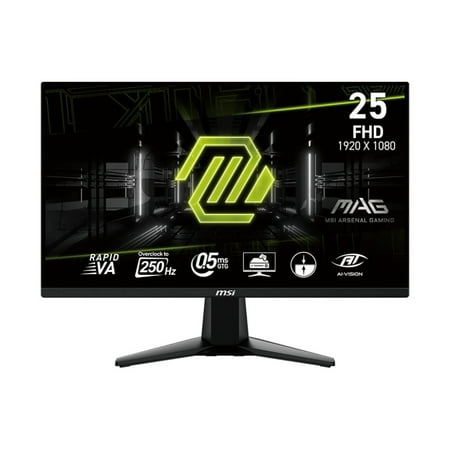
Visualize your victory with the MSI MAG 255XFV gaming monitor. Equipped with a 1920x1080, 250Hz(OC) Refresh rate, 0.5ms (GtG, Min.) response time Rapid VA panel, MAG 255XFV will give you the competitive edge you need to take down your opponents. Built with Adaptive-sync technology, the MAG...
MSI’s MAG line at $99. Solid build, gaming aesthetics, name-brand reliability at a budget price. Good call if you want MSI without spending more than $100.
Setup tips
Get a monitor arm. Seriously. Frees up desk space, lets you position the screen exactly right for your ergonomics, and makes cable management way cleaner. It’s one of those upgrades that changes how the whole battlestation feels.
The top of your monitor should sit roughly at eye level. Too high strains your neck. Too low and you’re hunching. For 24-27″ panels, 50-70cm viewing distance is the range you want.
Use DisplayPort 1.4 on PC for 1440p+ at high refresh rates. HDMI 2.1 for consoles. Don’t cheap out on cables — bad DisplayPort cables cause flickering at high resolutions and it’s maddening to diagnose.
Enable G-Sync or FreeSync in your GPU control panel. Cap your framerate just below your monitor’s max (141fps on a 144Hz panel) for optimal sync performance. Turn off in-game vsync when using either sync tech.
What actual gamers are saying
“I thought 144Hz was marketing hype until I tried it at a friend’s place. Went home, ordered one the same day.” — r/buildapc
“The jump from 1080p to 1440p at 27″ is more impressive than I expected. Individual pixels basically disappear. Games look like a different generation.” — r/Monitors
“Curved ultrawide for single-player games is a religion. Once you play Elden Ring on a 34″ ultrawide, flat monitors feel like you’re watching through a letterbox.” — r/ultrawidemasterrace
“Upgraded my GPU and kept the 60Hz monitor for three months. Biggest mistake. The monitor upgrade changed my experience more than the GPU did.” — r/pcgaming
User poll
What’s driving your next monitor upgrade?
[poll id=”monitors-upgrade-2026″]
Quick comparison
| Monitor | Size | Resolution | Refresh rate | Panel | Best for | Price |
|---|---|---|---|---|---|---|
| Samsung Odyssey Neo G9 | 57″ | Dual 4K | 240Hz | Mini-LED | Flagship | $1,599 |
| LG UltraGear 27G411A | 27″ | 1080p | 144Hz | IPS | Best value | $89 |
| TCL 25″ G64 | 25″ | 1080p | 300Hz | QD-Mini LED | Competitive | $148 |
| Deco Gear 49″ Ultrawide | 49″ | 3840×1080 | 144Hz | Curved VA | Ultrawide | $639 |
| Samsung S3 S32GF | 27″ | 1080p | 120Hz | IPS | Budget Samsung | $109 |
| MSI MAG 255XFV | 25″ | 1080p | Gaming LED | LED | Entry gaming | $99 |
Which one is right for you?
Get the Neo G9 if you want the absolute best and your GPU and wallet can back it up. The price is real. So is the experience.
Get the LG UltraGear if you’re upgrading from 60Hz and want to feel the difference without spending much. This $89 monitor will genuinely change how games feel.
Get the TCL G64 if competitive shooters are your main game. 300Hz for $148 is remarkable in 2026.
Get the Deco Gear Ultrawide if you want the full ultrawide battlestation experience without paying $1000+.
Wait on the upgrade if your GPU can’t reliably hit 60fps. Fix that bottleneck first, then come back for the monitor.
Where to buy
Elevate your game with the world's first Dual UHD Monitor – The Samsung 57" Class Odyssey Neo G9 Dual 4K UHD Quantum Mini-LED 240Hz 1ms HDR 1000 Curved Gaming Monitor. Features 57" screen size, 1000R curve with Quantum Matrix Technology powered by Quantum Mini LEDs for astounding levels of...
Upgrade your setup with this 27-inch Full HD IPS monitor made for work and play. See bright colors, wide angles, and a borderless screen for easy multi-monitor use. Enjoy smooth gaming with 144Hz, 1ms response, and AMD FreeSync and G-Sync Compatibility. Black Stabilizer and Dynamic Action Sync...
The TCL 25G64 QD-Mini LED Gaming Monitor is ideal for next level gaming with TCL’s Halo Control System that includes the Powerful Light-emitting Microchip, Condensed Micro Lens, Micro OD Reduced Optical Distance, High Contrast HVA Panel, QLED, and Dynamic Light Algorithm for Stunning “Halo-Free”...
Experience the Deco Gear DGLUMIERE49 49” White Curved Ultrawide Monitor. A sleek, value-packed display that delivers the immersion of two monitors in one seamless screen. With a 144 Hz refresh rate, Adaptive-Sync, and a GPU-friendly WDFHD resolution, it’s built for smooth gaming, effortless...
Samsung's 27" S3 Monitor with FHD Resolution consistently delivers stunning colors across the entire display with the IPS panel. The 120Hz refresh rate reduces lag and motion blur when playing fast-paced games, watching videos, or working on creative projects. Game Picture Mode shifts any game...
Visualize your victory with the MSI MAG 255XFV gaming monitor. Equipped with a 1920x1080, 250Hz(OC) Refresh rate, 0.5ms (GtG, Min.) response time Rapid VA panel, MAG 255XFV will give you the competitive edge you need to take down your opponents. Built with Adaptive-sync technology, the MAG...
Frequently asked questions
What refresh rate do I actually need for gaming?
144Hz is where I’d start. Competitive shooters benefit from 165Hz+. The jump from 60Hz to 144Hz is dramatic and very real. Going from 144Hz to 240Hz is more subtle but still noticeable in fast games. 360Hz+ is pro competitive territory.
Is 1080p still worth it in 2026?
Yes, for competitive gaming and budget builds. At 24-25″ it looks sharp. At 27″+ the limits show more. For pushing high framerates in esports titles, 1080p is still the standard — it’s way easier on your GPU than 1440p.
Do I need HDR?
Only if the monitor actually does it right. HDR400 is a marketing label — the visual difference is minimal. HDR600+ with real local dimming looks great. On a tight budget, skip HDR and spend on better core specs instead.
IPS or VA for gaming?
IPS for most people. Better colors, wide viewing angles, fast enough response times. VA has better native contrast for dark scenes but slower pixel transitions can cause ghosting in fast motion. If you mainly play atmospheric single-player games, VA’s contrast is genuinely nice. Otherwise, IPS.
How much desk space does an ultrawide need?
A 34″ ultrawide needs roughly 32-33″ of horizontal desk space. A 49″ needs a full-width desk (60″+). Measure first. Also think about depth — a 49″ panel works better if you can sit farther back.
Is 4K gaming worth it?
If you have an RTX 4070 or better, yes. 4K at 27-32″ looks incredible. If your GPU can’t hold 60fps at 4K in modern games, run 1440p instead. 1440p at 120fps is a better experience than 4K at 40fps every time.