Computer Station Nation is reader-supported.
When you buy through links on our site, we may earn an affiliate commission. Learn more.
Your battlestation deserves a router that keeps up. A regular router treats all your network traffic equally — Netflix, downloads, your game. A gaming router says “nope, the game goes first.” That difference shows up as lower ping, less jitter, and fewer mid-match lag spikes.
After evaluating gaming routers across price tiers based on QoS performance, latency, gaming-specific features, and value, here are the best gaming routers for your battlestation right now.
Quick Picks
- Best overall gaming router: ASUS ROG Rapture GT-AX11000 Pro — Wi-Fi 6 tri-band, dedicated gaming port, full QoS suite
- Best Wi-Fi 7 gaming router: NETGEAR Nighthawk BE3100 — Wi-Fi 7 for $109, serious upgrade path
- Best budget gaming: TP-Link Archer AX1500 — Wi-Fi 6 at $54, solid baseline
- Most affordable gaming-labeled: HYPEREV Gaming Router — $40, lag reduction hardware built in
At-a-Glance
| Router | Best For | Wi-Fi Gen | Price | Rating |
|---|---|---|---|---|
| ASUS ROG Rapture GT-AX11000 Pro | Serious competitive gamers | Wi-Fi 6 Tri-Band | $219.99 | ★★★★★ |
| NETGEAR Nighthawk BE3100 | Wi-Fi 7 future-proofing | Wi-Fi 7 | $109 | ★★★★★ |
| TP-Link Archer AX1500 | Budget gaming baseline | Wi-Fi 6 | $54 | ★★★★☆ |
| HYPEREV Gaming Router | Plug-and-play lag reduction | Wi-Fi 6 | $39.99 | ★★★☆☆ |
#1. ASUS ROG Rapture GT-AX11000 Pro — Best Overall Gaming Router
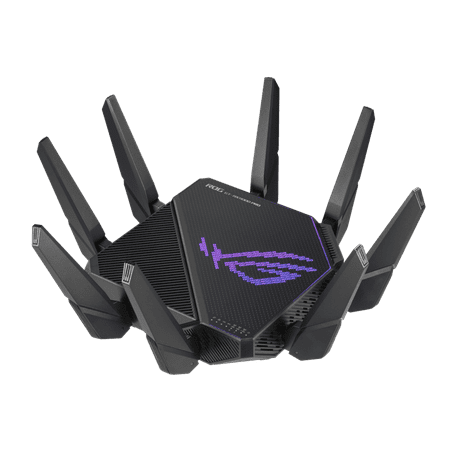
ASUS ROG Rapture GT-AX11000 Pro Tri-Band WiFi 6 gaming router, 10G port, Quad-core 2.0 GHz CPU, ASUS RangeBoost Plus, UNII4, Triple-level game acceleration, Lifetime internet security, AiMesh support
This is the gaming router. The ROG Rapture GT-AX11000 Pro is a Wi-Fi 6 tri-band beast — 2.4 GHz, 5 GHz, and a dedicated 5 GHz gaming band. That third band is key: it’s dedicated exclusively to your gaming devices while the other two handle everything else on your network.
The ROG gaming dashboard gives you full QoS control. You can manually assign priority to specific devices, enable the Game Accelerator to find faster paths to game servers, and monitor real-time network stats. Combined AIMESH support means you can expand to multiple ROG nodes for whole-home coverage without losing the gaming features.
At $219.99 it’s a real investment. But for competitive gamers who want to eliminate every variable on the network side, this is the pick.
| Spec | Detail |
|---|---|
| Standard | Wi-Fi 6 (AX11000) |
| Bands | Tri-band (2.4 + 5 + 5 GHz) |
| Gaming Band | Dedicated 5 GHz gaming band |
| QoS | Full game traffic prioritization |
| Price | ~$219.99 |
Pros: Dedicated gaming band, full ROG software suite, tri-band AX11000, AiMesh support, serious QoS controls
Cons: Expensive, large footprint, overkill for casual gamers
Rating: 5/5 — Best gaming router at a price that makes sense for serious players. This is the one.
#2. NETGEAR Nighthawk BE3100 — Best Wi-Fi 7 Gaming Router
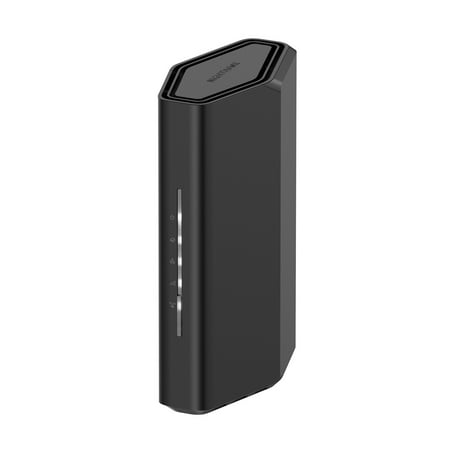
Leverage the power of WiFi 7 for speeds up to 3.1 Gbps at 1.2X faster than WiFi 6. The Nighthawk RS70 WiFi 7 Dual-band Router provides up to 2,000 sq. ft. WiFi coverage and capacity for up to 50 devices. Experience stunning streaming, video conferencing and reliably connect smart home devices....
Wi-Fi 7 at $109. The NETGEAR Nighthawk BE3100 is a dual-band Wi-Fi 7 router that brings Multi-Link Operation into the gaming space at an actually reasonable price. MLO is the big deal — it lets your devices use both bands simultaneously, which directly reduces latency and improves connection stability.
It’s not a gaming-branded router with a dashboard and LED strips, but the underlying Wi-Fi 7 hardware delivers genuine performance gains for gaming on supported devices. As more devices ship with Wi-Fi 7 adapters, this router grows into its hardware.
| Spec | Detail |
|---|---|
| Standard | Wi-Fi 7 (BE3100) |
| Key Feature | Multi-Link Operation (MLO) |
| Bands | Dual-band |
| Price | ~$109 |
Pros: Wi-Fi 7 MLO at a budget Wi-Fi 7 price point, NETGEAR reliability, future-proof
Cons: No dedicated gaming features/dashboard, dual-band only
Rating: 5/5 — Best bang for the buck if you want Wi-Fi 7 performance for gaming without the premium gaming branding tax.
#3. TP-Link Archer AX1500 — Best Budget Gaming Option
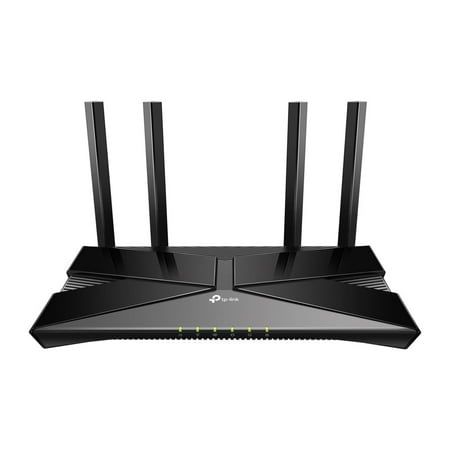
The Archer AX1500 is equipped with the latest Wi-Fi 6 for faster speeds, increased capacity and reduced network congestion. Dual-Band speeds of up to 1.5 Gbps for a buffer-free 4K/HD streaming and gaming experience. Connect more devices via OFDMA and MU-MIMO technology while eliminating network...
Not marketed as a gaming router, but the AX1500 delivers Wi-Fi 6 with OFDMA at $54. For a gamer who just wants stable Wi-Fi 6 without spending $100+, this does the job. No gaming dashboard, no QoS controls beyond basics, but solid wireless performance for the price.
Rating: 4/5 — The honest budget choice. Not a gaming router. But a solid Wi-Fi 6 router that handles gaming traffic fine.
#4. HYPEREV Gaming Router — Most Affordable Gaming-Specific Option
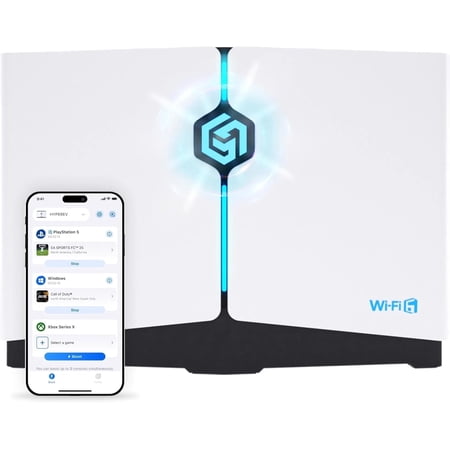
Power up your gaming and home wi fi with the hyperev gaming router. Engineered for players and power users, hyperev combines wi fi 6 speed Up to 3 gbps With latency-lowering traffic management so you can download faster, cut ping, and play without lag. Whether you'Re on ps5, xbox series x,s,...
The HYPEREV is an interesting option at $39.99. It’s specifically designed to reduce lag for PS/Xbox/PC with dedicated lag-reduction hardware. Wi-Fi 6 connectivity and plug-and-play setup. The approach is different from traditional gaming routers — it prioritizes gaming packets at the hardware level rather than through a software dashboard.
Rating: 3/5 — Worth considering as an entry-level gaming-specific device. Don’t expect full QoS controls, but it’s cheaper than any other gaming-labeled option.
What Makes a Gaming Router Different?
Three things matter for gaming-specific router performance:
- QoS (Quality of Service) — Prioritizes gaming packets over other network traffic. When someone starts streaming 4K during your match, QoS keeps your game packets moving first.
- Game Accelerators — Find the lowest-latency path to specific game servers. Not all routers have this. ROG’s implementation is one of the better ones.
- Dedicated gaming bands — Tri-band routers with a reserved gaming band keep your gaming device on its own lane. Big deal on crowded networks.
Honestly: if you game solo or your household isn’t hitting your router hard, a good Wi-Fi 6 router with basic QoS is plenty. The gaming router tax is worth paying when you’re on a congested network with multiple heavy users.
Verdict
Serious competitive gamers: ASUS ROG Rapture GT-AX11000 Pro. Tri-band, dedicated gaming band, full software suite. Spend the $220 and be done with it.
Future-focused gamers: NETGEAR Nighthawk BE3100. Wi-Fi 7 at $109 is a deal. As Wi-Fi 7 client devices become standard, this router gets better over time.
Budget gamers: TP-Link AX1500. Wi-Fi 6, $54, does the job without the premium price tag.
FAQ
Is a gaming router actually worth it?
Depends on your situation. If you live alone and only game, a regular Wi-Fi 6 router is fine. If you share a connection with multiple people doing heavy downloads or streaming while you game, a gaming router’s QoS controls make a real difference. The dedicated gaming band on tri-band routers is the most impactful feature.
What ping improvement can I expect from a gaming router?
On an uncongested connection, maybe none — your ISP’s routing to game servers matters more. On a congested home network with multiple users, a good QoS gaming router can drop your ping by 10-30ms during peak usage. The bigger improvement is consistency — less jitter and fewer spikes.
Do gaming routers work with all gaming platforms?
Yes. Gaming routers work with PC, PlayStation, Xbox, Nintendo Switch, or any other device on your network. Some routers (like ROG) have specific console QoS presets, but the underlying traffic prioritization works across all platforms.