Computer Station Nation is reader-supported.
When you buy through links on our site, we may earn an affiliate commission. Learn more.
Small business printing is different from home printing in one important way: volume. You’re printing more, more often, and the cost per page actually matters. A printer that’s fine for occasional home use becomes an ink money pit at 200 pages a month.
These three printers cover the realistic options for small businesses and home offices with real printing needs: a dedicated mono laser, a capable color inkjet AIO, and a budget inkjet for lower-volume operations.
Quick Verdict
- High-volume text printing: Brother HL-L2420DW — mono laser built for volume, low per-page cost
- Mixed color + documents: Epson WorkForce WF-2950 — ADF, auto duplex, fax under $70
- Light-use / budget: Canon PIXMA TS3722 — under $55 for occasional printing needs
The Printers
Brother HL-L2420DW — Best for High-Volume Text
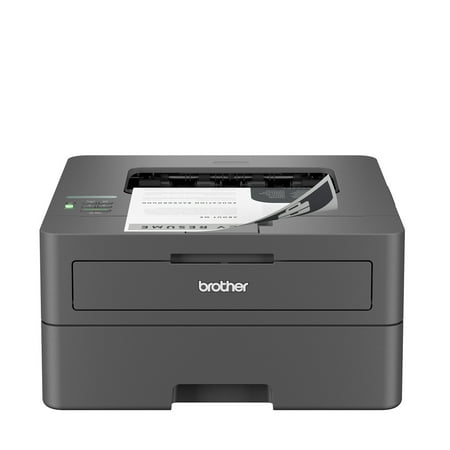
The Brother HL-L2420DW is designed for efficiency, reliability, and quality. This compact wireless laser printer delivers crisp black and white prints at speeds of up to 30 pages per minute*, with automatic two-sided printing to help save time and reduce paper waste. Its space-saving design fits...
The Brother HL-L2420DW is a wireless mono laser printer built for the kind of volume that kills inkjets. It prints text-only documents at up to 36 ppm, auto duplexes, and holds 250 sheets in the paper tray — nearly double what most inkjet AIOs offer. Toner cartridge yield is 1,200 pages standard, with high-yield cartridges available at 3,000 pages. At ~3 cents per page, the math is favorable at any significant print volume.
What it doesn’t do: color, scanning, or copying. It’s a print-only mono laser. If your business output is invoices, reports, contracts, and internal documents, that’s not a problem. If you need to scan or copy, you need a different printer or a separate scanner.
At $125 upfront, it costs roughly twice the Epson WF-2950. At 200 pages/month, the lower per-page cost makes that back in about a year. At 300+ pages/month, it pays for itself faster.
| Spec | Value |
|---|---|
| Price | $124.99 |
| Type | Mono laser (print only) |
| Print speed | 36 ppm |
| Auto duplex | Yes |
| Paper capacity | 250 sheets |
| Cost per page | ~3 cents (standard toner) |
| Connectivity | Wi-Fi, USB, AirPrint, Mopria |
| Scanner | No |
| Color | No |
Best for: anyone printing 150+ pages/month of text documents. The volume economics clearly favor laser at that level.
Epson WorkForce WF-2950 — Best for Mixed Use
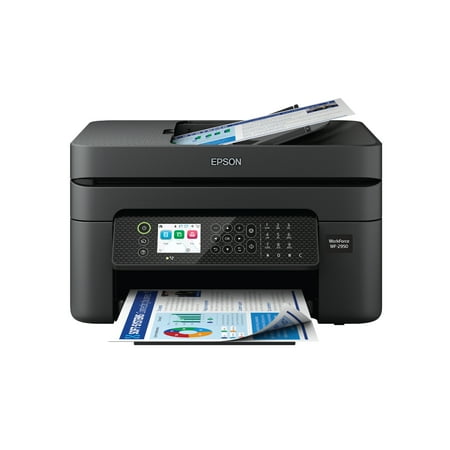
Epson WorkForce WF-2950 Wireless All-in-One Printer with Scan, Copy, Fax, Auto Document Feeder, Automatic 2-Sided Printing and 2.4" Color Display The easy-to-use, pro-quality home office printer—with convenient features. Business printing should be simple. That’s why we developed the WorkForce...
The Epson WorkForce WF-2950 is the most complete printer on this list for under $70. Auto duplex, ADF (Automatic Document Feeder) for multi-page scanning, scanner, copier, and fax — the full small office AIO package at a price that requires no justification.
The ADF is the feature that separates this from everything else at this price. Stack a 10-page contract, press scan, walk away. For anyone whose workflow includes regularly scanning multi-page documents, this is worth the price of entry by itself.
The trade-off vs. the Brother: color inkjet at moderate volume costs more per page over time, and actual print speeds are slower than the rated 10 ppm. For businesses printing 50-150 pages/month with mixed color and black-and-white needs, it’s the right balance. For 200+ pages/month text-only, the Brother wins on economics.
| Spec | Value |
|---|---|
| Price | $69 |
| Type | Color inkjet AIO |
| Print speed | 10 ppm mono / 5 ppm color (rated) |
| Auto duplex | Yes |
| ADF | Yes (30-page capacity) |
| Paper capacity | 150 sheets |
| Cost per page | ~6-8 cents color / ~3 cents mono |
| Connectivity | Wi-Fi, USB, AirPrint, Mopria |
| Scanner | Yes (flatbed + ADF) |
| Fax | Yes |
Best for: home offices and small businesses with mixed printing needs (color + mono + scanning). The ADF and auto duplex are the features that earn this recommendation.
Canon PIXMA TS3722 — Best Budget Option
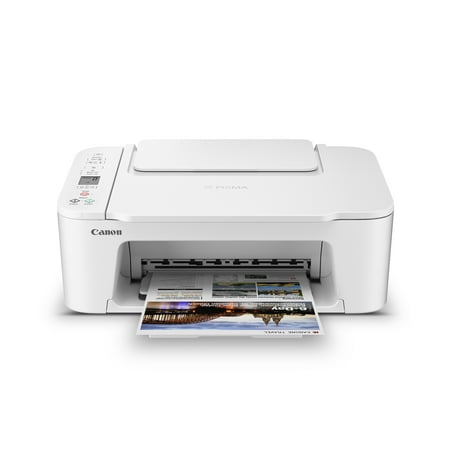
Designed for home use, the Canon PIXMA TS3722 All-in-One inkjet printer delivers high-quality printing and outstanding wireless connectivity in a compact size. The PIXMA TS3722 is easy to set up and maintain and offers great media versatility to print on a variety of media types and sizes,...
At $53, the Canon PIXMA TS3722 is a legitimate option for a small business or freelancer with genuinely light printing needs. Wireless, AIO, over 24,000 reviews at 4 stars. It prints, scans, and copies without issue.
The limitation for business use: no auto duplex, 60-sheet paper capacity, and standard inkjet cartridge costs that add up at any significant volume. This is the right printer if printing is occasional (fewer than 50 pages/month) and budget is a real constraint. It’s not the right printer for anything resembling regular business output.
| Spec | Value |
|---|---|
| Price | $53 |
| Type | Color inkjet AIO |
| Auto duplex | No |
| ADF | No |
| Paper capacity | 60 sheets |
| Cost per page | ~10-12 cents color |
| Connectivity | Wi-Fi, USB, AirPrint, Mopria |
Best for: solo operators and freelancers with minimal printing needs. Step up to the WF-2950 if you print more than occasionally.
Head-to-Head Comparison
| Brother HL-L2420DW | Epson WF-2950 | Canon TS3722 | |
|---|---|---|---|
| Price | $124.99 | $69 | $53 |
| Technology | Mono laser | Color inkjet | Color inkjet |
| Color printing | No | Yes | Yes |
| Scanner | No | Yes (flatbed + ADF) | Yes (flatbed) |
| Auto duplex | Yes | Yes | No |
| ADF | No | Yes | No |
| Paper capacity | 250 sheets | 150 sheets | 60 sheets |
| Print speed | 36 ppm | 10 ppm | 7.7 ppm |
| Cost/page (mono) | ~3¢ | ~3-4¢ | ~9-11¢ |
| Fax | No | Yes | No |
| Best for | High-volume text | Mixed office use | Light occasional use |
Which One Should You Get?
Print mostly documents, 150+ pages/month, color rarely matters: Brother HL-L2420DW. The volume economics are straightforward and it’ll outlast the inkjets at heavy use.
Need to print, scan, copy, and fax with occasional color needs, 50-150 pages/month: Epson WorkForce WF-2950. The ADF and auto duplex make it the most capable small-office tool at the price.
Occasional printing only, budget matters, under 50 pages/month: Canon PIXMA TS3722. Don’t overspend on a printer for genuinely light use.
For more context on calculating total cost of ownership and choosing the right technology for your print volume, check the full printer buying guide.
FAQ
Is a laser printer better than inkjet for small business use?
For high-volume text printing, yes. Laser toner costs less per page than inkjet cartridges at volume, laser printers are faster, and laser output doesn’t smear if it gets wet. The trade-off: lasers print worse photos and color graphics, and mono lasers don’t scan. For mixed-use small offices, a color inkjet AIO with an ADF is often the better practical choice.
What does “ADF” mean and why does it matter for business?
ADF stands for Automatic Document Feeder. It’s the tray on top of the scanner where you stack pages for automatic multi-page scanning. Without an ADF, you lift the scanner lid and reposition each page manually. For a business that scans contracts, invoices, or reports regularly, this is a major workflow difference.
How much does ink cost for small business inkjet printers?
At typical business use, inkjet cartridge costs add $60-$150/year depending on volume and color usage. For comparison, a Brother laser printer’s toner costs about $20-$35 for 1,200-3,000 pages. At 200 pages/month, a laser pays for its higher upfront cost in ink savings within 12-18 months.
Can the Brother HL-L2420DW scan documents?
No. It’s a print-only mono laser. If you need scanning, you need either the Epson WF-2950 or a separate flatbed scanner alongside the Brother. Some small offices run both — the Brother for high-volume document printing, a separate scanner for document capture.