Computer Station Nation is reader-supported.
When you buy through links on our site, we may earn an affiliate commission. Learn more.
Two of the biggest names in gaming peripherals, two very different philosophies for webcam design. Logitech keeps it clean and reliable; Razer goes bold with features. Which one actually wins for streaming? Let’s break it down.
Quick Verdict
For most streamers: Razer Kiyo at ~$102 wins on price-to-features. For studio-quality streaming where reliability matters most: Logitech StreamCam at ~$119. If money is no concern: Razer Kiyo Pro Ultra at ~$430 is in a different league entirely.
The Contenders
| Model | Resolution | Key Feature | Price |
|---|---|---|---|
| Razer Kiyo Pro Ultra | 4K/30fps | Large Sony sensor, AI tracking | ~$430 |
| Logitech StreamCam | 1080p/60fps | USB-C, portrait mode | ~$119–$201 |
| Razer Kiyo | 1080p/30fps | Built-in ring light | ~$102 |
Head-to-Head: Razer Kiyo vs Logitech StreamCam
These are the two most direct competitors in the $100–$120 range for streaming.
Razer Kiyo — Built-in Ring Light Webcam
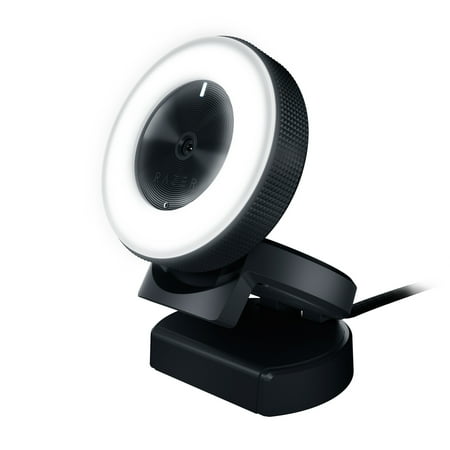
MOUNT UP, LIGHT UP, WHAT’S UP - With the Razer Kiyo, your fans or friends are always just one click away. With studio-like lighting and full HD capability, it’s great for streaming and video calls, so you can stay connected with the people in your life. Forget setting up several lights just to...
The Kiyo’s signature feature is its built-in adjustable ring light — a genuine differentiator for streamers without a separate lighting setup. 1080p/30fps, full autofocus, and that ring light make it a compelling all-in-one package for beginners and intermediate streamers who don’t want to deal with separate lighting. It plugs into your setup and handles the lighting problem automatically.
| Resolution | 1080p / 30fps |
| Signature Feature | Built-in adjustable ring light |
| Autofocus | Yes |
| Connection | USB-A |
| Price | ~$102 |
- ✅ Built-in ring light — no separate lighting needed
- ✅ Autofocus
- ✅ Razer Synapse software integration
- ❌ 30fps only
- ❌ Fixed 1080p — no 4K
Logitech StreamCam — Clean 1080p/60fps
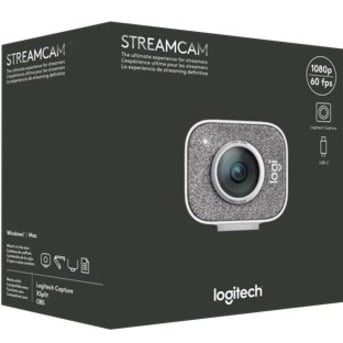
BRING YOUR STORY INTO FOCUS Logitech StreamCam streams and records in full HD 1080p resolution at 60 fps, delivering stunning video content with smooth motion to every aspect of your online world. From recording YouTube videos to streaming on Twitch and beyond, StreamCam's premium glass lens and...
The StreamCam drops the ring light but adds 60fps — a meaningful upgrade for the smoothness of your stream. USB-C connection is modern and the portrait mode (vertical 9:16 orientation) is genuinely useful for TikTok or Instagram live content. Logitech’s driver reliability means it just works, stream after stream, without hiccups.
| Resolution | 1080p / 60fps |
| Signature Feature | 60fps, portrait mode, USB-C |
| Autofocus | Yes |
| Connection | USB-C |
| Price | ~$119 |
- ✅ 60fps — noticeably smoother than 30fps
- ✅ Portrait mode for vertical content
- ✅ USB-C connection
- ✅ Logitech driver reliability
- ❌ No ring light — need separate lighting
- ❌ 1080p cap
The Premium Option: Razer Kiyo Pro Ultra
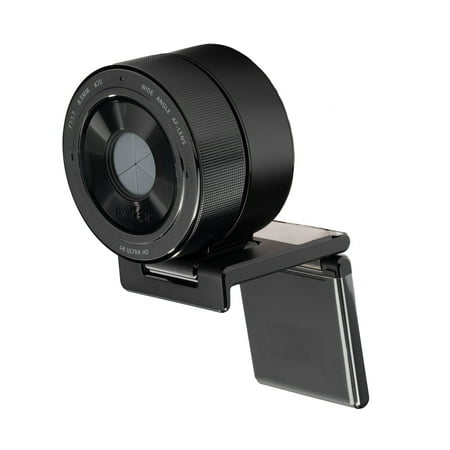
Take your content to the next level with the Razer Kiyo Pro Ultra, featuring the largest sensor ever in a webcam for DSLR-like 4K quality. Its ultra-large 1/1.2” Sony STARVIS 2 sensor and 2.9 μm pixel size capture remarkable detail, vibrant color, and outstanding image fidelity. Designed for...
The Kiyo Pro Ultra is in a completely different category. Large Sony sensor, 4K resolution, AI-powered subject tracking, and advanced auto light correction. At $430, it’s for full-time streamers and content creators for whom camera quality is a professional priority. The AI tracking is the real story — it keeps you centered in frame automatically without any physical pan/tilt adjustment.
Who Should Buy Which
- Just starting out / budget-conscious: Razer Kiyo ($102) — the ring light handles lighting without extra gear.
- Consistent streamer who wants 60fps: Logitech StreamCam ($119) — the smoothness upgrade is real and the driver reliability matters for regular streaming.
- Full-time streamer / professional creator: Razer Kiyo Pro Ultra ($430) — AI tracking and 4K put it in a class by itself.
FAQ
Does the Razer Kiyo ring light make a real difference?
Yes, noticeably. The built-in ring light fills in shadows and gives your face an even, flattering light without a separate ring light setup. It’s adjustable brightness. For streamers in a dark room or with inconsistent lighting, it’s a meaningful feature.
Is 60fps worth it for streaming over 30fps?
If you move around on camera, yes. 60fps is noticeably smoother. For a static talking-head cam in the corner of your stream, 30fps is fine. For a main camera where your face is a big part of the stream, 60fps is worth paying for.
Does Logitech G HUB work with the StreamCam?
Yes, Logi Tune (Logitech’s dedicated webcam app) works with the StreamCam for adjusting field of view, focus, and exposure. G HUB is for peripherals; Logi Tune is the right app for cameras.