Computer Station Nation is reader-supported.
When you buy through links on our site, we may earn an affiliate commission. Learn more.
Quick Answer: The Logitech Z623 wins on sound quality, power, and bass. Not even close. The Creative Pebble V2 wins on price and desk space — it runs about $22 vs $80–$100 for the Z623. Get the Z623 if you game, watch movies, or care about bass. Get the Pebble V2 if you just need something that works and don’t want to spend $80+ or deal with a subwoofer on your floor.
Introduction
These two speakers come up in the same Reddit threads because they both answer the same question: what do I put on my desk? The problem is they’re answering for completely different people.
The Logitech Z623 is a 2.1 system with two satellites and a side-ported subwoofer, THX certified, 200W RMS. It’s the speaker everyone recommends when someone wants actual bass from their battlestation. Been on the market for years and still holds up because nothing else near the price gives you that subwoofer performance.
The Creative Pebble V2 is two small desktop speakers. No sub, USB powered, about the size of coffee mugs. The appeal is simple: ~$22, takes up almost no space, sounds better than you’d expect.
Short version: if budget and desk space aren’t a concern, get the Z623. If they are, the Pebble V2 is hard to beat at the price.
Quick Comparison
| Spec | Logitech Z623 | Creative Pebble V2 |
|---|---|---|
| System Type | 2.1 (satellites + subwoofer) | 2.0 (stereo, no sub) |
| Total Power (RMS) | 200W | 8W |
| Frequency Response | 35 Hz – 20 kHz | 150 Hz – 20 kHz |
| THX Certified | ✓ Yes | ✗ No |
| Inputs | 2× 3.5mm, 1× RCA | 1× 3.5mm, USB power |
| Subwoofer | ✓ 5.25” side-ported | ✗ None |
| Price (approx.) | ~$80–$100 | ~$22 |
| Desk Footprint | Large (sub takes floor/desk space) | Tiny |
| Headphone Jack | ✓ (right satellite) | ✗ |
| Rating | 9.3/10 | 8.6/10 |
Price — Creative Pebble V2 Wins
Not close. The Pebble V2 runs about $22. The Z623 runs $80–$100 depending on where you buy. That’s a $60+ gap — enough to buy three sets of Pebbles for the price of one Z623.
For a budget build, a work desk, or just basic audio you don’t want to overthink, the Pebble V2 wins. The Z623 only makes sense if you actually care about what you’re getting for the extra money.
Winner: Creative Pebble V2
Bass & Low-End — Logitech Z623 Wins by a Mile
This is where the Z623 runs away with it. It ships with a 5.25-inch side-ported subwoofer that hits down to 35Hz. You feel it in game explosions, in movie bass drops, in kick drums. There’s a dedicated bass knob on the right satellite so you can dial it exactly where you want it.
The Pebble V2 rolls off around 150Hz. No sub, no pretending otherwise. For podcasts, acoustic music, casual YouTube — fine. But once you’ve heard a Z623 hit a game soundtrack hard, you can’t un-hear what the Pebble is missing.
Winner: Logitech Z623
Desk Footprint — Creative Pebble V2 Wins
The Z623 subwoofer is big. 10.3 inches tall, 8.5 wide. Most people floor it under their desk. The satellites are compact but you’re still managing three physical units and the cables that connect them.
The Pebble V2 is just two small speakers. No sub on the floor, no extra cabling. If you’re on a small desk, in a dorm, or just hate clutter, this setup is a pleasure to live with.
Winner: Creative Pebble V2
Connectivity — Logitech Z623 Wins
The Z623 has three inputs: two 3.5mm jacks and an RCA stereo pair, plus a headphone jack on the right satellite. PC, console, and TV can all stay plugged in at once.
The Pebble V2 has one 3.5mm input and a USB power cable. Works fine for one source. Gets annoying fast if you run multiple devices.
Winner: Logitech Z623
Volume & Power — Logitech Z623 Wins
200W RMS vs 8W RMS. The Z623 fills a room. The Pebble V2 is loud enough for the person at the desk — it’s not designed to project. For solo work and casual listening, Pebble volume is fine. For gaming with people around or a larger room, you want the Z623.
Winner: Logitech Z623
Setup & Ease of Use — Creative Pebble V2 Wins
Pebble V2 setup: plug USB in for power, plug 3.5mm into your audio out. Done in two minutes. Z623 setup: run cables to both satellites, connect the sub, position the sub, adjust the bass. Still not complicated, but there’s actual setup and sub placement affects sound quality.
Winner: Creative Pebble V2
Build Quality — Logitech Z623 Wins
The Z623 is THX certified and feels like it — solid, substantial controls, quality speaker cloth. The Pebble V2 is plastic and light. Fine for $22, but you know what you’re getting. Neither breaks under normal use, but the Z623 is built to stick around for a decade while the Pebble V2 is built to a price.
Winner: Logitech Z623
Who Should Buy Each
Buy the Logitech Z623 if:
- You game and want bass you can actually feel
- You watch movies at your desk and want real cinematic low-end
- You listen to bass-heavy music — EDM, hip-hop, metal
- You run multiple audio sources and want them all connected at once
- Budget isn’t the primary constraint and you want speakers that last
Buy the Creative Pebble V2 if:
- You mostly use your PC for work, calls, and casual YouTube
- Desk space is limited or you don’t want a subwoofer taking up floor space
- You’re on a tight budget and don’t want to spend $80+
- You want plug-and-play with zero fuss
- You use headphones most of the time and speakers are secondary
Verdict
These two aren’t really competing for the same person. The Z623 is for gaming setups and media desks where bass matters. The Pebble V2 is for anyone who needs working desktop audio without spending $80+ or giving up floor space to a subwoofer.
If I had to pick right now? Z623 — I game and I want the bass. If I was setting up a work-from-home desk on a budget I’d grab the Pebble V2 and put the $60 toward something else in the build.
Neither is a bad pick. They’re just for different situations.
Where to Buy
Logitech Z623:
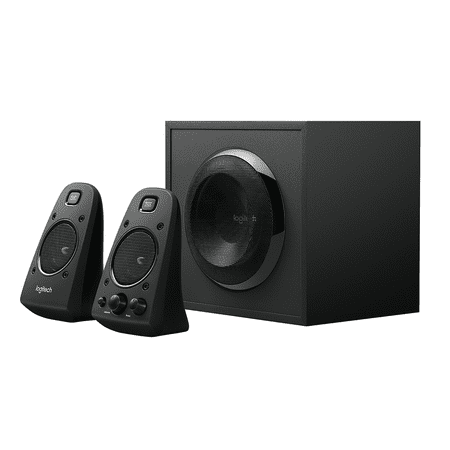
Logitech® Speaker System Z623. For big, bold, 2.1 sound. THX® Certified means quality you can count on-these speakers have met strict performance standards to achieve THX certification. You'll hear-and feel-immersive audio from 200 watts (RMS) of power that brings music, movies, and games to...
Creative Pebble V2:
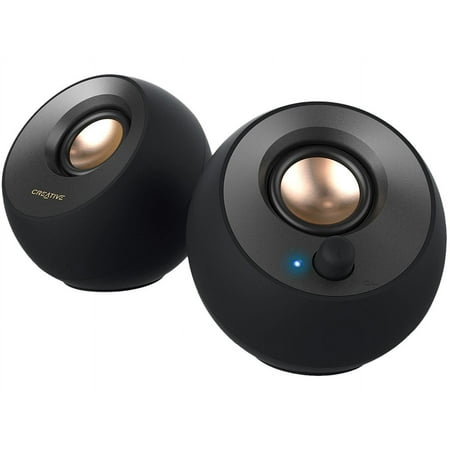
The item in this listing is a brand new sealed product in its original manufacture retail packaging. This product will come with a Minimum 1 year warranty. Creative Pebble V2 - Minimalistic 2.0 USB-C Powered Desktop Speakers, 3.5 mm AUX-in, Up to 8W RMS Power for Computers and Laptops, Type-A...
Frequently Asked Questions
Is the Logitech Z623 worth the extra money over the Creative Pebble V2?
Yes, if bass and volume matter to you. The Z623 is a completely different class of audio — THX certified, 200W, with a dedicated subwoofer. If you mostly want something for background music and calls, the Pebble V2 is plenty and you’ll save $60+.
Can the Creative Pebble V2 handle gaming audio?
It handles gaming audio fine for casual play. You’ll hear everything clearly. What you won’t get is bass impact from explosions, gunfire, or game soundtracks. For immersive gaming, the Z623 is significantly better.
Does the Logitech Z623 subwoofer have to go on the floor?
It doesn’t have to, but it performs best on the floor. Most people put it under their desk. It’s about the size of a small file box — desk placement is possible but takes up real estate.
Which is better for a small desk setup?
The Creative Pebble V2, no contest. Two compact satellites, USB powered, no subwoofer. It fits anywhere. The Z623 setup means managing three physical units and more cabling.
For more on the Z623, check out our full Logitech Z623 review and complete spec sheet.