Computer Station Nation is reader-supported.
When you buy through links on our site, we may earn an affiliate commission. Learn more.
Quick Answer: The Acer 23.8\” IPS ($104) is the better home office monitor — the IPS panel delivers better color accuracy, wider viewing angles, and more comfortable extended use. The onn 22\” ($79) is the budget choice when $25 savings matters more than panel quality.
Introduction
The Acer 23.8\” IPS and onn 22\” 100Hz are both affordable home office monitors, but they’re built differently. The Acer uses an IPS panel — the gold standard for color accuracy and viewing angles. The onn uses a more basic panel technology that cuts costs but compromises on image quality. At a $25 price difference, this comparison comes down to whether you think that panel upgrade is worth it for your use case.
Quick Comparison
| Acer 23.8\” IPS | onn 22\” 100Hz | |
| Price | $104 | $79 |
| Screen Size | 23.8 inches ✅ | 22 inches |
| Panel Type | IPS ✅ | TN/VA |
| Refresh Rate | 75Hz | 100Hz ✅ |
| Response Time | 4ms GtG | N/A |
| VESA Mount | 100×100mm ✅ | TBC |
| Brand Support | Acer warranty ✅ | Basic |
| Our Score | 8.5/10 | 7.8/10 |
Panel Quality — Acer IPS vs onn
This is the core of the comparison. The Acer’s IPS panel produces consistent, accurate color across the full viewing angle. Lean to the side, show it to a colleague, glance at it from across the room — the image stays accurate. The onn’s panel type shifts in color and brightness when viewed off-axis. For a solo desk setup where you’re always centered, this matters less. For anyone else, IPS is the clear win.
For productivity use — document editing, design work, presentations — the Acer’s color accuracy is a genuine daily comfort advantage. Text rendering and white backgrounds look cleaner on IPS over extended sessions.
Winner: Acer IPS
Refresh Rate — onn 100Hz vs Acer 75Hz
The onn runs at 100Hz; the Acer at 75Hz. For an office monitor, 75Hz vs 100Hz is a real but small difference — both are noticeably smoother than 60Hz. If you do any light gaming on the side, the onn’s 100Hz has the edge. For pure office work, the difference is subtle.
Winner: onn (higher refresh rate)
Screen Size — Acer 23.8\” vs onn 22\”
The Acer is 1.8 inches larger. Both work for a single-monitor desk, but the extra screen real estate on the Acer contributes to comfort over an 8-hour workday. With IPS quality on a slightly larger panel, the Acer wins this dimension too.
Winner: Acer
Build & Support — Acer vs onn
The Acer carries a manufacturer warranty and Acer’s driver/support ecosystem. If the monitor has a problem in year 2, you have a pathway. onn monitors come with Walmart’s basic return policy. For a monitor you’re using 40 hours a week, brand reliability matters over a 3–5 year horizon.
Winner: Acer
Value — Acer $104 vs onn $79
$25 separates them. For the extra $25, you get IPS quality, a larger screen, VESA compatibility, and Acer’s warranty. That’s a legitimate upgrade for a monitor you’ll use every day.
Winner: Acer (better dollar-for-value for office use)
Use Case Breakdown
Choose the Acer 23.8\” IPS if:
- This is your primary work monitor for 6+ hours/day
- Color accuracy matters (design, photo editing, presentations)
- You plan to use it for 3+ years and want brand support
- You want VESA compatibility for a monitor arm
Choose the onn 22\” if:
- Budget is hard-capped at $79
- This is a secondary or spare monitor
- You do gaming on the side and want the higher refresh rate
Verdict
For a serious home office setup, the Acer 23.8\” IPS is worth the $25 premium. Better panel, bigger screen, VESA support, and Acer’s warranty add up to a meaningfully better long-term investment. The onn 22\” is the pick when budget is the overriding constraint.
Where to Buy
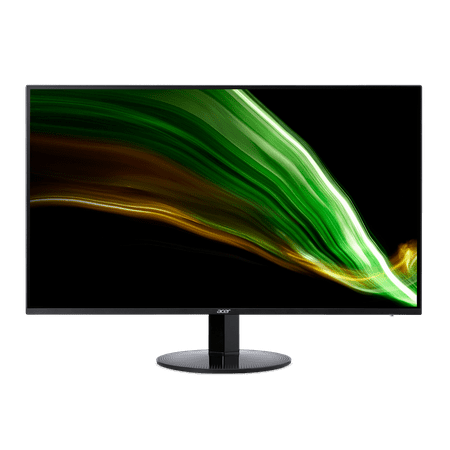
Acer SA243Y 23.8-inch monitor has an amazing thin enclosure with a frameless bezel. Get fast refresh rates thanks to the Adaptive-Sync Support product that matches the refresh rate of your monitor with your graphics card. The 1920 x 1080 Full HD resolution with an incredible 100,000,000:1...
Also available: onn 22\” FHD 100Hz at Walmart
FAQ
Is an IPS monitor worth $25 more for home office use?
Yes, for most office workers. IPS panels have better color accuracy and wider viewing angles than TN/VA panels. If you spend 6+ hours/day in front of the monitor, the visual comfort difference adds up over time.
Does the Acer 23.8\” have a VESA mount?
Yes — the Acer supports 100×100mm VESA mounting, which means you can use a monitor arm or wall mount. The onn 22\” VESA compatibility is not confirmed in the product listing.
Which is better for gaming — Acer or onn?
The onn 22\” at 100Hz has a higher refresh rate than the Acer’s 75Hz. For light gaming, the onn is the faster display. Neither is a gaming monitor — no FreeSync, no G-Sync, no gaming-specific features.