Computer Station Nation is reader-supported.
When you buy through links on our site, we may earn an affiliate commission. Learn more.
Quick Answer: The Logitech H390 is the best budget pick for work calls and remote meetings. The HyperX Cloud Alpha Wireless is the best pick for PC gaming with wireless freedom. At 4× the price, the HyperX is overkill for basic work use.
The Logitech H390 costs $20. The HyperX Cloud Alpha Wireless costs $79. Both are headsets, but they serve entirely different purposes. The H390 is a USB work headset optimized for voice calls. The HyperX is a premium wireless gaming headset with 300-hour battery life and 50mm gaming drivers. Choosing between them depends entirely on whether you are working or gaming.
Quick Comparison
| Spec | Logitech H390 | HyperX Cloud Alpha Wireless |
|---|---|---|
| Connection | USB-A wired | 2.4GHz wireless |
| Battery Life | N/A | 300 hours |
| Driver Size | 20mm | 50mm dual-chamber |
| Microphone | Noise-cancelling condenser | Detachable cardioid condenser |
| Controls | In-line (wired) | On-headset |
| Use Case | Work calls, remote meetings | PC gaming, Discord |
| Price | ~$20 | ~$79 |
Call Quality — H390 vs HyperX
For voice calls — Zoom, Teams, Google Meet — the H390 is surprisingly competitive. Its noise-cancelling mic keeps voices clear without background noise, which is the primary metric for work calls. The HyperX Cloud Alpha Wireless also performs well on calls, but its gaming-optimized microphone is not meaningfully better for voice calls than the H390. Both pass the “colleagues do not complain” test.
Winner: Tie for basic calls; HyperX if you also stream
Gaming Audio — H390 vs HyperX
The H390 is not a gaming headset. Its 20mm drivers are sized for voice clarity, not game audio immersion. The HyperX Cloud Alpha Wireless with 50mm dual-chamber drivers delivers positional audio, bass for explosions, and the wider soundstage gaming requires. For gaming, the HyperX wins by a large margin.
Winner: HyperX Cloud Alpha Wireless
Wireless Freedom — H390 vs HyperX
The H390 is wired — cable runs from headset to USB port. For a desk-bound work setup, this is fine. The HyperX is wireless with 300-hour battery — you never think about charging. If you value wireless, the HyperX wins decisively.
Winner: HyperX Cloud Alpha Wireless
Price — H390 vs HyperX
$20 vs $79. The H390 costs less than a quarter of the HyperX. For a work headset that just needs to handle calls, spending $79 on features you will not use (gaming audio, wireless, 300-hour battery) is hard to justify.
Winner: Logitech H390
Who Should Buy Which
Buy the Logitech H390 if: You need a headset for work calls and remote meetings, budget is a priority, you work at a fixed desk, and you do not need gaming audio quality.
Buy the HyperX Cloud Alpha Wireless if: You game on PC and want wireless, you want one headset for gaming and Discord calls, battery life matters, or you stream and want better audio presence.
Verdict
Do not overthink this. If you work from home and need a call headset, the H390 at $20 is the rational choice — it does the job without waste. If you game and want wireless with genuine audio quality, spend the extra $59 on the HyperX. The only case where the comparison is genuinely difficult is if you work from home AND game — in which case a single HyperX Cloud Alpha Wireless handles both, and may justify the premium.
Where to Buy
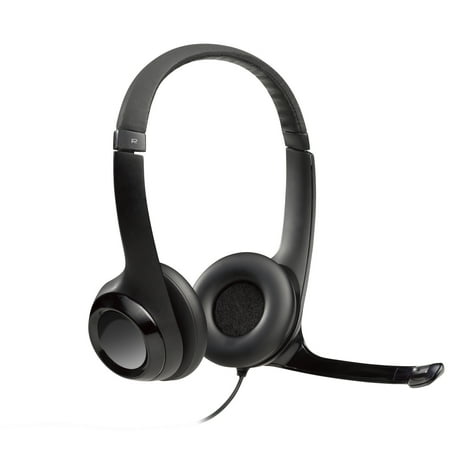
Get clear, comfortable and effective communication with H390 USB Headset from Logitech. Its noise-canceling microphone cuts background noise and rotates out of the way when youre not using it. Plus, the adjustable, padded headband and plush ear pads keep you comfortable and the microphone...
HyperX Cloud Alpha Wireless: Check price at Walmart
FAQ
Is the Logitech H390 good for gaming?
Not really. It handles in-game voice chat fine, but its 20mm drivers are not tuned for positional audio or immersive game sound. For gaming audio, the HyperX or a dedicated gaming headset is the better choice.
Can the HyperX Cloud Alpha Wireless be used for work calls?
Yes. It works well on Zoom, Teams, and Discord. The microphone quality is solid. If you are buying primarily for work with occasional gaming, it covers both roles well.