Computer Station Nation is reader-supported.
When you buy through links on our site, we may earn an affiliate commission. Learn more.
- Best Overall: Razer Huntsman Mini Special Edition — optical switches, PBT keycaps, built like a tank
- Best Budget with Arrows: MageGee MK-Box — 68 keys, USB-C, under $30
- Best True 60%: Geeky GK61 SE — 61 keys, RGB, great entry point
- Best Value: UHM 60% RGB — switch choice, compact, solid daily driver
- Best Wireless: FFN Wireless Compact — 2.4GHz, volume knob, cable-free for under $28
Selection methodology: These 5 keyboards were selected after evaluating form factor, switch quality, build materials, price-to-value ratio, and user-reported reliability. Picks range from $25 entry-level to $119 premium to cover every budget.
The 60% keyboard used to be a weird niche thing. Tiny board, no arrow keys, looked like something built from spare parts in a basement. Now everybody wants one. More desk space, more mouse room, and the layout clicks faster than you’d expect.
The tricky part is the market — budget boards have flooded in and plenty of them look fine in photos and fall apart after two months. Here are five that don’t.
| Keyboard | Best For | Price | Rating |
|---|---|---|---|
| Razer Huntsman Mini SE | Premium gaming | $119 | 4.5/5 |
| MageGee MK-Box | Budget + arrow keys | $29.99 | 4.2/5 |
| Geeky GK61 SE | True 60% beginners | $25 | 4.0/5 |
| UHM 60% RGB | Budget + switch choice | $28.87 | 4.1/5 |
| FFN Wireless Compact | Wireless + knob | $27.49 | 3.9/5 |
Table of Contents
- 1. Razer Huntsman Mini Special Edition
- 2. MageGee MK-Box
- 3. Geeky GK61 SE
- 4. UHM 60% RGB
- 5. FFN Wireless Compact
- Verdict
- Buying Advice
- FAQ
1. Razer Huntsman Mini Special Edition — Best Overall
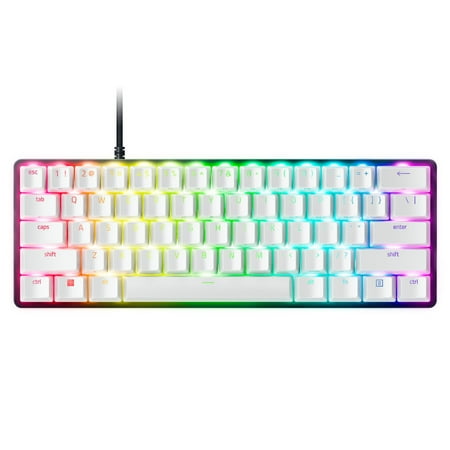
Dominate on a different scale with the Razer Huntsman Mini Special Edition, a 60% form factor gaming keyboard with cutting-edge Razer Optical Switches. Highly portable and ideal for streamlined setups, it’s time to experience lightning-fast actuation in our most compact form factor yet. The...
| Layout | 60% — 61 keys |
| Switches | Razer Linear Optical Purple (pre-lubed) |
| Actuation | 1.0mm / 45g |
| Keycaps | Doubleshot PBT |
| Backlighting | Razer Chroma RGB per-key |
| Connection | USB-C (detachable braided cable) |
| Price | ~$119 |
Rating: 4.5/5
Spend real money here and the Razer Huntsman Mini Special Edition is the one. Optical switches mean actuation at 1mm — registers on light, not a physical contact point. That’s faster than standard mechanical. Competitive gamers feel it.
PBT keycaps are worth calling out separately. Budget boards use ABS that turns shiny and gross fast. PBT doesn’t age like that. Still looks clean years later. The white case with Chroma per-key RGB is just stupidly good-looking. Obnoxiously nice, actually.
No wireless though. Razer’s FN layer takes some adjustment. And $119 is a real jump. But this is the board you keep. Pay once.
- Optical switches — 1mm actuation, fastest available
- Doubleshot PBT keycaps resist shine and wear
- Per-key Chroma RGB pops on white case
- USB-C braided cable included
- Razer Synapse software is mature and stable
- No wireless
- FN layer has a learning curve
- $119 is a real premium over budget options
- Full RGB customization requires Razer Synapse
2. MageGee MK-Box — Best Budget Pick with Arrow Keys
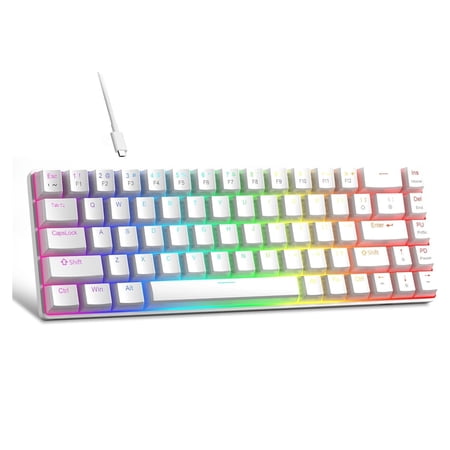
Product description Fn Shortcut KeysFn+Q= my computerFn+W= home, Fn+E= emailFn+R= media playerFn+T= previous, Fn+Y= nextFn+U= play, Fn+I= pauseFn+O= volume+Fn+P= volume-Fn+[[= mute, Fn+]]= calculatorKeyboard Specification:· Dimension: 30.8*10.1*3.9cm, 12.1*4*1.5in · Net Weight: 570g,1.26lb ·...
| Layout | 68 keys (compact with dedicated arrows) |
| Switches | Red linear |
| Actuation | ~2.0mm |
| Keycaps | Double injection molded ABS |
| Backlighting | Blue LED, 16 modes |
| Connection | USB-A (detachable cable) |
| Price | ~$30 |
Rating: 4.2/5
Not ready to give up arrow keys? Fair. The MageGee MK-Box is 68 keys — dedicated arrows plus a couple extras, still way smaller than tenkeyless. Good landing spot if you’re coming from a full-size keyboard and the idea of FN-layer arrows makes you want to return it before you even try.
Thirty bucks, better build than expected. Clean two-tone case, detachable cable, red linears that don’t feel scratchy out of the box. N-key rollover means nothing gets dropped mid-game.
One thing: no RGB. Blue LED only. If you need the light show, look somewhere else. For work and general use it’s fine — you stop noticing after a day.
- Dedicated arrow keys — easier transition from full-size
- Detachable cable at this price is rare
- Full N-key anti-ghosting
- Red linears feel smooth for $30
- Adjustable tilt stand included
- Blue LED only — no RGB
- ABS keycaps will shine with use
- Not a true 60% — 68 keys
- No wireless
3. Geeky GK61 SE — Best True 60% Entry-Level
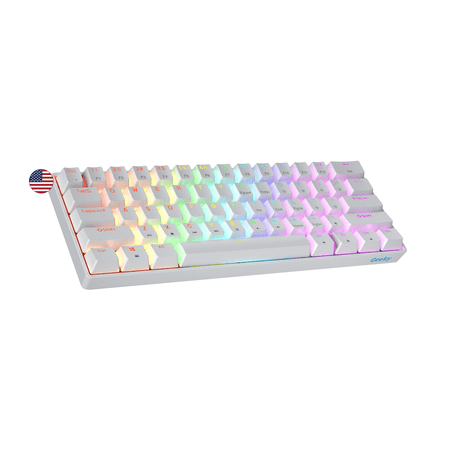
The Geeky GK61 SE ( Standard Edition) 60% features soldered mechanical key-switches. (Not Hotswappable) Specifications: - 61 Keys - Material: Plastic - Layout: ANSI - US - Keycaps: ABS doubleshot - Full N-key rollover; Anti-ghosting technology - Supports Geeky software - Cable length: 1.5 m (5.9...
| Layout | 60% — 61 keys |
| Switches | Optical |
| Actuation | ~2.0mm |
| Keycaps | ABS double-shot |
| Backlighting | Multi-color RGB |
| Connection | USB-C |
| Price | ~$25 |
Rating: 4.0/5
Twenty-five bucks. True 60%. That’s the GK61 SE pitch and it lands. No hidden arrow keys, no weird layout compromises. USB-C, RGB, optical switches. Baseline covered.
The board’s been around long enough that people have modded the heck out of it — lubed switches, swapped caps, the works. There’s a whole community around turning a $25 board into something that types like it costs four times as much. Good first board for that kind of tinkering.
Just be straight with yourself about what you’re getting. Stock switches are okay, not special. ABS caps will shine. No hot-swap on the SE, so swapping switches means soldering. Great starting board. Not your forever board.
- True 60% — no layout compromises
- USB-C connection
- RGB at a $25 price point
- Strong mod community — easy to upgrade
- Optical switches snappier than basic mechanical
- ABS keycaps will shine with heavy use
- No hot-swap — soldering required for switch swaps
- Plasticky build feel
- Software can be finicky
4. UHM 60% RGB — Best Budget Value
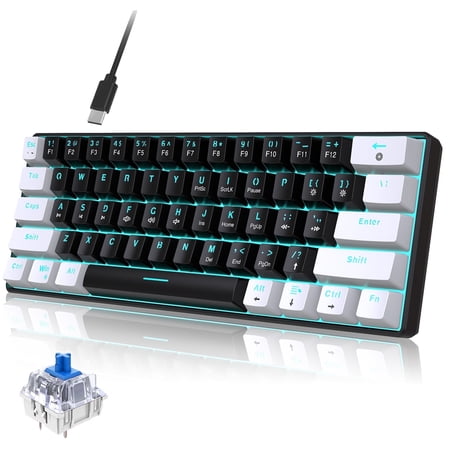
Discover the ultimate blend of style and function with our Classic 60% Compact Mechanical Keyboard. Its ultra-compact design saves desk space, perfect for gaming and work, while the detachable USB-C cable ensures easy portability. Enjoy precise, responsive key commands with Mechanical Blue...
| Layout | 60% — 61 keys |
| Switches | Mechanical (red / brown / blue) |
| Actuation | ~2.0mm |
| Keycaps | ABS |
| Backlighting | Per-key RGB |
| Connection | USB-C |
| Price | ~$29 |
Rating: 4.1/5
Same price as the GK61, but the UHM 60% lets you pick your switches — red, brown, or blue. Most budget boards just ship red and assume that’s fine. Having the choice at $29 is actually unusual.
Per-key RGB, USB-C, ergonomic kickstand. Plug it in, it works. No driver headaches. Plastic case, ABS caps, no hot-swap — same limitations as the GK61. But if you care about what switch you type on, this is the pick.
- Switch choice (red / brown / blue) at $29
- Per-key RGB
- USB-C, no driver required
- Adjustable tilt kickstand
- Works out of the box without setup hassle
- Plastic build
- ABS keycaps will shine
- No hot-swap
- No macro support
5. FFN Wireless Gaming Keyboard — Best Wireless Compact
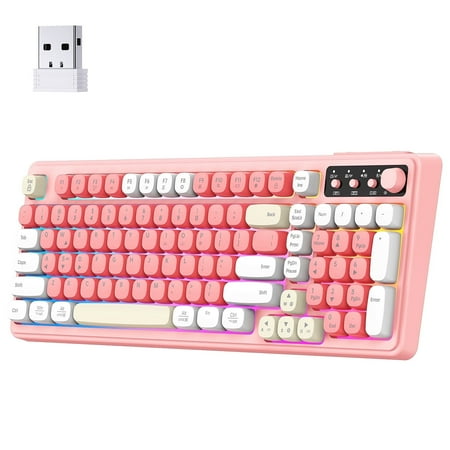
This wireless membrane keyboard combines the smoothness with a satisfying mechanical-like feel, offering the perfect balance for gaming and work. With triple connection modes (BT1,BT2, 2.4GHz wireless , and USB-C wired), customizable RGB lighting, and a space-saving 99-key layout, it’s designed...
| Layout | Compact (99 keys with volume knob) |
| Switches | Mechanical |
| Connection | 2.4GHz wireless USB receiver |
| Backlighting | RGB |
| Extra | Dedicated volume knob |
| Price | ~$27 |
Rating: 3.9/5
Quick disclaimer: this one isn’t a true 60% board. It’s 99 keys in a compact layout. It’s on this list because it’s wireless, and at $27 there’s almost nothing else wireless and mechanical at that price with a volume knob.
The 2.4GHz dongle keeps it snappy — not Bluetooth. The volume knob is a small thing that turns into a big deal once you have one. You’ll reach for it on keyboards that don’t have it.
Want a smaller footprint for mouse room? Get one of the other four. Want no cable on your desk? This one.
- Only wireless option at this price
- 2.4GHz receiver — gaming-grade latency
- Dedicated volume knob
- RGB lighting
- Very affordable for wireless mechanical
- Not a true 60% — larger footprint
- Budget build quality
- Wireless dongle to manage
- Less customization support
Verdict
The Razer Huntsman Mini Special Edition is the answer if budget isn’t the blocker. Optical switches, PBT keycaps, Chroma RGB — it’s a better keyboard in every way. Pay once, keep it for years.
On a budget? The MageGee MK-Box is the move — keeping those arrow keys makes the transition from full-size way less painful at $30. The Geeky GK61 SE is for anyone who wants a true 60% without spending much and doesn’t mind a starter board. The UHM 60% wins on switch choice. The FFN Wireless is for the cable-haters.
Buying Advice: Who Should Get What
Get the Razer Huntsman Mini if you game competitively or type a lot and want a board that won’t feel like a compromise. The optical switches and PBT keycaps are the real deal.
Get the MageGee MK-Box if you’re new to compact keyboards and not ready to give up arrow keys. The FN-layer arrow learning curve is real — the MK-Box removes that friction at $30.
Get the Geeky GK61 SE if you want to try a true 60% without risking much. Great first board to mod — swap keycaps, experiment with stabilizers, see how far a $25 board can go.
Get the UHM 60% over the GK61 if you care about switch feel and want to pick red, brown, or blue.
Get the FFN Wireless if your setup needs to be cable-free. Wireless mechanical at $27 is genuinely hard to beat, and the volume knob is a bonus you’ll appreciate every day.
Frequently Asked Questions
What is a 60% mechanical keyboard?
A 60% keyboard removes the function row, numpad, and navigation keys, leaving roughly 61 keys. The missing stuff isn’t gone — it’s on an FN layer. FN + number for function keys, FN + WASD for arrows. Takes a few days to internalize. Most people stop missing the extra keys within a week.
Is a 60% keyboard good for gaming?
Arguably better than full-size for gaming. The compact footprint moves your mouse closer to center, reduces arm strain, and frees up space for bigger mouse movements. Most PC games don’t use the keys that got cut. The one exception is games that lean hard on the navigation cluster — though the FN layer covers it.
Should I get 60% or 65%?
Comes down to arrow keys. A 65% adds dedicated arrows back plus a few navigation keys, still compact. If you navigate text, code, or spreadsheets a lot, 65% is worth it. Pure gamers or people who never touch arrows will prefer 60% for the smaller footprint. The best 65% keyboards are a separate page if you want to compare side by side.
What switches are best for a 60% keyboard?
Red linears are the gaming standard — fast, smooth, no bump. Brown tactiles are the all-rounder for typing and gaming both. Blues are satisfying to type on but loud. At the premium end, optical switches (like on the Razer Huntsman Mini) are the fastest option. Full breakdown in the mechanical keyboard switches guide.
Are cheap 60% keyboards worth it?
Yes, with realistic expectations. Twenty-five to thirty dollars gets you a board that types fine, looks decent, and lasts a year or two with normal use. Keycaps will shine, switches won’t feel refined, build won’t feel heavy. But for getting into the 60% form factor without risk, that’s the right price to start.