Computer Station Nation is reader-supported.
When you buy through links on our site, we may earn an affiliate commission. Learn more.
- Best Overall: CORNE V4.1 Wired — split ortholinear, hot-swap, standard layout
- Best Wireless: CORNE V4 Wireless — low profile, wireless, 46-key split
- Best for Customization: CORNE V4.1 Hot-swap — 3×6 ortholinear, hot-swap, open layout
- Best Entry Price: CORNE V4 Budget — split ergo, under $50
Selection methodology: The 40% keyboard market on mainstream retail is dominated by the CORNE V4 line, which is a well-regarded split ortholinear design. These 4 picks represent the main variants across wired/wireless, hot-swap, and price.
Let me be honest about 40% keyboards upfront: they are not for everyone. Most people who buy one regret it within a week. The 40% layout removes the number row, most punctuation keys, and function row entirely. Everything lives on layers you access via held modifier keys. The learning curve is steep and the payoff is narrow.
Who should actually get one: programmers or writers who spend hours a day typing and experience wrist strain, ergonomic setup enthusiasts, and people who have already tried smaller layouts and want to go further. If you just want a small keyboard that looks cool, a 60% or 65% will serve you far better.
On mainstream retail, the CORNE V4 line is the main accessible 40% option worth buying. It is a legitimate split ortholinear keyboard at a price that does not require a group buy or custom order.
| Keyboard | Best For | Price | Rating |
|---|---|---|---|
| CORNE V4.1 Wired | Overall 40% entry | $78.61 | 4.4/5 |
| CORNE V4 Wireless | Low profile wireless | $69.85 | 4.3/5 |
| CORNE V4.1 Hot-swap | Switch customization | $68.14 | 4.4/5 |
| CORNE V4 Budget | Entry price point | $45.99 | 4.1/5 |
Table of Contents
1. CORNE V4.1 Wired — Best Overall
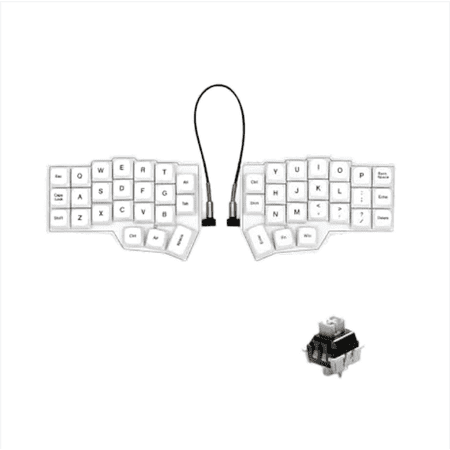
Experience comfortable and efficient typing with the White CORNE V4.1 Wired Split Mechanical Keyboard, featuring an ergonomic 40% orthogonal layout with a 3x6 staggered split and three thumb keys per hand. This innovative design allows users to adjust spacing, tilt, and rotation, significantly...
| Layout | 40% split / 3×6 ortholinear |
| Keys | 42 keys |
| Hot-swap | Yes |
| Connection | Wired USB-C |
| Price | ~$79 |
Rating: 4.4/5
The CORNE V4.1 is the standard recommendation for anyone serious about getting into 40% ortholinear typing. It is a split keyboard — two halves that you position independently — with a 3×6 grid layout. Hot-swap sockets let you try different switches without soldering. At $79 it is accessible for what the product category offers.
The split design is the point. Your hands sit at shoulder width rather than squeezed together, which is the ergonomic argument for going down this rabbit hole. Combined with the lack of a number row forcing your fingers to stay in the home row position, this is a keyboard designed around reducing hand movement.
The learning curve is real. Plan for two to four weeks of deliberate practice before hitting your old WPM. Programmers who use layers heavily tend to adapt faster.
- Genuine split ergonomic design
- Hot-swap sockets
- Ortholinear layout reduces finger reach
- Accessible price for 40% category
- Steep learning curve — weeks to reach old speed
- Not for casual users
- No wireless on base wired model
2. CORNE V4 Wireless — Best Wireless 40%
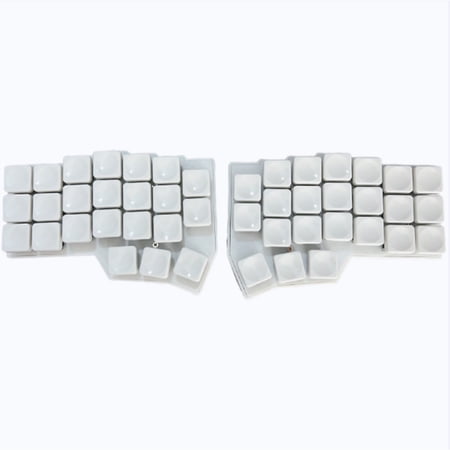
Experience the Ultimate in Ergonomic Customization – Now in Ultra-Slim Form. The CORNE V4 is a legendary open-source split keyboard, beloved by enthusiasts worldwide for its 3x6 column-staggered layout with dedicated thumb keys . This V4 edition features low-profile Kailh Choc switches and...
| Layout | 40% split low-profile |
| Keys | 46 keys |
| Connection | Wireless + USB-C |
| Profile | Low profile |
| Price | ~$70 |
Rating: 4.3/5
The wireless CORNE V4 adds Bluetooth and goes low-profile. The lower key profile means less wrist extension, which some typists prefer for long sessions. The 46-key count gives slightly more keys than the standard 42-key CORNE, which can ease the layer learning curve.
Wireless on a split keyboard is convenient for desk arrangement — no cable running between halves. If you are using the CORNE with a standing desk that moves up and down, or on different surfaces, wireless removes a cable management problem.
- Wireless — no cable between halves
- Low-profile switches for less wrist extension
- 46 keys slightly easier to learn than 42
- Low-profile switches require separate replacements
- Still a steep learning curve
3. CORNE V4.1 Hot-swap — Best for Customization
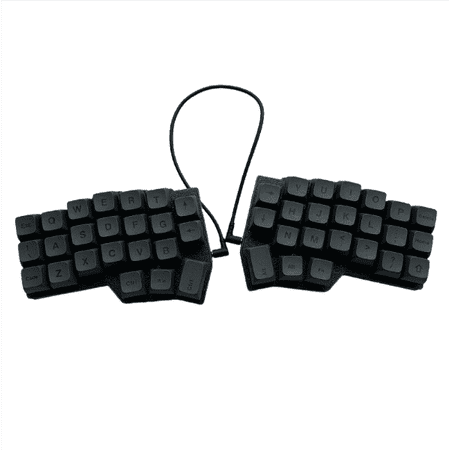
The Corne V4.1 Split Ergonomic Keyboard offers a 40% 3x6 ortholinear layout, meticulously designed to enhance comfort and reduce typing fatigue by allowing a natural shoulder width and preventing wrist strain. This hot-swappable mechanical keyboard comes equipped with pre-lubed linear switches...
| Layout | 40% split / 3×6 ortholinear |
| Hot-swap | Yes |
| Connection | Wired USB-C |
| Price | ~$68 |
Rating: 4.4/5
The V4.1 hot-swap model prioritizes switch flexibility. You can pull and replace MX-style switches without soldering. For a 40% keyboard, this matters more than on larger boards — the switch feel has an outsized impact when your hands are always in the same small zone. The standard 3×6 ortholinear layout is the same as the wired V4.1, but the focus here is on tuning the switch feel after purchase.
- Hot-swap — switch without soldering
- Slightly lower price than wired V4.1
- Full 3×6 ortholinear layout
- No wireless
- Same learning curve as all 40% boards
4. CORNE V4 Budget — Best Entry Price
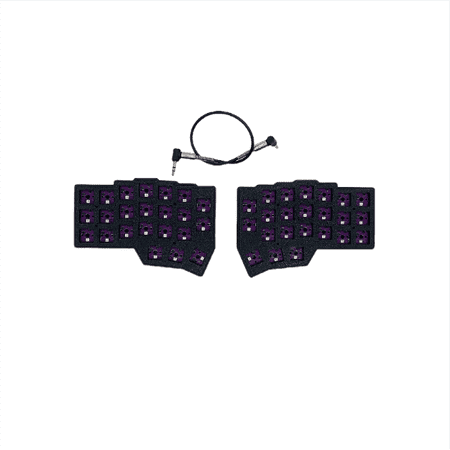
The CORNE V4 Split Keyboard is an ergonomic dual-hand split keyboard designed for comfort and precision, featuring a left/right hand layout for personalized setup. Powered by a 2040 main controller and supporting VIAL, it allows users to effortlessly remap keys and create macros without...
| Layout | 40% split ergonomic |
| Connection | Wired |
| Price | ~$46 |
Rating: 4.1/5
The CORNE V4 budget option brings the split ergo design under $50. If you want to try the CORNE layout without spending $70+ and are not sure if 40% is for you, this is the sensible test purchase. The layout is the same core design — split halves, ortholinear arrangement — at a lower price point with fewer features. If you stick with it, you can upgrade to a fuller-featured model later.
- Entry price under $50
- Same split ergo layout as premium models
- Lower risk for testing the 40% format
- Fewer features than higher-tier models
- No hot-swap on base model
Verdict
If you have decided that a 40% keyboard is what you actually want, the CORNE V4.1 Hot-swap at $68 is the best place to start. Hot-swap lets you tune the switch feel after you figure out your preferences, which matters at this layout where you are already re-learning everything. The CORNE V4 Wireless is the move if you want to eliminate cable between the split halves. Start with the CORNE V4 Budget if you are genuinely not sure whether 40% will stick.
Frequently Asked Questions
Should I actually get a 40% keyboard?
Probably not, unless you have specific reasons. The 40% layout requires learning key layers for everything above the bottom three rows. Most people who try one go back to a larger layout within a month. If you have wrist strain from reaching for keys, or you are a programmer who types for many hours daily and wants to minimize hand movement, it can pay off. For casual users or gamers, a 65% keyboard is a better choice.
What is an ortholinear layout?
Ortholinear means the keys are arranged in a strict grid rather than the staggered rows of traditional keyboards. The logic is that fingers move straight up and down rather than at angles, which reduces reach distance. The CORNE uses this layout. It takes adjustment coming from staggered, but most people adapt within two weeks.
What is a split keyboard?
A split keyboard divides into two halves that you position independently. You can angle each half to match your natural wrist position rather than holding both wrists at unnatural inward angles. The CORNE splits after the B-T-G column, giving each hand its own half with dedicated thumb clusters.
How long does it take to learn a 40% keyboard?
Most people take two to four weeks to reach their pre-40% typing speed. Some take longer. Programmers who already use keyboard shortcuts heavily tend to adapt faster because they are used to modifier key patterns. The ortholinear grid is a separate adjustment that adds another week or two for most people coming from staggered layouts.