Computer Station Nation is reader-supported.
When you buy through links on our site, we may earn an affiliate commission. Learn more.
Your mousepad deserves more real estate. That’s the whole point of a mini keyboard: strip the layout down to 60-68 keys, push it to the corner, and suddenly there’s room to breathe. More room for your mouse arm, a cleaner desk, and you can actually pack it in a bag without it taking up half the space.
“Mini keyboard” covers a lot of ground. You’ve got strict 60% boards (61 keys, no arrow keys), 68-key layouts that squeeze arrows in, wireless models, hot-swap decks, and everything from $28 budget options up to $200 flagships. This list covers the best options at each price point.
After going through compact mechanical keyboards available right now, five made the cut based on wireless reliability, switch quality, build, and real value at each price. One important filter: anything labeled “mechanical feeling” (that’s marketing for membrane) got cut on the spot.
Quick picks
- Best overall: SteelSeries Apex Pro Mini Wireless — adjustable Hall Effect switches and premium wireless in a 60% shell
- Best gaming: Redragon K677 Pro Rammus — triple-mode wireless from a trusted gaming brand under $50
- Best with arrow keys: RK68 Dual Mode Keyboard — 68-key layout with 2.4GHz and Bluetooth under $50
- Best value wireless: COSTOM Wireless 60% — hot-swappable switches in a clean cream colorway at $40
- Best budget: K68 Wireless Keyboard — Bluetooth plus 2.4GHz, hot-swappable, under $30
How we picked these
We looked at 60% and 68-key keyboards available right now. Wireless flexibility got weighted heavily because a mini keyboard that still needs a cable defeats about half the point. Hot-swap was a secondary filter — at budget prices especially, it matters a lot. Everything here uses real mechanical switches. Anything listed as “mechanical feeling” got cut immediately.
At a glance
| Keyboard | Best for | Price | Wireless |
|---|---|---|---|
| SteelSeries Apex Pro Mini Wireless | Premium gaming | $199.99 | 2.4GHz + BT |
| Redragon K677 Pro Rammus | Gaming value | $47.99 | BT + 2.4GHz + Wired |
| RK68 Dual Mode | Arrow key users | $47.50 | 2.4GHz + BT |
| COSTOM Wireless 60% | Aesthetic builds | $39.99 | Wireless |
| K68 Wireless | Budget wireless | $28.79 | BT 5.0 + 2.4GHz |
Table of contents
- SteelSeries Apex Pro Mini Wireless — Best Overall
- Redragon K677 Pro Rammus — Best Gaming
- RK68 Dual Mode — Best with Arrow Keys
- COSTOM Wireless 60% — Best Value Wireless
- K68 Wireless — Best Budget
- Verdict
- Buying advice
- FAQ
SteelSeries Apex Pro Mini Wireless — Best overall mini mechanical keyboard
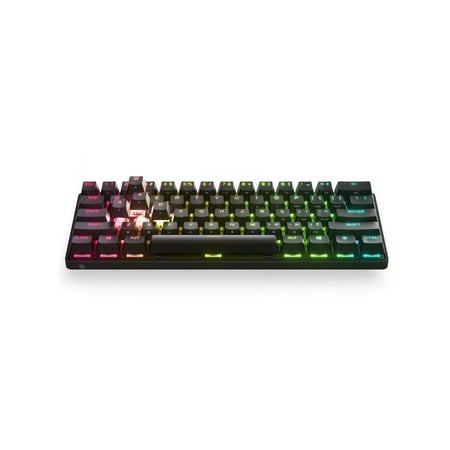
The item in this listing is a brand new sealed product in its original manufacture retail packaging. This product will come with a Minimum 1 year warranty. SteelSeries Apex Pro Mini Wireless Mechanical Gaming Keyboard - World's Fastest Keyboard - Adjustable Actuation - Compact 60% Form Factor -...
The Apex Pro Mini is what happens when SteelSeries puts their best switch tech into the smallest possible chassis. The OmniPoint 2.0 switches are Hall Effect, meaning magnetic actuation with zero mechanical contact. No wear, no inconsistency, and the actuation point adjusts from 0.1mm to 4.0mm. Want a hair-trigger for FPS? Dial it down. Want more resistance for typing? Dial it up. That kind of real-time adjustability is genuinely rare at any price.
Wireless runs dual-band: 2.4GHz for gaming, Bluetooth for everything else. SteelSeries’ Quantum 2.0 wireless keeps input latency in the single-digit millisecond range on 2.4GHz, which puts it in wired-competitive territory. The 60% footprint is minimal, and the per-key RGB runs through SteelSeries’ Prism engine, which is one of the better lighting implementations in the space.
$199.99 is a real number. Nobody’s pretending otherwise. But this is the most capable 60% board on this list by a significant margin, and if you’re a gamer who wants the best and prefers a compact layout, there’s nothing to argue about here.
| Spec | Detail |
|---|---|
| Layout | 60% (61 keys) |
| Switches | OmniPoint 2.0 magnetic (Hall Effect) |
| Connectivity | 2.4GHz + Bluetooth 5.0 |
| Hot-swap | No |
| Backlighting | Per-key RGB (Prism) |
| Price | $199.99 |
Rating: 4.7/5
- ✓ OmniPoint 2.0 Hall Effect switches with adjustable actuation
- ✓ Dual-band wireless (2.4GHz + BT 5.0)
- ✓ Premium build and per-key RGB
- ✓ SteelSeries warranty and support
- ✗ $199.99
- ✗ No hot-swap
- ✗ No dedicated arrow keys
Price: $199.99 — Check current price
Redragon K677 Pro Rammus — Best mini keyboard for gaming
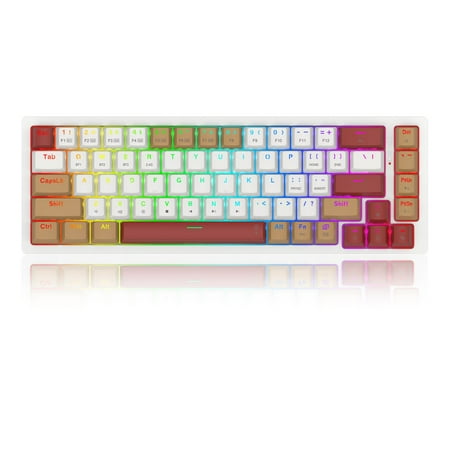
Pro Rammus 60% Wireless RGB Mechanical Keyboard, BT/2.4Ghz/Wired 3-Mode 61 Keys Compact Gaming Keyboard w/Hot-Swap Socket, Free-Mod Plate Mounted PCB & Tactile Brown Switch
Redragon has been making budget gaming peripherals long enough to know what they’re doing, and the K677 Pro Rammus delivers where it counts. Three connection modes: Bluetooth, 2.4GHz, and wired USB. That means it works on your gaming PC, your work laptop, your TV setup — whatever. Triple-mode wireless under $50 is a real deal.
The 60% layout is tight and clean. Redragon’s own switches are clicky enough to feel satisfying without being obnoxious. The build doesn’t flex or rattle. RGB covers the usual effect modes. Nothing here is going to blow your mind, but for a first mini keyboard or a backup board, it does the job well at a fair price.
If you’re not ready to spend $200 to see whether you like the 60% form factor, the K677 Pro is the right way to find out. Worst case, you spend $48 and decide mini isn’t for you. Best case, you have a capable wireless gaming keyboard that’ll last.
| Spec | Detail |
|---|---|
| Layout | 60% (61 keys) |
| Switches | Redragon mechanical |
| Connectivity | BT + 2.4GHz + USB wired |
| Hot-swap | Check listing |
| Backlighting | RGB |
| Price | $47.99 |
Rating: 4.3/5
- ✓ Triple-mode wireless (BT + 2.4GHz + wired)
- ✓ Trusted gaming brand, real support
- ✓ Under $50 with RGB
- ✓ No flex, no rattle
- ✗ No arrow keys
- ✗ Redragon switches are decent, not premium
- ✗ RGB software is clunky
Price: $47.99 — Check current price
RK68 Dual Mode — Best mini keyboard with arrow keys
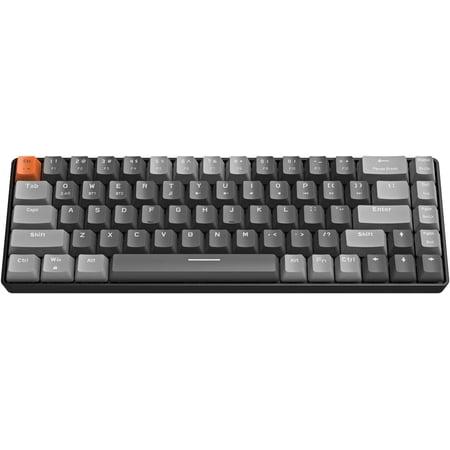
Product description The USB A port is for the PC/Laptop//Gaming devices.The Type C port is for the Mobile Phone//Ipad,etc. Using the 2.4G technology, no delay, and .Also support to connect 2 devices at the same time.It makes our work very convenient. The receiver has 2 ports: USB A and Type C....
Not everyone can let go of arrow keys. Fair. The RK68 keeps them. It fits 68 keys into a compact frame, landing between a strict 60% board and a full 65% layout. You get dedicated arrows without the keyboard sprawling back across your desk. The footprint is still dramatically smaller than a tenkeyless, let alone full-size.
The dual wireless setup runs through a single 2-in-1 receiver covering both 2.4GHz and Bluetooth, which saves the hassle of juggling two dongles when you switch between devices. At $47.50 it’s basically the same price as the Redragon, so the real question is simple: do you want arrow keys or not? If yes, get this. If no, get the K677.
No-frills build. Does its job. If arrow keys in a compact package matter more to you than brand prestige, the RK68 is the pick.
| Spec | Detail |
|---|---|
| Layout | 68 keys (compact 65%) |
| Switches | Mechanical (see listing) |
| Connectivity | 2.4GHz + Bluetooth (2-in-1 receiver) |
| Hot-swap | Check listing |
| Backlighting | RGB |
| Price | $47.50 |
Rating: 4.2/5
- ✓ 68-key layout with dedicated arrow keys
- ✓ Dual wireless on a single 2-in-1 receiver
- ✓ Compact without going arrowless
- ✓ Under $50
- ✗ Generic switches, quality varies by listing
- ✗ Less brand support than Redragon or SteelSeries
- ✗ Customization software is limited
Price: $47.50 — Check current price
COSTOM Wireless 60% — Best value wireless mini keyboard
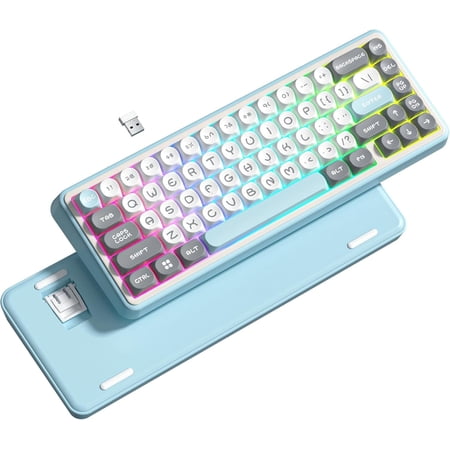
Meet the WK60 Wireless Mechanical Gaming Keyboard, a compact 60% layout keyboard that maximizes desk space without sacrificing functionality. This versatile wireless keyboard offers triple-mode connectivity BT, 2.4GHz, or USB-C wired for seamless switching between devices. It features 20 dynamic...
COSTOM keeps showing up across keyboard categories with the same formula: hot-swap capability, clean looks, reasonable price. The Wireless 60% Cream is that in wireless form. The cream colorway is a breath of fresh air compared to every other black keyboard on this list, and because the switches are hot-swappable, you’re not locked into whatever the factory loaded.
Hot-swap on a $40 wireless keyboard is actually unusual. Most boards at this price solder their switches in. COSTOM doesn’t. So if the stock switches feel off, you pull them and drop something else in. Normally you’d pay $80+ for that kind of upgrade path on a wireless board.
The wireless works fine — user feedback doesn’t show major connectivity issues. Battery life is acceptable. If you want a good-looking compact keyboard that you can tune over time without spending Apex Pro money, this is the move.
| Spec | Detail |
|---|---|
| Layout | 60% (61 keys) |
| Switches | Mechanical, hot-swappable |
| Connectivity | Wireless |
| Hot-swap | Yes |
| Colorway | Cream |
| Price | $39.99 |
Rating: 4.2/5
- ✓ Hot-swappable at $40
- ✓ Cream colorway looks great on any desk
- ✓ Wireless under $40
- ✓ Switch upgrade path, no soldering required
- ✗ No arrow keys
- ✗ Newer brand, limited track record
- ✗ Customization software is basic
Price: $39.99 — Check current price
K68 Wireless — Best budget mini mechanical keyboard
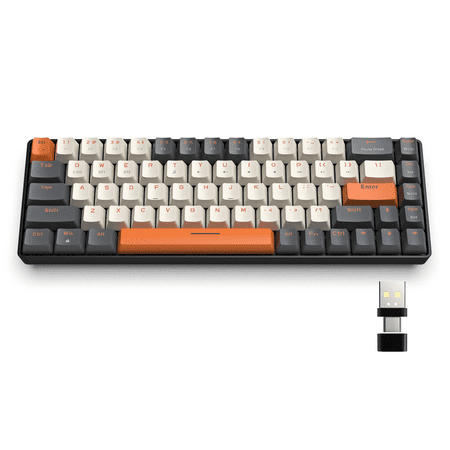
【Wireless Capacity】The mini mechanical keyboard includes Wireless 2.4GHz and Bluetooth 5.0 two-mode can connect with up to three devices and switch among them easily for multitasking needs. The keyboard equipped with an upgraded wireless Bluetooth chip which ensures stable and fast connectivity...
Under $30 for Bluetooth 5.0, 2.4GHz wireless, 68 keys, and hot-swap capability. That list sounds wrong. It’s not. The K68 delivers all of it at $28.79 and it works.
The hot-swap is the real story at this price. On a sub-$30 keyboard, being able to pull switches and try something different is genuinely useful. Start with the stock switches, figure out if you want something quieter or more tactile, and swap them in an afternoon. No soldering, no drama.
The 68-key layout keeps arrow keys, which makes coming from full-size less jarring. Bluetooth 5.0 plus 2.4GHz means you can run it however makes sense — dongle for gaming, Bluetooth for a laptop across the room. For someone testing whether the mini form factor works for them without risking $200, this is the right entry point.
| Spec | Detail |
|---|---|
| Layout | 68 keys (compact 65%) |
| Switches | Mechanical, hot-swappable |
| Connectivity | BT 5.0 + 2.4GHz wireless |
| Hot-swap | Yes |
| Backlighting | RGB |
| Price | $28.79 |
Rating: 4.0/5
- ✓ Hot-swappable under $30
- ✓ BT 5.0 + 2.4GHz dual wireless
- ✓ 68-key layout with arrow keys
- ✓ Cheapest pick on this list
- ✗ Budget build, plastic flex and creak
- ✗ RGB is basic compared to higher-tier picks
- ✗ Limited warranty and brand support
Price: $28.79 — Check current price
Verdict
The SteelSeries Apex Pro Mini Wireless wins this list. OmniPoint 2.0 switches with adjustable actuation, dual-band wireless, premium build — it earns the price. If $200 is too steep, the Redragon K677 Pro at $47.99 covers triple-mode wireless with real brand support for a fraction of the cost. And if giving up arrow keys sounds like a dealbreaker, the RK68 or the K68 Wireless both solve that for under $50.
Buying advice
If you’ve never used a 60% keyboard before, start with the K68 Wireless or the RK68. Both are 68-key, which means you keep arrow keys. That one feature makes the transition from full-size significantly less painful. You can always go down to a strict 60% later once you’re used to the compact footprint.
Already comfortable with 60% boards and want wireless? The Apex Pro Mini is the answer. Nothing on this list touches it for gaming. The adjustable actuation alone is worth the upgrade for anyone playing FPS or RTS at a competitive level.
Hot-swap matters differently depending on price tier. At $200 you buy SteelSeries and use their switches — that’s the product. At $30-40 you buy hot-swap and treat the stock switches as a starting point. The COSTOM and K68 both give you that option. If you have any curiosity about trying different switch types, grab one of those.
One note: if typing is more important than gaming, check out the best 60% mechanical keyboards guide — a few of those boards are tuned more for typing feel than what’s here.
FAQ
What’s the difference between a 60% and a 68-key mini keyboard?
A 60% board has 61 keys — no function row, no arrow keys. You access those through layers by holding Fn. A 68-key layout keeps dedicated arrow keys and a few navigation keys on the right side. If you use arrow keys regularly for text editing or work, get 68-key. If you want the smallest footprint possible and are willing to learn the layer shortcuts, 60% is cleaner.
Are mini keyboards good for gaming?
For most gaming, yes — and some players prefer them. WASD plus modifiers is all you need for FPS, MOBA, or strategy games. A mini keyboard pushes the board to the corner and frees up mouse room. The missing keys matter more for productivity work than for gaming.
What does hot-swap mean on a keyboard?
Hot-swap means you can remove switches and install new ones without soldering. Takes about ten minutes with a cheap switch puller. If you don’t know whether you prefer linear, tactile, or clicky switches, a hot-swap board lets you try different types without buying a different keyboard each time.
Do mini keyboards work with Mac?
Most do, via Bluetooth or USB. The key labels are Windows-oriented — the Windows key maps to Command, Alt maps to Option. You can remap these in macOS System Settings. The Redragon and SteelSeries both list Mac compatibility explicitly.
Is a mini keyboard worth it for working from home?
If desk space is tight or you travel with a laptop, probably yes. A 60-68% board takes up significantly less desk space than a full-size, which adds real inches of mouse room on a smaller desk. The adjustment period is a few days of muscle memory. Most people stop noticing the missing keys pretty quickly.