Computer Station Nation is reader-supported.
When you buy through links on our site, we may earn an affiliate commission. Learn more.
Most mechanical keyboards worth buying cost $60-$150. But you don’t have to spend that much to get a genuine mechanical keyboard with hot-swappable switches, solid RGB, and a layout that actually fits your desk setup. The Redragon lineup has become the default recommendation for budget mechanical keyboards — and with good reason. Every board on this list ships under $50 with real mechanical switches, real hot-swap sockets, and RGB that works.
These five cover the full range of layouts available at budget prices: 60%, 65%, 75%, and full-size. One includes wireless. All five are hot-swappable, which means you can change switches later without soldering — a feature that used to cost $100+ extra and now ships standard on $40 keyboards.
Quick picks
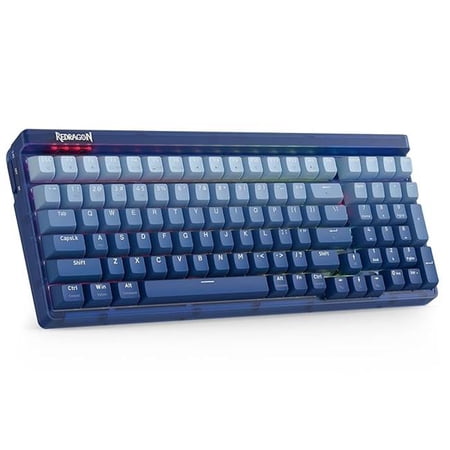
- Best overall budget: Redragon K628 75% — 75% hot-swap wired for $42.99
- Best budget full-size: Redragon K670 — 104-key hot-swap with full numpad at $47.99
- Best budget wireless: Redragon K530 Pro — 60% wireless hot-swap under $50
- Best budget 65%: Redragon K631 — 68-key compact hot-swap at $39.99
- Best budget 60%: Redragon K630 Dragonborn — 61-key compact mechanical under $40
At a glance
| Keyboard | Best for | Price | Layout |
|---|---|---|---|
| Redragon K628 | Best overall budget | $42.99 | 75% (78 keys) |
| Redragon K670 | Budget full-size | $47.99 | Full-size (104 keys) |
| Redragon K530 Pro | Budget wireless | $49.99 | 60% (61 keys) |
| Redragon K631 | Budget 65% | $39.99 | 65% (68 keys) |
| Redragon K630 | Budget 60% | $39.99 | 60% (61 keys) |
Redragon K628 75% — Best overall budget mechanical keyboard
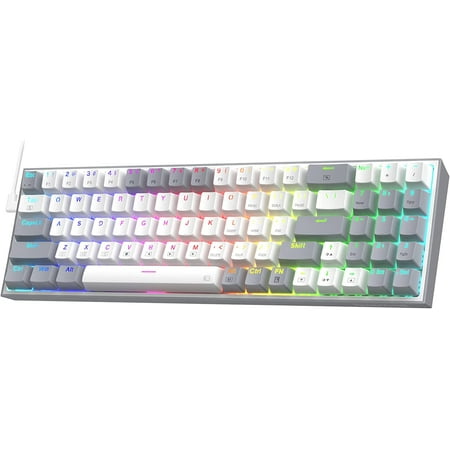
YES! TRUE HOT-SWAP;Practical Wired 78 Keys;More Than Quiet;Vibrant Groovy RGB;The Mix+ Grey;Pro Software Supported
The Redragon K628 is the budget keyboard that makes the most sense for most buyers. At $42.99 you get a 75% layout — full function row, arrow keys, compact navigation cluster — with hot-swappable sockets and solid RGB. The 75% layout is the most practical compact format: smaller than a full-size board, but you keep the function row and arrows without needing layer shortcuts. For a first mechanical keyboard or a desk keyboard that needs to fit a tighter space, this is the right default.
The hot-swap sockets take any MX-compatible switch, so when the stock Outemu switches wear out or you want to try something different — Red linears, Browns, clicky Blues — you can swap without soldering. At the budget tier, this matters more than at higher price points because you’re more likely to want to upgrade the switches than the board itself later. The per-key RGB covers standard preset modes reliably.
Build quality is plastic, which is expected at $42.99. The chassis is solid enough for daily use without obvious flex issues. Redragon’s product support is reliable at this price tier and replacement parts are available. For a budget keyboard recommendation to someone who has never owned a mechanical and wants to try one without committing $100+, this is the board.
| Spec | Detail |
|---|---|
| Layout | 75% (78 keys) |
| Switch type | Outemu (hot-swappable) |
| Connectivity | Wired USB |
| Hot-swap | Yes — MX-compatible |
| Backlight | Per-key RGB |
| Price | $42.99 |
Rating: 4.3/5
- ✓ 75% layout keeps function row and arrow keys
- ✓ Hot-swappable at $42.99
- ✓ Compact footprint for tighter desk setups
- ✓ Redragon support and part availability
- ✗ Wired only — no wireless option
- ✗ Stock Outemu switches aren’t the best starting point
Price: $42.99 — Check current price
Redragon K670 Full-Size — Best budget full-size mechanical keyboard
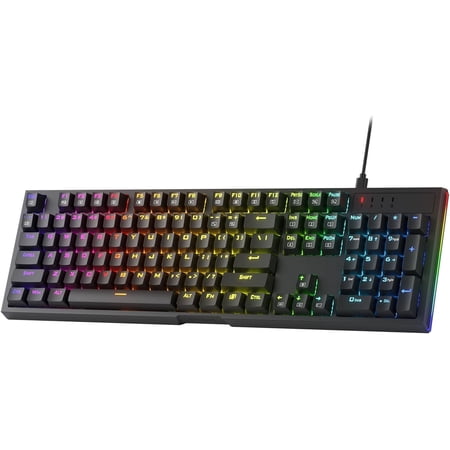
Upgraded Hot-Swap;Quiet+ Red Switches;Dedicated Multimedia Controls;Vibrant Groovy RGB;
The Redragon K670 is what you buy when you want all 104 keys — numpad included — for under $50. Hot-swappable sockets, per-key RGB, and full-size layout at $47.99. For anyone doing data entry, accounting, or any number-heavy work, the numpad is non-negotiable, and the K670 is the cheapest way to get it with mechanical switches and hot-swap capability. It also makes a solid starter keyboard for someone upgrading from a standard office keyboard who doesn’t want to relearn a compact layout.
The full-size format takes up more desk space than the 75%, 65%, or 60% options on this list — that’s the trade-off for keeping the numpad. If your desk can accommodate it, the K670 gives you the full key count at the same budget price tier. The switch options and build quality are comparable to the K628 — hot-swappable Outemu switches in a plastic chassis with RGB effects. Reliable at this price, not remarkable.
| Spec | Detail |
|---|---|
| Layout | Full-size (104 keys with numpad) |
| Switch type | Mechanical hot-swappable |
| Connectivity | Wired USB |
| Hot-swap | Yes — MX-compatible |
| Backlight | Per-key RGB |
| Price | $47.99 |
Rating: 4.2/5
- ✓ Full numpad for data entry and number work
- ✓ Hot-swappable at under $50
- ✓ Budget-friendly entry to full-size mechanical
- ✗ Largest footprint on this list
- ✗ Wired only
Price: $47.99 — Check current price
Redragon K530 Pro Draconic — Best budget wireless mechanical keyboard
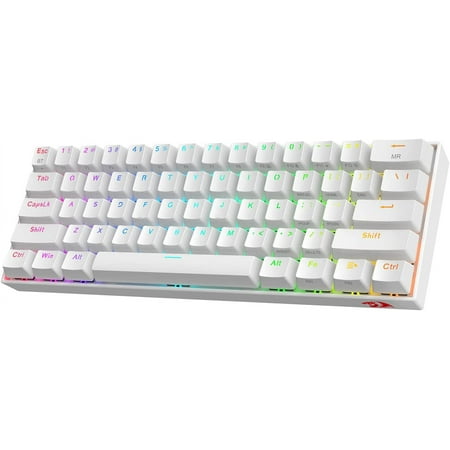
Upgraded K530 PRO;Hot-Swappable Red Switches;3-Mode Connection;Wireless Made Easy;Dedicated for FPS Gamer;RGB Illumination Builder;
The Redragon K530 Pro at $49.99 is the budget pick for anyone who needs wireless and doesn’t want to spend $60+. 60% compact layout with 61 keys, 100% hot-swappable sockets, Bluetooth wireless, and RGB backlight for under $50. Three years ago, budget wireless mechanical keyboards were largely unreliable. The K530 Pro is proof that the category has matured: the Bluetooth connection is stable, the hot-swap sockets work, and the compact 60% layout fits any desk.
The 60% layout means no function row, no arrows, no navigation keys — all of these are accessible through the Fn layer but require learning the layer shortcuts. It’s the most demanding adjustment on this list for someone used to a full-size keyboard. If you’re already comfortable with 60% or you specifically want the smallest footprint possible, this is the pick. For everyone else, the K628’s 75% layout is more approachable without the wireless.
| Spec | Detail |
|---|---|
| Layout | 60% (61 keys) |
| Switch type | Mechanical hot-swappable |
| Connectivity | Wireless Bluetooth + USB-C wired |
| Hot-swap | Yes — 100% hot-swappable |
| Backlight | RGB |
| Price | $49.99 |
Rating: 4.2/5
- ✓ Wireless at under $50
- ✓ 100% hot-swappable sockets
- ✓ Most compact footprint on this list
- ✗ 60% layout — steeper adjustment curve
- ✗ No dedicated function row, arrows, or nav keys
Price: $49.99 — Check current price
Redragon K631 65% — Best budget 65% mechanical keyboard
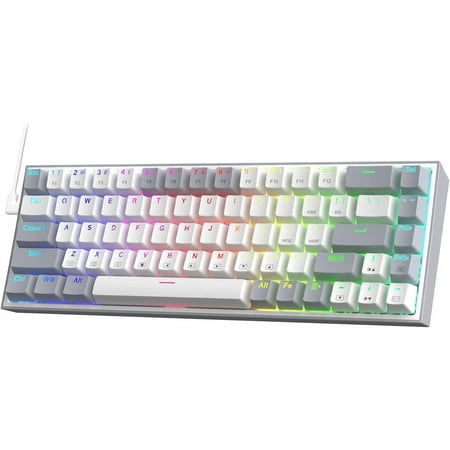
Wired 68 Keys Layout;Hot-Swappable Red Switches;Vibrant Groovy RGB;Pro Software Supported;Dedicated for FPS Gamer
The Redragon K631 is the 65% option for buyers who want dedicated arrow keys without the function row or numpad. 68 keys, hot-swappable, RGB, at $39.99 — the cheapest board on this list. The 65% layout is a popular middle ground: smaller than 75% but keeps the arrows and a few nav keys that 60% drops. For gaming specifically, dedicated arrow keys without the numpad overhead is a clean setup.
The hot-swap sockets are the standout feature at this price. The K631 is one of the cheapest hot-swappable mechanical keyboards available from a brand with real customer support. If you want to experiment with switch types — linear, tactile, clicky — the K631 lets you do that at the lowest entry cost. Build quality is plastic and comparable to the rest of the Redragon lineup: functional, nothing premium.
| Spec | Detail |
|---|---|
| Layout | 65% (68 keys) |
| Switch type | Mechanical hot-swappable |
| Connectivity | Wired USB |
| Hot-swap | Yes — MX-compatible |
| Backlight | RGB |
| Price | $39.99 |
Rating: 4.1/5
- ✓ Dedicated arrow keys in 65% compact form
- ✓ Hot-swappable at $39.99 — cheapest hot-swap on this list
- ✗ No function row — accessed via Fn layer
- ✗ Wired only
Price: $39.99 — Check current price
Redragon K630 Dragonborn — Best budget 60% mechanical keyboard
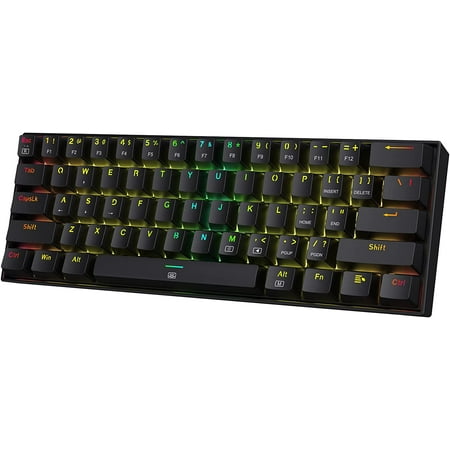
60% Layout In Wired;Hot-Swappable Red Switches;Vibrant RGB;Pro Software Customizable
The Redragon K630 Dragonborn is the most stripped-down option on this list — 61 keys, wired, at $39.99. No wireless, no function row, no arrows without Fn — just a compact 60% board with mechanical switches and RGB. The K630 is the pick if you specifically want a 60% wired board and want to start at the lowest possible price. The compact form factor is the appeal: this takes up minimal desk space and is easy to travel with.
The 60% layout is the strictest adjustment on this list. Arrows, function keys, Page Up/Down, Delete, Insert, Home, End — all of these require Fn layer access. Most users adapt in a few days for basic use, but it takes longer to internalize completely. If you’re committed to 60% for the footprint advantage, the K630 is the budget entry point. If you’re not sure whether 60% is for you, get the K631 or K628 instead — you’ll have dedicated arrow keys and will adjust more easily.
| Spec | Detail |
|---|---|
| Layout | 60% (61 keys) |
| Switch type | Mechanical |
| Connectivity | Wired USB |
| Backlight | RGB |
| Price | $39.99 |
Rating: 4.0/5
- ✓ Smallest wired form factor on this list
- ✓ $39.99 — tied for cheapest pick
- ✗ No hot-swap — switches are soldered
- ✗ 60% layout requires layer shortcuts for most keys
- ✗ Wired only
Price: $39.99 — Check current price
Verdict
For most buyers, the Redragon K628 75% at $42.99 is the right call — practical layout with function row and arrows, hot-swappable, and a solid introduction to mechanical keyboards without breaking the budget. If you need a numpad, step up to the K670 for $5 more. If you need wireless and can live with 60%, the K530 Pro at $49.99 delivers it. The K631 and K630 are for buyers who specifically want 65% or 60% compact builds at the cheapest possible price.
Buying advice
Budget mechanical keyboards are better than they’ve ever been, but there are still two things to verify before buying. First, confirm the keyboard is truly mechanical — some budget listings describe keyboards as “mechanical feeling” or use optical switches marketed as mechanical when they’re not traditional mechanical switches with physical actuation. All five keyboards on this list are confirmed genuine mechanical switch boards. Second, if hot-swap matters to you, verify it’s listed explicitly — the K630 on this list is not hot-swappable, while the other four are.
Switch types on budget boards are typically Outemu Blue (clicky), Brown (tactile), or Red (linear). They’re not premium switches, but they’re functional and hot-swappable — which means you can replace them with Gateron, Akko, or any other MX-compatible switch when you want to upgrade the feel without buying a new board.
FAQ
What is the best budget mechanical keyboard under $50?
The Redragon K628 75% at $42.99 is the best overall budget mechanical keyboard under $50. Hot-swappable sockets, 75% layout with function row and arrow keys, and per-key RGB. The Redragon brand has real product support and the 75% layout is the most practical compact format for most users.
Are budget mechanical keyboards worth it?
Yes, for a first mechanical keyboard. Budget mechanicals like the Redragon line use real mechanical switches (Outemu or similar), deliver the responsive feel that makes mechanical keyboards popular, and come with hot-swap capability that lets you upgrade the switches later. You’re not getting premium build materials or advanced firmware, but you’re getting an authentic mechanical keyboard experience for $40-50.
What is the cheapest hot-swap mechanical keyboard?
The Redragon K631 65% at $39.99 is the cheapest hot-swappable mechanical keyboard on this list. Hot-swap means you can pull and replace switches without soldering, which is a feature that used to cost significantly more.
Is Redragon a good mechanical keyboard brand?
Redragon is a solid budget brand with a large product lineup, real customer support, and consistent quality at their price tier. They don’t compete with premium brands on materials or firmware, but they consistently deliver functional mechanical keyboards at $30-60 that work reliably. For the budget mechanical keyboard category, they’re one of the most recommended brands across communities like Reddit’s r/MechanicalKeyboards.