Computer Station Nation is reader-supported.
When you buy through links on our site, we may earn an affiliate commission. Learn more.
Quick answer: The THTRO 15.6″ is the best-value pick at $300, and it’s the right buy if your accounting work lives in the cloud. The Auusda 15.6″ costs $200 more but adds 16GB of RAM, doubles the storage, and includes Windows 11 Pro with BitLocker — worth the premium if you run QuickBooks Desktop or store client data locally.
If you’re shopping the budget end of our best laptops for accounting roundup, the THTRO 15.6″ IPS at $300 catches your eye fast. The next pick up the list, the Auusda 15.6″ Business Laptop, costs $497. That’s a $200 premium for what looks like the same form factor. The real question for an accountant is whether the upgrade earns its money back in your specific workflow.
This comparison covers eight dimensions that actually matter for accounting work and ends with a clear recommendation. The short answer is that these laptops are aimed at different buyers — and getting the right one matters more than getting the cheaper one.
Quick comparison table
| Spec | THTRO 15.6″ | Auusda 15.6″ |
|---|---|---|
| Price | $299.99 | $496.99 |
| CPU | Intel 6500Y (2-core) | Intel Celeron N5095 (4-core) |
| RAM | 16GB | 32GB DDR4 |
| Storage | 512GB SSD | 1TB NVMe SSD |
| Display | 15.6″ 1080p IPS | 15.6″ 1080p IPS |
| OS | Windows 11 Home | Windows 11 Pro |
| Numeric keypad | Varies | Yes |
| Weight | ~3.7 lb | ~3.9 lb |
Price — THTRO at $300 is hard to argue with
The THTRO costs $299.99, the Auusda costs $496.99. That’s a $197 gap — closer to a CPA exam prep section than to pocket change. If you’re a student, an early-career accountant, or a one-person shop watching every dollar, the THTRO is the obvious starting point. The question is whether the things you give up are worth the savings.
Winner: THTRO.
RAM and storage — Auusda doubles both
The Auusda doubles you on both — 32GB of RAM versus 16GB, and a 1TB SSD versus 512GB. For cloud accounting (Xero, Wave, QuickBooks Online), 16GB of RAM is genuinely enough. You can run the cloud tool, plus Chrome with twenty tabs, plus a Zoom call, and feel no lag. The 512GB SSD is similarly fine if you don’t hoard local files.
For QuickBooks Desktop with multi-company files, that math flips. Intuit’s recommended specs call for 16GB minimum, 16GB+ for “optimal” multi-company use. With the Auusda’s 32GB you have headroom forever; with the THTRO’s 16GB you’re at the floor. The 1TB versus 512GB difference matters most for accountants who archive multi-year client files locally — most outgrow 512GB within two tax seasons.
Winner: Auusda — by a wide margin if your workflow needs it.
CPU — Auusda’s quad-core wins multi-thread
The THTRO’s Intel 6500Y is a two-core, four-thread chip from an older generation. The Auusda’s Intel Celeron N5095 is a four-core, four-thread efficiency chip from a more recent generation. Single-thread performance is roughly comparable. Multi-thread performance, which matters for QuickBooks loading multiple company files or Excel recalculating complex workbooks, favors the Auusda’s extra cores.
Neither is fast by 2026 standards. Both struggle with anything that’s not Office, browsers, or accounting software. Winner: Auusda — modest edge on multi-core, irrelevant for cloud-only work.
Display — tie
Both ship with a 15.6″ 1920×1080 IPS panel. IPS is the right call at this price tier — TN panels (the cheaper alternative) wash out at any viewing angle and render fine spreadsheet text fuzzy. Both panels are usable for long stretches of spreadsheet and PDF reading. Neither will impress a graphic designer.
Winner: tie.
Operating system — Auusda’s Pro license matters for client data
The Auusda ships with Windows 11 Pro. The THTRO ships with Windows 11 Home. The accounting-relevant difference is BitLocker — Pro includes full-disk encryption out of the box, Home doesn’t. If client data sits on the laptop and the laptop ever gets stolen or lost, BitLocker is what stops the thief from reading the drive.
You can pay $99 to upgrade Home to Pro on the THTRO, which closes the gap but eats $99 of the $197 price advantage. Winner: Auusda.
Build quality and brand history — slight Auusda edge
Both laptops have plastic chassis, mediocre trackpads, and the kind of build that earns the words “good enough.” Auusda has been on the market longer and has more user reviews — generally positive about basic build solidity, mixed about Wi-Fi reliability and trackpad feel. THTRO is newer with thinner review history, which makes it harder to predict.
Reddit’s r/SuggestALaptop notes that generic-brand budget laptops in this tier — Auusda, THTRO, Acemagic, SGIN — often share OEMs with name brands. The chassis come from the same factories. Quality control is the variable. Winner: Auusda — slight edge for review depth.
Use case fit
Choose the THTRO if you:
- Live in cloud accounting (Xero, Wave, QuickBooks Online)
- Are an accounting student saving for CPA prep or other expenses
- Don’t store client data locally
- Want the cheapest 16GB Windows laptop with an IPS panel
Choose the Auusda if you:
- Run QuickBooks Desktop with multi-company files
- Store client data locally and need BitLocker
- Want 1TB of storage for multi-year archives
- Plan to keep the laptop 4+ years (the extra RAM future-proofs longer)
The verdict
The THTRO 15.6″ IPS Laptop is the right pick for cloud-first accountants and accounting students. At $300, with 16GB of RAM and an IPS panel, it covers everything QuickBooks Online or Xero can throw at it. Save the $200 and put it toward a CPA prep section, an external monitor, or a real mouse.
The Auusda 15.6″ earns its $200 premium for QuickBooks Desktop power users and anyone storing client data locally. The 32GB / 1TB / Pro combination maps directly onto serious accounting workloads, and the gap closes further once you factor in the $99 it would cost to add BitLocker to the THTRO.
Where to buy
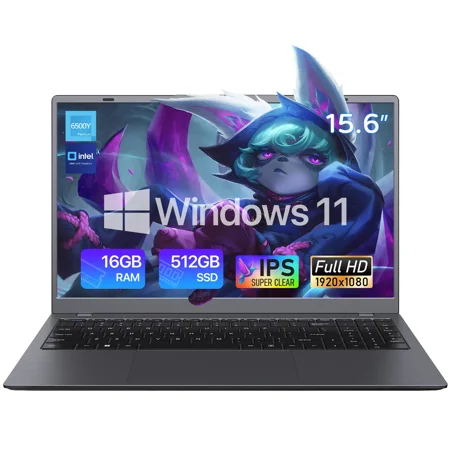
THTRO 15.6-inch laptop is equipped with a 1080P FHD display, delivering sharp text and vivid images for comfortable extended office and academic use. Powered by an Intel dual-core processor, it features 16GB of system memory and a 512GB solid-state drive (SSD), ensuring smooth operation when...
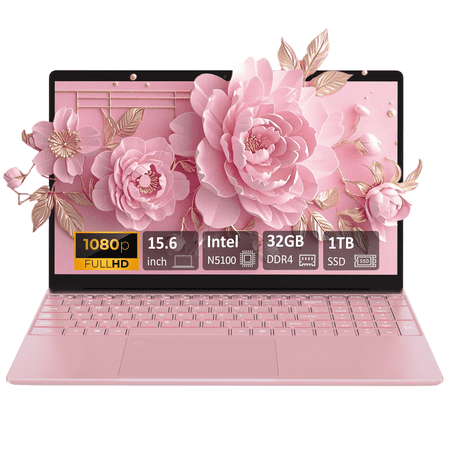
Introduce: This Auusda laptop is an ultra portable, powerful, and versatile companion that can meet your daily office and multimedia needs. Auusda Laptop with the latest Intel Celeron N5100 chipset, built-in 32GB DDR4 RAM and 1TB SSD large storage, equipped with 15.6-inch FHD 1920x1080 LCD 16:9...
Frequently asked questions
Will the THTRO handle QuickBooks Desktop?
With one company file open, yes. Intuit recommends 16GB of RAM as the comfortable threshold for normal use, which the THTRO meets. If you regularly run two or three companies simultaneously, the Auusda’s 32GB is the safer choice — the THTRO will start swapping under that load.
Is the Intel 6500Y still capable in 2026?
For Excel, browser-based accounting, and PDFs, yes. It’s an older two-core chip but still handles light desktop workloads without complaint. For anything that genuinely loads multiple cores — code compiling, video rendering, large Excel macros — it’s underpowered. Most accountants don’t do those things.
Should I upgrade Home to Pro on the THTRO?
Only if you store client data locally. The $99 upgrade gets you BitLocker, which is the practical reason an accountant cares about Pro. If your stack is fully cloud and the laptop never holds anything sensitive, Home is fine.
Which lasts longer?
The Auusda’s 32GB of RAM future-proofs it longer for software that gets hungrier each year (QuickBooks, Chrome, Office). The THTRO’s 16GB hits a ceiling sooner. Both are budget-build laptops with similar lifespan expectations from a hardware perspective — 4 to 5 years is reasonable. The Auusda’s spec headroom likely keeps it useful longer.