Computer Station Nation is reader-supported.
When you buy through links on our site, we may earn an affiliate commission. Learn more.
The Corsair K65 PLUS Wireless 75% versus the K70 CORE RGB Mechanical is the most useful comparison in Corsair’s current keyboard lineup. Both are great in 2026. They’re great for different people. Here’s everything you need to know to pick the right one.
Quick Verdict
Get the K65 PLUS Wireless if wireless flexibility, hot-swap switches, or a compact 75% layout matter to you. It’s the more future-proof board.
Get the K70 CORE RGB Mechanical if you need a numpad, you want the rotary dial, or you’d rather save $23 for a wired-only full-size flagship.
Spec Comparison
| Spec | K65 PLUS Wireless | K70 CORE RGB Mechanical |
|---|---|---|
| Layout | 75% (no numpad) | Full-size + numpad |
| Switches | MLX Red (hot-swap) | MLX Red (soldered) |
| Connection | 2.4GHz / BT / USB-C | USB-C wired only |
| Keycaps | PBT double-shot | ABS double-shot |
| Rotary dial | No | Yes |
| Media keys | Fn-layer only | Dedicated row |
| Polling rate | 1,000Hz | Up to 8,000Hz |
| Battery life | ~266 hours (RGB off) | N/A |
| Price | $140 | $117 |
Form Factor and Layout
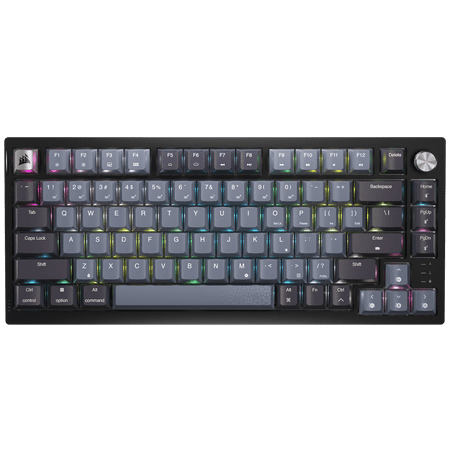
CORSAIR K65 PLUS WIRELESS 75% RGB Mechanical Gaming Keyboard - Pre-Lubricated CORSAIR MLX Red Linear Switches - 2.4GHz Wireless - Bluetooth®
The K65 PLUS Wireless is a 75% layout. You keep the function row across the top, the arrow keys in the bottom right, and a tight column of navigation keys (Home, End, Page Up, Page Down) on the far right side. What’s gone is the numpad. The keyboard is roughly 25% smaller than a full-size, which means your mouse can sit closer to your body and your shoulder gets a break over a long workday.
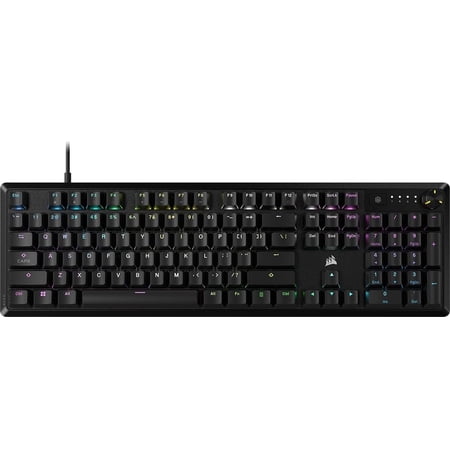
CORSAIR K70 CORE RGB Mechanical Gaming Keyboard - CORSAIR Red Linear Switches - Sound Dampening - Rotary Dial - Aluminum Top Plate - Onboard Storage - Black
The K70 CORE RGB Mechanical is a full-size. Numpad on the right, dedicated media row across the top, a customizable rotary dial in the top-right corner. If you do spreadsheet work, accounting, gaming with 10-key macros, or you just like the option to enter numbers without using the top row, the full-size layout wins easily. If you don’t need a numpad, the K65 PLUS form factor is more ergonomic and frees up real desk space.
Switch Feel
Both boards use Corsair MLX Red linear switches with the same 45g actuation force, same 4mm total travel, same factory pre-lube. Identical typing feel out of the box. If you blindfolded yourself and typed on both, you would not be able to tell which is which from switch feel alone.
The K65 PLUS adds hot-swap. You can pop the stock switches out and drop in Gateron, Kailh, Akko, or any other MX-style switch without soldering. The K70 CORE is soldered — what you buy is what you have for the life of the board. If you’re a keyboard hobbyist who might want to try different switches a year from now, this is a meaningful difference.
Sound Profile
The K65 PLUS sounds a bit deeper and more satisfying overall. PBT keycaps absorb more high-end click and produce a fuller thock. Multiple foam layers and a silicone gasket mount inside the case also reduce hollow resonance.
The K70 CORE has internal foam dampening that gets it close, but the larger chassis has more empty space to resonate and the ABS keycaps produce slightly more high-pitched click. Both sound good. The K65 PLUS sounds slightly better.
Keycaps and Long-Term Wear
This is the most under-rated comparison point. The K65 PLUS uses double-shot PBT keycaps. They resist shine, hold their texture, and look new years from now. The K70 CORE uses double-shot ABS keycaps. They will develop shine on the WASD cluster and spacebar within 6 to 12 months of heavy use.
If you’re keeping the board for one or two years, ABS is fine. If you want a keyboard that still looks great in five years, PBT matters.
Connectivity
The K70 CORE is wired-only USB-C. Plug it in and go. Connection is always instant.
The K65 PLUS is wired and wireless. The 2.4GHz dongle delivers gaming-grade low latency that’s indistinguishable from wired in practice. Bluetooth handles connections to laptops, tablets, and phones with up to three saved profiles. USB-C wired is always there as a fallback and to charge the battery. If you have a desktop-laptop-tablet workflow, the K65 PLUS is the obviously better choice.
Polling Rate
The K70 CORE supports up to 8,000Hz polling. The K65 PLUS maxes out at 1,000Hz on wired or 2.4GHz, and 125Hz on Bluetooth.
Practical answer: 1,000Hz is enough for 99% of users including competitive gamers. If you’re a top-level Valorant or CS player and you can demonstrably feel the difference between 1,000Hz and 8,000Hz, the K70 CORE has an edge. For everyone else, this difference is theoretical.
Software
Both run iCUE. Same features, same lighting controls, same macro support, same ecosystem integration with Corsair RAM, fans, AIO coolers, and mice. The K65 PLUS has occasional wireless reconnection lag after sleep — not a deal-breaker but worth knowing. The K70 CORE has no equivalent wireless quirks because it’s wired.
Value
The K65 PLUS is $140. The K70 CORE Mechanical is $117. That’s $23 more for the K65 PLUS — you’re paying for the wireless capability, the hot-swap PCB, and the PBT keycaps. Whether that’s worth it depends entirely on whether you’ll use those features.
If you’ll use wireless even once a week, the upgrade pays for itself in convenience.
If you never go wireless and never plan to swap switches, the K70 CORE is the better dollar-for-dollar value.
Which Should You Buy?
The K65 PLUS Wireless is the right pick if:
- Wireless matters to you
- You want hot-swap switches for future-proofing
- You don’t need a numpad
- You want PBT keycaps that last
- You’d benefit from a more compact, ergonomic layout
The K70 CORE RGB Mechanical is the right pick if:
- You need a numpad
- You want the rotary dial
- You play competitive FPS at a level where 8,000Hz polling helps
- You’d rather save $23
- You don’t care about wireless
For more Corsair keyboard options across every layout and price tier, see our best Corsair mechanical keyboard roundup.
FAQ
Is the wireless on the K65 PLUS really competitive with wired for gaming?
Yes, in 2.4GHz mode. Latency is approximately 1ms more than wired in most testing — undetectable in practice even in competitive FPS games. Bluetooth mode introduces more latency and is not recommended for gaming.
Do both boards use the same MLX Red switches?
Yes. Same switch design, same 45g actuation, same 4mm travel, same factory pre-lube. The only difference is that the K65 PLUS has them mounted in hot-swap sockets while the K70 CORE has them soldered.
Can I get a K65 PLUS without wireless?
No. Corsair only sells the K65 PLUS in wireless trim. If you want wired-only at a similar size, look at the K65 RGB Mini (60%) or step up to the K70 CORE.
Which is better for typing?
Slight edge to the K65 PLUS due to PBT keycaps, deeper sound, and the more focused layout. Both are good for typing on linear switches, but linears aren’t ideal for typing in general — if you type a lot, consider a tactile switch board instead.