Computer Station Nation is reader-supported.
When you buy through links on our site, we may earn an affiliate commission. Learn more.
Quick Answer: It depends on your desk setup. The BOHASHIN wins if you need more outlets (4 AC + 2 USB built in). The BCOOSS wins if you want wireless phone charging, better light control, and a pen holder. Both cost about the same — pick based on which feature set solves your actual desk problem.
Introduction
At roughly the same price, the BOHASHIN LED Desk Lamp and the BCOOSS LED Desk Lamp both solve the same basic problem — desk lighting — with very different secondary features.
The BOHASHIN builds a 4-outlet power strip and 2 USB ports into the base. The BCOOSS builds Qi wireless charging and a pen holder into the base. Both have adjustable brightness and color temperature modes. Both use touch controls. The hardware quality is comparable. So this comparison really comes down to: do you need more wall outlets, or do you need wireless phone charging?
Quick Comparison
| Spec | BOHASHIN LED | BCOOSS LED |
| Price | ~$13.99 | ~$14.99 |
| AC Outlets | 4 built-in ✅ | ❌ |
| USB Ports | 2 USB-A ✅ | 1 USB-A |
| Wireless Charging | ❌ | ✅ Qi |
| Pen Holder | ❌ | ✅ |
| Brightness Control | Touch dimmer ✅ | Touch dimmer ✅ |
| Color Temperature | Warm + cool ✅ | Warm + cool ✅ |
| Eye-Care LED | Standard LED | ✅ Low flicker |
| Base Width | Wide (power strip) ⚠️ | Compact ✅ |
Light Quality — BOHASHIN vs BCOOSS
Both lamps have multi-level touch dimmers and warm/cool color temperature modes. On light quality they’re closely matched. The BCOOSS edges it with eye-caring LEDs that produce less flicker than the BOHASHIN’s standard LEDs. For casual work and general desk lighting, both perform well at this price. For long eye-intensive sessions, the BCOOSS’s flicker reduction is a meaningful advantage. Winner: BCOOSS — eye-caring LED gives slight edge for extended use.
Power Utility — BOHASHIN vs BCOOSS
This is the BOHASHIN’s decisive advantage. Four AC outlets and two USB ports built into the lamp base essentially gives your desk a dedicated power strip that takes up no extra space. If your workstation is running low on outlet slots — and most battlestations are — the BOHASHIN solves that problem while also providing your desk light. The BCOOSS has one USB port and no AC outlets. Winner: BOHASHIN — 4 AC outlets + 2 USB ports is a major desk utility win.
Wireless Charging — BOHASHIN vs BCOOSS
The BCOOSS has Qi wireless charging built into the base — set your phone down and it charges without a cable. The BOHASHIN has no wireless charging, though its two USB ports can charge your phone via cable. If you prefer cable-free phone charging and consistently keep your phone on your desk while you work, the BCOOSS’s wireless pad is more convenient than hunting for a cable. Winner: BCOOSS — wireless charging vs. wired USB only.
Desk Footprint — BOHASHIN vs BCOOSS
The BOHASHIN’s base is necessarily wider than the BCOOSS’s due to the built-in power strip. On a crowded desk, this may matter. The BCOOSS has a more compact base that takes up less footprint while still accommodating the wireless charging pad and pen holder. For smaller desks or tight setups, the BCOOSS is easier to fit in. Winner: BCOOSS — more compact base for tight desk spaces.
Desk Organization — BOHASHIN vs BCOOSS
The BCOOSS has a built-in pen holder for keeping pens, styluses, and small items organized at the lamp base. The BOHASHIN has no dedicated storage. Small advantage to the BCOOSS for desk organization. Winner: BCOOSS — pen holder adds practical desk organization.
Who Should Buy Each
Buy the BOHASHIN LED Desk Lamp if: Your desk is running low on outlet slots and you want to solve lighting and power in one purchase. You have multiple devices to power (monitor, phone, tablet, small speakers). You don’t need wireless charging — you prefer cables.
Buy the BCOOSS LED Desk Lamp if: You want Qi wireless phone charging without a cable. Your desk has adequate outlet space already. You want a pen holder and a more compact base. Eye-care LED technology matters to you for long sessions.
Verdict
This is a genuine it-depends comparison. The BOHASHIN is the right call if you need more outlets — its 4 AC + 2 USB power strip is the most practical desk upgrade you can get for $14. The BCOOSS is the right call if you want wireless charging, a pen holder, and better eye-care LEDs for extended desk sessions. Both are excellent value — pick based on your specific desk constraint.
Where to Buy
BOHASHIN LED Desk Lamp
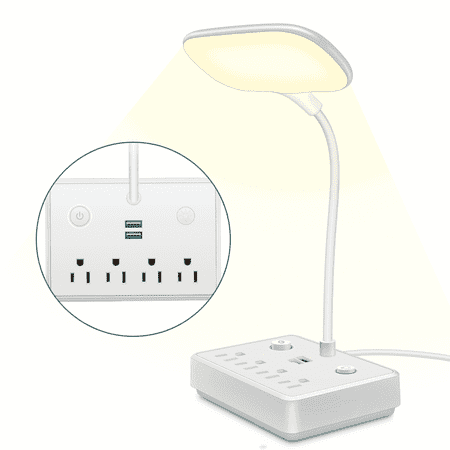
BOHASHIN LED desk lamp with 2 USB Charging Port and 4 AC Outlets, 2 Color Temperatures and 4ft Extension Cord for reading, Working, Studying Number of Outlets: 4 Number of USB ports: 2USB Shell: ABS Line length: 4ft Rated voltage: 110V Rated current: 10A Rated total power: 2000w USB output...
BCOOSS LED Desk Lamp
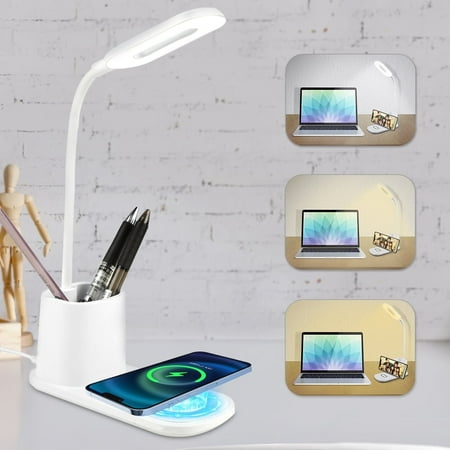
If you love a clean and tidy desk space that is clutter-free, BCOOSS LED desk lamp is here for you. It offers more than just illumination; it features a built-in pen holder for your pencils, pens, or glasses, and a convenient wireless charger that also doubles as a phone holder for your...
Frequently Asked Questions
How many watts are the BOHASHIN AC outlets?
The BOHASHIN’s built-in AC outlets support standard US 120V power. Use them for small to medium desk devices — phone chargers, small LED strips, USB hubs, laptop chargers. Avoid plugging in high-draw appliances like space heaters or monitors; stay within the rated load specification listed on the product label.
Does the BCOOSS wireless charger work while the lamp is off?
Yes — the wireless charging pad on the BCOOSS operates independently from the lamp light. You can charge your phone on the pad even with the lamp turned off, as long as the unit is plugged in to power.
Which is better for a gaming battlestation?
The BOHASHIN is more useful for a gaming setup — 4 AC outlets and 2 USB ports handle the power demands of RGB peripherals, controllers, and desk accessories without adding another power strip. The wireless charging is convenient for a gaming phone as a secondary use, but the outlet count advantage of the BOHASHIN matters more for a device-heavy battlestation.
Can you use both USB ports on the BOHASHIN simultaneously?
Yes — both USB-A ports on the BOHASHIN operate simultaneously. They share a total USB charging output, so charging two devices at once will be slower than charging one. For typical phone and tablet charging, both ports work fine in parallel.