Computer Station Nation is reader-supported.
When you buy through links on our site, we may earn an affiliate commission. Learn more.
Quick answer: The HP 15.6″ Touchscreen wins on screen real estate, multitasking, and touch input. The HP 14″ Ultra Thin Copilot wins on portability, battery life, and price ($350 vs $600). Choose based on whether you mostly sit at a desk (15.6″) or carry the laptop around (14″).
Two HP picks from our best all-purpose laptops roundup serve different buyers. The 15.6″ Touchscreen is the desk-focused all-rounder. The 14″ Ultra Thin Copilot is the daily-carry portable. The choice between them isn’t really about specs — it’s about how you use a laptop.
Quick comparison table
| Spec | HP 15.6 Touchscreen | HP 14 Ultra Thin Copilot |
|---|---|---|
| Price | $599.79 | $349.99 |
| Display | 15.6″ touchscreen | 14″ non-touch |
| Weight | ~4 lb | ~3 lb |
| Battery | ~6–7 hours | ~8–9 hours |
| CPU | Intel N-series | Intel N150 (2025) |
| Numeric keypad | Yes | No (14″ too small) |
| Copilot key | No | Yes |
| Warranty | 1-year HP | 1-year HP |
Price — HP 14 wins by $250
The HP 14 Ultra Thin Copilot at $350 undercuts the 15.6 Touchscreen at $600 by a substantial $250. That’s real money — almost the full price of another budget laptop. Winner: HP 14.
Display — HP 15.6 wins on size and touch
The 15.6″ Touchscreen is meaningfully bigger — about 30% more pixel real estate than 14″ — and the touch layer adds genuine input flexibility. For students taking handwritten notes with a stylus, casual creative work, or any side-by-side window snapping, the 15.6″ wins clearly. The 14″ is fine for single-window work but feels cramped for multitasking.
Winner: HP 15.6 — clear edge.
Portability — HP 14 wins easily
3 lb versus 4 lb, 14″ footprint versus 15.6″. The HP 14 slides into a small bag the 15.6 doesn’t. Battery life favors the HP 14 too — 8–9 hours on the modern N150 chip versus 6–7 hours on the 15.6’s larger panel. For daily commute, travel, and coffee shop use, the HP 14 is the obvious pick.
Winner: HP 14 — clear edge.
CPU — HP 14’s N150 is newer
The HP 14 ships with the 2025-generation Intel N150 — modern silicon with strong single-thread performance and excellent power efficiency. The HP 15.6’s CPU varies by SKU but is typically an older N-series chip. For light productivity, both feel equivalent. For battery efficiency, the N150 wins. Winner: HP 14 — modest edge.
Build quality — tie
Both are HP builds with consistent quality across the lineup. Plastic chassis with metallic finish, proper keyboard with key travel, decent trackpad, Wi-Fi 6, 1-year HP warranty. Neither has a meaningful build advantage over the other. Winner: tie.
Numeric keypad — HP 15.6 wins
The 15.6″ form factor includes a full-size numeric keypad on the right side. The 14″ can’t fit one. For data entry workflows or anyone who uses the numpad regularly, the 15.6 wins. An external USB numpad costs $15 if you go with the 14 and miss having one. Winner: HP 15.6.
Use case fit
Choose the HP 15.6″ Touchscreen if you:
- Work mostly at a desk
- Use a stylus for note-taking or casual creative work
- Need a numeric keypad for data entry
- Want side-by-side window snapping for multitasking
Choose the HP 14 Ultra Thin Copilot if you:
- Travel, commute, or carry the laptop daily
- Need 8+ hours of battery life
- Work mostly in single-window apps or browsers
- Want $250 saved off the budget
The verdict
For desk-bound users, the HP 15.6″ Touchscreen is the better laptop in absolute terms — bigger, touch-capable, with the screen real estate that makes Windows multitasking work. The $250 premium buys real value for the right buyer.
For mobile users, the HP 14 Ultra Thin Copilot is the smarter buy. Lighter, longer battery, modern N150 chip, $250 cheaper. The touchscreen and bigger panel aren’t worth the portability sacrifice if you actually move with the laptop.
Where to buy
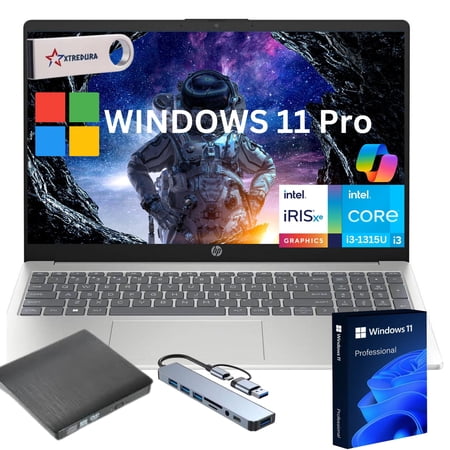
We sells computers with custom/upgraded configurations to enhance system performance. If the computer has modifications as listed above, the manufacturers box was opened by our highly skilled technicians for testing, inspection, and installation of the upgrades according to the specifications...
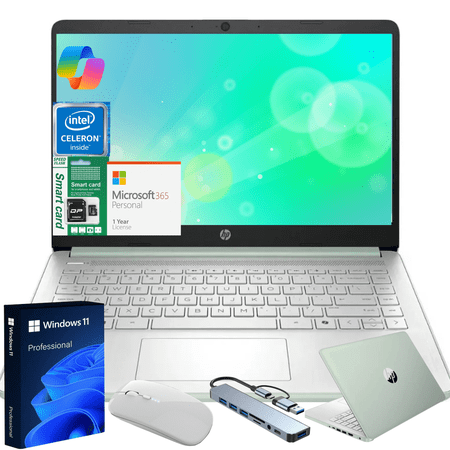
Product Overview Stay productive and connected with the HP 14-inch Ultra Thin Laptop. Designed for students, professionals, and everyday users, this ultra-lightweight laptop delivers reliable performance, modern features, and a bundle of practical accessories to enhance your computing...
FAQ
Is the touchscreen worth $250?
Only if you’ll actually use it. For users with a stylus and note-taking workflows, yes — the touch layer is transformative. For traditional keyboard-and-mouse users, no — the touchscreen adds weight and battery drain without buying you anything you’ll use.
How much does battery life actually matter?
For desk users with constant outlet access, almost not at all — both laptops will run plugged in 90% of the time. For mobile users, the 2-3 hour difference is the gap between a full workday off-charger and needing to plan around outlet access at lunch.
Will the HP 14 fit in a backpack?
Yes, in any standard laptop backpack. The 14″ footprint is the sweet spot for everyday-carry — small enough to fit anywhere, big enough to be productive on. The 15.6″ requires a larger bag and feels heavier on long carries.
Does the Copilot key on the HP 14 actually matter?
Marginally. It’s a one-button shortcut to open Microsoft’s Copilot AI assistant. For users who already use Copilot, it’s a small convenience. For users who don’t, it’s an unused key. Don’t make a buying decision based on it.