Computer Station Nation is reader-supported.
When you buy through links on our site, we may earn an affiliate commission. Learn more.
The NETGEAR Nighthawk BE3100 brings Wi-Fi 7 to gaming at $109. The ASUS ROG Rapture GT-AX11000 Pro brings the full gaming router toolkit at $360. This comparison looks at the matchup from the BE3100’s angle — where Wi-Fi 7 at $109 makes sense, and where the ROG’s gaming engineering is hard to replicate.
Quick Comparison
| Feature | NETGEAR Nighthawk BE3100 | ASUS ROG GT-AX11000 Pro |
| Price | ~$109 | ~$359.99 |
| Wi-Fi Standard | Wi-Fi 7 (BE3100) | Wi-Fi 6 (AX11000) |
| Multi-Link Operation | Yes — Wi-Fi 7 MLO | No |
| Bands | Dual-band | Tri-band + dedicated gaming |
| Gaming QoS | Basic | Adaptive QoS + Game Accelerator |
| 10G Port | No | Yes |
| WAN Port | 2.5G | 2.5G |
| Value Per Dollar | High — Wi-Fi 7 at $109 | Gaming-specialized at $360 |
| Best For | Budget Wi-Fi 7, future-proofing | Competitive gaming, full feature set |
Where the BE3100 Wins
The NETGEAR BE3100 wins on value and wireless generation. Wi-Fi 7 at $109 is the most accessible entry into Multi-Link Operation — the technology that lets your device bond both wireless bands simultaneously for lower latency. For a gaming setup that will still be running in 5–7 years, buying Wi-Fi 7 now means the router is current when Wi-Fi 7 devices become standard across consoles, PCs, and peripherals.
At $251 less than the ROG, the BE3100 also leaves budget for a gaming headset, new controller, or other battlestation upgrades. The savings are real.
Where the ROG Wins
The ROG wins on gaming-specific engineering. The dedicated 5 GHz gaming band ensures gaming traffic doesn’t compete with other household Wi-Fi. Adaptive QoS automatically prioritizes game packets. Game Accelerator finds faster routing paths to game servers. The 10G dedicated gaming port maximizes wired performance. VPN Fusion lets you run gaming on a direct connection while VPN handles other traffic.
None of these features exist on the BE3100. For competitive gaming where every millisecond of latency matters, the ROG’s engineering is purpose-built in ways the BE3100 simply isn’t.
The Practical Reality
For most gaming setups — casual competitive players, streamers, mixed-use households — the BE3100’s Wi-Fi 7 performs excellently at gaming without any of the ROG’s extra complexity. The ROG’s advantage is most pronounced for players where a few ms of latency genuinely matters: pro-level competitive gaming, high-refresh-rate setups, and large households with many competing Wi-Fi devices.
Use Cases
Choose the NETGEAR BE3100 if: you want Wi-Fi 7 future-proofing, your gaming is solid but not professional-level competitive, or you need to keep the router budget under $150.
Choose the ASUS ROG GT-AX11000 Pro if: you want maximum gaming optimization, dedicated gaming band isolation, Game Accelerator server routing, and the full ROG ecosystem — budget is secondary to performance.
Where to Buy
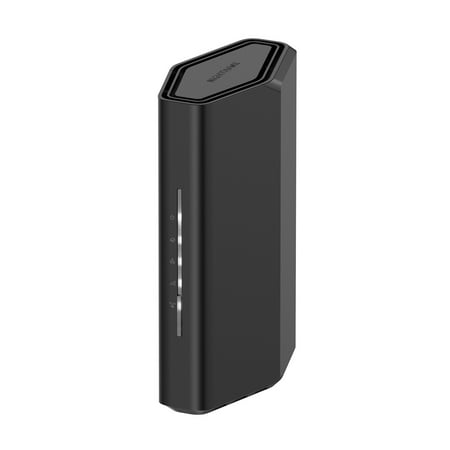
Leverage the power of WiFi 7 for speeds up to 3.1 Gbps at 1.2X faster than WiFi 6. The Nighthawk RS70 WiFi 7 Dual-band Router provides up to 2,000 sq. ft. WiFi coverage and capacity for up to 50 devices. Experience stunning streaming, video conferencing and reliably connect smart home devices....
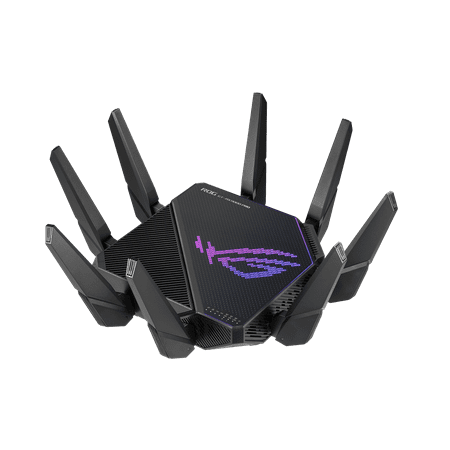
The ROG Rapture GT-AX11000 Pro is designed for gamers who want to keep multiple devices connected and still get incredible gaming performance. Enjoy up to twelve simultaneous WiFi streams for more video streaming, gaming and browsing for everyone in your home.
FAQ
Is the NETGEAR BE3100 good enough for competitive gaming?
Yes — for most competitive gaming including FPS, battle royale, and MOBA, the BE3100 delivers solid performance. Wi-Fi 7 MLO provides low latency on compatible devices. The gap vs. the ROG is only relevant at the highest competitive levels where single-digit millisecond improvements matter.
Will my current gaming devices work with Wi-Fi 7?
Most current consoles (PS5, Xbox Series X) and gaming PCs use Wi-Fi 5 or Wi-Fi 6. They’ll work fine on the BE3100 using standard Wi-Fi 5/6 mode — no Wi-Fi 7 MLO benefit until you upgrade to Wi-Fi 7-capable devices. The future-proofing advantage kicks in on next-gen hardware.