Computer Station Nation is reader-supported.
When you buy through links on our site, we may earn an affiliate commission. Learn more.
Quick answer: The Raspberry Pi 5 (8GB) wins on raw performance — meaningfully faster CPU, much better GPU, and double the RAM enable PS2-era emulation and Linux gaming the Pi 4 can’t manage. The Raspberry Pi 4 wins on ecosystem maturity and power efficiency, making it the better pick for dedicated retro emulation builds and battery-powered handhelds.
Two top picks from our best SBC for gaming roundup represent the current and previous generations of Raspberry Pi hobby boards. The Pi 5 is the new flagship with significantly faster silicon. The Pi 4 is the proven veteran with a deeper accessory ecosystem.
Quick comparison table
| Spec | Pi 5 (8GB) | Pi 4 Model B |
|---|---|---|
| Price | $239.90 | $199.99 |
| Chip | BCM2712 | BCM2711 |
| CPU | 4× Cortex-A76 @ 2.4 GHz | 4× Cortex-A72 @ 1.5 GHz |
| GPU | VideoCore VII @ 800 MHz | VideoCore VI @ 500 MHz |
| RAM | 8GB LPDDR4X | 4GB / 8GB LPDDR4 |
| PCIe | Yes (PCIe 2.0) | No |
| Power | 27 W max | 15 W max |
| Active cooling | Required | Recommended |
CPU — Pi 5 is roughly 2x faster
The Pi 5’s Cortex-A76 cores at 2.4 GHz are meaningfully faster than the Pi 4’s Cortex-A72 cores at 1.5 GHz — roughly 2x in single-core benchmarks and similar gains in multi-core. For emulation, that translates to playable PS2 frame rates on the Pi 5 versus marginal performance on the Pi 4. Winner: Pi 5 — clear edge.
GPU — Pi 5’s VideoCore VII is much better
The new VideoCore VII GPU at 800 MHz delivers roughly 3x the graphics throughput of the Pi 4’s VideoCore VI at 500 MHz, plus modern features like Vulkan 1.3 support. The practical impact is GameCube and Wii emulation that’s genuinely playable on the Pi 5 versus borderline on the Pi 4. Winner: Pi 5 — significant edge.
Ecosystem maturity — Pi 4 wins
RetroPie, Recalbox, custom case designs, every YouTube tutorial, every r/RetroPie thread — almost all of it assumes a Pi 4. The ecosystem around the Pi 4 is years more mature. Specific emulator optimizations for the Pi 5 are still being dialed in by the community. Picking the Pi 4 means picking the path with the most documentation and the fewest “this guide is for the Pi 4, the Pi 5 might be different” footnotes. Winner: Pi 4.
Power efficiency — Pi 4 wins
The Pi 4 draws up to 15 W under load. The Pi 5 draws up to 27 W. For battery-powered handheld emulator builds (NESPi 4, GPi Case 2, custom enclosures), the Pi 4’s lower power draw matters — it’s the difference between 4 hours of battery life and 2 hours on the same power bank. For desktop or wall-powered builds, this is irrelevant. Winner: Pi 4 — clear edge for portable use.
RAM — Pi 5 (8GB) wins
The 8GB Pi 5 versus the typical 4GB Pi 4 doubles your RAM headroom for multi-tasking — Steam Link streaming alongside browser tabs, Linux desktop gaming with Discord and OBS, and similar stacked workloads. For dedicated emulation-only builds, 4GB is enough. For multi-purpose machines, 8GB matters. Winner: Pi 5 — clear edge for multi-purpose builds.
Storage flexibility — Pi 5 wins
The Pi 5 adds a PCIe 2.0 x1 lane that lets you attach an NVMe SSD via a HAT — meaningfully faster game library access, faster boot times, longer storage lifespan than microSD cards. The Pi 4 is stuck with microSD or USB-attached SSDs. For serious use, the NVMe option is a quality-of-life upgrade. Winner: Pi 5.
Use case fit
Choose the Pi 5 (8GB) if you:
- Want PS2, GameCube, or Wii emulation
- Plan to run native Linux gaming alongside other workloads
- Want NVMe storage via a HAT
- Don’t need battery power (always wall-powered)
Choose the Pi 4 Model B if you:
- Want a dedicated retro emulator build (NES through Dreamcast/PS1)
- Are building a battery-powered handheld emulator
- Want the most mature RetroPie ecosystem
- Are buying for someone new to Raspberry Pi who’ll follow online tutorials
The verdict
For most SBC gaming buyers in 2026, the Raspberry Pi 5 (8GB) is the right pick. The performance gains are real and meaningful — the difference between borderline PS2 emulation on the Pi 4 and genuinely playable PS2 emulation on the Pi 5. The $40 price premium is easy to justify for any new build.
For dedicated retro emulator builds (PS1 era and earlier), portable handhelds, or buyers learning Raspberry Pi for the first time, the Pi 4 Model B is still the smart buy. The mature ecosystem and lower power draw outweigh the Pi 5’s performance edge for these specific use cases.
Where to buy
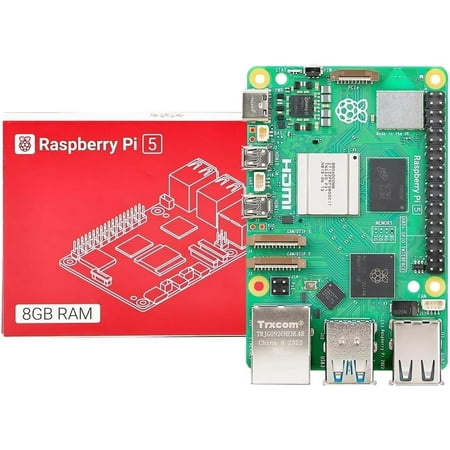
Integrated, temperature-controlled cooling fan that connects to the fan connector on Raspberry Pi 5,12mm × 17mm × 4mm heatsink with self-adhesive pad improves heat transfer from the processor,Easily removable lid exposes fan and breakout slot for cables and GPIO,Integrated mounting features...
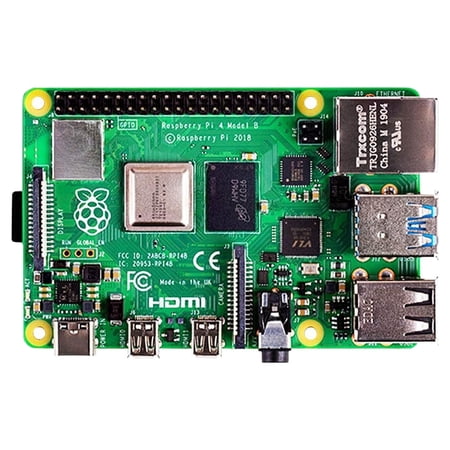
Raspberry Pi 4 Model B - single-board computer
FAQ
Will my Pi 4 RetroPie SD card work on the Pi 5?
No, not directly. The Pi 5 requires an updated boot loader and Pi 5-specific kernel. RetroPie has Pi 5-compatible images you’ll need to download separately. Game ROMs and save data can be migrated, but the OS image needs to be fresh.
Can I use Pi 4 cases with the Pi 5?
Sometimes — the Pi 5 is the same form factor as the Pi 4 (85 × 56 mm), but port locations have shifted slightly and the active cooler adds height. Many Pi 4 cases are physically incompatible with Pi 5 + active cooler. Check case compatibility before assuming.
Is the Pi 5 worth $40 more than the Pi 4?
For a new build, yes — the performance gain is significant. For an upgrade from an existing Pi 4 setup that’s working fine, the answer depends on whether you specifically need PS2 emulation or Linux gaming workloads. If your Pi 4 is happy doing PS1-era emulation, there’s no compelling reason to upgrade.
Do I need an NVMe HAT?
For casual use, no — microSD works. For serious use with large emulator collections (50GB+) or for running Linux as a desktop, yes — NVMe is meaningfully faster and more reliable than microSD over time. Budget around $40 for the HAT plus the cost of a 256GB or 500GB NVMe drive.