
Computer Station Nation is reader-supported.
When you buy through links on our site, we may earn an affiliate commission. Learn more.
Quick answer: If your priority is build quality, sound profile, and a daily-driver keyboard for typing plus gaming, the Attack Shark X68 HE earns its $60 price tag. If you want the cheapest legitimate hall effect 60% on the market and don’t need top-mount construction, the Aula WIN60 HE at $40 saves you the $20.
Why this comparison matters
The Attack Shark X68 HE sits at $59.99. The Aula WIN60 HE sits at $39.99. Both are hall effect 60% keyboards with 8000Hz polling and adjustable per-key actuation. On the surface they look interchangeable. They aren’t. The Attack Shark spends its extra $20 on top mount construction with internal foam dampening — a design feature that until recently lived only in $200+ custom keyboards.
This article is for buyers who’ve narrowed it down to these two and want to know whether the Attack Shark’s $20 premium is worth it. If you’re still deciding between hall effect and traditional mechanical, see our best 60% keyboard guide first.
Quick comparison table
| Attack Shark X68 HE | Aula WIN60 HE | |
|---|---|---|
| Price | $59.99 | $39.99 |
| Switch type | Hall effect magnetic | Wing Chun magnetic |
| Actuation range | 0.1mm – 3.4mm | 0.1mm – 3.4mm |
| Polling rate | 8000Hz | 8000Hz |
| Latency | 0.125ms | ~0.125ms |
| Mount | Top mount with foam | Standard tray mount |
| Layout | 68 keys with arrow cluster | 61 keys true 60% |
| Keycaps | PBT | PBT double-shot |
| RGB | Per-key, north-facing | Per-key, south-facing |
| Adjustable feet | Yes | No |
Build quality and construction
The Attack Shark X68 HE wins this round outright. Top mount construction means the plate sits on internal foam gaskets rather than screwing directly into the case. The result is less hollow ping, less keystroke vibration, and an overall typing acoustic that sounds closer to a properly modded $150 keyboard.
The Aula WIN60 HE uses a more traditional tray mount layout. It’s been improved with internal foam in 2026 revisions and reviewers describe the sound as “muted and deep” — solid for $40. Just not on the same level as the X68 HE’s gasket-style assembly. The Attack Shark also adds adjustable feet for typing angle; the Aula has a fixed angle.
Winner: Attack Shark X68 HE.
Switch performance and tuning
Both keyboards use hall effect magnetic switches with the same 0.01mm precision and 0.1mm-3.4mm actuation range. Both support rapid trigger with adjustable RT step distance. Both hit 8000Hz polling with sub-millisecond latency. On the spec sheet, this is a tie.
Owner reports give the Attack Shark a slight edge on tactile consistency across the full keyset and on stock switch feel. Aula’s Wing Chun switches are good but vary slightly between batches. Both are wildly above the previous price floor of HE switches.
Winner: Attack Shark X68 HE (slight edge).
Layout differences
This is where it gets interesting. The Attack Shark X68 HE is technically a 65% layout with a squeezed arrow cluster — 68 keys total. The Aula WIN60 HE is a true 60% with 61 keys, no arrows. Same physical footprint, just an extra column on the right.
If you want pure 60% minimalism and the layered keymap that comes with it (Fn+WASD for arrows), get the Aula. If you’ve never lived without dedicated arrow keys and aren’t sure you can adapt, the Attack Shark eases that transition without sacrificing footprint.
Winner: Depends on your preference. True 60% buyers go Aula. Arrow-key holdouts go Attack Shark.
Software and features
Neither of these companies makes software that competes with Razer Synapse or Wooting Wootility. Both are functional but feel like beta builds. The Attack Shark suite has been updated more frequently in 2026 based on owner reports and feels slightly more polished.
The Attack Shark also requires mandatory calibration on first use or rapid trigger feels off. The Aula is more forgiving and works out of the box without setup, though calibration still helps. Net: Attack Shark has more setup steps but a better long-term software experience.
Winner: Attack Shark X68 HE (slight edge).
Polling and gaming performance
Both deliver 8000Hz polling and approximately 0.125ms latency in real-world testing. That puts both in the same tier as a Wooting 60HE v2. Real input delay including USB processing and game engine pipeline lands in the 1-3ms range — beyond perceptual difference for most players.
For competitive Valorant, CS2, or Apex, both will give you the same response advantage over a 1000Hz polling keyboard like the Razer Huntsman Mini. There’s no measurable gap between these two on raw input speed.
Winner: Tie.
Value for money
The Aula WIN60 HE at $40 is the cheapest hall effect 60% keyboard worth buying. Period. Nothing else gets you adjustable actuation, rapid trigger, and 8KHz polling for under $40. On a pure dollars-per-feature basis, it wins.
The Attack Shark X68 HE at $60 still represents tremendous value when you account for the build quality upgrade. Top mount construction at this price tier is genuinely uncommon. But the Aula does most of what it does for 33% less.
Winner: Aula WIN60 HE.
Who should buy which?
Buy the Attack Shark X68 HE if:
- You care about typing sound and bottom-out feel
- You want top-mount construction and proper foam dampening
- You’re using this as a daily driver for typing plus gaming
- You want dedicated arrow keys without giving up the 60% footprint
- You’re willing to spend 5 minutes calibrating before first use
Buy the Aula WIN60 HE if:
- You want the absolute cheapest legitimate HE 60%
- You prefer a true 60% layout with no arrow cluster
- You’re new to hall effect and want to test the waters
- $20 saved means more than build quality refinement
Verdict
For most buyers willing to spend $60, the Attack Shark X68 HE is the better keyboard. Top mount construction, internal foam, slightly tighter switch feel, and adjustable feet add up to a noticeably better daily-driver experience. It’s the cheapest keyboard that genuinely feels like a “real” enthusiast board out of the box.
The Aula WIN60 HE is still a phenomenal pick if budget is the deciding factor or if you specifically want a true 60% layout. At $20 less, it gives you 90% of the gaming benefit for 67% of the cost. There’s no wrong answer here, just two different price-to-performance points.
Where to buy
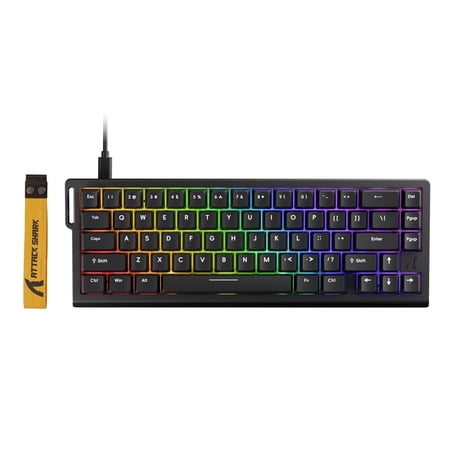
The ATTACK SHARK X68 HE Rapid Trigger Gaming Keyboard is a compact 60% wired magnetic switch keyboard built for players who need fast response, precise control, and advanced customization. Designed with Hall Effect magnetic switches, adjustable actuation, and rapid trigger technology, it...
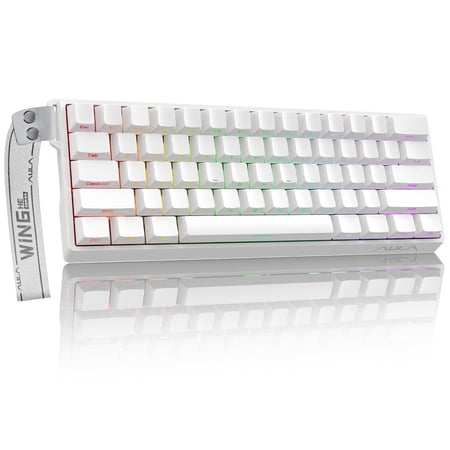
AULA WIN60 HE Hall Effect Gaming Keyboard Designed for competitive play and daily productivity, the AULA WIN60 HE combines Hall Effect magnetic switch technology with a compact 60% form factor, delivering exceptional precision, long‑lasting durability and fully customizable typing for gamers and...
FAQ
Is the Attack Shark X68 HE worth $20 more than the Aula?
For most people, yes. Top-mount construction with internal foam is a real upgrade in build quality and sound profile. If you’ll use this keyboard daily for both gaming and typing, the $20 pays back in long-term satisfaction. If you only want the cheapest possible HE board for FPS gaming, the Aula is fine.
Does the Attack Shark X68 HE have arrow keys?
Yes. The X68 HE technically has a 65% layout with 68 keys including a dedicated arrow cluster on the right side. The Aula WIN60 HE is a true 60% with 61 keys and no arrow cluster. If you can’t live without arrow keys, the Attack Shark is your pick.
Are both compatible with Mac?
Yes. Both keyboards work on Windows and macOS. The configuration software is Windows-only on both, so you’ll need a Windows machine to remap keys or adjust actuation curves. Once configured, settings persist on the keyboard and work with any OS.
How do these compare to a Wooting 60HE?
Both close most of the gap on raw gaming performance. Wooting still wins on software (Wootility is best in class), keycap quality, and overall refinement. But you’re paying 3-4x more for the Wooting. For gamers who want the HE advantage without the $200 price tag, the Attack Shark is the better long-term value pick of these two.

