
Computer Station Nation is reader-supported.
When you buy through links on our site, we may earn an affiliate commission. Learn more.
So you finally caved and decided to ditch the F-row, the numpad, and the arrows. Welcome to the smallest serious mechanical layout that still types like a real keyboard. The 60% category exploded in 2026 with hall effect switches trickling down from $200 boutique boards to under-$40 daily drivers, and that changes the math on what’s worth buying.
This guide is for gamers, programmers, and minimalists who want a compact battlestation without sacrificing typing feel. Every pick below is hot-swap or hall effect (or both), available at Walmart, and ranked based on switch tech, polling rate, build quality, and real owner sentiment from Reddit and review sites. We considered the Wooting 60HE, Ducky One 3 Mini, and Glorious GMMK Compact too, but none were available through our affiliate channels at writing, so we focused on what you can actually buy today.
Quick picks: top 60% keyboards at a glance
- Best overall: Aula WIN60 HE — hall effect, 8000Hz polling, under $40. Genuinely shocking value.
- Best premium hall effect: ATTACK SHARK X68 HE — top mount, adjustable 0.1mm actuation, 8KHz, the closest thing to a Wooting under $60.
- Best hot-swap budget: Geeky GK61 SE — swap your switches without soldering, $22.
- Best entry under $20: MageGee Mini 60% — 61 keys, RGB, gateway drug pricing.
- Best looking: ZIYOULANG T8 — 18 RGB modes, blue switches, coiled USB-C cable in the box.
How we picked
After evaluating six 60% mechanical keyboards available at Walmart, we ranked these five based on switch technology, polling rate, hot-swap support, build quality, and owner sentiment from Reddit threads and review sites like Tom’s Hardware and RTINGS. Hall effect models got priority for gaming use cases. Hot-swap support was the deciding factor for typing-focused buyers. Anything with under 50 verified reviews or sketchy build quality complaints was dropped.
Why a 60% keyboard?
A 60% layout drops the function row, numpad, and dedicated arrow keys. You get 61 keys instead of the usual 104. That’s a 41% smaller footprint, freeing up roughly 4 inches of mouse swing room. For FPS players who run low DPI, that’s a meaningful upgrade.
The tradeoff is a layered keymap. F-keys live behind a Fn modifier, arrows hide on WASD or IJKL, and you’ll fumble for a week before the muscle memory clicks. Most people who push through love it. Some go back to TKL. Both are valid.
The bigger story for 2026 is hall effect (HE) switches. Instead of physical contact, HE switches use magnets and a hall sensor to detect motion, which means actuation distance is fully adjustable in software. According to RTINGS’ 2026 roundup, HE boards now dominate competitive play. Among 2,237 tracked pro players in March, the Wooting 60HE family was the most-used keyboard in VALORANT. Good news for 2026 buyers: HE tech has trickled down to $40 boards.
At-a-glance comparison
| Keyboard | Best for | Switch type | Price | Rating |
|---|---|---|---|---|
| Aula WIN60 HE | Best overall | Hall effect magnetic | $39.99 | 4.8/5 |
| ATTACK SHARK X68 HE | Premium HE gaming | Hall effect, top mount | $59.99 | 4.7/5 |
| Geeky GK61 SE | Hot-swap on a budget | Mechanical brown (swappable) | $22.50 | 4.6/5 |
| MageGee Mini 60% | Entry-level | Mechanical feel membrane | $17.99 | 4.4/5 |
| ZIYOULANG T8 | RGB show-off | Mechanical blue | $42.99 | 4.3/5 |
1. Aula WIN60 HE — Best overall 60% keyboard
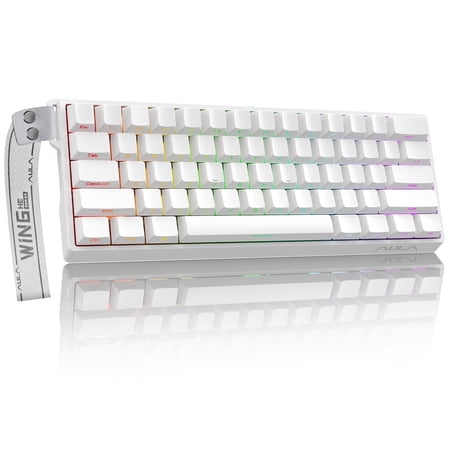
AULA WIN60 HE Hall Effect Gaming Keyboard Designed for competitive play and daily productivity, the AULA WIN60 HE combines Hall Effect magnetic switch technology with a compact 60% form factor, delivering exceptional precision, long‑lasting durability and fully customizable typing for gamers and...
This bad boy is the reason this article needed a rewrite. The Aula WIN60 HE drops a real hall effect 60% under $40, with specs that read like a $150 keyboard from two years ago. 8000Hz polling rate. 0.01mm actuation precision. Rapid trigger mode. PBT keycaps. Hot-swap magnetic switches. None of those should exist together at this price.
The included Wing Chun magnetic switches let you set actuation depth anywhere from 0.1mm to 3.4mm per key in the software. Want hair-trigger movement keys for FPS and deeper actuation on movement-critical typing keys? Easy. According to The Phonograph’s review, the sound profile is “muted, deeper, and much easier on the ears” than the typical scratchy budget mech. South-facing RGB doesn’t blast you in the face either.
Build is plastic but tight. The PBT keycaps feel hefty with a slightly textured finish, and the keyboard ships with a USB-C detachable cable. There are no adjustable feet, which is the one consistent complaint, but at $40 you’re already winning.
| Switch type | Hall effect magnetic (Wing Chun) |
| Actuation | 0.1mm – 3.4mm adjustable |
| Polling rate | 8000Hz |
| Keycaps | PBT, double-shot |
| Connection | Wired USB-C, detachable |
| RGB | South-facing per-key |
Rating: 4.8/5
Pros
- Real hall effect tech under $40, almost unheard of
- 8000Hz polling and rapid trigger for competitive FPS
- PBT keycaps don’t shine up after a few months
- Adjustable per-key actuation in software
- South-facing RGB doesn’t blind you when typing
Cons
- No flip-out feet for typing angle
- Software is functional but not polished
- Stabilizers can rattle slightly on spacebar
If you’ve been waiting for hall effect to get cheap enough to try, this is the moment. Check the Aula WIN60 HE at Walmart.
2. ATTACK SHARK X68 HE — Best premium hall effect
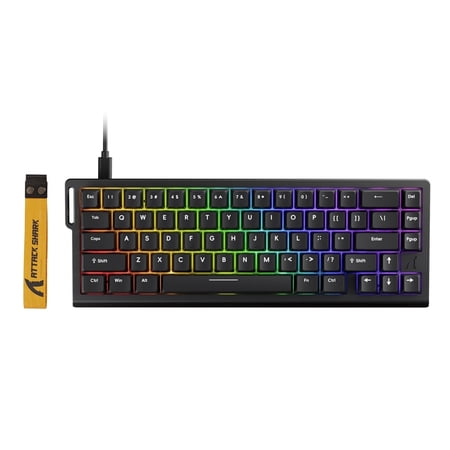
The ATTACK SHARK X68 HE Rapid Trigger Gaming Keyboard is a compact 60% wired magnetic switch keyboard built for players who need fast response, precise control, and advanced customization. Designed with Hall Effect magnetic switches, adjustable actuation, and rapid trigger technology, it...
Step up to $60 and the X68 HE adds the one thing the Aula doesn’t: top mount construction with proper internal foam. According to Vivid Repairs’ UK review, “the ATTACK SHARK X68 HE democratises hall effect technology.” It’s the closest thing to a Wooting 60HE under $100.
Specs are stacked. 8KHz polling matches the Aula. Actuation runs 0.1mm to 3.4mm with 0.01mm precision and zero deadzones. The board uses a top mount layout, a construction normally reserved for $200+ custom builds. It absorbs typing impact and gives the keypress a softer, deeper sound. PBT keycaps come standard.
Owner reports flag two quirks. First, you have to calibrate the keyboard before first use through the AttackShark software. Skip this step and rapid trigger feels off. Second, the spacebar stabilizer can rattle out of the box. That’s a five-minute lube fix and pretty standard on any sub-$100 mech anyway. Past those, Reddit users consistently rank it second only to the Wooting in the budget HE conversation.
| Switch type | Hall effect magnetic |
| Actuation | 0.1mm – 3.4mm, 0.01mm step |
| Polling rate | 8000Hz |
| Mount | Top mount with foam |
| Latency | 0.125ms |
| Keycaps | PBT |
Rating: 4.7/5
Pros
- Top mount construction at a budget price
- Per-key adjustable actuation 0.1mm to 3.4mm
- 8KHz polling and 0.125ms latency
- Sound profile rivals boards 3x the price
- Detachable USB-C cable, RGB backlit
Cons
- Mandatory calibration on first use
- Spacebar stab needs a lube job
- Software lags behind Razer Synapse / Wooting Wootility
For competitive players who want Wooting-level performance without the wait list, this is the move. Grab the ATTACK SHARK X68 HE at Walmart.
3. Geeky GK61 SE — Best hot-swap on a budget
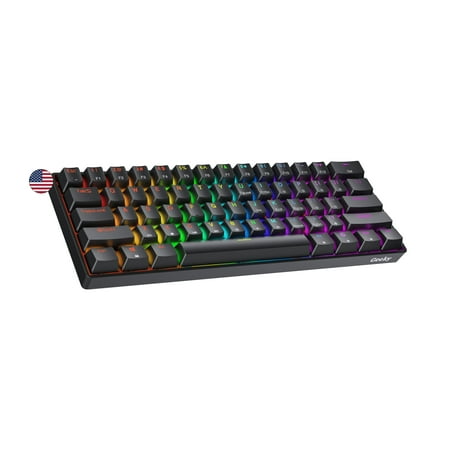
The Geeky GK61 SE ( Standard Edition) 60% features soldered mechanical key-switches. (Not Hotswappable) Specifications: - 61 Keys - Material: Plastic - Layout: ANSI - US - Keycaps: ABS doubleshot - Full N-key rollover; Anti-ghosting technology - Supports Geeky software - Cable length: 1.5 m (5.9...
Not everyone wants hall effect. If you’re getting into mechanical keyboards because you want to try different switch feels (Cherry MX Reds, Gateron Yellows, Kailh Box Whites), you need a hot-swap board. The GK61 SE delivers that for $22.
Hot-swap means you can pop switches out by hand and drop new ones in without soldering. The GK61 SE supports both 3-pin (plate mounted) and 5-pin (PCB mounted) switches, which covers basically every mainstream switch on the market. Pre-installed brown switches are a tactile-but-quiet baseline most people get along with.
According to Switch and Click’s 2025 long-term review, the GK61 line still holds up as the cheapest hot-swap entry point in the 60% space. The RGB software supports 20 backlight patterns and 16.8 million colors. Polling caps at 1000Hz. Fine for typing and general gaming, just not the 8KHz of the HE boards above.
| Switch type | Mechanical brown (hot-swap) |
| Compatibility | 3-pin and 5-pin MX-style |
| Polling rate | 1000Hz |
| Keys | 61 (ANSI US) |
| RGB | Per-key, 20 patterns |
| Connection | Wired USB-C |
Rating: 4.6/5
Pros
- Cheapest hot-swap 60% on the market
- Supports both 3-pin and 5-pin switches
- Per-key RGB with software customization
- Solid build quality for the price
- Works on PC and Mac out of the box
Cons
- 1KHz polling lags behind HE competitors
- Stock switches and stabs are average
- Some users report key rattle on certain units
If swapping switches sounds like the fun part, start here. Pick up the Geeky GK61 SE at Walmart.
4. MageGee Mini 60% — Best entry-level
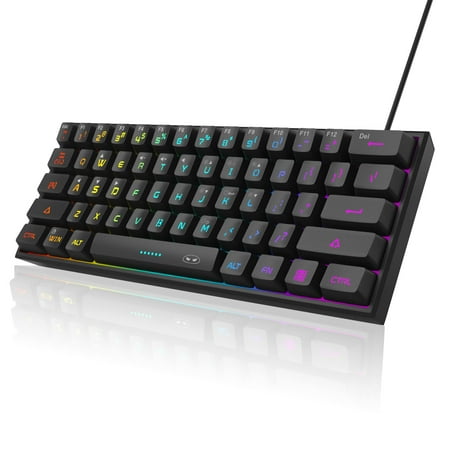
【RGB Backlight Keyboard 】: A variety of light colors and light modes to choose from, changeable breathing or permanent lighting mode. It can be great for playing the game at night even without light. You can also adjust the brightness and breathing speed of the backlit according to your...
Real talk: at $18, the MageGee Mini isn’t a true mechanical keyboard. It’s a mechanical-feel membrane keyboard. The keys click and clack and feel reasonably tactile, but they aren’t switch-based in the strict sense. For some buyers, that’s a dealbreaker. For kids’ first gaming setups, dorm rigs, or travel keyboards, it’s perfect.
What you do get: 61 keys in a clean 60% layout, RGB backlighting with multiple patterns, a compact footprint that throws in a coffee shop bag, and 129 verified Walmart reviews averaging 5 stars. Owners consistently say the same thing: for the price, it’s an easy yes for casual use.
The MageGee Mini already has a product cluster on this site at our MageGee Mini review. Hit that for the deeper writeup if you’re seriously considering it.
| Switch type | Mechanical-feel membrane |
| Keys | 61 |
| RGB | Multiple backlight modes |
| Connection | Wired USB |
| Compatibility | Windows, Mac, Linux |
| Weight | Lightweight, travel-friendly |
Rating: 4.4/5
Pros
- Cheapest entry into the 60% form factor
- Strong owner sentiment (129 reviews, 5 stars)
- Lightweight and travel-friendly
- Works across Windows, Mac, and Linux
- RGB looks decent for the price tier
Cons
- Not actually mechanical, it’s membrane
- No hot-swap or hall effect
- Build quality reflects the budget price
The cheapest way to find out if 60% is for you. Get the MageGee Mini at Walmart.
5. ZIYOULANG T8 — Best looking 60% under $50
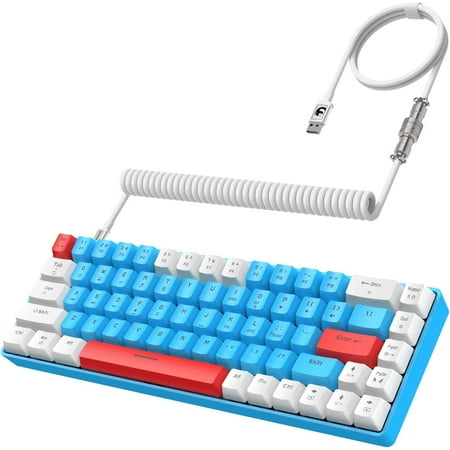
60% Multi-Color Mechanical Keyboard Compact Gaming Keyboard has multiple mixed color design, Customized Wired Keyboard and Pro USB-C Coiled Keyboard Cable Set are dedicated for gaming and efficient working. The Mechanical Gaming Keyboard has floating keycap. It is ergonomically designed and...
The T8 is the one you buy because of how it looks on stream. Blue and white chassis. Coiled USB-C cable that ships in the box. 18 chroma RGB backlight modes. The aesthetic alone gets it on a shortlist for streamers and content creators who care about the camera shot.
Specs are solid for $42. Real mechanical blue switches with full clicky feedback. 68 keys (a hair wider than true 60%, closer to a 65% with arrows squeezed in). Compatible with PC, Mac, PS4, and Xbox out of the box. Owner reviews on Walmart sit at 4 stars across 71 reviews. Most complaints are about the loud blue switches, which is what blue switches do.
| Switch type | Mechanical blue (clicky) |
| Keys | 68 (compact 60%) |
| RGB modes | 18 chroma backlight effects |
| Cable | Coiled USB-C, included |
| Compatibility | PC, Mac, PS4, Xbox |
| Color | Blue/white two-tone |
Rating: 4.3/5
Pros
- Coiled cable included (usually a $20 add-on)
- 18 RGB modes for stream-ready aesthetics
- Real blue mechanical switches
- Console compatibility built in
- 68-key layout includes squeezed arrow keys
Cons
- Blue switches are loud, roommates beware
- Not hot-swap, so you’re stuck with blues
- 1KHz polling, no hall effect
If looks matter and you love clicky switches, this one’s for you. Check the ZIYOULANG T8 at Walmart.
The verdict
The Aula WIN60 HE is the winner here, no asterisk. Hall effect 60% keyboards used to start at $150 from Wooting. Now you can grab one with 8000Hz polling, rapid trigger, and PBT keycaps for under $40 with free shipping. That changes the entire game.
If you’ve got room in the budget and want even better build quality, the ATTACK SHARK X68 HE at $60 gives you top mount construction normally reserved for $200+ custom keyboards. For typing-focused buyers who want to swap switches over time, the Geeky GK61 SE at $22 stays the cheapest hot-swap entry on the market. Everything else on this list serves a niche (entry-level, aesthetic, console-friendly), but for raw value in 2026, the Aula is the one.
Buying advice: which 60% keyboard is right for you?
If you mainly play FPS (Valorant, CS2, Apex): Get the Aula WIN60 HE or ATTACK SHARK X68 HE. Hall effect with rapid trigger is the new competitive standard, and these are the cheapest legit options. The 8000Hz polling matters less for casual play but pays off in ranked grind.
If you type more than you game: Skip the HE boards and grab the Geeky GK61 SE. Hot-swap lets you replace stock browns with Gateron Yellows, Holy Pandas, or whatever sound profile you fall in love with later. Adjustable actuation matters way less for typing than for fragging.
If you’ve never owned a 60% before: Try the MageGee Mini at $18 first. It isn’t a real mechanical, but it’ll tell you in a week whether you can live without arrow keys. If yes, upgrade to the Aula. If no, you’re out $18 instead of $60.
If looks come before specs: The ZIYOULANG T8 with its coiled cable and blue/white finish wins streamer points. Just know you’re paying for the aesthetic, not for benchmark numbers.
For the broader category, see our pillar guide on the best mechanical keyboards and our deep dive into the ultimate mechanical keyboard guide for switch types, lubing, and modding rabbit holes.
FAQ
Are 60% keyboards worth it for typing?
For most people, yes, after a one-week adjustment period. You lose the numpad and dedicated arrow keys, which hurts spreadsheet work and code with heavy navigation. For prose typing, programming with arrow keys mapped to IJKL via a layer, and general daily use, 60% works fine. If you do a lot of data entry, get a TKL or grab a separate numpad.
What’s the difference between 60% and 65% keyboards?
A 65% keyboard adds dedicated arrow keys and one more column on the right (typically Delete, Page Up, Page Down). Same general size, 68 keys instead of 61, but with proper arrow keys you avoid the layered Fn+WASD setup. The ZIYOULANG T8 in this list is technically a 65% sold as a 60%. If you’re new to compact keyboards, 65% is often the easier first step.
Are hall effect keyboards better than mechanical?
For competitive gaming, yes. Hall effect switches let you adjust actuation distance per key in software, enable rapid trigger (the key resets the moment you start lifting), and don’t degrade from physical contact wear. For typing feel, mechanical switches still win. The tactile bump on a Cherry MX Brown or the sound of Holy Pandas can’t really be replicated by HE. Get HE for FPS, mech for typing, both if you can.
Do 60% keyboards have arrow keys?
Not dedicated ones. True 60% boards layer arrow keys behind a Fn key, usually on WASD or IJKL. You hold Fn and tap the layered key to navigate. Some 60% boards (like the ZIYOULANG T8) cheat and squeeze in arrow keys by going to 68 keys, which technically makes them 65% boards. If arrow access is critical to your workflow, get a 65% instead.
Can you use a 60% keyboard for work?
Depends on the work. For developers, writers, and general office use, yes, once your muscle memory locks in. For accountants, data analysts, or anyone using a numpad daily, no. The missing function row also annoys Excel power users. Check which shortcuts you use 50+ times a day. If most live on the bottom three rows of a regular keyboard, you’ll be fine.


