Computer Station Nation is reader-supported.
When you buy through links on our site, we may earn an affiliate commission. Learn more.
Both of these keyboards earned top spots on our best mechanical keyboards for Mac roundup, but they’re aimed at completely different users. The SteelSeries Apex 9 TKL is a gaming-first wired board with optical switches and native macOS software. The Logitech MX Mechanical is a wireless productivity keyboard with full-size layout and Easy-Switch device hopping. Let’s settle it.
Quick Verdict
For gaming on Mac: the SteelSeries Apex 9 TKL wins, no contest. Adjustable optical actuation, wired latency, and native macOS GG software make it the smarter pick.
For productivity and writing: the Logitech MX Mechanical wins. Easy-Switch across three devices, 15-day battery, and Mac-native keycaps make it the obvious daily driver.
Side-by-Side at a Glance
| Spec | SteelSeries Apex 9 TKL | Logitech MX Mechanical |
|---|---|---|
| Price | $139.99 | $159.99 |
| Layout | Tenkeyless (87 keys) | Full size (114 keys) |
| Switches | OmniPoint optical, adjustable | Tactile Quiet mechanical |
| Connectivity | USB-C wired | Bluetooth + Logi Bolt |
| Battery | N/A (wired) | Up to 15 days lit, 10 months unlit |
| Easy-Switch | No | Yes — 3 devices |
| Polling rate | 1000 Hz | Standard Bluetooth |
| Backlight | Per-key RGB | Adjustable white with ambient sensor |
| Mac configuration | SteelSeries GG (native) | Logi Options+ (native) |
| Best for | Mac gaming, fast typing | Productivity, multi-device workflows |
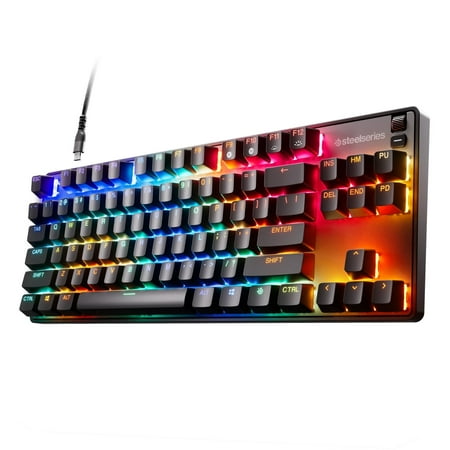
SteelSeries Apex 9 TKL Mechanical Gaming Keyboard – Tenkeyless – RGB – USB-C - Mac/PC
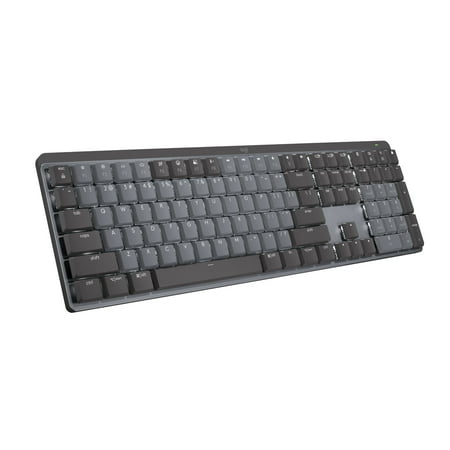
Logitech MX Mechanical Wireless Illuminated Performance Keyboard, Tactile Quiet Switches, Backlit Keys, Bluetooth, USB-C, macOS, Windows, Linux, iOS, Android, Metal, Graphite
$149.99
Switch Feel & Typing Experience
This is where the two boards really diverge. The Apex 9 TKL uses OmniPoint optical switches — magnetic-actuated, smooth as a linear with a hint of tactility. You can tune the actuation point per key, anywhere from 0.1mm (so light a finger rest triggers it) to 4.0mm (you have to mean it). For gaming, that’s revolutionary. For typing, it feels fast and effortless, but slightly alien if you’re used to traditional mechanical bumps.
The MX Mechanical uses tactile quiet switches — the closest thing to a traditional Cherry MX Brown you’ll find with the sound muted. The bump is clean, the bottom-out is soft, and the overall experience is built for marathon typing sessions. After eight hours of writing, the MX wins for fatigue. After three hours of gaming, the Apex 9 wins for reaction time.
Mac Compatibility & Software
Both are rare unicorns: gaming/productivity peripherals that ship with first-class macOS software. SteelSeries GG runs natively on Apple Silicon and Intel. Logi Options+ runs natively too. You won’t be bouncing into a Windows VM with either one.
Where they differ: the MX Mechanical ships in a “for Mac” SKU with Command and Option labeled on the keycaps. No remap needed. The Apex 9 TKL has Windows-style keycap legends, so you’ll want to swap modifier keys once in System Settings — about ninety seconds of work, then it’s permanent. Beyond keycap labels, both work flawlessly on every macOS version since Big Sur.
Layout & Footprint
The Apex 9 TKL is tenkeyless — 87 keys, no numpad. This frees real estate for mouse movement, which matters more than you’d expect at a Mac mini setup where every inch of desk counts. The footprint is 355mm wide.
The MX Mechanical is full-size — 114 keys with a numpad, dedicated function row, and media controls. If you crunch numbers in Numbers or Excel, the numpad is non-negotiable. The MX also comes in a “Mini” 75% variant if you want the same switches in a smaller chassis.
Wireless vs Wired
This is the deal-breaker for a lot of buyers. The MX Mechanical is wireless via Bluetooth LE or the included Logi Bolt USB receiver. Battery is up to 15 days with backlighting on, 10 months with it off. Easy-Switch lets you hop between three Apple devices with a single button press. Game-changer for anyone juggling a Mac mini, MacBook, and iPad.
The Apex 9 TKL is wired only. For gaming this is a feature — zero input lag, no battery anxiety, 1000Hz polling. For productivity, the lack of a wireless option means one extra cable on your desk and no device hopping.
Price & Value
The Apex 9 TKL runs $139.99 — solid value for an optical switch board with native Mac software. The MX Mechanical sits at $159.99. The $20 premium gets you wireless, Easy-Switch, a full numpad, and a 15-day battery. Whether that’s worth it depends on how you use your Mac.
Final Recommendation
If you game on your Mac — even occasionally — the SteelSeries Apex 9 TKL is the smarter buy. Adjustable optical actuation is the kind of feature you don’t know you need until you have it, and at $139.99 you’re getting near-flagship gaming hardware with proper macOS support.
If you’re primarily writing, coding, designing, or running spreadsheets — and especially if you bounce between multiple Apple devices — the Logitech MX Mechanical is the obvious pick. Easy-Switch alone justifies the price difference for anyone with a Mac mini and a MacBook on the same desk.