
Corsair K55 CORE RGB Review — The Best $40 RGB Keyboard You Can Buy
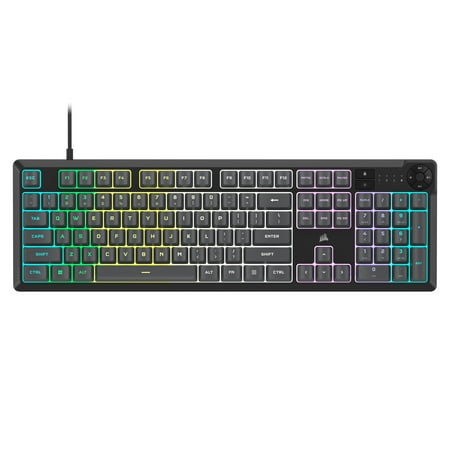
| RGB Lighting | 9.5 |
|---|---|
| Build Quality | 8.5 |
| Value | 9.5 |
Corsairs full-size K55 CORE is the easiest RGB recommendation we can make for anyone who wants ten-zone lighting, dedicated media keys, and iCUE software without paying premium mechanical prices.

Description
Quick Specs
| Layout | Full-size, 104 keys |
| Switch type | Rubber-dome (mechanical feel) |
| Keystroke rating | 75 million |
| Backlighting | Ten-zone RGB |
| Software | Corsair iCUE |
| Media controls | Dedicated keys + volume roller |
| Connection | USB-A wired, braided cable |
| Anti-ghosting | Yes, 12-key rollover |
| Polling rate | 1000Hz |
| Wrist rest | Detachable, included |
| OS support | Windows, Mac, Xbox, PlayStation |
Source: Corsair official product page
The Corsair K55 CORE RGB is the easy answer to a question that should not be this hard to answer: where can I get a great-looking RGB keyboard from a brand I trust, without paying $150? At about $40, the K55 CORE pulls off the trick — it nails the lighting, the layout, and the software polish, and it does it without pretending to be something it isn’t.
This is a full-size board with 104 keys and a dedicated number pad, which is increasingly rare in 2026 as everyone shrinks down to TKL and 65%. If you crunch spreadsheets, code numerically, or just like having dedicated arrow keys and a num pad, the layout alone is worth the price of admission.
The switches are where Corsair gets honest. They are not Cherry MX. They are rubber-dome “mechanical feel” switches, which means a tactile bump under each cap with a quieter and shorter travel than a true mech. After a week of use the typing feel is consistent and the bottoming-out is firm without being painful. Corsair rates the switches for 75 million keystrokes, which puts them on par with mid-tier mechanicals for longevity.
RGB is the headline. Ten-zone lighting with full iCUE software control, which means you can dial in colors per section, sync the board with the rest of your Corsair gear (fans, mouse, headset, cooler), and run animation effects across the whole keyboard. The colors are vibrant and the brightness is easily controllable from the Fn layer for daytime use. It is one of the better-looking RGB experiences in this price tier, full stop.
The dedicated media controls deserve a callout. A real volume roller sits in the top-right corner, with play/pause and skip keys nearby. These are not Fn-layer keys — they are first-class controls. After a few days you forget they used to be hidden on other keyboards. The braided USB cable is fixed (not detachable), and the included wrist rest is plastic but functional. No USB pass-through, which is the one obvious miss versus pricier Corsair boards.
Verdict
For the price, this keyboard is hard to argue against. You get full-size layout, real media controls, proper RGB software, and a trusted brand — all for $40. The only reason to skip it is if you specifically want a true mechanical switch (in which case look at the Geeky GK61 SE) or if you need a compact layout. For everyone else, this bad boy is the smart pick.
Reviews (0)
User Reviews
Be the first to review “Corsair K55 CORE RGB Review — The Best $40 RGB Keyboard You Can Buy”
Related Products


There are no reviews yet.