
Computer Station Nation is reader-supported.
When you buy through links on our site, we may earn an affiliate commission. Learn more.
If you’re choosing between the Corsair K70 CORE RGB Mechanical and the K65 PLUS Wireless 75%, you’re really choosing between two different ideas about what a Corsair keyboard should be in 2026. One is the modern full-size flagship. The other is the compact, future-proofed wireless. Both are great. They’re great for different reasons.
Here’s the breakdown.
Quick Verdict
Get the K70 CORE RGB Mechanical if you want a full-size board with a numpad, you don’t care about wireless, and you want the best fixed-config mechanical Corsair makes in this price range.
Get the K65 PLUS Wireless if you want wireless flexibility, you can live without a numpad, and you want the option to swap switches down the road via the hot-swap PCB.
At a Glance
| Spec | K70 CORE RGB Mechanical | K65 PLUS Wireless 75% |
|---|---|---|
| Layout | Full-size + numpad + rotary dial | 75% (with arrows, no numpad) |
| Switches | MLX Red Linear (soldered) | MLX Red Linear (hot-swap) |
| Connection | Wired USB-C only | 2.4GHz / Bluetooth / USB-C |
| Battery | N/A (wired) | ~266 hours (no RGB) |
| Keycaps | ABS double-shot | PBT double-shot |
| Polling rate | Up to 8,000Hz | 1,000Hz |
| Hot-swap | No | Yes |
| Price | $117 | $140 |
Layout and Form Factor
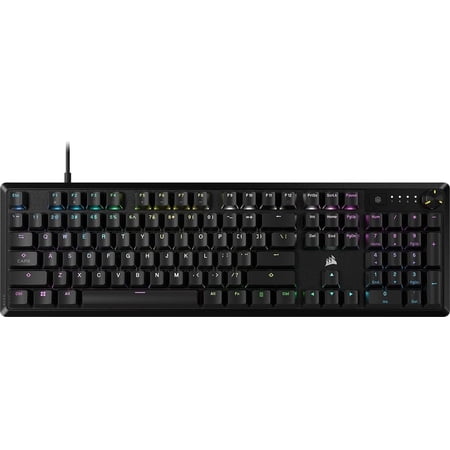
CORSAIR K70 CORE RGB Mechanical Gaming Keyboard - CORSAIR Red Linear Switches - Sound Dampening - Rotary Dial - Aluminum Top Plate - Onboard Storage - Black
The biggest difference between these two boards isn’t the wireless. It’s the size. The K70 CORE RGB Mechanical is a full-size keyboard with a numpad, a top-row of dedicated media keys, and Corsair’s now-signature rotary dial in the top right. It takes up the desk space you’d expect from a flagship gaming board. If you do spreadsheet work, you crunch numbers, or you just like having a numpad to enter your card details quickly, the full-size wins easily.
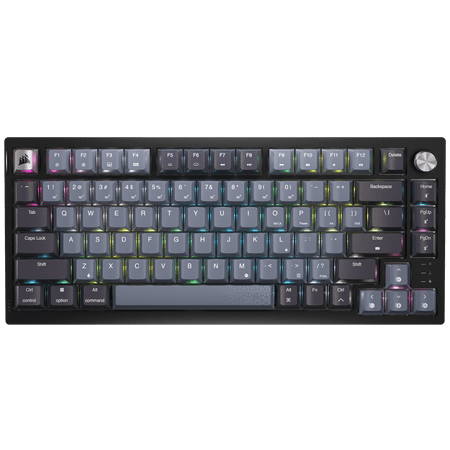
CORSAIR K65 PLUS WIRELESS 75% RGB Mechanical Gaming Keyboard - Pre-Lubricated CORSAIR MLX Red Linear Switches - 2.4GHz Wireless - Bluetooth®
The K65 PLUS Wireless is a 75% layout. You keep the function row and you keep the arrow keys, but the numpad is gone and the navigation cluster (home, end, page up/down) gets condensed into a tighter column on the right side. The result is a board that gives you almost everything important from a full-size while freeing up a noticeable amount of desk space. Mouse movement gets closer to your body. Shoulder strain drops over a long workday. If you don’t need a numpad, this is the better ergonomic choice.
Switch Feel
Both boards use Corsair MLX Red linear switches. Same actuation force, same travel, same pre-lubed feel. If you typed on them blindfolded you’d struggle to tell which is which from key feel alone.
What’s different is what’s underneath. The K65 PLUS has a hot-swap PCB, which means you can pull the switches out without soldering and try whatever you want — Gateron Yellows, Kailh Box Whites, Cherry MX Browns, the whole keyboard hobbyist universe. The K70 CORE Mechanical is soldered. What you buy is what you have for the life of the board.
Sound profile favors the K65 PLUS slightly because the PBT keycaps absorb a bit more of the high-end click and deliver a deeper thock. The K70 CORE has internal foam dampening that gets it close, but PBT keycaps + the smaller form factor still has the edge for sound.
Build Quality
Both boards have plastic chassis with metal accents. The K70 CORE has an aluminum top plate that adds rigidity and a more premium top-down look. The K65 PLUS is mostly plastic with a heavier weight than you’d expect from a 75% — Corsair stuffed enough battery and metal plates in there that it doesn’t feel toy-like even though it’s compact.
Keycaps go to the K65 PLUS. PBT vs ABS is the difference between keys that look new in three years and keys that have a permanent shine on the WASD cluster by next summer. If you type heavily, PBT is worth the upgrade by itself.
Connectivity
This is the easiest category to score. The K70 CORE is wired-only USB-C. That’s it. Plug it in and go.
The K65 PLUS is wired AND wireless. Three modes — 2.4GHz dongle for gaming with no input latency penalty, Bluetooth for laptops and tablets without needing the dongle, and USB-C wired which also charges the battery. If you ever switch between a desktop PC and a laptop, work from cafes, or just hate cable clutter, the K65 PLUS gives you flexibility the K70 CORE simply cannot match.
Software (iCUE)
Both boards run on Corsair’s iCUE software. Same lighting controls, same macro support, same ecosystem sync with other Corsair products like RAM, fans, and AIO coolers.
The K65 PLUS has occasional firmware quirks when connecting over 2.4GHz wireless — usually a brief reconnection lag after waking from sleep. The K70 CORE is wired so connection is always instant and reliable. If you absolutely require zero connection variability, wired wins by default.
Price and Value
The K70 CORE RGB Mechanical is $117. The K65 PLUS Wireless is $140. That’s a $23 premium for the wireless capability and the hot-swap PCB.
If you compare the two on pure “keyboard you get for your dollar,” the K70 CORE has more feature density — full-size layout, rotary dial, dedicated media keys, 8,000Hz polling. If you compare on “future-proof keyboard with the most flexibility,” the K65 PLUS wins with wireless and hot-swap. Both are reasonable buys at their price points.
Which One Should You Buy?
Buy the K70 CORE RGB Mechanical if:
- You need a numpad for spreadsheets, code, or general productivity
- You play competitive FPS games and want 8,000Hz polling
- You don’t care about wireless
- You want to save $23 and get more keyboard for your money
Buy the K65 PLUS Wireless if:
- You want a clean desk without cable clutter
- You switch between a desktop PC and a laptop or tablet
- You like the option to swap switches down the road
- You don’t need a numpad and want the desk space back
- You want PBT keycaps that won’t shine over time
For more options across Corsair’s full mechanical lineup, see our best Corsair mechanical keyboard roundup.
FAQ
Is the K65 PLUS Wireless worth the $23 extra?
If wireless or hot-swap matters to you, yes — easily. If neither matters and you’d prefer a full-size, the K70 CORE is the better buy.
Do both keyboards work with Mac?
Yes. iCUE has a macOS version with reduced feature support compared to Windows, but core functionality (lighting, basic macros, layout) works on both Mac and Windows for both boards.
Can I use the K65 PLUS Wireless in wired mode and treat it like a fixed-config board?
Yes. Plug the USB-C cable in and it operates exactly like a wired keyboard — the battery just charges in the background. You’re not stuck using wireless if you don’t want to.
Which has better RGB?
Both have per-key RGB through iCUE. The K70 CORE’s lighting looks slightly brighter and more vibrant because it has more surface area to spread color across. The K65 PLUS lighting is just as good per-key, just on a smaller board. Functionally they’re equivalent.


