Computer Station Nation is reader-supported.
When you buy through links on our site, we may earn an affiliate commission. Learn more.
Quick picks: best gaming mice for MMO and MOBA
- Best overall MMO mouse: Razer Naga V2 Pro — swappable side panels (12-button, 6-button, 2-button), wireless, the gold standard for MMO
- Best wireless under $100: Corsair Scimitar Elite Wireless — 18 side buttons, reliable wireless, built for serious MOBA and MMO players
- Best wired MMO mouse: Corsair Scimitar RGB Elite — 18 configurable side buttons, precise 18K DPI sensor, popular choice for hardcore MMO
- Best mid-range MOBA mouse: SM809 9-Button Gaming Mouse — 9 side buttons, 24,000 DPI, good value for MOBA where fewer binds are needed
- Best budget MMO mouse: Redragon M908 Impact — 18 side buttons, under $35, the most buttons per dollar on this list
MMO and MOBA mice live in a different world than FPS mice. Where FPS players want light and fast, MMO players need buttons. A lot of them. Healers juggling cooldowns in a 40-person raid need to fire off abilities without looking away from the screen. MOBA players have fewer binds but still benefit from side buttons for item actives and ward placement.
Five picks covering every need from $35 budget to $172 premium. Picked on what actually matters for MMO/MOBA: button count and layout, sensor accuracy, software reliability for remapping, and long-term comfort over extended sessions.
At-a-glance comparison
| Mouse | Best for | Side buttons | Price | Connection | Rating |
|---|---|---|---|---|---|
| Razer Naga V2 Pro | Serious MMO players | 12 (swappable) | $171.99 | Wireless | 9.3/10 |
| Corsair Scimitar Elite Wireless | MOBA/MMO wireless | 18 | $97.90 | Wireless | 8.7/10 |
| Corsair Scimitar RGB Elite | Hardcore MMO wired | 18 | $104.98 | Wired | 8.4/10 |
| SM809 9-Button Gaming Mouse | MOBA, lighter MMO | 9 | $65.81 | Wired | 7.6/10 |
| Redragon M908 Impact | Budget MMO | 18 | $32.89 | Wired | 7.2/10 |
Razer Naga V2 Pro — best overall MMO mouse
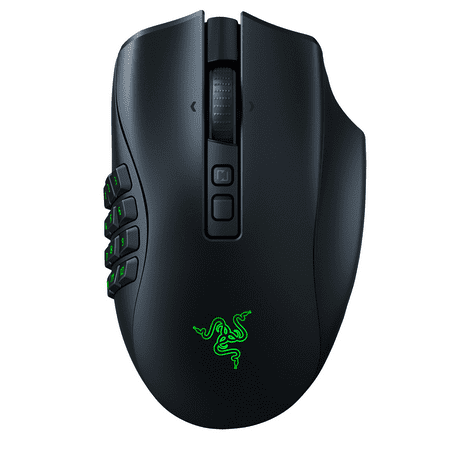
Razer Naga V2 Pro Wireless Gaming Mouse: Interchangeable Side Plate w/ 2, 6, 12 Button Configurations, Focus+ 30K DPI Optical Sensor, Fastest Gaming Mouse Switch, Black. ADAPT AND UNLEASH. Designed to dominate in MMO, battle royale, FPS, and more, the multi-genre master returns stronger than...
The Naga V2 Pro is the top-of-line option for MMO players. What sets it apart from other button-heavy mice is the swappable side panel system. The box includes three panels: a 12-button grid for serious MMO play, a 6-button layout for MOBA and hybrid use, and a standard 2-button panel for everything else. Swap time is about 30 seconds and requires no tools.
The 12-button grid is what most buyers are here for. Buttons laid out in a 4×3 arrangement that maps directly to a WoW action bar row. Each button is individually textured so you can tell them apart without looking — after a week of practice, most players can hit specific buttons by feel. That’s genuinely hard to pull off at this form factor, and Razer has spent generations of hardware refining this layout.
Wireless makes this better for long sessions. No cable pulling on a heavy mouse means less fatigue over a 6-hour raid. Battery life is around 150 hours with RGB off. HyperSpeed wireless matches wired latency for all practical purposes.
Specifications
| Sensor | Razer Focus Pro (30,000 DPI max) |
| Side buttons | 12 (plus two 6-button and standard 2-button panels included) |
| Weight | 117g |
| Connection | HyperSpeed wireless / Bluetooth / wired |
| Battery life | ~150 hours (RGB off) |
| Software | Razer Synapse 3 |
Rating: 9.3/10
Pros
- Three swappable side panels for different game types
- 12-button grid maps directly to MMO action bars
- Textured buttons distinguishable by feel after practice
- Wireless with 150-hour battery life
- Focus Pro sensor is flagship-class
Cons
- $171.99 is expensive
- 117g is on the heavier side
- Razer Synapse required for full button remapping
- Right-hand only ergonomic shape
Corsair Scimitar Elite Wireless — best wireless MMO mouse under $100
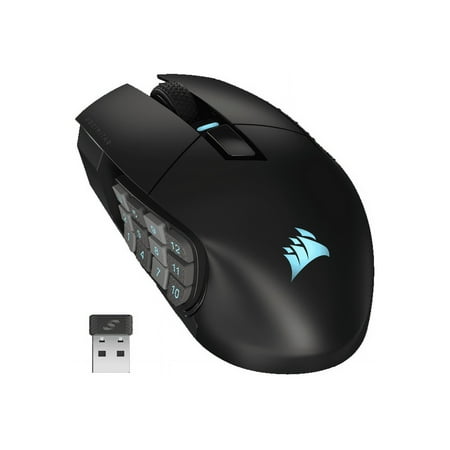
Forge your own path, without wires. The SCIMITAR ELITE WIRELESS MMO gaming mouse equips you with 16 fully programmable buttons, for the freedom to lead the raid, your way. The patented 12-button Key Slider™ side panel adjusts to fit your hand, so you can play without strain or fatigue. Enjoy...
The Scimitar Elite Wireless puts 18 individually addressable side buttons into a sub-$100 wireless mouse. That button count covers every ability and macro you’d need in a full MMO rotation. The side panel has a physical slider to adjust button positioning forward and backward — sounds like a gimmick until you realize how much hand size affects where your thumb lands on a 4-row button grid.
Wireless is good. No perceptible latency for MMO play where reaction windows are measured in hundreds of milliseconds. Battery runs around 100 hours. Corsair iCUE software handles button remapping with per-game profile switching — if you bounce between WoW, FFXIV, and a MOBA, that automatic switching is genuinely useful.
Specifications
| Sensor | Marksman optical (26,000 DPI max) |
| Side buttons | 18 (adjustable position slider) |
| Weight | 114g |
| Connection | USB wireless receiver / wired |
| Battery life | ~100 hours |
| Software | Corsair iCUE |
Rating: 8.7/10
Pros
- 18 side buttons with adjustable physical positioning
- Reliable wireless under $100
- iCUE software handles per-game profiles well
- 100-hour battery life
Cons
- 18 buttons is overwhelming for casual MMO players
- iCUE can be resource-intensive in the background
- Right-hand ergonomic shape only
- Takes time to learn button positions by feel
Corsair Scimitar RGB Elite — best wired MMO mouse
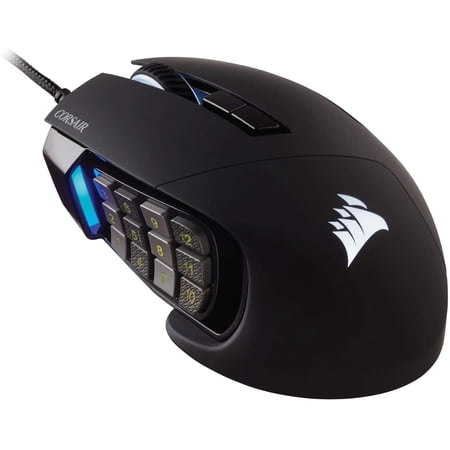
17 Fully Programmable Buttons: Built with Ideal for performing frequent actions and executing complex macros in MMOs and MOBAs.
The wired Scimitar has been a staple in the MMO community for years. Same 18-button slider-adjustable panel as the wireless model, just without the battery to manage. For players who run long raid nights several days a week, never having to think about battery is a genuine quality-of-life thing.
The Marksman sensor tracks at up to 18,000 DPI. Not flagship accuracy, but MMO players rarely need elite tracking precision — most gameplay happens at moderate sensitivity settings. Wired connection means zero latency concerns.
At $104.98, the wired model is currently priced slightly above the wireless version, which is odd. If you specifically want wired to avoid managing wireless connections, this makes sense. Otherwise the wireless Scimitar gives you more flexibility for the same money.
Specifications
| Sensor | Marksman optical (18,000 DPI max) |
| Side buttons | 18 (adjustable slider position) |
| Weight | 122g |
| Connection | Wired USB-A |
| Cable | Braided, 1.8m |
| Software | Corsair iCUE |
Rating: 8.4/10
Pros
- 18 side buttons with adjustable positioning
- No battery management needed
- iCUE per-game profiles work well
- Well-established community support for MMO setups
Cons
- Currently priced higher than the wireless model
- 122g is heavy for a wired mouse
- Older sensor (18K DPI vs 26K in wireless version)
- Right-hand only
SM809 9-button gaming mouse — best mid-range MOBA mouse
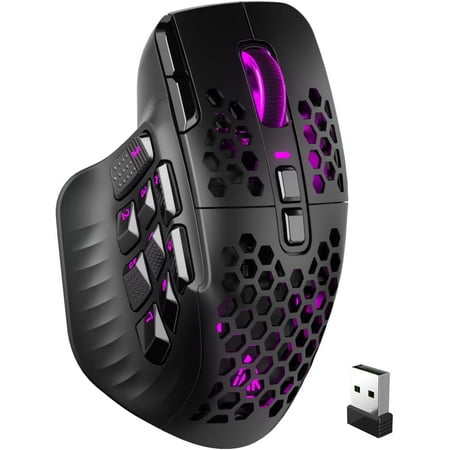
Product description Driver: driver.com Large-capacity intelligent mode.The lights default turn off when moved, Anti-accidental touch:This area cannot be pressed. Please click area . Touch typing:Easily locate the side button area without looking down This large hands for fits the right palm ....
MOBA players don’t need 18 side buttons. In League, Dota 2, or Smite, you have at most a handful of item actives and spell macros. Nine side buttons covers that plus extras without cramming your thumb into a 12-button grid. The SM809 gives you that count at a reasonable price.
The 24,000 DPI sensor is more than you’ll ever use in a MOBA, but the tracking performance at 400–1200 DPI where most MOBA players live is solid. The software lets you assign macros to any button, though it’s less polished than Synapse or iCUE. At $65.81, this sits in the middle of the market — not budget, not premium. Players who want more than a standard gaming mouse but not a full MMO layout will find this fits.
Specifications
| Sensor | Optical (24,000 DPI max) |
| Side buttons | 9 |
| Weight | ~140g |
| Connection | Wired USB |
| Programmable buttons | 16 total |
| RGB zones | 16 |
Rating: 7.6/10
Pros
- 9 side buttons is right for MOBA play
- High DPI ceiling for players who want flexibility
- 16 programmable buttons total
- Good value for the button count
Cons
- Software less polished than Razer or Corsair
- Heavy at ~140g
- Not enough buttons for hardcore MMO raiders
- Less brand support and community documentation
Redragon M908 Impact — best budget MMO mouse
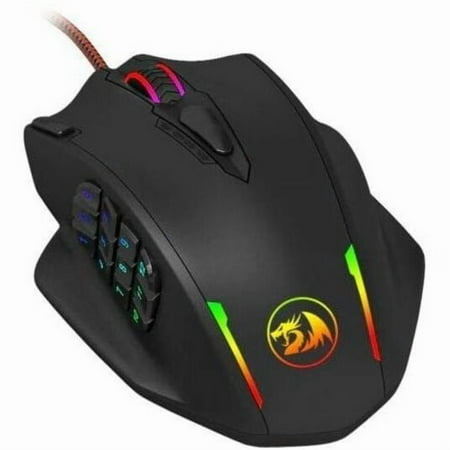
PROFESSIONAL GAMING MOUSE: Redragon M908 optical gaming mouse is designed with up to 12400 DPI, 5 adjustable DPI levels (500/1000/2000/3000/6200 DPI) meet your multiple needs, either for daily work or gaming. DPI can be adjusted freely by ±100 from 100 to 12400 via software. 1000 Hz polling...
The M908 Impact gets you 18 side buttons for under $35. That’s the headline. If you want to try the button-heavy MMO layout without dropping $100, this is the obvious entry point. Redragon has built a reputation for usable hardware at budget prices, and this mouse holds up that pattern.
The 12,400 DPI sensor tracks well enough. Side buttons use mechanical switches with a satisfying click. They’re not individually textured like the Naga’s, so muscle memory takes longer to build, but the buttons are spaced well enough to learn by position after some practice.
The software works — not iCUE or Synapse, but functional for remapping and macros without much friction. If you’re new to MMO mice and want to test whether the layout is actually for you before spending $100+, the M908 is the low-risk way to find out.
Specifications
| Sensor | Optical (12,400 DPI max) |
| Side buttons | 18 |
| Weight | 135g |
| Connection | Wired USB |
| RGB | Yes, 16.8M colors |
| Software | Redragon custom software |
Rating: 7.2/10
Pros
- 18 side buttons under $35 is hard to beat on value
- Mechanical side switches with satisfying click
- Basic software works for remapping
- Good low-risk entry to MMO mouse layouts
Cons
- Buttons not individually textured — harder to learn by feel
- 135g is heavy
- Budget sensor lower quality than flagship options
- Software less reliable than Corsair or Razer
Verdict
Serious MMO raiders: the Razer Naga V2 Pro is worth the $172. Swappable panels, best-in-class 12-button grid, wireless for long sessions. If you raid on multiple specs, the panel swap alone justifies it.
For most MMO players: the Corsair Scimitar Elite Wireless at $98 is the better value. Eighteen buttons, adjustable positioning, good wireless, iCUE for per-game profiles. If you play multiple MMOs or mix in MOBA sessions, this is the smarter pick.
MOBA players who want side buttons without the full MMO grid: SM809 at $66. Nine buttons covers League and Dota 2 comfortably without the learning curve of 18 buttons.
Budget priority: Redragon M908. Gives you the button count to test the layout. If you find you actually use 12+ buttons regularly, the upgrade path to the Scimitar or Naga is clear.
Buying advice: which mouse for which game?
WoW raiders and FFXIV Savage healers should prioritize the 12-button layout. You need every one of those buttons, and the Naga has spent years making that grid as usable as possible. The Scimitar’s 18 buttons also works, but honestly 18 buttons is more than most WoW specs actually require.
MOBA players in League, Dota 2, or Smite rarely need more than 6 side buttons. Item actives, ward hotkeys, a couple of macros — the SM809 covers that. If you want room to grow into MMO later, the Scimitar gives you that flexibility.
If you play both MMO and FPS: honestly, buy two mice. An MMO mouse in an FPS feels wrong. The weight and shape of button-heavy mice aren’t built for flick shots. Use the MMO mouse for MMO, keep a lighter mouse for FPS.
Frequently asked questions
How many buttons do I actually need for MMO?
Depends on your class and role. DPS specs in most MMOs use 6–9 active abilities regularly. Healers can use 12 or more. If you’re healing in progression raiding, a 12-button mouse pays off. If you DPS and want to try side buttons for the first time, start with 6–9 before committing to a full 12-button grid.
Does the button adjustability on the Scimitar actually matter?
Yes. The physical slider moves the button cluster forward and backward on the body. Hand size differences of half an inch change where your thumb lands relative to the button grid. Larger hands usually need the panel slid forward; smaller hands push it back. Without this, a meaningful percentage of buyers would find the button placement awkward. It’s practical, not marketing.
Can I use an MMO mouse for FPS games?
Technically yes, but you won’t enjoy it. MMO mice are heavier (100–140g vs 60–80g for FPS mice) and shaped for thumb access rather than precise wrist control. The weight and side button bulk make fast flicks harder. Players who switch between genres usually keep both types and swap based on what they’re playing.
What software do I need for MMO mouse button remapping?
Each brand uses its own: Razer Synapse for Naga mice, Corsair iCUE for Scimitar mice. Both are free downloads. You assign in-game ability keybinds to each side button, the mappings save to the mouse, and they persist without the software running. Most MMO players set this up once and forget it.