Computer Speakers Buying Guide — Everything You Need to Know (2026)
Computer Station Nation is reader-supported.
When you buy through links on our site, we may earn an affiliate commission. Learn more.
Computer Speakers Buying Guide – At a Glance
What to Look For in Computer Speakers
- Type matters most: 2.0 (stereo) for desk-only, 2.1 (stereo + subwoofer) for bass-heavy use, 5.1 for surround immersion, powered bookshelf for audiophile quality
- Connectivity: USB for simplicity, 3.5mm for compatibility, Bluetooth for wireless convenience, optical for lossless audio
- Power: 3–10W RMS for small desks, 10–30W for medium rooms, 30W+ for larger spaces or nearfield listening
- Budget: Excellent options from $20 to $500+ — the sweet spot for most users is $80–$200
Skip to our FAQ, jump to How to Choose, or read our Computer Speakers Buying Guide: What to Look For and What to Skip for an in-depth breakdown of specific models.
Introduction
Your computer’s built-in speakers — whether laptop drivers or a basic monitor pair — were never designed to deliver a satisfying listening experience. They’re thin, tinny, and almost always positioned incorrectly. Adding a dedicated set of computer speakers is the single biggest upgrade you can make to your desktop audio, transforming everything from music and movies to gaming and video calls.
The market in 2026 is crowded with options spanning tiny USB-powered cubes to high-end powered bookshelf systems that rival dedicated hi-fi setups. The good news? There’s never been a better time to buy — Bluetooth 5.3 is now standard, USB-C connectivity has largely replaced legacy ports, and even budget speakers deliver sound quality that would have cost five times as much a decade ago.
Here’s what you need to know before buying computer speakers: the types, the specs that actually matter, connectivity decisions, budget tiers, and the most common pitfalls. Whether you’re outfitting a $30 desk setup or building a nearfield monitoring station, you’ll find what you need here.
Table of Contents
- Types of Computer Speakers
- Key Features & Specifications
- Connectivity & Compatibility
- Sound Quality & Performance
- Budget Guide: What You Get at Each Price Tier
- Desktop Setup Considerations
- Frequently Asked Questions
- Final Verdict
1. Types of Computer Speakers
Before looking at specs or prices, you need to decide which type of speaker system fits your desk and listening habits. This single choice determines most of your experience.
2.0 Stereo Systems
A 2.0 system is simply two speakers — left and right. No subwoofer, no surround channels. These are the most common computer speakers, ranging from $10 USB-powered cubes to $400+ powered monitors.
Best for: Office work, casual listening, small desks, video calls, and anyone who prioritizes desk space. Not ideal for: movie watching (lacks bass impact), bass-heavy music genres, or large rooms.
Most 2.0 speakers in the under-$100 range are “powered” (amplifier built into one speaker), making them plug-and-play with your PC via USB or 3.5mm. Higher-end 2.0 systems often use separate amplification or active studio monitor designs with individual amplifier channels per driver.
2.1 Systems (Stereo + Subwoofer)
A 2.1 system adds a dedicated subwoofer to handle low frequencies (typically below 80–120 Hz), freeing the satellite speakers to focus on mids and highs. The result is dramatically fuller sound without making the satellites themselves larger.
Best for: Gamers who want explosion rumble, movie watchers, music listeners who enjoy bass, and medium-to-large desks. Not ideal for: Apartments with thin walls (the subwoofer travels), or anyone with extremely limited floor space (the sub needs floor or under-desk placement).
Popular 2.1 systems include the Logitech Z313 and Z407 series, which balance affordability with genuinely enjoyable bass. The Logitech Z313 ($39.99) delivers 10W total with a wired control pod, while step-up models add Bluetooth and digital signal processing.
5.1 Surround Sound Systems
Five speakers (front left, center, front right, rear left, rear right) plus a subwoofer. True surround sound for gaming and movies. These systems require more space, more cables, and a sound card or receiver with multi-channel output.
Best for: Dedicated gamers playing FPS titles (positional audio advantage), home theater PC setups, and enthusiasts who want full immersion. Not ideal for: Small desks, shared rooms, office use, or anyone who doesn’t want visible speaker wires.
Powered Bookshelf Speakers
This category blurs the line between computer speakers and hi-fi. Powered bookshelf speakers (like the Audioengine A2+ or Edifier R2000DB) contain their own amplification and accept direct input from your PC. They deliver dramatically better sound than typical “multimedia” speakers because they use larger drivers, better cabinet construction, and higher-quality amplifier circuits.
Best for: Audiophiles on a budget, music producers doing casual monitoring, and anyone who values sound quality above all else. Not ideal for: Tight budgets (decent powered bookshelf speakers start around $150), or desks that can’t accommodate speakers 6+ inches tall.
Soundbars
Desktop soundbars sit under your monitor in a single slim enclosure. They’re gaining traction because they clean up your desk — no separate left and right speakers to place. Most connect via Bluetooth or USB.
Best for: Ultra-clean desk aesthetics, multiple monitor setups (where there’s no room for flanking speakers), and casual use. Not ideal for: Stereo imaging (soundbars can’t create a true left-right soundstage), critical listening, or gaming where directional audio matters.
2. Key Features & Specifications
Understanding speaker specs helps you compare apples to apples. Here’s what actually matters.
Frequency Response
Measured in Hz to kHz (e.g., 60 Hz – 20 kHz), frequency response tells you the range of sound a speaker can reproduce. Human hearing spans roughly 20 Hz to 20 kHz. Lower numbers mean deeper bass; higher numbers mean clearer treble. A speaker that reaches down to 60 Hz or lower will produce satisfying bass without a subwoofer. Most budget computer speakers bottom out around 100–150 Hz, which is why they sound thin.
Power (Watts)
Speaker power is typically listed as “RMS” (continuous) or “peak” (maximum). RMS is the honest number — peak can be 2–4x higher and only represents brief bursts. For desktop listening:
- 3–10W RMS: Sufficient for nearfield listening at low-to-moderate volume
- 10–30W RMS: Good for medium rooms, fills a bedroom or office comfortably
- 30–100W RMS: Loud enough for parties or large rooms; overkill for most desks
Don’t fall for “2000W PMPO” marketing — PMPO numbers are meaningless. Look for RMS watts.
Driver Configuration
Drivers are the actual speaker elements. A “two-way” design (tweeter for highs + woofer for mids/lows) sounds significantly better than a single full-range driver. Most $50+ computer speakers use two-way designs. Budget speakers under $30 almost always use single full-range drivers, which explains their muddier sound.
Signal-to-Noise Ratio (SNR)
Measured in dB, SNR indicates how clean the audio signal is. A rating of 75 dB or higher is good for computer speakers. Below 70 dB, you may notice hiss at low volumes or during quiet passages. This matters most for nearfield listening where you’re 2–3 feet from the speakers.
Controls
Physical volume knobs are vastly preferable to digital buttons — they give you precise, muscle-memory control. Bonus points for: front-facing controls (reachable without reaching behind the speaker), a dedicated bass control, and a headphone jack on the control pod or front panel. Some speakers place the volume knob on the back (or on the subwoofer), which is frustrating in daily use — check placement before buying.
3. Connectivity & Compatibility
How your speakers connect to your computer determines both audio quality and convenience. Here’s the hierarchy:
USB (Best for Most Users)
USB speakers contain their own DAC (digital-to-analog converter), bypassing your computer’s potentially noisy internal audio hardware. This means cleaner sound, especially on laptops or motherboards with poor onboard audio. USB also provides power — many USB speakers don’t need a wall outlet. The trade-off is that USB audio is limited to what your computer sends; you can’t use USB speakers with a game console or TV without adapters.
3.5mm Analog (Most Compatible)
The classic headphone jack works with literally everything — PCs, Macs, phones, tablets, game controllers, and monitors. Quality depends entirely on your computer’s built-in audio hardware. High-end motherboards with dedicated audio circuitry (Realtek ALC1220 or better) sound excellent; budget laptops may introduce hiss or noise. With 3.5mm, the speakers are at the mercy of your computer’s DAC.
Bluetooth (Most Convenient)
Bluetooth 5.0+ speakers eliminate cables entirely. For casual listening and background music, Bluetooth is perfect. For gaming or video, be aware that standard Bluetooth codecs (SBC, AAC) introduce 100–300ms of latency — enough to desync audio from lip movements. Bluetooth 5.3 with aptX Low Latency or LC3 codec support solves this, but these are still rare in PC speakers. If you game or watch video, keep a wired connection as your primary and Bluetooth as secondary.
Optical / RCA
Optical (TOSLINK) delivers uncompressed digital audio and is common on higher-end powered bookshelf speakers. RCA inputs allow connection to external DACs, audio interfaces, or separate amplifiers. These are found mostly on speakers above $150 and are overkill for most users — but essential if you’re building a high-fidelity desktop audio chain.
4. Sound Quality & Performance
Specs only tell part of the story. Here’s what to listen for when evaluating computer speakers:
Clarity & Detail
The most noticeable difference between budget and premium speakers is clarity — the ability to hear individual instruments, breath details in vocals, and texture in ambient sounds. Good speakers reveal details you didn’t know were in your music. Bad speakers smear everything into a wall of sound. This quality is driven primarily by the tweeter design and crossover quality, which is why two-way designs consistently outperform single-driver speakers.
Bass Response
Bass quality matters more than bass quantity. A tight, controlled bass note that stops when it’s supposed to (rather than lingering or “booming”) makes music sound realistic. Subwoofer-equipped systems naturally excel at bass, but a well-designed 2.0 system with larger drivers (4-inch or bigger) can deliver surprisingly satisfying low end. If you listen to electronic music, hip-hop, or action-heavy games, a 2.1 system is worth the desk space trade-off.
Imaging & Soundstage
“Imaging” refers to how precisely you can locate individual sounds in the stereo field. Good imaging makes a kick drum sound like it’s coming from a specific point between the speakers, rather than from both speakers simultaneously. “Soundstage” is the perceived width and depth of the audio. These qualities are determined by speaker placement, driver matching, and cabinet design. Powered bookshelf speakers generally offer the best imaging at any given price point.
5. Budget Guide: What You Get at Each Price Tier
Under $30 — Surprisingly Capable Basics
At this price, you’re getting 2.0 USB-powered speakers with single full-range drivers. The onn. AC Powered Computer Speakers ($24.36, 4.0 stars from 1,311 ratings) and Logitech S150 USB Speakers ($15.99–$17.84, 4.0 stars from 894+ ratings) represent the best of this tier. They’re adequate for system sounds, YouTube, and voice calls — but expect thin bass and limited volume. The trade-off is near-zero desk footprint and USB-powered simplicity.
Who this is for: Budget-constrained setups, secondary monitors, office PCs, or anyone whose primary audio is headphones and just needs “better than built-in” for casual use.
$30–$80 — The Sweet Spot
This tier delivers the best value in computer speakers. The Logitech Z313 2.1 system ($39.99, 4.0 stars from 1,269 ratings) adds a subwoofer for genuinely satisfying bass at an astonishingly low price. At the upper end of this range, you’ll find 2.0 systems with two-way drivers, better cabinet construction, and front-panel controls.
Who this is for: Most desktop users. If you spend more than 2 hours a day at your computer and listen to music or play games, this is the minimum tier worth considering.
$80–$200 — Enthusiast Territory
At this price, you gain real hi-fi components: silk-dome tweeters, dedicated woofers, wooden cabinets, and proper amplifier stages. Audioengine A2+ Wireless ($229 at retail) and Edifier R1280DBs (~$130) are benchmarks. Bluetooth with aptX, optical inputs, and subwoofer outputs become common. These speakers will outperform most soundbars at the same price.
Who this is for: Music lovers, competitive gamers who want positional accuracy without a headset, and anyone who considers audio a core part of their computing experience.
$200+ — Nearfield Audio Nirvana
Beyond $200, you’re in studio monitor territory. The KEF LSX II LT ($799), Vanatoo Transparent One Encore ($549), and Kali Audio LP-6 v2 ($149 each) deliver reference-grade sound with flat frequency response, exceptional imaging, and enough SPL to fill a living room. These aren’t “computer speakers” in the traditional sense — they’re professional audio tools that happen to work beautifully on a desktop.
Who this is for: Audiophiles, music producers, and anyone who wants their desktop experience to rival a dedicated hi-fi system.
6. Desktop Setup Considerations
Your speakers’ performance depends heavily on placement. Here are the rules that apply regardless of budget:
Positioning
Place speakers at ear height when seated. The tweeters should point directly at your ears. Form an equilateral triangle: you and the two speakers should be equally distant from each other (e.g., if your ears are 3 feet from the speakers, space the speakers 3 feet apart). Angle them slightly inward toward your listening position — this is called “toe-in” and dramatically improves imaging.
Subwoofer Placement
Subwoofers are less directional than satellites, but placement still matters. Put the sub on the floor (not the desk — it will vibrate everything), ideally near your desk’s centerline. Avoid corners, which exaggerate bass and create muddy sound. If the sub has a port (hole), ensure nothing blocks it and leave at least 4 inches of clearance.
Cable Management
Wireless speaker connections (Bluetooth) eliminate cable clutter at the cost of potential latency. If going wired, plan your routes before buying — some systems have short cables between satellites and the subwoofer that may not reach across your desk. Measure your setup and check cable lengths in the specifications before purchasing.
Account for Your Monitor Setup
A multi-monitor setup leaves little room for flanking speakers. In this case, consider a soundbar (sits under your monitors) or a 2.1 system where satellites can be positioned above the monitors on stands. Alternatively, compact 2.0 speakers like the Audioengine A2+ fit in tight spaces without sacrificing sound quality.
7. Frequently Asked Questions
Do I need a sound card for computer speakers?
Not for most setups. USB speakers have a built-in DAC and bypass your sound card entirely. Analog speakers connect to your motherboard’s built-in audio, which is adequate for most users. A dedicated sound card or external DAC only improves quality if you’re using high-end speakers ($200+) or experiencing audible noise from your motherboard’s audio.
Can I use bookshelf speakers with my computer?
Yes — powered bookshelf speakers plug directly into your computer via 3.5mm, USB, or optical. Passive bookshelf speakers require a separate amplifier or receiver between your computer and the speakers. For desktop use, powered is simpler and more space-efficient.
Are expensive computer speakers worth it?
For casual use (YouTube, calls, background music), $30–$80 speakers are sufficient. If you actively listen to music, game competitively, or edit audio/video, the jump from $50 to $200 brings a transformative improvement in clarity, bass quality, and imaging. Beyond $200, returns diminish relative to price but are meaningful for dedicated listeners.
Should I get 2.0 or 2.1 speakers?
Choose 2.1 if you’ve desk space for the subwoofer and want bass-heavy sound for music, movies, or gaming. Choose 2.0 if desk space is limited, you live in an apartment with shared walls, or you prioritize clarity and detail over bass impact. A good 2.0 system with large drivers (4+ inches) can produce respectable bass without a sub.
Can I connect Bluetooth speakers to my PC?
Yes — Windows and macOS both support Bluetooth audio. For best results, use Bluetooth 5.0+ speakers and your computer’s built-in Bluetooth (or a Bluetooth 5.3 USB adapter). Be aware of audio latency for gaming and video. Most Bluetooth speakers also include a 3.5mm aux input for low-latency wired use.
How loud should computer speakers be?
For nearfield desktop listening (2–3 feet away), 10–20W RMS per channel is plenty. You’ll rarely use more than a few watts at normal listening levels. Higher wattage provides headroom for dynamic peaks rather than raw volume. Don’t buy based on wattage alone — a well-designed 10W system will sound better than a badly designed 50W system.
8. Final Verdict
Choosing computer speakers comes down to matching your priorities to the right speaker type:
- Budget under $30: The Logitech S150 or onn. AC Powered Speakers deliver reliable, USB-powered audio for basic use.
- Best value ($30–$80): The Logitech Z313 2.1 system offers the most dramatic audio upgrade at the lowest price of any option on this list.
- Mid-range enthusiast ($80–$200): Powered bookshelf speakers from Edifier, Audioengine, or Neumi give you genuine hi-fi sound that will outlast multiple computer upgrades.
- High-end ($200+): Studio monitors from Kali, Vanatoo, or KEF turn your desk into a nearfield listening room.
Our bottom line: Most people reading this guide will be happiest spending $40–$80 on a 2.1 system like the Logitech Z313 or stepping up to powered bookshelf speakers around $130–$150. That range delivers 90% of the audio quality available at any price, with a practical desk footprint and straightforward setup.
Skip speakers that list only “PMPO” wattage, avoid anything that doesn’t specify RMS power, and always check whether the volume control is front-facing before buying. With those rules, you’ll end up with speakers you enjoy every time you sit down.
Where to Buy
Ready to upgrade your desktop audio? Here are the computer speakers featured in this guide:
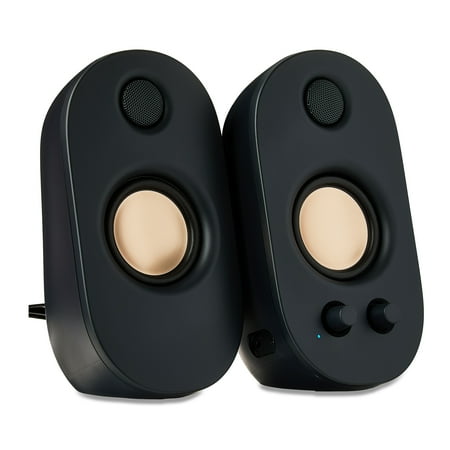
The onn Powered Stereo Speakers are a great option for anyone looking to enhance their audio experience. These speakers feature a 3.5mm AUX input, allowing you to connect your devices and enjoy high-quality sound. You can customize your listening experience with the volume and bass controls, and...
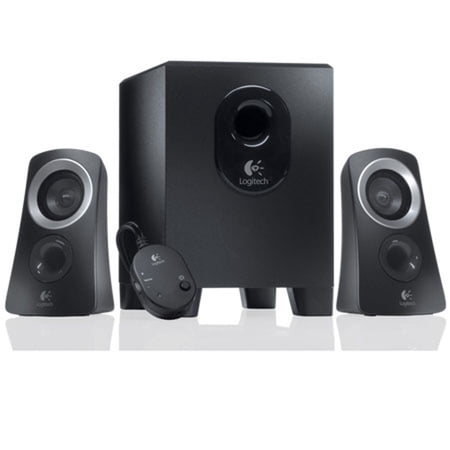
You’re listening to music and online videos, watching movies and TV on your computer. But your built-in PC audio just won’t cut it. That’s where the Logitech® Speaker System Z313 comes in, offering you the easy way to kick back and enjoy your music. Its convenient control pod makes it easy to...
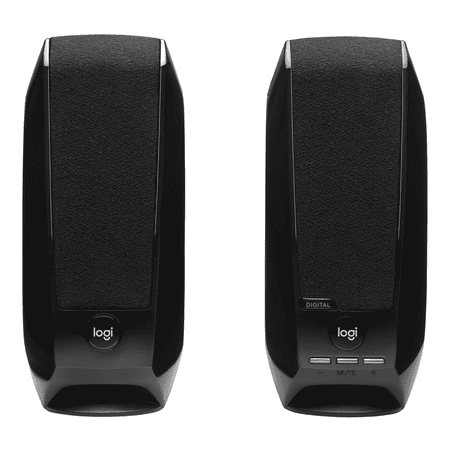
Questions about your S150 Digital USB Speaker System? We've got the answers, videos, downloads and information you need. Search for articles or select a topic below to get started.
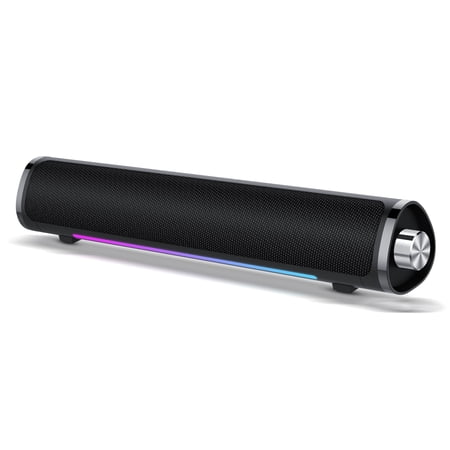
Click the link to discover more products --- CASCHO Shop Our team:CASCHO is a team dedicated to manufacturing intelligent products and is committed to meeting customers' various functional needs for intelligent products. Unlike other brands, we are careless in our promotions. We spend most of...