Essential Streaming Accessories You Actually Need (2026)
Computer Station Nation is reader-supported.
When you buy through links on our site, we may earn an affiliate commission. Learn more.
Streaming accessories are the unsung heroes of any great broadcast. The camera and microphone get all the attention, but it’s the accessories — capture cards, boom arms, lighting, and stream decks — that separate a polished stream from one that frustrates both the streamer and the viewer. Our Essential Streaming Accessories You Actually Need (2026) guide covers what you actually need, whether you’re starting out on Twitch or upgrading a setup that’s been through a few too many cable tangles.
What Counts as a Streaming Accessory?
By accessories, I mean the gear that supports your core camera, microphone, and PC. The stuff that solves real problems mid-broadcast: a boom arm picking up desk vibration, bad lighting washing out your face, or having no way to switch scenes without alt-tabbing out of your game. Good accessories make your stream run smoother and look more expensive than it actually was.
1. Microphones & Audio Accessories
Audio quality matters more for viewer retention than any other piece of streaming gear. People will tolerate a grainy webcam, but muddy or echoey audio makes them click away within seconds. A USB condenser microphone with a few basic accessories takes your audio from “tinny laptop mic” to something that sounds intentional. For serious audio mixing hardware, check our roundup of the Best Audio Mixers for Streamers (2026): Budget to Pro.
USB Condenser Microphones
USB condenser mics are the standard entry point for streaming. They plug straight into your PC — no audio interface needed — and most include a headphone jack for zero-latency monitoring. Look for a cardioid pickup pattern (picks up sound from the front, rejects room noise), a mute button for mid-stream cuts, and adjustable gain.
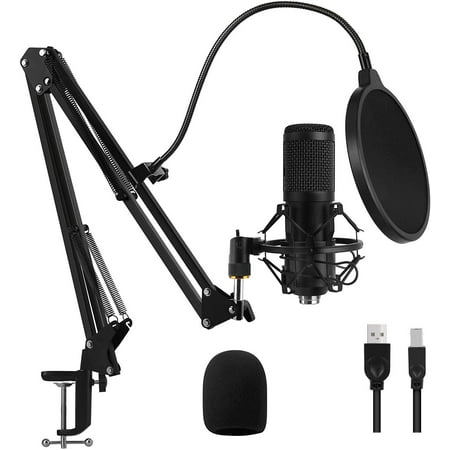
This microphone doesn't need to install any driver, compatible with PC, Computer and Laptop, Windows, Linux. This makes it easily to use for chatting, gaming, recording, podcasting, and singing. This package includes a condenser microphone, suspension scissors arm, metal shock mount,...
The GLUAAE USB Gaming Microphone is a solid budget pick. It includes a condenser mic capsule, flexible arm, and plug-and-play USB. With over 200 reviews and a 4-star rating, it’s a proven entry point if you’re watching your budget.
Step up to the Atzeste USB Microphone and you get a headphone output, volume control, USB-C, and an LED mute button — practical features that matter during a live stream. For RGB styling and a full kit (boom arm, pop filter, shock mount) in one box, the Gaming USB Microphone Kit at $34.99 is hard to beat for the price.
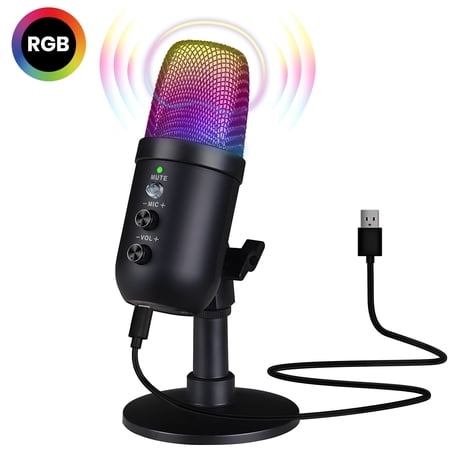
Elevate your content creation with this premium USB microphone, featuring intelligent noise cancellation, a cardioid pickup pattern, and customizable RGB lighting that enhances your streaming or gaming setup. With a high-quality audio processing chip, adjustable gain, volume, and reverb...
Boom Arms & Shock Mounts
A mic is only as good as its mount. A desk stand picks up every keyboard clack and mouse click — your viewers hear your typing louder than your voice. A boom arm gets the mic close to your mouth (the single biggest audio upgrade you can make) and isolates it from desk vibrations. Look for internal spring tension (not exposed springs), a C-clamp that fits your desk, and built-in cable management.
Pop Filters & Windscreens
A pop filter is a simple mesh screen between your mouth and the mic. It tames plosive sounds — the “puh” and “buh” bursts that cause distortion spikes. Most budget mic kits include a basic one, but upgrading to a double-layer metal mesh filter makes a real difference. Foam windscreens are lighter and reduce breath noise, good for streamers who move around while talking.
2. Capture Cards for Console & Multi-PC Streaming
If you stream console games (PS5, Xbox Series X, Nintendo Switch) or run a dual-PC setup, a capture card is non-negotiable. It takes an HDMI signal from your source and converts it to USB for OBS or Streamlabs. Two specs matter: pass-through resolution (you want 4K60 or at least 4K30 for modern consoles) and capture resolution (1080p60 minimum for a clean stream).
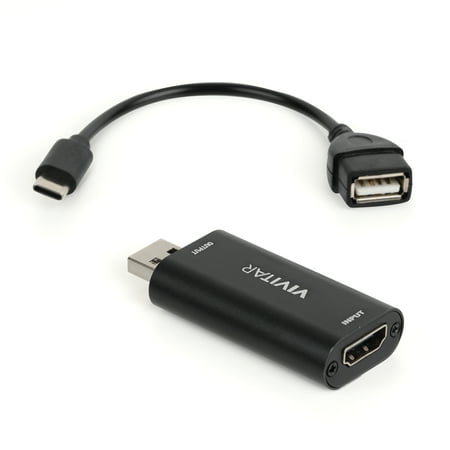
The Vivitar Creator Series HDMI to USB Video Capture Card Converter with Real-time HDMI Video and Audio Capture provides real-time HDMI video and audio capture for next-level live streaming, online class teaching, vlogging, video conferencing and dual screen share. With our advanced transmission...
The Vivitar HDMI to USB Capture Card is a budget entry at $13, with nearly 500 reviews and a 4-star average. It captures 1080p60 and includes a USB-C adapter for modern laptops. Step up to the 4K HDMI Capture Card at $15.99 and get the same 1080p60 capture with wider compatibility — Nintendo Switch, PS5, Xbox Series X, even 3DS and PS4. You do not need to spend Elgato money to get a clean console stream on the air.
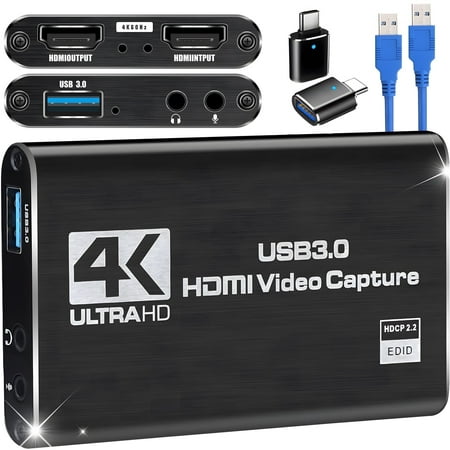
【4K Loop-out & 2K30 Capture】 This HDMI game capture card for switch comes with 5 ports. Faster transmission speed, better meet the needs of high frame rate video capture, support 4K 60HZ HDMI input and loop out up to 4K 60HZ, perfectly adapted to USB3.0 1080P 60fps/2K30fps video output. Support...
3. Lighting Accessories
Good lighting improves perceived video quality more than a better webcam does. A $50 webcam with great lighting looks better than a $300 webcam in a dark room. Streaming lighting falls into three categories:
- Ring lights — Circular LED panels with a hole in the middle for your camera or phone. Even, flattering face lighting, and the most popular choice for streamers. Look for adjustable color temperature (3200K–5600K) and dimmable brightness.
- Key lights — Rectangular LED panels at 45 degrees to your face. More natural, interview-style look with better shadow definition. Bi-color panels let you switch between warm and cool tones.
- Backlighting / accent lighting — RGB strips or colored lights behind your monitor or desk. Creates depth between you and the background. Even a $15 RGB strip makes a noticeable difference.
The golden rule: spend your first lighting dollar on a key light or ring light before upgrading your webcam. The visual improvement per dollar is dramatically higher.
4. Stream Decks & Controllers
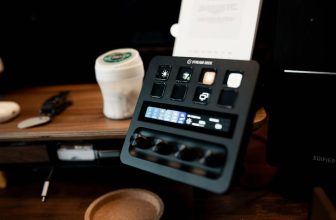
A stream deck is a programmable keypad with physical buttons for scene switching, audio muting, media controls, and social media actions. Instead of clicking around OBS mid-game, you press a button and it happens instantly. Elgato makes the premium option, but there are good budget alternatives and even app-based solutions that run on a tablet or phone. Any streamer playing fast-paced games while managing live chat will find a stream deck worth having.
5. Cable Management & Mounting Essentials
Behind every clean-looking stream setup is cable management nobody sees. A few inexpensive accessories keep your desk organized and prevent cable-related frustration mid-stream. Our Cable Management Tips for Streamers: Clean Desk, Zero Clutter covers the full setup process.
- Under-desk cable trays — Clamp or screw-mounted trays that hide power strips and excess cable length. Everything stays accessible but out of sight.
- Velcro cable ties — Reusable straps for bundling cables. Color-code by device for easier troubleshooting.
- Monitor arms — Free up desk space and let you position screens at eye level. Most have built-in cable channels.
- Desk grommets — Pass cables through the desk surface instead of draping them over the edge.
Cable management is cheap, takes one afternoon, and makes your whole setup look more professional — for your stream camera and for your own sanity.
6. Green Screens & Background Solutions
A green screen replaces your background with any image or video in OBS. Collapsible green screens are the most streamer-friendly option: they fold into a circle for storage, pop open in seconds, and mount behind your chair without wall damage. If a full green screen feels like overkill, a “green screen blanket” draped over a chair or rack costs about $20 and works with good lighting. Not sure if a green screen is right for your situation? Read Green Screens for Streaming: When They Help and When They Don’t for the full breakdown. For VTubers or streamers using virtual avatars, a clean, evenly-lit background — even just a blank wall — is usually sufficient.
Putting It All Together: Your Priority Roadmap
Starting from zero on a limited budget? Here’s the order that delivers the biggest viewer-facing improvements first. For a full walkthrough on arranging your space, see How to Organize Your Streaming Setup for Maximum Efficiency.
- Microphone + boom arm — Audio is the #1 retention factor. A $20–35 USB mic on a boom arm beats a $100 mic on a desk stand every time.
- Lighting — A $20 ring light improves perceived video quality more than a $200 webcam upgrade.
- Capture card (if streaming console) — $13–16 gets you 1080p60 capture that just works.
- Webcam — 1080p webcams start under $30 and look great with proper lighting.
- Stream deck or controller — Improves production quality and reduces mid-stream scrambling.
- Cable management — Cheap, one-time investment that makes your space feel professional.
- Green screen — Nice-to-have for background control once everything else is solid.
Frequently Asked Questions
Do I really need a dedicated microphone for streaming?
Yes. Built-in laptop and webcam mics produce hollow, echoey audio that drives viewers away. Even a $20 USB condenser mic with a cardioid pattern is a massive upgrade.
Can I stream console games without a capture card?
Some platforms support direct console streaming (PS5 to Twitch, Xbox to Twitch), but you lose overlays, scene switching, alerts, and chat management. A capture card gives you full OBS control.
Webcam vs. DSLR for streaming — which should I choose?
For 99% of streamers, a webcam is the right call. DSLRs need a capture card, dummy battery, and continuous power — they’re a headache unless you’re already a photographer. Get the lighting right before spending on camera gear.
How much should I spend on streaming accessories to start?
A functional starter setup (mic + arm + light) costs about $60–80. A complete beginner bundle (mic + arm + light + capture card + webcam) runs $120–150. You can produce a genuinely good-looking stream at that budget.
What’s the most overlooked streaming accessory?
A boom arm. Most new streamers set their mic on the desk, which transmits every keyboard and mouse sound into the broadcast. A $15 boom arm is the cheapest and most effective audio upgrade you can make.
Is It Worth Investing in Streaming Accessories?
Streaming accessories don’t get the spotlight that cameras and microphones get, but they’re the difference between a stream that looks amateur and one that feels produced. A $13 capture card, a $20 USB mic on a boom arm, and a $15 ring light will improve your stream quality more dramatically than any single big purchase. Start with audio and lighting, add the capture card if you need it, and build from there. These accessories solve real streaming problems, and none of them require a pro budget to make a visible difference. If you’re serious about streaming — even as a hobby — these are the essentials you actually need.