Computer Station Nation is reader-supported.
When you buy through links on our site, we may earn an affiliate commission. Learn more.
Quick Answer: For most buyers, the Logitech Pro Stream Webcam is the better pick — glass lens, dual stereo mics, and 60fps mode are worth the extra $30. Choose the Brio 100 if you only need plug-and-play 1080p for basic video calls and want maximum simplicity at a lower price.
Introduction
Both webcams come from Logitech. Both shoot 1080p. Both plug in via USB-A. But the similarities mostly end there. The Logitech Brio 100 is a stripped-down, plug-and-play video call cam — no autofocus, no 60fps, no Logitech Capture. The Logitech Pro Stream Webcam is built for streaming and calls alike — glass lens, autofocus, dual stereo mics, and 720p/60fps support.
The Brio 100 costs around $25. The Pro Stream costs around $55. Is the $30 difference worth it? For streaming, almost certainly yes. For video calls only, the answer depends on your lighting setup and how much you care about audio.
Quick Comparison
| Spec | Logitech Brio 100 | Logitech Pro Stream |
| Max Resolution | 1080p / 30fps | 1080p / 30fps |
| 60fps Mode | ❌ | 720p / 60fps ✅ |
| Lens Type | Plastic | Glass ✅ |
| Autofocus | ❌ Fixed focus | ✅ Continuous |
| Light Correction | RightLight 2 ✅ | Standard |
| Microphone | Omnidirectional (1 mic) | Dual stereo + noise cancel ✅ |
| Connection | USB-A | USB-A |
| Privacy Shutter | ✅ | ❌ |
| Software | None | Logitech Capture ✅ |
| Price | ~$24.99 ✅ | ~$54.99 |
Resolution & Frame Rate — Brio 100 vs Pro Stream
Both cameras max out at 1080p/30fps — tied on peak resolution. The Pro Stream breaks the tie with a 720p/60fps mode that the Brio 100 doesn’t have. For standard video calls, 1080p/30fps is fine on both. For streaming gaming or fast-motion content, 60fps matters significantly — the Pro Stream is the only choice in this pairing for that use case. Winner: Logitech Pro Stream — 60fps mode is a clear advantage for streamers.
Autofocus — Brio 100 vs Pro Stream
The Brio 100 has no autofocus — it is fixed focus set for a standard desk distance of roughly 60–90cm. At typical sitting distances it stays sharp, but if you lean very close to the camera or sit further back than normal, you’ll notice soft edges. The Pro Stream’s continuous autofocus tracks movement and adjusts instantly when you shift position or reach toward the camera. For anyone who moves around while streaming or presenting, this is a meaningful difference. Winner: Logitech Pro Stream — autofocus vs. none.
Image Quality — Brio 100 vs Pro Stream
The Pro Stream’s glass lens produces cleaner, sharper images at 1080p with better color accuracy and lower noise compared to the Brio 100’s plastic lens. Side-by-side, the Pro Stream image has more detail and truer color rendition. The Brio 100 still looks decent for the price — it is not a bad camera — but the difference is visible, especially in close-up framing. Winner: Logitech Pro Stream — glass lens produces noticeably cleaner 1080p.
Low-Light Performance — Brio 100 vs Pro Stream
Here the Brio 100 fights back with RightLight 2 — Logitech’s automatic exposure correction that adjusts to backlit windows and dim rooms without manual input. The Pro Stream handles low light well due to its glass lens, but lacks RightLight. In a back-lit or dim office, the Brio 100’s auto-correction may actually produce a better exposure than the Pro Stream’s uncorrected image. Winner: Brio 100 for auto-exposure in difficult lighting; Pro Stream for pure sensor performance.
Microphone Quality — Brio 100 vs Pro Stream
The Pro Stream wins clearly on audio. Its dual stereo mics with noise cancellation produce cleaner, fuller voice audio than the Brio 100’s single omnidirectional mic. For video calls, both will get the job done — but the Brio 100’s mic sounds noticeably more basic and is more susceptible to ambient room noise. If you do not plan to use a separate microphone, the Pro Stream’s audio is a real upgrade. Winner: Logitech Pro Stream — dual stereo noise-canceling mics.
Privacy & Design Features — Brio 100 vs Pro Stream
The Brio 100 has a built-in privacy shutter — slide it across the lens when not in use, no software needed. The Pro Stream has no hardware shutter. The Brio 100 also comes in three color options (Off-White, Graphite, Rose) versus the Pro Stream’s black only. Build quality is comparable at their price points — both feel solid for the money. Winner: Brio 100 — privacy shutter and color options.
Software Ecosystem — Brio 100 vs Pro Stream
The Brio 100 is plug-and-play only — no software app, no customization, just a camera. The Pro Stream has Logitech Capture for background removal, color tuning, and scene management. It also integrates natively with OBS, Discord, Zoom, and Streamlabs. If you want to control your camera settings beyond what Windows gives you, the Pro Stream is the only option in this comparison. Winner: Logitech Pro Stream — full software ecosystem vs. none.
Value — Brio 100 vs Pro Stream
The Brio 100 costs $25 and delivers exactly what it promises: clean 1080p for video calls, a privacy shutter, and RightLight auto-exposure in a Logitech-reliable package. It is exceptional value for what it is. The Pro Stream costs $55 — more than double — and delivers glass lens quality, autofocus, superior audio, and 60fps. If video calls are your only use case, the Brio 100 is hard to argue with at that price. For anything beyond calls, the Pro Stream justifies its cost quickly. Winner: Brio 100 on price-per-feature for calls; Pro Stream on feature completeness for content creation.
Who Should Buy Each Webcam
Buy the Logitech Brio 100 if: You primarily use it for Zoom, Teams, or Google Meet calls. Budget is tight and you want the most reliable 1080p under $25. You want a hardware privacy shutter. You don’t need autofocus or 60fps. You sit at a consistent distance from your desk.
Buy the Logitech Pro Stream if: You stream games or create video content. You want 60fps for gaming streams. Your desk lighting varies and you need a camera that handles it without software correction. Audio quality from the built-in mic matters to your streams or calls. You want Logitech Capture for background removal or color correction.
Verdict
For streamers and content creators, the Logitech Pro Stream Webcam is the clear winner — glass lens, autofocus, 60fps mode, and dual stereo mics give it a decisive edge in every dimension that matters for streaming.
For remote workers and students on a budget who just need clean 1080p for video calls, the Logitech Brio 100 is the smarter buy — RightLight auto-exposure, a privacy shutter, and Logitech reliability at under $25 is genuinely hard to beat for calls-only use.
Where to Buy
Logitech Brio 100 Full HD Webcam
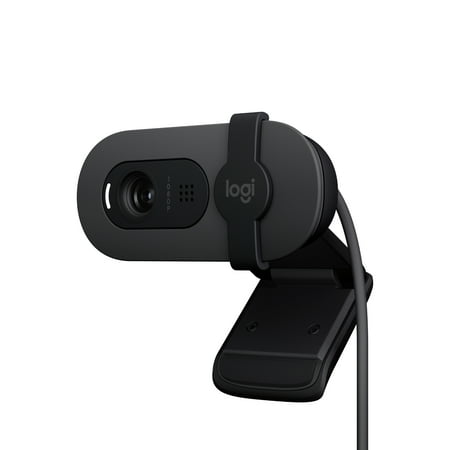
Look, sound, and meet better with Brio 100—a simple and affordable webcam that lets you show your best self in video calls. Full HD 1080p resolution and auto-light balance bring clarity and brightness to your calls, so you look your best. Sound better with a built-in microphone, and get total...
Logitech Pro Stream Webcam
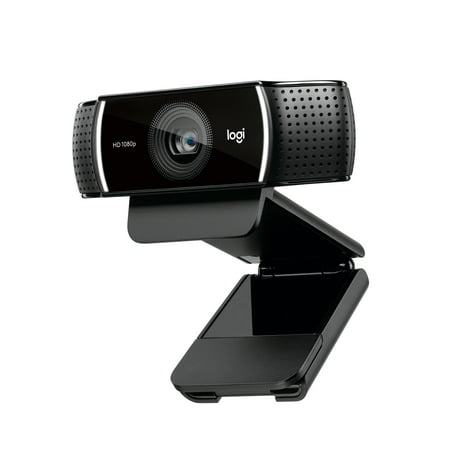
Live stream with outstanding clarity with the Logitech Pro Stream webcam, designed and built for streamers who take their game seriously. With a choice of 30 fps at 1080p or the hyperfast 60 fps at 720p, you can record or go live with vibrant, true-to-life video on channels like Twitch and...
Frequently Asked Questions
What is the difference between the Logitech Brio 100 and Pro Stream?
The Brio 100 is Logitech’s entry-level webcam — fixed focus, one mic, no software app, and a hardware privacy shutter. The Pro Stream is a streaming-optimized camera with a glass lens, continuous autofocus, dual stereo mics with noise cancellation, 720p/60fps mode, and Logitech Capture software. The Pro Stream costs about $30 more but is substantially more capable.
Does the Logitech Brio 100 work with OBS?
Yes — the Brio 100 shows up as a standard USB video device and works fine with OBS Studio. It does not have native OBS integration like the Pro Stream does, but it functions correctly as a basic video source in any streaming software.
Is the Logitech Pro Stream worth double the price of the Brio 100?
For streamers and anyone creating video content: yes, absolutely. The glass lens, autofocus, 60fps mode, and noise-canceling mics are all meaningful upgrades you will use constantly. For video calls only, the Brio 100 is more than adequate and the $30 savings are real. Evaluate by use case, not just by the price gap.
Which Logitech webcam is best for working from home?
For most home offices, the Brio 100 hits the sweet spot — clean 1080p, auto-exposure for variable lighting, privacy shutter, and very simple setup. If you host a lot of video calls and want better audio without a separate mic, the Pro Stream’s noise-canceling mics make a real difference. Go Brio 100 for simplicity; go Pro Stream if audio and lighting flexibility matter.