Computer Station Nation is reader-supported.
When you buy through links on our site, we may earn an affiliate commission. Learn more.
Quick Answer: The onn 4K Webcam wins on resolution and price. Choose it if your budget is under $35 and you have decent desk lighting. Choose the Logitech Pro Stream if you need 60fps, better audio, or reliable low-light performance.
Introduction
The onn 4K Webcam makes a bold pitch: genuine 4K resolution at under $35, with USB-C, autofocus, dual mics, and a hardware privacy shutter. It is Walmart’s own-brand challenger, and on paper, it embarrasses webcams that cost twice as much.
But the Logitech Pro Stream Webcam has something the spec sheet doesn’t capture: years of streaming-optimized tuning. Glass lens. Noise-canceling mics. Software background removal. A 60fps mode for gaming streams. And Logitech’s reliability track record.
So is 4K at $35 worth it — or does the Pro Stream’s real-world performance make it the smarter call even at $20 more?
Quick Comparison
| Spec | onn 4K Webcam | Logitech Pro Stream |
| Max Resolution | 4K / 30fps ✅ | 1080p / 30fps |
| 60fps Mode | ❌ | 720p / 60fps ✅ |
| Lens Type | Plastic | Glass ✅ |
| Autofocus | ✅ | ✅ |
| Microphone | Dual built-in | Dual stereo + noise cancel ✅ |
| Connection | USB-C ✅ | USB-A |
| Privacy Shutter | ✅ | ❌ |
| Software | None | Logitech Capture ✅ |
| Price | ~$34.86 ✅ | ~$54.99 |
Resolution & Frame Rate — onn 4K vs Logitech Pro Stream
The onn’s headline advantage is real: 4K captures four times more pixels than 1080p, and in a well-lit room this shows as noticeably sharper detail on face and texture. But the Pro Stream counters with its 720p/60fps mode — smoother motion for gaming content and fast-paced streams. Neither camera offers 1080p at 60fps. If your priority is the sharpest still frame for calls, the onn wins. If you stream gaming or fast action, the Pro Stream’s 60fps mode matters more. Winner: onn 4K for resolution; Pro Stream for 60fps.
Image Quality in Good Lighting — onn 4K vs Logitech Pro Stream
In a well-lit room the onn 4K produces impressive detail for the price. Fine detail in clothing, hair, and background objects comes through clearly at 4K that gets compressed out at 1080p. The Logitech’s glass lens delivers cleaner, lower-noise images at 1080p, but if your platform and audience are viewing at anything above 1080p, the onn’s resolution advantage is visible. Winner: onn 4K — more pixels in ideal conditions.
Low-Light Performance — onn 4K vs Logitech Pro Stream
High resolution is a liability in low light — more pixels means more visible sensor noise when light drops. The onn 4K struggles in dim conditions, producing grainy, dark images that make 4K feel like a burden rather than a benefit. The Logitech Pro Stream’s glass lens and image processing handle evening lighting, back-lit desks, and dim rooms significantly better. If your battlestation doesn’t have dedicated lighting, this is the most important comparison in this article. Winner: Logitech Pro Stream — by a wide margin in dim lighting.
Autofocus — onn 4K vs Logitech Pro Stream
Both cameras autofocus, but the Logitech’s is smoother and more consistent. The onn’s face-tracking autofocus works in normal conditions but shows more hunting behavior in lower-contrast or mixed lighting scenes. For standard desk setups with good ambient light, both cameras stay locked on reasonably well. Winner: Logitech Pro Stream — more consistent autofocus tracking.
Audio Quality — onn 4K vs Logitech Pro Stream
The Logitech wins clearly on audio. Dual stereo mics with noise cancellation versus dual basic built-in mics is a meaningful difference — the Pro Stream sounds less hollow, handles keyboard and fan noise better, and produces voice audio that holds up for streaming without a separate microphone. The onn’s mics are adequate for Zoom calls but fall short for content creation. Winner: Logitech Pro Stream — noise-canceling stereo mics win.
Design Features — onn 4K vs Logitech Pro Stream
The onn 4K has two practical advantages the Logitech lacks: a swivel/tilt mount for positioning flexibility, and a built-in hardware privacy shutter. USB-C is also a plus for newer desktops and laptops. The Pro Stream has a braided cable and a more solid feel, but no shutter and only USB-A. Winner: onn 4K — better mounting, privacy shutter, and modern USB-C.
Software — onn 4K vs Logitech Pro Stream
The onn 4K is plug-and-play with zero software. That is both its strength and its ceiling — no exposure control, no background removal, no color correction. The Logitech Pro Stream has Logitech Capture with a full feature set and deep OBS, Discord, and Streamlabs integration. If you want any control over your image beyond basic exposure, the Pro Stream is the only option. Winner: Logitech Pro Stream — full software vs. none.
Value — onn 4K vs Logitech Pro Stream
At under $35, the onn 4K delivers a spec list that would be impossible at that price point even a few years ago. 4K resolution, USB-C, autofocus, and a privacy shutter — for $35. The Logitech costs $20 more and tops out at 1080p. From a pure specs-per-dollar standpoint, the onn wins decisively. From a performance-per-dollar standpoint, the Pro Stream delivers more of what you actually feel using a webcam every day. Winner: onn 4K on specs-per-dollar; Logitech Pro Stream on real-world value.
Who Should Buy Each Webcam
Buy the onn 4K Webcam if: Your budget is $35 or under. You have a ring light or good natural desk lighting. You want USB-C and a privacy shutter. You don’t need software features or low-light performance. You primarily use it for daytime Zoom or Teams calls.
Buy the Logitech Pro Stream if: You stream games and want a 60fps mode. Your desk lighting is variable or dim. You use OBS, Streamlabs, or Discord and want software camera control. Audio quality from the built-in mic matters. You want long-term reliability from an established brand.
Verdict
The onn 4K Webcam wins on resolution and price — it is the most affordable way to get 4K video for calls and streams. But the Logitech Pro Stream wins on real-world usability — better low-light performance, superior audio, 60fps mode, and software you can actually use to improve your image.
For most people, especially those who stream in varying lighting conditions or care about audio, the Pro Stream is the smarter buy. The onn 4K is the right call when budget is the hard constraint and desk lighting is already covered.
Where to Buy
onn 4K Webcam with Autofocus
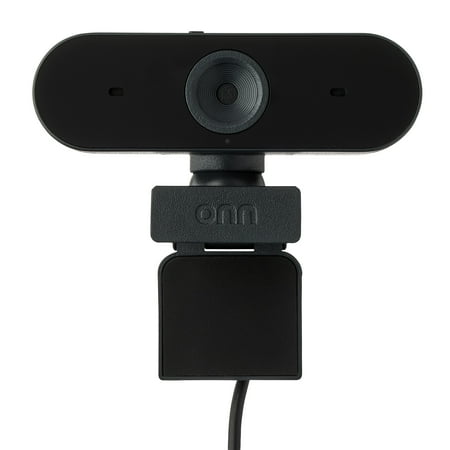
The onn 4K Webcam is a high-quality device designed to deliver superior video clarity and audio performance. With its ability to support up to 2160p resolution at a maximum of 25 fps, and 1080p resolution at 30 fps max, you can expect crystal clear images in every interaction. The webcam also...
Logitech Pro Stream Webcam
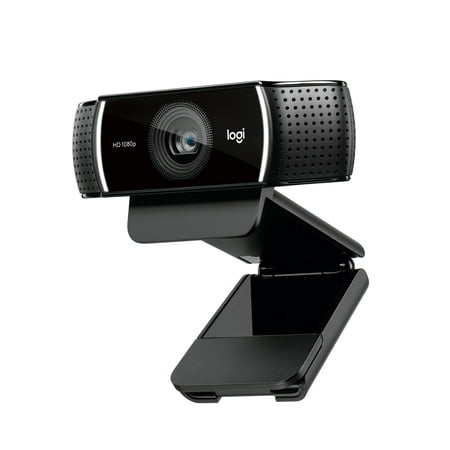
Live stream with outstanding clarity with the Logitech Pro Stream webcam, designed and built for streamers who take their game seriously. With a choice of 30 fps at 1080p or the hyperfast 60 fps at 720p, you can record or go live with vibrant, true-to-life video on channels like Twitch and...
Frequently Asked Questions
Is the onn 4K Webcam good for streaming?
It works for streaming but has real limitations: no 60fps mode, basic audio, and poor low-light performance. For daytime streams in a well-lit room it is a solid budget pick. For evening gaming streams, the Logitech Pro Stream handles mixed lighting significantly better and gives you 60fps at 720p.
Does the onn 4K need drivers?
No — it is fully plug-and-play on Windows 10+ and macOS 10.15+. Connect via USB-C and it shows up immediately as a video device. No software installation required.
Can you use the Logitech Pro Stream with a PS5 or Xbox?
The Logitech Pro Stream is designed primarily for PC use. It can work with PlayStation 4/5 via the USB port in limited scenarios, but official support is for Windows and Mac. Xbox consoles generally require Microsoft-approved accessories for video capture.
Which webcam is better for working from home?
For a home office, both work well. The onn 4K gives you a sharper image in good lighting and has a privacy shutter for security. The Logitech Pro Stream handles variable lighting better and has superior audio for calls. If your office has a bright window or strong overhead light, go onn 4K. If your lighting setup changes throughout the day, go Logitech.