Computer Station Nation is reader-supported.
When you buy through links on our site, we may earn an affiliate commission. Learn more.
Quick answer: The Razer DeathAdder V3 wins on price and ergonomics. The Logitech G Pro X Superlight 2 wins on wireless and switch technology. If $100 matters to you and you prefer a right-handed shape, grab the DeathAdder V3. If you want the best wireless competitive mouse money can buy and aren’t sweating the price tag, the Superlight 2 is worth every penny.
Introduction
On paper these two mice look almost identical. Both hover around 60 grams. Both run flagship optical sensors. Both are built for competitive FPS. The price gap between them is $106 — and whether that gap is worth crossing depends entirely on what you’re after.
The Razer DeathAdder V3 is a wired mouse with an ergonomic right-handed shape, Focus Pro 30K sensor, and Razer’s gen-3 optical switches. At $43.99, it’s one of the best competitive mice at any price point. The Logitech G Pro X Superlight 2 is wireless with a pseudo-ambidextrous shape, HERO 2 sensor, LIGHTFORCE hybrid switches, and 2,000 Hz LIGHTSPEED wireless. That bad boy runs $149.99.
Both mice are genuinely excellent. The right pick comes down to grip style, wired vs wireless preference, and how much that price difference stings. Let’s break it down.
Quick comparison
| G Pro X Superlight 2 | DeathAdder V3 | |
|---|---|---|
| Price | $149.99 | $43.99 |
| Weight | ~60g | ~59g |
| Sensor | HERO 2 (32K DPI) | Focus Pro 30K |
| Max IPS | 500 | 500 |
| Switches | LIGHTFORCE optical-mechanical | Razer optical-mechanical gen-3 |
| Polling rate | Up to 2,000 Hz (wireless) | 1,000 Hz standard; 8,000 Hz (adapter, $30 extra) |
| Connectivity | LIGHTSPEED wireless + USB-C | USB-C wired only |
| Battery | ~95 hours | N/A (wired) |
| Shape | Pseudo-ambidextrous | Ergonomic right-handed |
| Software | Logitech G Hub | Razer Synapse 3 |
| Warranty | 2 years | 2 years |
Price — DeathAdder V3 wins
The DeathAdder V3 is $43.99. The Superlight 2 is $149.99. That’s a $106 spread — enough to buy a solid gaming mousepad and still have money left over. The Superlight 2 earns its premium through wireless tech and LIGHTFORCE switches, but whether that justifies the price difference is personal.
For budget-conscious players, no switch or wireless tech closes a $106 gap. For players who treat their mouse as a long-term competitive investment, the math looks different. We’ll get there.
Winner: DeathAdder V3
Weight — tie
The Superlight 2 is about 60 grams. The DeathAdder V3 is about 59 grams. Functionally the same. Neither will fatigue your wrist on a long grind, and if you’re coming from something heavier, both will feel like a big upgrade.
Both use solid shells with no honeycomb cutouts — no flex, no debris traps, no structural compromise.
Winner: Tie
Sensor — tie
The Superlight 2 runs Logitech’s HERO 2 (32,000 DPI ceiling, 500 IPS). The DeathAdder V3 runs Razer’s Focus Pro 30K (30,000 DPI ceiling, 500 IPS). Both are top-tier optical sensors. Both are effectively flawless at the DPI settings competitive players actually use.
Independent testing shows near-zero jitter and no angle snapping from either sensor at competitive speeds. Running 400-800 DPI? You won’t find a meaningful tracking difference between them. The DPI ceiling gap is irrelevant.
Winner: Tie
Switches and click feel — Superlight 2 edges ahead
The Superlight 2 packs LIGHTFORCE hybrid optical-mechanical switches. In active mode they fire optically — click registers the instant you press, zero debounce delay. The DeathAdder V3 uses Razer’s gen-3 optical-mechanical switches, which also fire optically. Neither has the debounce delay traditional mechanical switches need.
The difference is feel, not speed. LIGHTFORCE switches have a heavier, more deliberate tactile bump. Razer’s gen-3 switches are lighter and snappier. Neither is objectively better. Logitech rates LIGHTFORCE at 100 million clicks; Razer rates theirs at 90 million. Both have clean reliability records after years in the wild.
Slight edge to the Superlight 2 here. That said, if you’ve already used Razer’s gen-3 switches and love them, there’s no urgent reason to switch.
Winner: Superlight 2 (marginal)
Wireless vs wired — depends on you
The DeathAdder V3 is wired only. The Superlight 2 is wireless via LIGHTSPEED 2.4 GHz, with USB-C as a fallback. This is one of the sharpest splits between the two, and honestly it comes down to personal preference more than objective performance.
Wired means no charging routine, no signal concerns, and lower cost. A lot of competitive players who frequent LAN events or just don’t want battery management in their life stick with wired. LIGHTSPEED wireless, for what it’s worth, has been effectively indistinguishable from wired in measured latency tests for years now.
The Superlight 2’s 2,000 Hz wireless polling gives you a 0.5ms report interval — faster than the DeathAdder V3’s standard 1,000 Hz wired (1ms). The DeathAdder V3 can hit 8,000 Hz with Razer’s optional HyperPolling adapter ($30 extra), but that pushes the total to around $74 and still leaves you wired.
Winner: Superlight 2 for wireless fans; DeathAdder V3 for wired-only players
Shape and ergonomics — depends on grip
The DeathAdder V3 has that classic ergonomic right-handed shape — pronounced thumb rest, taller rear hump, flared right side for the ring finger. It’s one of the most copied shapes in gaming mice because it genuinely works for palm and claw grip in medium-to-large right hands.
The Superlight 2 is pseudo-ambidextrous. Flatter, lower profile, two thumb buttons on the left, no right-side support. It suits claw grip well and works for palm grip, but it doesn’t give you the natural hand placement that a dedicated ergonomic shape does. Left-handed players get a bit more flexibility here, though even the Superlight 2 isn’t truly ambidextrous since the buttons are left-side only.
Right-handed palm-grip players will almost always be more comfortable in the DeathAdder V3 for long sessions. Claw grip players tend to land on the Superlight 2 more naturally.
Winner: DeathAdder V3 for right-handed palm grip; Superlight 2 for claw grip
Software — tie (both have issues)
Neither software experience is great. Logitech G Hub has a history of profile resets, polling rate settings not sticking between sessions, and background CPU usage. Razer Synapse 3 requires a Razer account for full features, runs as a persistent background service, and has its own update bugs.
Good news: both mice store settings in onboard memory, so you don’t need the app running during play once you’ve configured it. Set it up once, close it, forget about it.
Winner: Tie
Who should buy which
Buy the Razer DeathAdder V3 if:
- Budget matters — $44 is hard to beat for this sensor and switch quality
- You prefer a right-handed ergonomic shape for palm grip
- You’re fine with wired and don’t want to think about battery life
- You want the option to add HyperPolling for up to 8,000 Hz later
- You’re newer to competitive gaming and want top-end performance without the top-end price
Buy the Logitech G Pro X Superlight 2 if:
- Wireless is a must — no cable drag, same latency as wired
- You want LIGHTFORCE switches and the cleanest click feel available
- You own a Logitech Powerplay mat and want continuous wireless charging
- You compete at a high level where every hardware margin matters
- You prefer a lower-profile shape or play with claw grip
Verdict
This comparison is genuinely close in a way most mouse matchups aren’t. The DeathAdder V3 at $44 has no real weakness for its price. Excellent sensor, optical switches, ergonomic shape, solid build. It doesn’t lose on performance — it just loses on wireless and the premium switch feel.
The Superlight 2 earns its $150 price tag, but only on specific things: LIGHTSPEED wireless at 2,000 Hz, LIGHTFORCE switches, and Powerplay compatibility. If those matter to you, the extra $106 is worth it. If they don’t, the DeathAdder V3 is not a compromise mouse. It’s just a cheaper one.
Buy the Superlight 2 when price isn’t the constraint. Buy the DeathAdder V3 when it is.
Where to buy
Logitech G Pro X Superlight 2 — $149.99
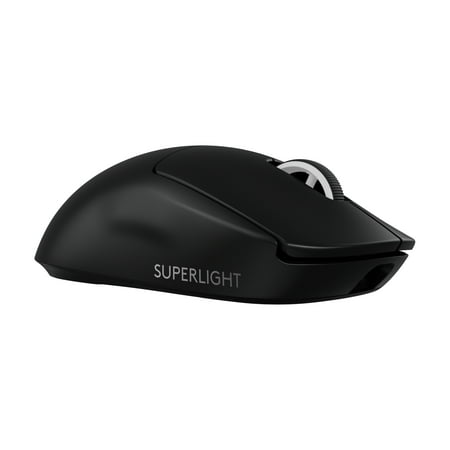
The PRO X SUPERLIGHT 2 Wireless Gaming Mouse is the next generation of our trusted championship-winning mouse, made even better. Take your performance to new heights with an award-winning 60g design, LIGHTFORCE hybrid switches, the most advanced HERO 2 gaming sensor, and the confidence and...
Razer DeathAdder V3 — $43.99
Frequently asked questions
Is the Razer DeathAdder V3 as accurate as the Logitech G Pro X Superlight 2?
For all practical purposes, yes. Both sensors track at 500 IPS with near-zero jitter and no angle snapping in independent testing. The Focus Pro 30K and HERO 2 are both excellent optical sensors. No competitive player is going to notice a tracking difference between them.
Can the DeathAdder V3 reach the same polling rate as the Superlight 2?
The DeathAdder V3 ships at 1,000 Hz. With Razer’s optional HyperPolling adapter (around $30), it hits 8,000 Hz wired — actually higher than the Superlight 2’s 2,000 Hz wireless ceiling. The Superlight 2 can’t be upgraded beyond 2,000 Hz.
Is the DeathAdder V3 available in a wireless version?
Not exactly. The wireless options in the DeathAdder V3 family are the DeathAdder V3 HyperSpeed ($69.99) with a lower-spec Focus X sensor, and the DeathAdder V3 Pro ($99.99) with the full Focus Pro 30K and HyperSpeed wireless. Neither matches the Superlight 2’s LIGHTSPEED protocol or 2,000 Hz wireless polling.
Which is better for palm grip?
The DeathAdder V3. Its right-handed ergonomic shape — taller rear hump, thumb rest, the whole deal — is built for palm grip. The Superlight 2’s lower, flatter profile suits claw grip more naturally. Palm-grip players can adapt to the Superlight 2 over time, but they’ll be more comfortable in the DeathAdder V3 from day one.