Computer Station Nation is reader-supported.
When you buy through links on our site, we may earn an affiliate commission. Learn more.
Logitech G Pro X Superlight 2
Rating: 9.2/10
The best gaming mouse Logitech has ever made. LIGHTFORCE switches kill the debounce delay, 2,000 Hz wireless is genuinely fast, and 60g without any holes in the shell is a combination that’s hard to beat. The stiff scroll wheel click and missing DPI button are real annoyances — just not deal-breakers.
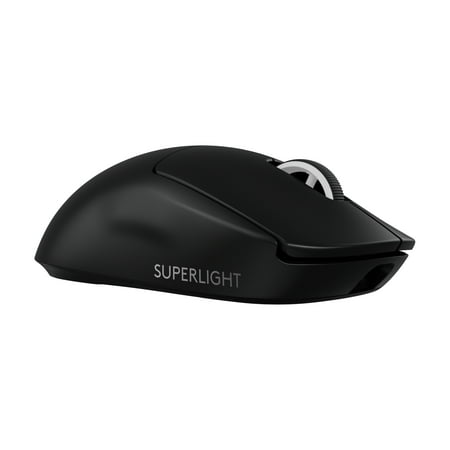
The PRO X SUPERLIGHT 2 Wireless Gaming Mouse is the next generation of our trusted championship-winning mouse, made even better. Take your performance to new heights with an award-winning 60g design, LIGHTFORCE hybrid switches, the most advanced HERO 2 gaming sensor, and the confidence and...
Quick verdict
Logitech built the original G Pro X Superlight around one idea: remove everything that doesn’t help you win. The Superlight 2 keeps all of that and adds the one thing the original was missing — optical switches. That’s the upgrade that matters here.
This review covers the standard Superlight 2 (pseudo-ambidextrous, around $150), not the SE or DEX variants. It’s for competitive FPS players in CS2, Valorant, and Apex deciding whether $150 is too much to spend on a mouse with no RGB, no DPI button, and just five buttons. It’s not.
Specifications
| Spec | Value |
|---|---|
| Sensor | Logitech HERO 2 |
| DPI range | 100–32,000 (50 DPI steps) |
| Max tracking speed | 500 IPS |
| Max acceleration | >40G |
| Switches | LIGHTFORCE hybrid optical-mechanical |
| Polling rate | Up to 2,000 Hz wireless; 1,000 Hz wired |
| Connectivity | LIGHTSPEED 2.4 GHz wireless + USB-C wired |
| Battery life | ~95 hours at 1,000 Hz; ~51 hours at 2,000 Hz |
| Weight | ~60g |
| Dimensions | 125.9 × 63.5 × 40.0 mm |
| Buttons | 5 (+ clickable scroll wheel) |
| PTFE feet | Zero-additive 100% PTFE |
| Powerplay compatible | Yes |
| RGB | No |
| Software | Logitech G Hub |
| Price | $149.99 (Black, White); $135.65 (SE variant) |
Design and build quality
The Superlight 2 is physically identical to the original. Same matte plastic shell, same low-profile hump, same pseudo-ambidextrous shape with two thumb buttons on the left side only. Logitech didn’t change the form factor because the original was already dialed in through years of pro player feedback. Why fix what isn’t broken?
At 60 grams, it’s one of the lightest solid-shell gaming mice you can buy. No honeycomb cutouts means no structural flex, no trapped debris, no compromise on rigidity. You notice the difference from heavier mice within the first few minutes.
Build quality is tight throughout. No creak when you squeeze the sides, no wobble in the scroll wheel, no flex under pressure. The zero-additive 100% PTFE feet are bigger than gen 1 and glide noticeably smoother on a cloth pad. USB-C replaces the old micro-USB port, centered at the rear. The LIGHTSPEED nano receiver tucks into a slot on the bottom — handy for LAN events and travel.
One thing worth knowing before you buy: this fits medium-to-large hands best. The 125.9mm length can feel awkward for fingertip grip. And despite the “ambidextrous” label, the thumb buttons are left-side only — so it’s functionally a right-handed mouse.
Sensor performance: HERO 2
The HERO 2 sensor is Logitech’s in-house optical sensor, rated to 500 IPS and 32,000 DPI. Both numbers are mostly irrelevant in practice. No serious FPS player goes above 3,200 DPI, and 500 IPS is faster than any wrist can move. What actually matters is accuracy at the sensitivity you use.
At 400 to 800 DPI on a cloth pad — where most FPS players spend their time — the HERO 2 tracks clean. Testing from RTINGS and Rocket Jump Ninja shows near-zero jitter and no angle snapping at real gaming speeds. Lift-off distance sits around 1 to 2mm and is adjustable in G Hub.
What separates it from cheaper sensors is tracking linearity. Move the mouse in a straight line and the cursor follows — no drift, no correction, no smoothing applied by default. For low-sensitivity players making large arm movements, that consistency adds up across every single input.
LIGHTFORCE switches: the most important upgrade
The LIGHTFORCE hybrid optical-mechanical switches are the single most important change between the Superlight 1 and 2. Not cosmetically. Functionally.
Standard mechanical switches add a debounce delay — typically 4 to 10ms after each click — to filter out unintended double-clicks from the physical mechanism bouncing. LIGHTFORCE switches in optical mode fire on a light beam break rather than physical contact. No debounce needed. The click registers the instant you press it.
The feel is deliberate and consistent. A bit heavier than typical gaming switches, but not stiff. Real tactile definition on each press. Logitech rates them for 100 million clicks, and nothing loosens with extended use.
One complaint that keeps coming up: the scroll wheel click is stiff. Not the rotation itself — that’s clean with good notched feedback — just the press-down action. If you bind middle-click to something you use constantly, like grenades in tactical shooters, this will get on your nerves.
Wireless performance and battery life
LIGHTSPEED wireless is Logitech’s 2.4 GHz protocol and has been the benchmark for gaming wireless since the original Superlight. Dropouts or lag under normal desktop conditions are rare. Logitech recommends using a USB extension cable to put the receiver on the desk rather than in the back of a tower — helps with USB 3.0 interference.
The Superlight 2 was the first gaming mouse to offer 2,000 Hz polling wirelessly. At 1,000 Hz the mouse reports position every millisecond; at 2,000 Hz, every half-millisecond. Whether that 0.5ms gap changes anything in real play is a fair debate — but for the players this mouse is built for, the measurement is the point.
Worth knowing: wired mode only goes to 1,000 Hz. The higher polling rate is wireless-only — which is counterintuitive. Also, 2,000 Hz needs a compatible USB controller. On some USB 3.0 setups it creates a measurable CPU load bump. If that happens, just drop back to 1,000 Hz.
Battery life at 1,000 Hz is around 95 hours — roughly 10 to 12 days for someone gaming 8 hours daily. At 2,000 Hz that drops to about 51 hours. Powerplay compatibility lets you skip charging entirely if you pair it with a Logitech Powerplay mat, which charges the mouse continuously while you play. That’s epic.
Software: Logitech G Hub
Logitech G Hub handles DPI presets from 100 to 32,000 in 50 DPI steps, polling rate, button remapping, and lift-off distance. Everything saves to onboard memory, so G Hub doesn’t need to be running during a session once you’ve configured your setup.
G Hub has earned its bad reputation. Profile resets, polling rate settings not sticking between sessions, background CPU usage — these come up often enough that most competitive players configure it once and close it. The mouse hardware is fine. The software is the frustrating part.
The missing DPI button is the most common complaint about this mouse, and it’s legitimate. Nothing on the body cycles presets. Players who hot-switch DPI for sniping or different games either live with going into software or remap a button through G Hub’s G-Shift layer. Neither option is as clean as a physical button.
Long-term reliability
The Superlight 2 has been on the market since late 2022, long enough to get a real read on durability. The LIGHTFORCE switches haven’t shown any pattern of early failure or click degradation. The PTFE feet hold up on cloth pads — most users report no visible wear after a year of daily use.
Logitech covers it with a 2-year warranty. No widespread hardware failures reported. The thing that frustrates long-term owners is G Hub, not the hardware. Cosmetically, the matte plastic picks up wear marks in the grip zones over time, most visibly on white and pink colorways.
Verdict
The G Pro X Superlight 2 is the best gaming mouse Logitech has made. The LIGHTFORCE switches are the clearest reason to buy it: zero debounce delay, real tactile feedback, 100 million click rating. The sensor is flawless, the wireless is the fastest available in this weight class, and the battery easily outlasts a week of heavy use.
The criticisms don’t really stack up against the target buyer. No DPI button only matters if you change sensitivity mid-game. Stiff scroll wheel only matters if you press it constantly. G Hub instability only matters if you rely on it for profile management. Configure it once and most of those complaints disappear.
Buy it if you play competitive FPS, palm or claw grip, medium-to-large hands, and you want the most focused performance mouse at this price.
Skip it if you need more than five buttons, prefer a proper right-handed ergonomic shape (the Superlight 2 DEX is the better call there), are left-handed, or are on a tighter budget (the SE covers most of the performance for $14 less).
Competitors compared
| Mouse | Weight | Max polling | Battery | Price |
|---|---|---|---|---|
| G Pro X Superlight 2 | ~60g | 2,000 Hz (wireless) | ~95 hrs | $149.99 |
| Razer Viper V2 Pro | ~58g | 1,000 Hz | ~80 hrs | ~$140 |
| Razer Viper V3 Pro | ~54g | 8,000 Hz | ~95 hrs | ~$160 |
| G Pro X Superlight 2 SE | ~60g | 2,000 Hz (wireless) | ~95 hrs | $135.65 |
Against the Razer Viper V3 Pro, the Superlight 2 gives up weight (~60g vs ~54g) and polling rate ceiling (2,000 Hz vs 8,000 Hz), but wins on switch feel and the Powerplay charging ecosystem. Against the Viper V2 Pro, it wins on wireless latency and switches for roughly $10 more. The Superlight 2 SE is the budget version of this mouse: same shape, same polling rate, conventional mechanical switches, $14 cheaper.
Where to buy
Standard (Black) — $149.99
The PRO X SUPERLIGHT 2 Wireless Gaming Mouse is the next generation of our trusted championship-winning mouse, made even better. Take your performance to new heights with an award-winning 60g design, LIGHTFORCE hybrid switches, the most advanced HERO 2 gaming sensor, and the confidence and...
Standard (White) — $149.99
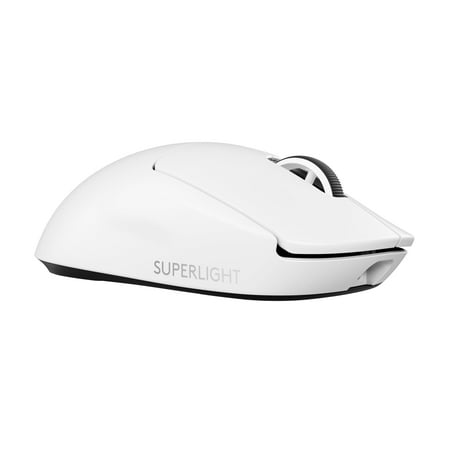
The PRO X SUPERLIGHT 2 Wireless Gaming Mouse is the next generation of the trusted championship-winning mouse, made even better. Take your performance to new heights with an award-winning design, LIGHTFORCE hybrid switches, the most advanced HERO 2 gaming sensor, and the confidence and...
SE variant (Black) — $135.65
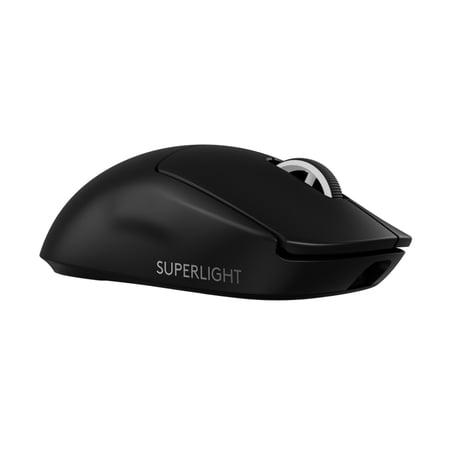
The PRO X SUPERLIGHT 2 SE Wireless gaming mouse is the next generation of our trusted championship-winning mouse, made even better. Take your performance to new heights with an award-winning 60g design, LIGHTFORCE hybrid switches, the most advanced HERO 2 gaming sensor, and the confidence and...
Frequently asked questions
Is the G Pro X Superlight 2 worth upgrading from the original Superlight?
Yes, mainly for the LIGHTFORCE switches. That’s the meaningful upgrade. Doubled wireless polling rate and extra battery hours are real improvements, but not enough on their own to justify replacing a working gen 1.
Why does the Superlight 2 have no DPI button?
Logitech designed the Superlight line for players who pick a DPI and stick with it. Leaving out the button saves weight and avoids accidental presses mid-game. If you need to switch on the fly, you can remap a button through G Hub’s G-Shift layer — though it’s not as clean as a physical switch.
What is the difference between the Superlight 2, SE, and DEX?
The standard Superlight 2 (this review) is pseudo-ambidextrous with LIGHTFORCE switches, around $150. The SE runs a standard HERO sensor (44K DPI) with conventional mechanical switches at about $135 — no LIGHTFORCE. The DEX is an ergonomic right-handed shape for players who prefer a taller, more contoured mouse. All three use LIGHTSPEED wireless at up to 2,000 Hz.
Does the Superlight 2 work without Logitech G Hub installed?
Yes. Settings live on the mouse, not in the software. Configure your DPI, polling rate, and button layout in G Hub once, then close it. The mouse keeps everything.