Computer Station Nation is reader-supported.
When you buy through links on our site, we may earn an affiliate commission. Learn more.
Razer DeathAdder V3 — review summary
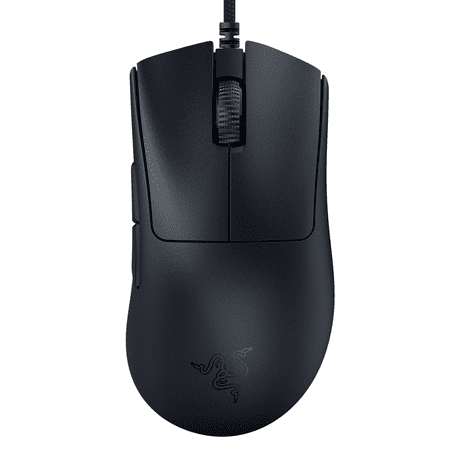
Razer™ DeathAdder V3 Ultra-lightweight Ergonomic Optical Esports Mouse FOR THE PRO With the Razer DeathAdder V3, victory takes on a new shape. Refined and reforged with the aid of top esports pros, its iconic ergonomic form is now more than 25% lighter than its predecessor, backed by a set of...
Overall rating: 8.8/10
Verdict: The DeathAdder V3 is the best value wired gaming mouse on the market. Flagship sensor, 63g weight, proven ergonomic shape, and optical switches — all for $44. If you are right-handed and willing to use wired, buy this.
The DeathAdder doesn’t try to be fancy. It just works.
Over 15 million units across multiple generations, according to Razer. That number gets thrown around in marketing, but it also means there’s 15 years of community feedback on what this shape does well and what it doesn’t. The V3 is the current iteration, and it’s the best one yet.
Razer cut the weight from the V2 (96g) down to 63g on the V3. That’s a 34% reduction. They kept the ergonomic shape right-handed players have been using for years. They upgraded to optical switches for the main clicks. The result is a mouse that feels like a modern flagship in most ways but retails for $43.99. Score.
This review covers what changed from prior generations, what the Focus Pro sensor does in practice (not just on paper), and whether the cable is actually a problem for day-to-day use.
Specifications
| Sensor | Razer Focus Pro optical |
| DPI range | 100 – 30,000 DPI |
| Polling rate | 1,000 Hz (up to 8,000 Hz with HyperPolling adapter) |
| Switches | Razer optical (90 million click rating) |
| Weight | 63g |
| Dimensions | 128 x 68 x 44mm |
| Connection | Wired, braided USB-A cable |
| Cable length | 2.1m |
| Buttons | 5 (left click, right click, scroll click, 2x side) |
| RGB | Razer Chroma (2 zones) |
| Software | Razer Synapse 3 (optional for basic use) |
| Compatibility | Windows 10/11, macOS 10.15+ |
Design and build
The V3 shape is recognizably DeathAdder but slimmer than older generations. The rear hump is lower and the sides are more aggressive. Right-hand palm and claw grip players will feel at home immediately. The thumb side has two side buttons and a sculpted ledge. Left side is smooth.
The top surface is matte coated plastic. It picks up fingerprints less than glossy options and gives some grip resistance. The PTFE (polytetrafluoroethylene) mouse feet are four separate pads — two small front pads, two rear. They glide well on both cloth and hard surface pads without rattling or flexing under normal use.
At 63g, the mouse feels noticeably lighter than most wired mice. You can hear and feel the hollow construction when you tap the shell. The build doesn’t feel cheap, but it’s clearly optimized for weight reduction rather than the dense feel of heavier mice. If premium heft matters to you, that’s a trade-off to accept going in.
The braided cable is 2.1 meters long. It has minimal memory — doesn’t hold the curled shape from being boxed. With a simple rubber band near the mouse cord anchor, most of the cable drag disappears. A proper cable bungee resolves it entirely.
Performance and sensor
The Focus Pro sensor is the same chip used in Razer flagship mice including the DeathAdder V3 Pro wireless and the Viper V3 Pro. It uses a Sony IMX899 image sensor. At 400-1600 DPI — the range most competitive players use — it tracks without jitter, angle snapping, or acceleration. Lift-off distance is low (about 2mm on most surfaces) and adjustable in Synapse with asymmetric cut-off settings.
The optical main switches register clicks with no pre-travel and no post-travel. They’re physically faster than mechanical switches because the light beam registers actuation before physical contact is made. The click latency difference between optical and mechanical is a few milliseconds at most — not meaningful for game performance. What optical switches do deliver is long-term durability. The 90 million click rating means the switches will outlive the rest of the mouse for most players.
Side button feel is solid. Short travel, clear tactile click. Better than average for side buttons. The scroll wheel has defined steps with light resistance — not mushy, not scratchy.
Software and updates
Razer Synapse 3 handles DPI (dots per inch) adjustment, polling rate (up to 1,000 Hz standard, 8,000 Hz with the HyperPolling adapter), RGB customization, button remapping, and surface calibration. The software is optional for basic use — the mouse ships with a default 800 DPI setting that works right out of the box.
Synapse has a history of being resource-intensive and requiring an account login. The latest versions are lighter than they were in 2020-2022. On a modern gaming PC with 16GB+ RAM, the background process doesn’t cause measurable performance issues. On older or lower-spec systems, disable the Synapse startup process and only run it when you need to change settings.
Firmware updates have been released since launch to improve surface calibration behavior and fix a click latency issue that affected some early units. The current firmware as of 2025 is stable. No outstanding known issues in the community.
Long-term reliability
The V3 has been on the market since 2022. Long-term ownership reports are positive. The main concerns after 12+ months: some coating wear on high-contact areas (top surface and side button edges) on units used with aggressive grip styles. Cosmetic only, doesn’t affect function.
The optical switches sidestep the double-click failure mode that plagues older DeathAdder generations using Omron mechanical switches. Double-clicking is the most common failure mode for mechanical gaming mice. The 90 million click rating on optical switches translates to real-world longevity most players will never test the ceiling of.
Razer offers a 2-year warranty on the V3. Community reports on warranty service quality are mixed — faster resolution on clearly defective hardware, slower on wear-related issues. Keep your purchase receipt.
Verdict
The DeathAdder V3 is the mouse to recommend to right-handed players with almost any budget. Flagship sensor. 63g weight competitive with mice costing three times as much. One of the most refined ergonomic shapes in gaming peripherals. Just buy it.
Who should buy it: right-handed players who want a wired mouse under $50, FPS players who want a proper ergonomic shape, anyone upgrading from a pre-2020 gaming mouse that’s started double-clicking or tracking inconsistently.
Who should look elsewhere: left-handed players (the shape doesn’t work), players who specifically need wireless (the DeathAdder V3 Pro wireless is $99), players who find the ergonomic shape uncomfortable after extended claw grip sessions.
Competitors compared
| Mouse | Price | Weight | Connection | Shape |
|---|---|---|---|---|
| Razer DeathAdder V3 (this review) | $43.99 | 63g | Wired | Right-hand ergonomic |
| Logitech G Pro X Superlight 2 | $149.99 | 60g | Wireless | Symmetrical |
| SteelSeries Prime Mini Wireless | $79.99 | 57g | Wireless | Symmetrical |
Where to buy
Razer™ DeathAdder V3 Ultra-lightweight Ergonomic Optical Esports Mouse FOR THE PRO With the Razer DeathAdder V3, victory takes on a new shape. Refined and reforged with the aid of top esports pros, its iconic ergonomic form is now more than 25% lighter than its predecessor, backed by a set of...
Frequently asked questions
Is the DeathAdder V3 good for FPS?
Absolutely. The Focus Pro sensor has no weaknesses at FPS DPI settings. The ergonomic shape is a natural fit for right-handed palm-grip FPS players. Several pro players have used DeathAdder shapes in competition. The main thing working against it for FPS is that it’s wired — competitive players who want wireless should look at the DeathAdder V3 Pro or the Superlight 2.
How does the V3 compare to the V2?
The V3 is significantly lighter (63g vs 96g), uses optical switches instead of mechanical, and has the newer Focus Pro sensor instead of the Focus+. The shape is similar but slimmer and lower-profile on the V3. If you have a V2 and are considering upgrading, the weight reduction alone justifies it for players who noticed fatigue from the V2 during long sessions.
Does the DeathAdder V3 work without Razer Synapse?
Yes. The mouse ships with 800 DPI and 1,000 Hz polling configured as defaults. Use it immediately without installing any software. Synapse is only needed if you want to change the DPI setting, remap buttons, adjust RGB, or use the asymmetric cut-off feature. Most players install Synapse once to set their preferred DPI and then disable the startup process.