
Computer Station Nation is reader-supported.
When you buy through links on our site, we may earn an affiliate commission. Learn more.
Walking into the gaming keyboard market cold is rough. Our complete mechanical keyboards guide has full background if you need it. There are hundreds of options, a ton of confusing specs, and no shortage of overpriced gear that isn’t worth half what it asks for. This guide cuts through it — here’s what actually matters when picking a gaming keyboard, and what to ignore.
What Actually Matters in a Gaming Keyboard
Three things move the needle: switch type, form factor, and polling rate. Everything else — RGB, brand name, software suites — is either secondary or marketing. Get those three right and you’ve got a board that’ll serve you well for years.
Switch type
For gaming specifically, linear switches are the standard recommendation. See our full mechanical keyboard switches guide for a breakdown of every type. See our full mechanical keyboard switches guide for a breakdown of every type. Cherry MX Red (45g actuation), Razer Yellow (35g), and Gateron Yellow (35g) all give you a smooth, uninterrupted keystroke with nothing to push through. Fast inputs, low fatigue over long sessions.
Tactile switches like Cherry MX Brown work fine for gaming too — the bump isn’t significant enough to slow you down. Where Browns shine is when you also do a lot of typing. They’re the all-arounder that most people won’t regret.
Clicky switches (Blue, Razer Green) are louder and heavier — most competitive players avoid them for gaming. Great for typing, but the heavier actuation and noise are real tradeoffs in a gaming context.
Form factor
TKL (tenkeyless, no numpad) is the most popular format among serious gamers. Dropping the numpad moves your mouse 3 to 4 inches closer to center — that’s real estate that matters over hours of play. Full size is fine if you need the numpad for work. 60% and 65% are great if desk space is tight, but require adjustment time.
Polling rate
Polling rate is how often the keyboard reports its state to your PC. Standard is 1000Hz (reports 1000 times per second). Gaming keyboards often advertise 8000Hz polling rates now. The real-world difference between 1000Hz and 8000Hz is negligible for most people — don’t pay a premium for it unless you’re grinding at a high competitive level where every millisecond genuinely counts.
Budget Tiers: What to Expect at Each Price Point
Under $30 — Entry level
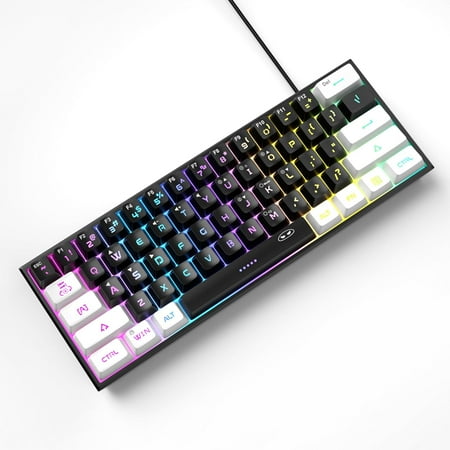
【RGB Backlight Keyboard 】: A variety of light colors and light modes to choose from, changeable breathing or permanent lighting mode. It can be great for playing the game at night even without light. You can also adjust the brightness and breathing speed of the backlit according to your...
At this price, you’re getting real mechanical switches in a plastic body with basic RGB. Quality control is inconsistent — some boards punch above weight, others fall apart quickly. Read recent reviews before committing. The MageGee is a decent example of what the budget end looks like: functional switches, serviceable build, limited features.
$30–$60 — The sweet spot
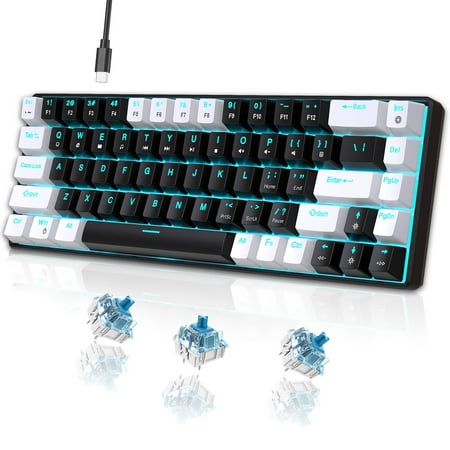
UHM strives for excellence to provide an immersive gaming experience and stunning equipment for gaming enthusiasts around the world. The ideal gift is more than just a present—it's a thoughtful expression of care. Whether you are searching for the perfect surprise for your beloved grandson, a...
This is where things get noticeably better. Better switch consistency, more durable construction, usually some level of anti-ghosting and N-key rollover. You can find solid TKL and compact boards in this range that will serve you well for years. This is where most gamers should aim for their first serious mechanical board.
$60–$120 — Mid-range
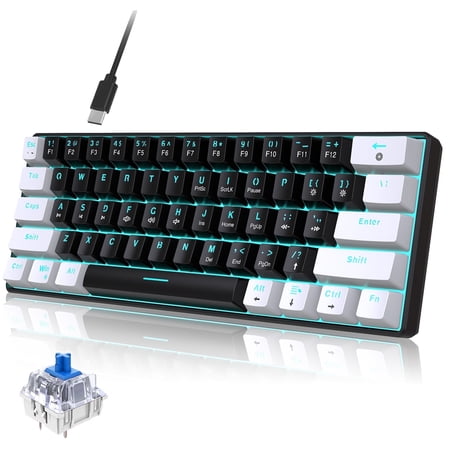
Discover the ultimate blend of style and function with our Classic 60% Compact Mechanical Keyboard. Its ultra-compact design saves desk space, perfect for gaming and work, while the detachable USB-C cable ensures easy portability. Enjoy precise, responsive key commands with Mechanical Blue...
Here you start seeing hot-swap support, premium switch options, better sound dampening, and more robust software. Brands like Keychron, Ducky, and Razer play in this range. This is where build quality stops feeling budget and starts feeling like something you’re proud to have on your desk.
$120+ — Enthusiast tier
Premium aluminum chassis, gasket mounts, pre-lubed switches, wireless options, full software suites with on-board profile storage. Razer BlackWidow V3 Pro, Logitech G915, Keychron Q series. You’re paying for build quality, acoustics, and features — not just for the logo. Worth it if you spend serious time at your desk. Diminishing returns if you only game casually.
Features Worth Paying For vs. Not
Worth the extra cost
Hot-swap sockets — lets you swap switches without soldering. Real N-key rollover — matters for games with complex multi-key inputs. Gasket/foam mounting — reduces hollow ping and makes typing quieter. USB passthrough — handy for plugging in a mouse or headset without reaching around your PC.
Often not worth the premium
Per-key RGB — looks great, uses battery faster on wireless boards, adds cost. Dedicated media keys — convenient but you can live without them. Wrist rest — almost always better to buy a separate aftermarket one. 8000Hz polling rate — real benefit exists only at the highest competitive levels.
Wireless vs. Wired for Gaming
The honest answer: modern wireless gaming keyboards have gotten good enough that latency is no longer a real concern for most players. Logitech LIGHTSPEED and Razer HyperSpeed connections test within 1ms of wired — a gap that’s effectively unmeasurable in real gameplay. Pros still run wired for redundancy, not because wireless is slower.
The real question is cost and convenience. Wireless adds $30 to $50 over equivalent wired boards. You’re managing battery life. For a competitive gaming setup where you’re buying one keyboard and want zero variables, go wired. For a clean desk setup where cable management is a priority, wireless is worth considering at the mid-to-high range.
Mechanical vs. Optical Switches
Optical switches are newer — instead of a physical contact point, they use a light beam that gets interrupted when a key presses down. The result is faster actuation (no physical contact bounce) and longer lifespan. Razer’s optical switches and Wooting’s Hall Effect switches are the most common examples.
For most gamers, traditional mechanical switches are fine. If you’re competitive enough to care about the absolute fastest possible input registration, optical or Hall Effect switches are worth looking at — Wooting keyboards are specifically built for competitive play. For everyone else, a good mechanical switch is all you need.
More Gaming Keyboard Guides
- Best Keyboards for FPS Games — ranked picks for competitive shooters
- How to Optimize Your Keyboard for Gaming — settings, NKRO, and keybind tips
- Mechanical Keyboard Troubleshooting — fixes for common problems
- Mechanical Keyboard RGB Lighting — is it worth the extra cost?
FAQ
Do I need a gaming keyboard specifically, or will any mechanical keyboard work?
Any mechanical keyboard works for gaming. “Gaming” is mostly marketing — it means the keyboard has features aimed at gamers (RGB, macros, polling rate advertising). The core typing/gaming experience comes from the switch. A $60 board with Cherry MX Reds will game just as well as a $150 “gaming” board with the same switches.
What’s the best switch for FPS games?
Linear switches — Cherry MX Red, Razer Yellow, Gateron Yellow. Smooth actuation, low actuation force (35g to 45g), nothing to push through. Fast and low-fatigue for extended sessions. Most competitive FPS players run linear switches.
Should I get a full-size keyboard or TKL for gaming?
TKL is the better choice for most gamers. Dropping the numpad gives your mouse hand more room and centers the board on your desk. Only go full-size if you genuinely use the numpad for work or number entry. If you’re on the fence, try TKL — most gamers who switch don’t go back.
Is it worth spending over $100 on a gaming keyboard?
Depends on how much time you spend at your desk. If you’re gaming 20+ hours a week, typing for work, and your keyboard is the most-used thing on your battlestation, yes — the jump from $60 to $120 brings real improvements in build quality, acoustics, and features. If you’re a casual gamer, a solid $50 to $70 board will serve you just fine.

