Computer Station Nation is reader-supported.
When you buy through links on our site, we may earn an affiliate commission. Learn more.
Quick Answer: For most buyers, the Logitech Pro Stream Webcam wins on overall image quality, audio, and software ecosystem. Choose the onn 4K if you specifically need 4K resolution on a tight budget and don’t care about build quality or companion software.
Introduction
Two very different webcams, two very different philosophies. The Logitech Pro Stream Webcam is a purpose-built streaming camera with a glass lens, dual stereo mics, and the Logitech software ecosystem behind it. The onn 4K Webcam is Walmart’s own-brand challenger that leads with one headline spec: 4K resolution at under $35.
The question isn’t which one has a better spec sheet on paper — the onn wins that comparison easily at its price. The question is whether 4K resolution actually matters more than everything else you give up to get it. Build quality, audio, software, low-light performance — the Pro Stream has the edge on all of them. So which one is right for your desk?
Quick Comparison
| Spec | Logitech Pro Stream | onn 4K Webcam |
| Max Resolution | 1080p / 30fps | 4K / 30fps |
| Gaming Mode | 720p / 60fps ✅ | No 60fps ❌ |
| Lens Type | Glass ✅ | Plastic |
| Autofocus | ✅ | ✅ |
| Microphone | Dual stereo + noise cancel ✅ | Dual built-in |
| Connection | USB-A | USB-C ✅ |
| Privacy Shutter | ❌ | ✅ |
| Software | Logitech Capture ✅ | None |
| Price | ~$54.99 | ~$34.86 ✅ |
Video Resolution & Frame Rate — Logitech Pro Stream vs onn 4K
The onn 4K wins on raw resolution — 3840×2160 versus 1920×1080. That is genuinely four times more pixels, and in ideal conditions you will see the difference in sharp, detailed 4K frames. But frame rate tells the other side of the story: both cameras are capped at 30fps at their highest resolution. The Logitech, however, unlocks 60fps at 720p — which matters significantly for gaming streams and fast-motion content. The onn has no 60fps mode at any resolution. Winner: Tie — 4K for quality calls, Pro Stream for 60fps streaming.
Image Quality in Good Lighting — Logitech Pro Stream vs onn 4K
In bright, well-lit environments, the onn 4K will look sharper on screen — 4K resolution captures more detail, and this shows in face texture, fabric texture, and background elements. But the Logitech’s glass lens produces cleaner color reproduction and less noise at 1080p than you get from the onn’s plastic lens at 4K. If your viewer is watching at 1080p anyway (which most are), the real-world difference is minimal. Winner: onn 4K — raw resolution wins in good light.
Low-Light Performance — Logitech Pro Stream vs onn 4K
This is where the Pro Stream earns its premium. The glass lens on the Logitech captures more light, and Logitech’s image processing holds up better in dim conditions — evening rooms, desk setups without dedicated lighting, darker home offices. The onn 4K drops off fast in low light; 4K resolution amplifies sensor noise, and without quality light correction software, the result is a grainy, dark image. If you do not have a ring light or key light on your desk, the Pro Stream will look noticeably better after sundown. Winner: Logitech Pro Stream — glass lens and better image processing.
Autofocus — Logitech Pro Stream vs onn 4K
Both cameras have autofocus. The Logitech’s continuous autofocus is smooth and reliable — it tracks well when you shift position or lean forward and snaps back quickly if you move out of frame. The onn’s face-tracking autofocus works, but it can hunt more noticeably in lower contrast scenes. In practice, both will keep a stationary presenter in focus without any issues. Winner: Logitech Pro Stream — smoother, more consistent autofocus behavior.
Microphone Quality — Logitech Pro Stream vs onn 4K
The Logitech Pro Stream wins this category clearly. Its dual stereo mics with noise cancellation deliver cleaner audio that suppresses background hum, fan noise, and keyboard clatter better than the onn’s basic dual mics. For video calls and casual streaming, the Logitech’s audio is good enough that you may not feel the urgency to add a separate mic. The onn’s mics are functional but flat — adequate for calls, underwhelming for streaming. Winner: Logitech Pro Stream — dual stereo with noise cancellation.
Build Quality & Design — Logitech Pro Stream vs onn 4K
The Pro Stream is noticeably more solid — braided cable, tight clip mechanism, and a body that feels premium relative to its price. The onn 4K’s swivel mount is a useful feature the Pro Stream lacks, but the overall build is plastic-heavy and a bit hollow. The onn also includes a hardware privacy shutter, which the Pro Stream does not have. Winner: Logitech Pro Stream on build quality; onn 4K on practical design features (swivel + shutter).
Software Ecosystem — Logitech Pro Stream vs onn 4K
The Logitech has Logitech Capture — a full app with background removal, color correction, scene management, and OBS integration. It also has native support profiles in Discord, Zoom, and Streamlabs. The onn has no companion software at all — plug-and-play only. If you want any image control beyond Windows camera settings, the Logitech is the only option here. Winner: Logitech Pro Stream — full software ecosystem vs. none.
Value for Money — Logitech Pro Stream vs onn 4K
The onn 4K costs $20 less and delivers 4K resolution — on paper, that is extraordinary value. If you only care about resolution and price, nothing beats it at this tier. But the Logitech Pro Stream delivers a more complete package: better audio, better software, better low-light performance, and a glass lens. You are paying $20 more for everything that makes a webcam work well in real conditions, not just spec sheet comparisons. Winner: onn 4K on raw value; Pro Stream on value-for-performance.
Who Should Buy Each Webcam
Buy the Logitech Pro Stream Webcam if: You stream games or do regular video calls in a room with variable lighting. You want 60fps for gaming content. You use Logitech Capture for background removal or color correction. Audio quality from the built-in mic matters to you.
Buy the onn 4K Webcam if: Your budget is firm at under $35. You have good desk lighting already (ring light or window). You want 4K resolution for meetings with colleagues on 4K monitors. You prefer USB-C and a hardware privacy shutter. You don’t care about software features.
Verdict
For most people — streamers, remote workers, students — the Logitech Pro Stream Webcam is the better buy. The glass lens, 60fps mode, noise-canceling mics, and Logitech Capture software deliver a more complete streaming and calling experience than the onn 4K can. The extra $20 is worth it for everything that makes a webcam work well day-to-day.
That said, if your budget is strict and you already have good desk lighting, the onn 4K is a legitimate bargain. Four times the resolution at a lower price is a real selling point when conditions are right.
Where to Buy
Logitech Pro Stream Webcam
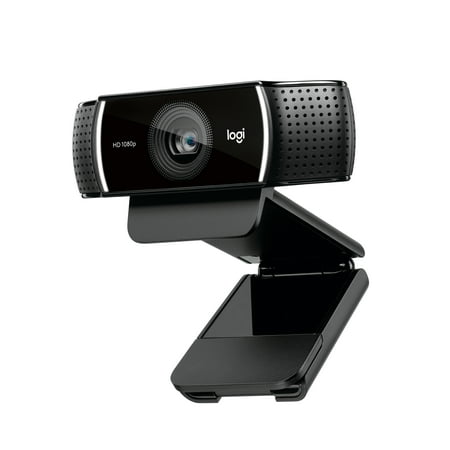
Live stream with outstanding clarity with the Logitech Pro Stream webcam, designed and built for streamers who take their game seriously. With a choice of 30 fps at 1080p or the hyperfast 60 fps at 720p, you can record or go live with vibrant, true-to-life video on channels like Twitch and...
onn 4K Webcam with Autofocus
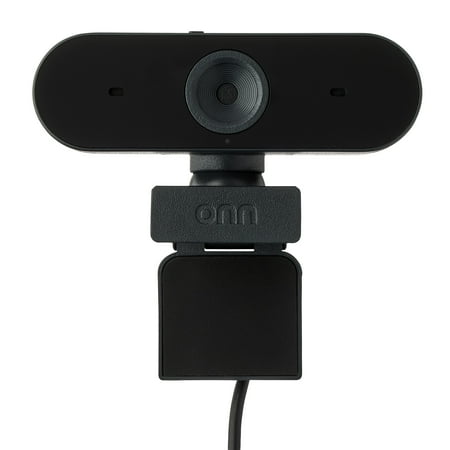
The onn 4K Webcam is a high-quality device designed to deliver superior video clarity and audio performance. With its ability to support up to 2160p resolution at a maximum of 25 fps, and 1080p resolution at 30 fps max, you can expect crystal clear images in every interaction. The webcam also...
Frequently Asked Questions
Does the onn 4K Webcam actually look better than the Logitech Pro Stream?
In ideal lighting conditions, the onn 4K does produce sharper detail due to its higher resolution. But in variable or low light — which is more common on real desks — the Logitech’s glass lens and image processing produce a cleaner, less noisy image. Most streaming viewers watch at 1080p anyway, so the 4K advantage is often invisible in practice.
Can the Logitech Pro Stream do 1080p at 60fps?
No — the Pro Stream maxes out at 1080p/30fps. It does support 720p at 60fps, which is useful for fast-motion gaming streams. For true 1080p/60fps, you would need to look at higher-end webcams like the Logitech C922 or Brio 4K.
Does the onn 4K Webcam work on Mac?
Yes — the onn 4K is plug-and-play on macOS 10.15 and later. No driver installation required. It will appear as a standard USB video device in Zoom, Teams, and other video apps.
Which webcam is better for Zoom calls?
Both work well for Zoom. The Logitech Pro Stream gives you better audio from its dual stereo mics with noise cancellation, which matters more in Zoom than video resolution does. The onn 4K will look sharper if your colleagues have 4K monitors, but the mic quality difference is audible to everyone on the call.