
onn 4K Webcam with Autofocus Review — Best Budget 4K Webcam
| Video Quality | 8.0 |
|---|---|
| Value for Money | 8.8 |
| Build & Features | 6.8 |
The onn 4K Webcam packs genuine 4K/30fps resolution, autofocus, USB-C, and a swivel mount into an unbeatable price — the best resolution-per-dollar webcam for budget-conscious streamers and remote workers.

Description
Quick Specs
| Resolution | 4K (3840×2160) at 30fps / 1080p at 30fps |
| Autofocus | Yes — with face tracking |
| Field of View | 90° |
| Microphone | Dual built-in mics |
| Connection | USB-C |
| Privacy Shutter | Yes — hardware slider |
| Mount | Swivel and tilt clip mount |
| Compatibility | Windows 10+, macOS 10.15+ |
| Software Required | None — plug-and-play |
Source: onn product listing on Walmart
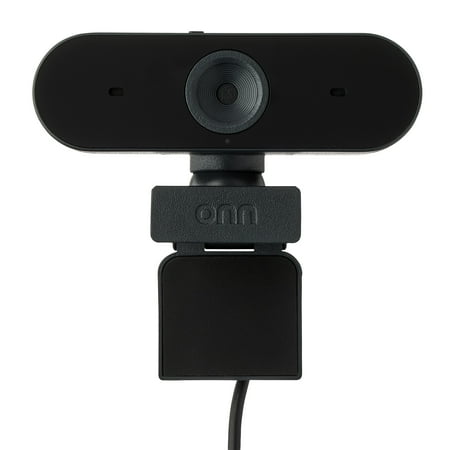
The onn 4K Webcam with Autofocus is Walmart’s own-brand answer to a simple question: how cheap can 4K get? At under $35, it delivers genuine 4K/30fps resolution — something that would have cost you five times as much just a few years ago. If your video calls look blurry and you want a fast, no-fuss upgrade, this webcam makes that argument pretty hard to ignore.
Image quality in good lighting is legitimately impressive for the price. 4K at 30fps means crisp, detailed frames during daytime calls and streams. The autofocus tracks your face well enough, keeping you sharp when you move around, and the 90° field of view captures a natural amount of your background without distorting the edges. Drop to 1080p and it stays sharp — the sensor handles lower resolutions cleanly.
The swivel mount is a nice practical touch. It snaps onto monitors of different thicknesses and lets you pan and tilt without repositioning the whole unit. Built-in dual mics are functional for calls — not studio-quality, but clear enough that your colleagues won’t complain about hollow audio. A hardware privacy shutter flips across the lens when you are done, which I always appreciate on a webcam.
The USB-C connection is modern and refreshing to see at this price point. Plug it in and it shows up immediately on Windows and Mac — no software required, no driver drama. That also means no software, period — there is no app for tuning exposure or adding effects. What you see is what you get.
Where the onn brand shows its limits is build quality. The plastic feels a bit hollow compared to Logitech alternatives, and the hinge mechanism is not as precise. Low-light performance drops off faster than a premium webcam — if your desk lighting is dim, 4K resolution will not save you.
Verdict
For budget-conscious buyers who want 4K video quality for calls and streaming without brand-name pricing, the onn 4K Webcam is a genuinely solid pick. Don’t expect premium build or software — but at this price, the resolution-to-dollar ratio is hard to beat.


There are no reviews yet.