
Computer Station Nation is reader-supported.
When you buy through links on our site, we may earn an affiliate commission. Learn more.
Quick answer: If you want the absolute cheapest hall effect 60% that still ships with rapid trigger and 8000Hz polling, get the Aula WIN60 HE. If you have an extra $20 and care about typing sound and build quality, the Attack Shark X68 HE is worth every dollar.
Why this comparison matters
The Aula WIN60 HE and Attack Shark X68 HE are the two most-recommended budget hall effect 60% keyboards in 2026. Both ship with magnetic switches, both hit 8000Hz polling, and both put you in the same gaming response bracket as the Wooting 60HE for a fraction of the price. The Aula starts at $40. The Attack Shark sits at $60. That $20 gap buys you better sound, top-mount construction, and a slightly tighter build.
This comparison is for FPS gamers and budget-conscious enthusiasts deciding between the two cheapest legitimate HE 60% boards on the market. If you’ve already decided you want a hall effect 60%, this article tells you which $20 is worth spending. If you’re still deciding HE vs traditional mechanical, see our best 60% keyboard roundup first.
Quick comparison table
| Aula WIN60 HE | Attack Shark X68 HE | |
|---|---|---|
| Price | $39.99 | $59.99 |
| Switch type | Wing Chun magnetic | Hall effect magnetic |
| Actuation range | 0.1mm – 3.4mm | 0.1mm – 3.4mm |
| Actuation precision | 0.01mm | 0.01mm |
| Polling rate | 8000Hz | 8000Hz |
| Latency | ~0.125ms | 0.125ms |
| Mount | Standard tray | Top mount with foam |
| Keycaps | PBT double-shot | PBT |
| RGB | South-facing per-key | Per-key RGB |
| Connection | Wired USB-C | Wired USB-C |
Switch tech: Aula WIN60 HE vs Attack Shark X68 HE
On paper, the switches are functionally identical. Both use hall effect magnetic switches with 0.01mm actuation precision and a 0.1mm – 3.4mm tunable range. Both support rapid trigger with adjustable RT step distance. Both ship with linear-feeling stock switches in the magnetic family.
In practice, owner reports give the Attack Shark a slight edge on tactility and consistency across the full keyset. Aula’s Wing Chun switches are good but vary slightly between batches according to early reviews. Neither has the dialed-in feel of a Wooting Lekker, but for the money, both are wildly above the previous price tier of HE switches.
Winner: Tie. The switch tech is functionally the same.
Build quality and sound profile
This is where the $20 gap shows up. The Attack Shark X68 HE uses a top mount construction with internal foam dampening — a layout normally reserved for $200+ custom keyboards. The result is a deeper, softer typing sound and less hollow ping when you bottom out a key.
The Aula WIN60 HE uses a more traditional tray mount setup. It’s been improved with internal foam in 2026 revisions and reviewers describe the sound as “muted and deep” — solid for a $40 board, just a notch behind the X68. Both have spacebar stabilizer rattle out of the box, both fix in five minutes with a switch lube.
Winner: Attack Shark X68 HE. Top mount construction is a real upgrade.
Software and configuration
Neither company makes software that rivals Razer Synapse or Wooting Wootility. Both are functional, both let you set per-key actuation depth and rapid trigger thresholds, both work fine for the basics. Attack Shark’s software is slightly more polished and has been updated more frequently in 2026 based on owner reports.
Both keyboards require initial calibration. The Attack Shark explicitly mandates a software calibration before first use or the rapid trigger feels off. The Aula is more forgiving but still benefits from a one-time tune.
Winner: Attack Shark X68 HE. Slightly better polish and update cadence.
Polling rate and gaming performance
Both boards advertise 8000Hz polling and deliver in real-world testing. That’s 8x the standard 1000Hz polling on most gaming keyboards and matches the Wooting 60HE v2. For competitive FPS, this is a meaningful upgrade over a Razer Huntsman Mini’s 1000Hz polling.
Latency comes out around 0.125ms on both boards when polling is set to max. Real input delay including USB stack and game engine processing remains in the 1-3ms range — beyond the perceptual threshold for most players. This is bragging-rights territory more than measurable advantage in casual play.
Winner: Tie. Both deliver pro-tier polling at consumer prices.
Keycaps and RGB
Both ship with PBT keycaps that resist shine and stay textured. Aula’s are double-shot legends, which means the printing won’t wear off even under heavy use. Attack Shark uses a similar PBT spec with comparable durability.
RGB is per-key on both boards. Aula’s south-facing layout is more aesthetic if you use Cherry-profile keycaps with shine-through legends, since the LED hits the legend from below the cap window. Attack Shark uses standard north-facing.
Winner: Tie. Both deliver expected build at this price tier.
Value for money
The Aula WIN60 HE at $39.99 is the most aggressive hall effect price point on the market right now. Nothing else gets you adjustable actuation, rapid trigger, and 8KHz polling for under $40. The value rating is essentially perfect.
The Attack Shark X68 HE at $59.99 is still tremendous value for what you get. Top mount construction at this price is genuinely uncommon. But the Aula does most of what it does for 33% less cash.
Winner: Aula WIN60 HE. The price floor wins on raw value.
Who should buy which?
Buy the Aula WIN60 HE if:
- You want the absolute cheapest legitimate HE 60% keyboard
- This is your first hall effect board and you’re testing the waters
- $20 saved is more important than marginal build quality gains
- You’re a casual to mid-tier competitive FPS player
Buy the Attack Shark X68 HE if:
- You care about typing sound and bottom-out feel
- You value top-mount construction and internal foam
- You’re using this as a daily driver for typing plus gaming
- You want slightly better software support over the long term
Verdict
It depends, but it’s a clean split. For raw FPS performance per dollar, the Aula WIN60 HE wins. The two boards are functionally tied on switches, polling, and feature set, and the Aula costs $20 less. If you’re building a competitive setup on a budget, this is the obvious pick.
If you also type for a living or care about sound profile and build quality at a deeper level, the Attack Shark X68 HE earns its $20 premium. Top mount construction, slightly more polished software, and better stock tactility all add up. For most people reading this article, both are good answers and you can’t really go wrong.
Where to buy
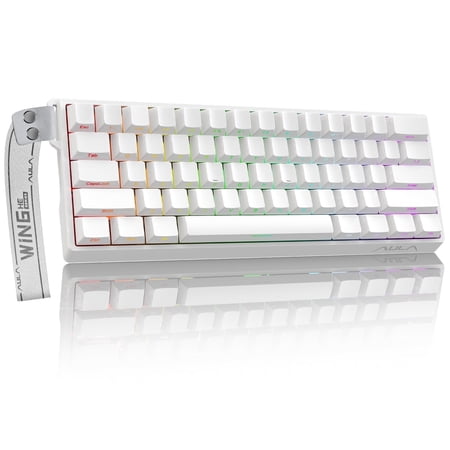
AULA WIN60 HE Hall Effect Gaming Keyboard Designed for competitive play and daily productivity, the AULA WIN60 HE combines Hall Effect magnetic switch technology with a compact 60% form factor, delivering exceptional precision, long‑lasting durability and fully customizable typing for gamers and...
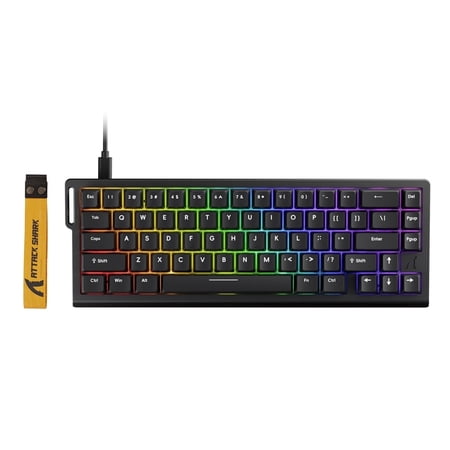
The ATTACK SHARK X68 HE Rapid Trigger Gaming Keyboard is a compact 60% wired magnetic switch keyboard built for players who need fast response, precise control, and advanced customization. Designed with Hall Effect magnetic switches, adjustable actuation, and rapid trigger technology, it...
FAQ
Is the Aula WIN60 HE actually as fast as the Attack Shark X68 HE?
Yes. Both ship with 8000Hz polling, 0.1mm minimum actuation, and rapid trigger mode. The raw input speed is functionally identical. The differences are in build quality, sound, and software polish, not switch responsiveness.
Are these as good as a Wooting 60HE?
For raw gaming performance, very close — within 5% on most measurable metrics. Wooting still wins on software (Wootility is best in class), keycap quality, and build refinement. But you’re paying 3x to 4x more. For most buyers, the Aula or Attack Shark closes the gap on what matters most.
Do either of these need calibration?
The Attack Shark X68 HE strongly recommends software calibration on first use. Skip it and rapid trigger feels inconsistent. The Aula WIN60 HE is more forgiving but still benefits from a one-time calibration through the Aula Driver software.
Which has better RGB?
Both are per-key RGB with software customization. The Aula uses south-facing LEDs which look better with Cherry-profile keycaps that have shine-through legends. The Attack Shark uses traditional north-facing. Visually they’re both good for a $40-60 board. Neither rivals the LED uniformity of a Corsair K70.

