
Computer Station Nation is reader-supported.
When you buy through links on our site, we may earn an affiliate commission. Learn more.
Two of the best budget mechanical keyboards on the market right now sit within ten bucks of each other, both wear name-brand badges, and both clack like a typewriter when you bottom out. The Logitech G PRO TKL at $89.99 and the Razer BlackWidow V3 at $99 are the two boards I keep recommending to people who want their first real mechanical without overpaying. They go after different buyers though, and that’s the whole point of this comparison.
The short answer: BlackWidow V3 is better if you want a full-size keyboard with a wrist rest and Chroma RGB out of the box. G PRO TKL is better if you want compact, portable, and have plans to take this thing somewhere. Read on for the dimensions that actually matter.
At-a-Glance: Logitech G PRO TKL vs Razer BlackWidow V3
| Spec | Logitech G PRO TKL | Razer BlackWidow V3 |
|---|---|---|
| Price | $89.99 | $99 |
| Layout | TKL (87 keys) | Full-size (104 keys) |
| Switches | GX Blue clicky | Razer Green clicky |
| Keycaps | ABS doubleshot | ABS doubleshot |
| Cable | Detachable Micro-USB | Fixed braided |
| Wrist rest | No | Yes (plush, included) |
| Media keys | None dedicated | Roller + buttons |
| RGB | Per-key Lightsync | Per-key Chroma |
| Software | G HUB | Synapse |
| Weight | 2.18 lbs | 3.16 lbs |
Logitech G PRO TKL
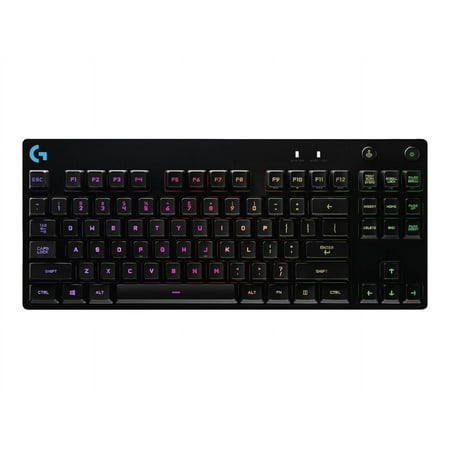
One Purpose The first Logitech G keyboard to carry the name PRO is designed and built to the exacting standards of the worlds top esports athletes. Engineered for extreme performance and designed to win. Advanced Mechanical Romer-G Tactile mechanical switches are purpose-built for pro-grade...
The G PRO TKL is built around a single design philosophy: durability and portability for esports. Logitech worked with pro CS players when designing it, and it shows. The detachable cable means you can stuff it in a backpack without bending the connector. The chassis is steel-plated and refuses to flex. Onboard memory carries your lighting and macros across machines, so plugging into a teammate’s PC at a LAN doesn’t reset your setup. Read the full Logitech G PRO TKL review for the complete breakdown.
Razer BlackWidow V3
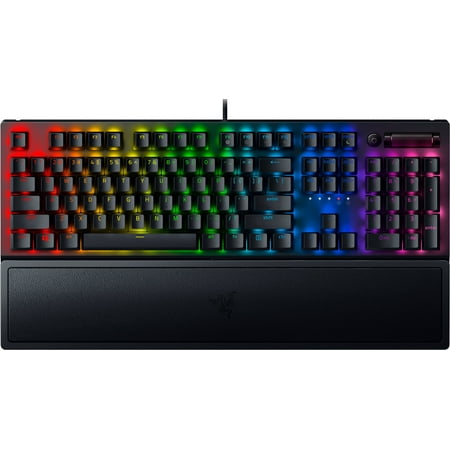
Razer BlackWidow V3 Mechanical Gaming Keyboard: Green Mechanical Switches, Tactile & Clicky, Chroma RGB Lighting, Compact Form Factor, Programmable Macro Functionality, Classic Black. The name that started it all returns to reassert its dominance. Feel the difference with the Razer BlackWidow...
The BlackWidow V3 takes the opposite approach: maximum features at the desk, no apologies. Full-size 104-key layout with dedicated media keys and a metal volume roller. Plush wrist rest in the box. Chroma RGB across every key, controlled by the most polished lighting software in the budget tier. The cable isn’t detachable — that’s the one knock — but for someone who plans to plant this on a desk and leave it there, the BlackWidow gives you more keyboard for $9 more.
Switch Feel — Razer Green vs GX Blue
Both are clicky tactiles in the Cherry MX Blue mold. Razer Green has a slightly heavier actuation force (50g, same as GX Blue on paper) but the click bump feels a touch sharper and the sound profile sits higher in the frequency range — more “snap,” less “click.” GX Blue feels marginally smoother on the downstroke and has a deeper click pitch. If you’re the kind of person who cares about thock vs click vs tick, you’d notice the difference. If you’re not, they’re both crisp clicky switches that sound great.
Both are loud. If you share a room or stream with a sensitive mic, neither is a great pick — get the SteelSeries Apex 3 TKL or a tactile/linear switch variant instead.
Build Quality and Durability
Both keyboards are tank-built, but in different ways. The BlackWidow has an aluminum top plate and is the heavier of the two — that weight tells you the chassis is reinforced. It feels planted on a desk. The G PRO is lighter at 2.18 lbs versus the BlackWidow’s 3.16 lbs, which is intentional — it’s optimized for travel. Both have steel mounting plates under the switches, so neither flexes when you press down.
Long-term durability favor: tie. Both are name-brand boards with reliable RMA support. Both use ABS keycaps that will shine over time on the high-traffic keys. Both should last five-plus years of heavy use without failing.
Software — Synapse vs G HUB
Synapse is the more polished lighting software. Chroma RGB has the deepest customization — per-key animations, game integrations with titles like Apex Legends and CS2, and a community library of effects. G HUB is more straightforward but less feature-rich for RGB. If you only care about static colors, both are fine. If you want reactive lighting that ties into gameplay, Synapse wins.
The downside: Synapse is heavier on system resources and has a history of background processes that some users find intrusive. G HUB is lighter, more stable, and rarely needs restarting. For a no-fuss daily-driver setup, G HUB is the better software.
Use Case Verdict
- Buy the BlackWidow V3 if: you want a full-size desktop keyboard with wrist rest, dedicated media keys, and the best RGB software. You’re staying at one desk. You’ll appreciate Excel and the numpad.
- Buy the G PRO TKL if: you want compact, portable, and don’t need a numpad. You travel between setups, prefer a smaller footprint for mouse room, and value a detachable cable.
Final Pick
For most people, the Razer BlackWidow V3 is the better all-around buy at $99 — it gives you more keyboard, more accessories, and better lighting software for $9 more. The G PRO TKL wins on portability, build sturdiness, and detachable cable, but those are tradeoffs you only feel if you actually move the thing around. If your battlestation is fixed and you have desk space, BlackWidow. If your keyboard travels, G PRO.
Want to see how both stack up against the rest of the budget keyboard market? Read the full best budget mechanical keyboard guide.

