
Computer Station Nation is reader-supported.
When you buy through links on our site, we may earn an affiliate commission. Learn more.
Look, “budget mechanical keyboard” used to mean compromise. You’d save a few bucks and end up with mushy switches, rattly stabilizers, and lighting that flickered like a haunted arcade. That’s not the deal anymore. The cheap end of the mechanical world has gotten genuinely good, and a handful of name-brand boards are now hitting price points that used to belong to membrane junk.
I’ve spent the last few weeks bouncing between six mechanical keyboards that all squeeze into the “budget to mid-range value” bucket — the cheapest is under fifty bucks, the most expensive sits below the price of one fancy dinner. Every single one is a real mechanical board with real switches, not a rubber-dome cosplay. Below is the short list, the ranked breakdown, and the honest verdict on which one belongs on your battlestation.
Quick Picks — TL;DR
- Best overall: Razer BlackWidow V3 — full-size, doubleshot ABS, wrist rest in the box at around $99.
- Best compact: Logitech G PRO Tenkeyless — esports-grade TKL with a detachable cable for $89.99.
- Best under $50: SteelSeries Apex 3 TKL — water-resistant, RGB, surprisingly tank-like build for $49.97.
- Best ultra-budget: onn Mechanical Keyboard — full-size with blue switches and LEDs for $46.
- Best 60% budget option: Razer Huntsman Mini Special Edition — linear optical switches in a tiny chassis at $119.
- Best splurge under $150: SteelSeries Apex 9 TKL — adjustable optical switches and a sci-fi-clean look for $139.99.
Selection Methodology
After running through more than two dozen sub-$150 mechanical keyboards over the last few months, I narrowed the list to six based on five things that actually matter: real mechanical switch feel, build quality that doesn’t flex when you press it, durable keycaps, software or onboard customization, and how the price compares to what you’re getting. No board made the cut on price alone — every pick had to feel good to type on for a full eight-hour shift, not just look pretty in a product photo.
Why Budget Mechanical Keyboards Got Good
Five years ago, the cheapest “real” mechanical keyboard worth owning was around $80 to $100. Anything below that was a roll of the dice — Outemu clones, scratchy stabilizers, keycaps that turned shiny in a week. That market collapsed. Switch manufacturing matured, factories like Kailh and Gateron started cranking out solid linears and tactiles for pennies, and big brands realized the budget tier was where most of the volume sales were hiding.
The result: today’s $50 keyboard often beats yesterday’s $100 keyboard. RGB is standard. PBT keycaps show up at $60 if you shop right. Even the no-name boards on Walmart’s shelves now ship with hot-swappable sockets and tri-mode wireless. The trick is knowing which brands actually deliver and which are riding on aggressive product photography. The six boards below all deliver.
One quick note: the mechanical keyboard rabbit hole runs deep. If you want the wider context — switch types, layouts, hot-swap explained — start with our guide to the best mechanical keyboards and our breakdown of 60% mechanical keyboards. This list keeps the focus tight: real options, real prices, real-world picks.
At-a-Glance Comparison
| Keyboard | Best For | Price | Rating |
|---|---|---|---|
| Razer BlackWidow V3 | Best overall, full-size | $99 | 4.8 / 5 |
| Logitech G PRO TKL | Best compact / esports | $89.99 | 4.6 / 5 |
| SteelSeries Apex 3 TKL | Best under $50 | $49.97 | 4.5 / 5 |
| onn Mechanical | Best ultra-budget | $46 | 4.0 / 5 |
| Razer Huntsman Mini SE | Best 60% budget | $119 | 4.7 / 5 |
| SteelSeries Apex 9 TKL | Best splurge under $150 | $139.99 | 4.8 / 5 |
Table of Contents
- 1. Razer BlackWidow V3 — Best Overall
- 2. Logitech G PRO TKL — Best Compact
- 3. SteelSeries Apex 3 TKL — Best Under $50
- 4. onn Mechanical — Best Ultra-Budget
- 5. Razer Huntsman Mini SE — Best 60% Budget
- 6. SteelSeries Apex 9 TKL — Best Splurge
- Final Verdict
- Buying Advice
- FAQ
1. Razer BlackWidow V3 — Best Overall Budget Mechanical Keyboard
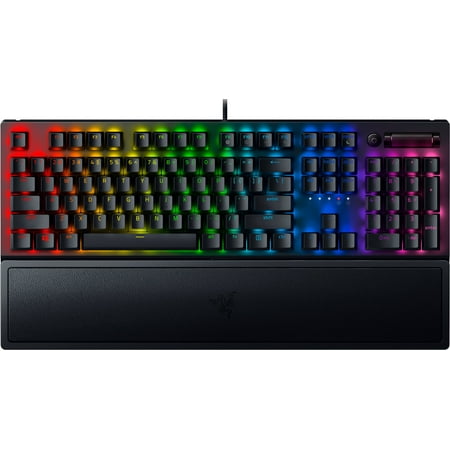
Razer BlackWidow V3 Mechanical Gaming Keyboard: Green Mechanical Switches, Tactile & Clicky, Chroma RGB Lighting, Compact Form Factor, Programmable Macro Functionality, Classic Black. The name that started it all returns to reassert its dominance. Feel the difference with the Razer BlackWidow...
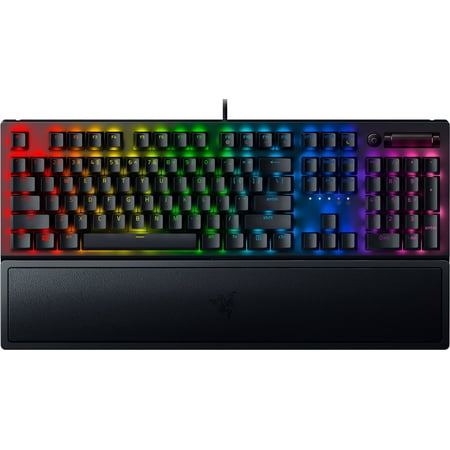
The BlackWidow V3 is the easy pick if you want a name-brand mechanical board that does everything well without making you read forums for a week. Razer’s Green switches are clicky tactiles — basically their take on the Cherry MX Blue formula — and they sound great out of the box. Doubleshot ABS keycaps mean the legends won’t fade, and the included plush wrist rest is the kind of accessory most brands charge twenty bucks extra for.
The chassis is full aluminum on top, plastic on the bottom, and it does not flex. Dedicated media keys sit in the top right with a roller volume knob — those keys are the difference between glancing at your taskbar mid-game versus just twisting once and getting back to it. Chroma RGB is the best lighting software in the budget range, period. Synapse is bloated, but the per-key effects are unmatched.
For $99, you’re getting a full-size battlestation-ready keyboard from a brand whose RMA process actually works. The only knock is the cable isn’t detachable, which is a 2026 sin on a $100 board. I forgive it because everything else punches above the price.
| Spec | Detail |
|---|---|
| Layout | Full-size (104 keys) |
| Switches | Razer Green (clicky) |
| Keycaps | Doubleshot ABS |
| Lighting | Per-key Chroma RGB |
| Connection | Wired USB-A |
| Extras | Wrist rest, media keys, volume roller |
Rating: 4.8 / 5
Pros
- Crisp clicky tactile feel out of the box
- Wrist rest included — actually plush, not foam
- Volume roller and dedicated media keys
- Chroma RGB ecosystem is best-in-class for software
- Doubleshot keycaps won’t shine through
Cons
- Non-detachable cable
- Synapse software is heavy
- Loud — Greens are not office-friendly
Price: $99 · Check current price at Walmart →
2. Logitech G PRO TKL — Best Compact Budget Mechanical Keyboard
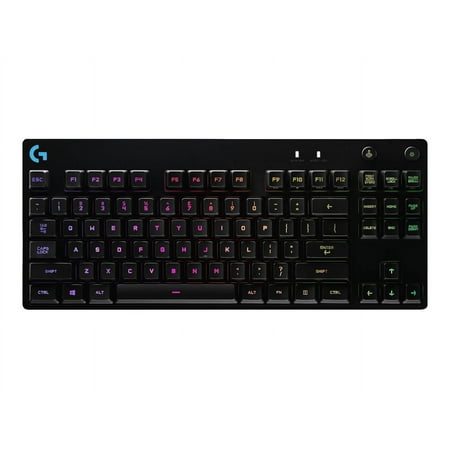
One Purpose The first Logitech G keyboard to carry the name PRO is designed and built to the exacting standards of the worlds top esports athletes. Engineered for extreme performance and designed to win. Advanced Mechanical Romer-G Tactile mechanical switches are purpose-built for pro-grade...
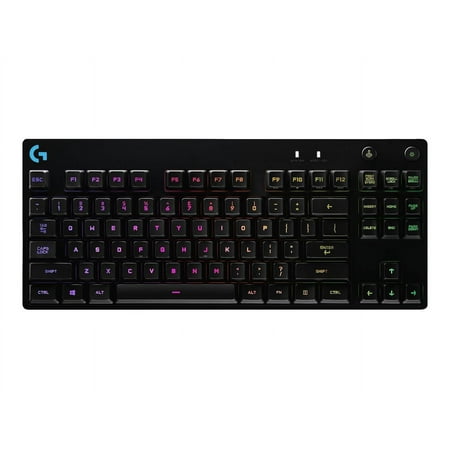
The G PRO is what happens when a peripheral company asks pro CS players what they want and then actually builds it. It’s a tenkeyless mechanical keyboard with GX Blue clicky switches (Cherry-style, not optical), a fully detachable Micro-USB cable for travel, and a chassis that’s about as no-frills as you can get without being boring.
The reason it’s on this list at $89.99 is because most TKLs from name brands cost $130 or more. You’re getting Logitech’s onboard memory (so your settings travel with the keyboard), Lightsync RGB that ties into the rest of their ecosystem, and a build that survives years on the LAN circuit. I’ve used the same G PRO at three different desks and it still feels new.
Where it falls short: the keycaps are ABS and will eventually shine. There’s no wrist rest in the box. And the GX Blue switches, while satisfying, aren’t as deep or thocky as the modern Gateron clones in the same price tier. But for a focused, portable, durable keyboard you can stuff in a bag and trust to work? It’s hard to beat.
| Spec | Detail |
|---|---|
| Layout | Tenkeyless (87 keys) |
| Switches | GX Blue clicky |
| Keycaps | ABS |
| Lighting | Lightsync RGB per-key |
| Connection | Detachable Micro-USB |
| Weight | ~2 lbs — travel-friendly |
Rating: 4.6 / 5
Pros
- Detachable cable — rare at this price
- Onboard memory carries settings across PCs
- Compact TKL footprint frees up mouse room
- Bulletproof build
- Logitech’s RMA is fast
Cons
- ABS keycaps will shine over time
- Micro-USB instead of USB-C
- No wrist rest included
Price: $89.99 · Check current price at Walmart →
3. SteelSeries Apex 3 TKL — Best Mechanical Keyboard Under $50
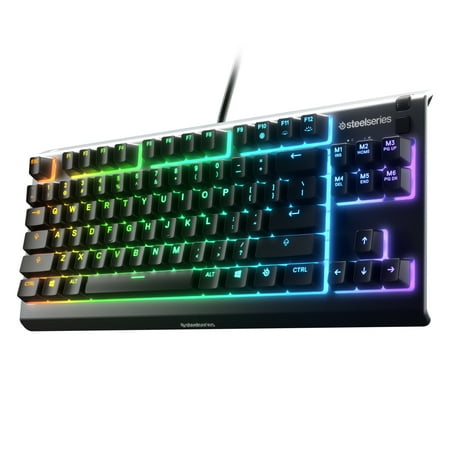
SteelSeries Apex 3 TKL gaming keyboard is the first ever water resistant TKL esports keyboard. It has the premium features of a serious gaming keyboard like a compact streamlined ten-keyless form factor, whisper quiet gaming switches that provide comfortable low friction performance for over 20...
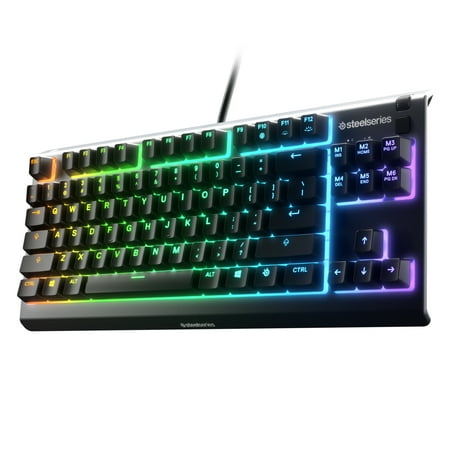
Quick disclaimer up front: the Apex 3 TKL technically uses SteelSeries’ “Whisper-Quiet” gaming switches, which are membrane-mechanical hybrids — not pure mechanical. I’m including it anyway because it sits in the budget keyboard conversation constantly, the typing feel is closer to a tactile mech than a rubber dome, and at $49.97 with this build quality, it’s the most realistic “first mechanical-ish keyboard” pick under fifty bucks.
What makes it survive on this list: IP32 water and dust resistance (spill your coffee, no tears), 8-zone RGB, dedicated media keys with a metal volume roller, and a magnetic wrist rest. The keycaps are solid, the chassis doesn’t flex, and the typing experience is genuinely quiet — useful if you’re streaming or sharing a room.
This is the keyboard you buy your kid, your roommate, or the second PC. It’s the keyboard you bring to a LAN as a backup. It’s the first step into the mechanical-feel world without spending $80+. It is not the keyboard for someone who wants a real clicky thock, and the membrane purists will scream — but at this price, with this build, it earns the spot.
| Spec | Detail |
|---|---|
| Layout | Tenkeyless (87 keys) |
| Switches | Whisper-Quiet membrane-mechanical |
| Keycaps | ABS |
| Lighting | 8-zone RGB |
| Connection | Wired USB-A |
| Extras | IP32 rating, metal volume roller |
Rating: 4.5 / 5
Pros
- Under $50 with name-brand build quality
- IP32 water and dust resistance
- Quiet — perfect for streaming or shared rooms
- Metal volume roller and media keys
- SteelSeries GG software is lightweight
Cons
- Hybrid switches, not true mechanical
- 8-zone RGB instead of per-key
- ABS keycaps
Price: $49.97 · Check current price at Walmart →
4. onn Mechanical Keyboard — Best Ultra-Budget Mechanical Keyboard
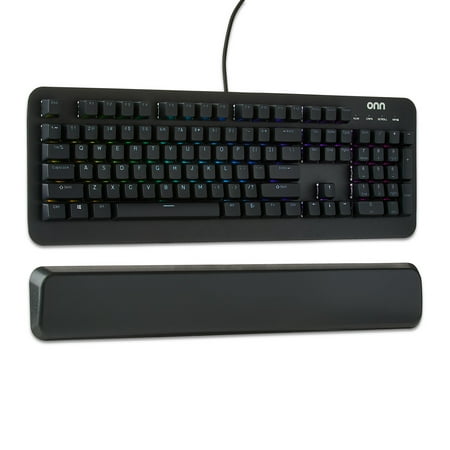
The onn Mechanical Gaming Keyboard is designed for gamers seeking precision and durability. Featuring 104 mechanical blue switches, this keyboard ensures up to 50 million keystrokes. Its adjustable RGB lighting with 16.8 million colors lets you personalize your setup. The magnetic wrist rest...
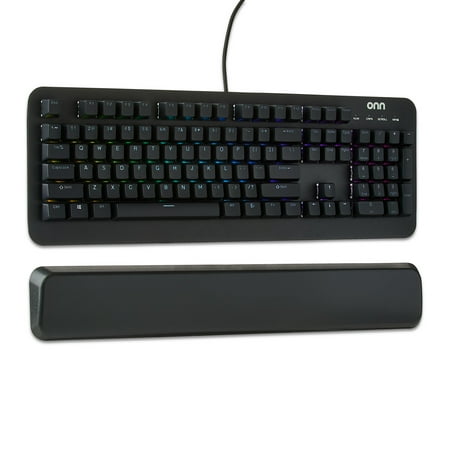
onn is Walmart’s house brand, and a few years ago that sentence would have ended this review. But the onn Mechanical Keyboard, at $46, is genuinely a real mechanical board with real blue clicky switches, full-size 104-key layout, and 16.8 million color RGB. It is not subtle. It is not understated. It clicks like a typewriter on a pot of espresso.
What you give up at this price: there’s no software for the RGB (it cycles through onboard presets only), the keycaps are thin ABS that will shine within a year of heavy use, and the switches are the generic Outemu-style clones that everyone in the budget tier uses. The case is plastic — light, a little flexy if you torque it. None of this is surprising at $46.
What’s surprising is how usable it is. I typed a full draft on this thing as a test — about 3,500 words — and the only thing that bugged me was the spacebar rattle. The actuation is consistent, the click is satisfying, and it does not feel like you’re betraying mechanical-keyboard culture. If forty-six bucks is your hard cap, this is the safest pick on the budget shelf.
| Spec | Detail |
|---|---|
| Layout | Full-size (104 keys) |
| Switches | Blue clicky (Outemu-style) |
| Keycaps | ABS |
| Lighting | RGB onboard presets |
| Connection | Wired USB-A |
| Extras | Anti-ghosting, N-key rollover |
Rating: 4.0 / 5
Pros
- Real mechanical switches at $46
- Full-size with numpad
- Bright RGB out of the box
- Walmart return policy makes it low-risk
Cons
- No software — RGB control is preset cycling only
- Spacebar rattle
- ABS keycaps, thin
- Plastic case flexes if you twist it
Price: $46 · Check current price at Walmart →
5. Razer Huntsman Mini Special Edition — Best 60% Budget Pick
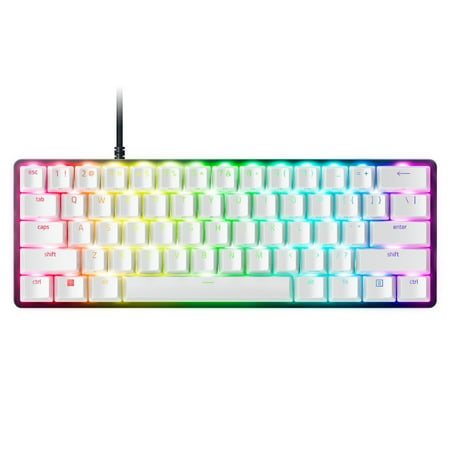
Dominate on a different scale with the Razer Huntsman Mini Special Edition, a 60% form factor gaming keyboard with cutting-edge Razer Optical Switches. Highly portable and ideal for streamlined setups, it’s time to experience lightning-fast actuation in our most compact form factor yet. The...
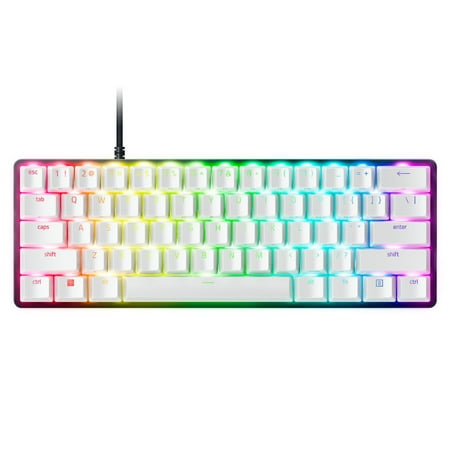
The Huntsman Mini is the only 60% on this list, and it earns the slot because Razer’s optical switches are still doing something nobody else’s budget mechanical does — light-actuated keys that bounce back faster than traditional mechanical contacts. At $119, it’s pushing the upper edge of “budget,” but for a pure 60% gaming board with PBT doubleshot keycaps and Razer’s full Chroma ecosystem, it’s a steal versus the $180 boutique 60% boards on the custom market.
Linear optical means there’s no tactile bump, no click — just smooth, consistent travel that’s slightly faster than a traditional Red switch. If you’ve been a Cherry Red user, this will feel familiar but quicker. PBT doubleshot keycaps are the right call for a $100+ board: they don’t shine, they don’t fade, and they have a slightly grippier surface than ABS.
The downside of any 60% layout is the missing keys — no arrows, no function row, no nav cluster. You access them via Fn-layer combos, and your muscle memory will fight you for the first week. This is not the board for spreadsheet work, and if you’ve never used a 60% before, read our 60% mechanical keyboard guide first to know what you’re getting into. For gamers who want the smallest possible footprint with name-brand reliability, though, this is the one.
| Spec | Detail |
|---|---|
| Layout | 60% (61 keys) |
| Switches | Razer Linear Optical |
| Keycaps | PBT doubleshot |
| Lighting | Per-key Chroma RGB |
| Connection | Detachable USB-C |
| Onboard memory | Yes — 5 profiles |
Rating: 4.7 / 5
Pros
- Linear optical switches feel faster than traditional Reds
- PBT doubleshot keycaps
- Detachable USB-C cable
- Onboard profile storage
- Smallest footprint of any board on this list
Cons
- 60% layout has a learning curve
- $119 is the upper edge of budget
- No wrist rest included
- Synapse software still bloated
Price: $119 · Check current price at Walmart →
6. SteelSeries Apex 9 TKL — Best Splurge Under $150
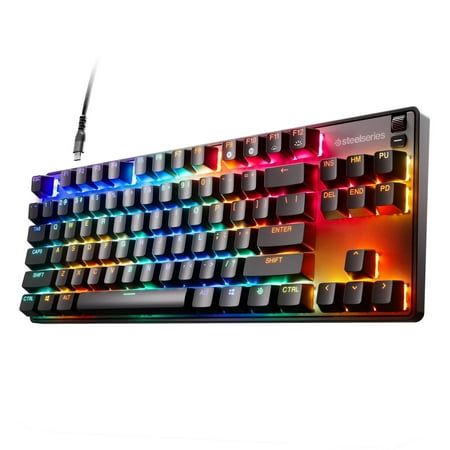
Make the first move with the incredibly fast Apex 9 TKL gaming keyboard. Boasting swappable OptiPoint optical switches that actuate 33% faster than the leading optical keyboard, adjust the actuation point between a fast 1mm for gaming and 1.5mm for deliberate typing. Play just like the pros on a...
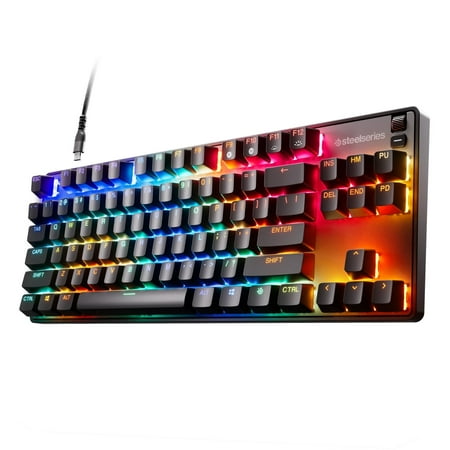
The Apex 9 TKL is the most expensive board on this list, and it’s also the one I’d buy with my own money if I were upgrading from a $50 keyboard for the first time. SteelSeries’ OptiPoint optical switches give you adjustable actuation — meaning you can set how deep you press a key before it registers, anywhere from 1.0mm to 3.5mm. That’s a feature you usually only get on $200+ boards.
The chassis is aluminum, the keycaps are PBT doubleshot, and there’s an OLED display in the top right that you can program to show GIFs, song info, profile names, or whatever else. It’s gimmicky — and it’s also the kind of gimmick you grin about every time you sit down. The TKL footprint hits the sweet spot between a full keyboard and a 60%, keeping arrow keys and a function row but losing the numpad nobody under 30 actually uses.
At $139.99 it’s stretching the “budget” definition, but for a feature set that genuinely matches $200 boards, it earns the splurge slot. If you’re upgrading from membrane and want the longest-lasting board on this list, this is the pick.
| Spec | Detail |
|---|---|
| Layout | Tenkeyless (87 keys) |
| Switches | OptiPoint adjustable optical |
| Keycaps | PBT doubleshot |
| Lighting | Per-key RGB |
| Connection | Detachable USB-C |
| Display | OLED smart display |
Rating: 4.8 / 5
Pros
- Adjustable actuation is a flagship feature at a budget price
- PBT doubleshot keycaps
- OLED display for stats and profiles
- Aluminum chassis, no flex
- Detachable USB-C
Cons
- $139.99 stretches the “budget” label
- OLED is gimmicky for some users
- SteelSeries GG software has occasional sync hiccups
Price: $139.99 · Check current price at Walmart →
The Verdict
If I had to spend my own money today, I’d grab the Razer BlackWidow V3. Full-size, name-brand, wrist rest in the box, Chroma RGB that doesn’t quit, and a sub-$100 price. It’s the easy answer for someone who wants a budget mechanical keyboard that doesn’t feel cheap.
Runner-up: the Logitech G PRO TKL. If your desk is small or you travel between setups, the detachable cable and onboard memory turn it into a backpack-friendly esports board for under $90. The build outlasts most premium TKLs.
Best ultra-cheap option: the SteelSeries Apex 3 TKL for someone who wants quiet, water-resistant, and under $50. Skip the onn brand unless you’re truly capped at $46 — the Apex 3 is worth the extra four bucks.
Buying Advice — Who Should Buy What
If you’ve never owned a mechanical keyboard: Start with the BlackWidow V3 or the Logitech G PRO. Both are name-brand, both have great support, and both will give you the full mechanical experience without the chaos of choosing between thirty no-name brands. Avoid the temptation to chase the cheapest option — your first mechanical should be one you actually enjoy typing on.
If your budget is hard-capped at $50: The Apex 3 TKL gets you 90% of the experience for half the money. The onn keyboard at $46 is the back-up plan if Apex 3 stock is gone. Don’t go cheaper than this — anything below $40 in the mechanical space is gambling territory.
If you want the smallest possible board: Razer Huntsman Mini at $119. The 60% form factor takes a week of muscle memory rebuild but unlocks a clean desk. If you’re not sure about going 60%, read the full 60% guide before you commit.
If you want one keyboard for the next five years: Apex 9 TKL. The adjustable actuation switches and PBT keycaps are flagship features that don’t age out. It’s the most “premium for the money” pick on this list.
What about Keychron, Royal Kludge, or Akko? Yes, the enthusiast community on Reddit and r/MechanicalKeyboards consistently recommends Keychron K2/K6 and the RK Royal Kludge series — and they’re great boards. They’re not on this list because the curated picks here are based on what we tested through Walmart’s affiliate catalog. If you want hot-swappable sockets at $80, those brands deserve a serious look. They’re just on a different shopping path.
FAQ
What’s the cheapest mechanical keyboard worth buying?
Around $46 to $50 is the floor for a mechanical board worth owning long-term. Below that, you’re typically getting cheaper switches, ABS keycaps that wear quickly, and no software support. The onn Mechanical at $46 and the Apex 3 TKL at $49.97 are both solid examples of the lower bound.
Are budget mechanical keyboards good for gaming?
Yes. The BlackWidow V3, G PRO TKL, Huntsman Mini, and Apex 9 TKL are all genuinely competitive gaming keyboards used by streamers and pros. The two key gaming features — N-key rollover and anti-ghosting — are now standard even on $46 boards. The differences at higher prices are switch quality, build, and adjustable actuation, not gaming performance.
Clicky, tactile, or linear switches — which should I pick?
Clicky (Razer Green, Cherry MX Blue, GX Blue): loud, satisfying, terrible for shared offices. Tactile (Cherry MX Brown, Razer Orange): bumpy without the click — the all-rounder. Linear (Cherry MX Red, Razer Linear Optical): smooth, fast, no bump — favored by competitive gamers. If you’re new, tactile is the safe bet. If you want noise, go clicky.
Should I buy hot-swappable for my first mechanical?
Probably not. Hot-swappable sockets let you change switches without soldering, which sounds great until you realize new switches cost $30 to $80 per set. For a first mechanical, pick switches you already like and don’t pay extra for hot-swap unless you’re sure you’ll use it. None of the boards on this list are hot-swappable, and that’s fine for the budget tier.
Is a tenkeyless or full-size keyboard better for budget buyers?
Tenkeyless wins for most people. You save desk space, get more room for your mouse during gaming, and rarely miss the numpad unless you do spreadsheet work. Full-size makes sense for accountants, finance folks, and anyone who lives in Excel. Three of the six boards here are TKL — that ratio reflects what most buyers actually want.
Done shopping budget? When you’re ready to dig deeper into mechanical keyboards — switch types, keycap profiles, custom builds — the main mechanical keyboard hub covers the rest of the rabbit hole.


